

📎 AI Summary:
The thread discusses difficulties in locating classic utility tools like Calculator and Paint on Windows 8. The original poster expresses concern about finding these tools, prompting responses that explain how to access them through the "All Apps" screen or by typing to search in the Start menu. The conversation concludes with the original poster sharing success in finding a free calculator app via the Windows Store, indicating a positive resolution.
The thread discusses difficulties in locating classic utility tools like Calculator and Paint on Windows 8. The original poster expresses concern about finding these tools, prompting responses that explain how to access them through the "All Apps" screen or by typing to search in the Start menu. The conversation concludes with the original poster sharing success in finding a free calculator app via the Windows Store, indicating a positive resolution.
Solution

They are all there. Hardly anything has changed from Windows 7. If you have not installed a third oarty Start menu on the legacy desktop then, in the windows 8 screen, right click a blank space and select "all Apps" (Bottom right). You can then right click the two items you have mentioned, and several others, and at the bottom of the screen select "Pin to Start". You will then find they are in the default screen.

Member details
- Joined
- May 1, 2008
- Messages
- 5,546
They are all there. Hardly anything has changed from Windows 7. If you have not installed a third oarty Start menu on the legacy desktop then, in the windows 8 screen, right click a blank space and select "all Apps" (Bottom right). You can then right click the two items you have mentioned, and several others, and at the bottom of the screen select "Pin to Start". You will then find they are in the default screen.

Medico
Essential Member
Member details
- Joined
- Sep 20, 2011
- Messages
- 1,144
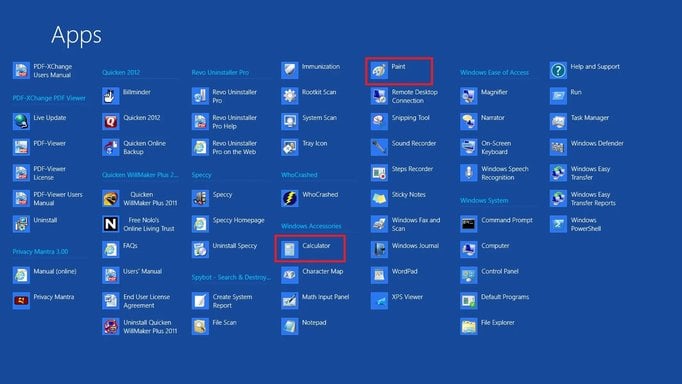
This is the All Apps screen:
Link Removed
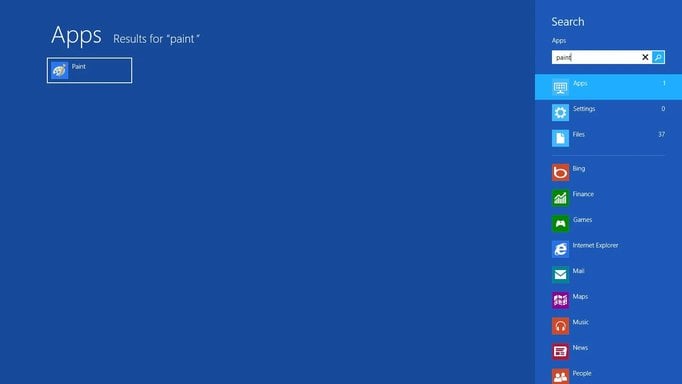
If instead of opening this All Apps screen, you wish to find just one tool, when on the Win 8 Style Start Screen just start typing the name of the tool you are looking for, for example Paint and find this screen:
Link Removed
Link Removed
If instead of opening this All Apps screen, you wish to find just one tool, when on the Win 8 Style Start Screen just start typing the name of the tool you are looking for, for example Paint and find this screen:
Link Removed
Attachments
-
 Microsoft Defender: No threats detected Scan detailsAllAppsCalPaint.webp101.5 KB · Views: 371
 -
 Microsoft Defender: No threats detected Scan detailsSearchPaint.webp19 KB · Views: 417
