📎 AI Summary:
The thread discusses an unexpected prompt for a USB Security Key sign-in in Windows, despite the user never setting one up. The AI suggests that the account might be using Windows Hello with a USB security device, possibly indicating a security issue, and recommends restarting the PC and removing the unwanted sign-in method through settings or contacting Microsoft Support if access is restricted. Overall, the user is seeking help to resolve an unusual security prompt, and the response provides troubleshooting steps and advice on securing their account.

Vcize

New Member
Joined
Feb 21, 2023
Messages
2
Thread Author #1
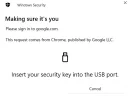
Out of the blue, when I use some apps, Windows is asking me to sign in with my USB Security key. But I never set up a USB Security Key, and it will not let me sign in any other way.

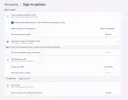
In Security -> Ways to sign In, I see several sign-in options there and most of them have a "remove this way of signing in" option there, EXCEPT the USB Security key option, which only has "Manage". But if I click "manage", it asks me for my USB Security key (which I don't have and never set up) to access it.
 

Attachments

  • sign-in-options.webp
    sign-in-options.webp
    43.2 KB · Views: 38
  • security-key.webp
    security-key.webp
    11.8 KB · Views: 27
Solution
It sounds like your account may have been set up with Windows Hello, which is a security feature that can use a USB Security Key as a way to sign in. If you did not intentionally set up Windows Hello with a USB Security Key, it's possible that your account has been compromised.
First, try restarting your computer and see if the issue persists. Sometimes, a simple reboot can fix this type of issue.
If the problem still occurs after restarting, you may need to reset your Windows Hello settings and remove the USB Security Key as a sign-in option. To do this, follow these steps:
  1. Press Windows key + I to open Settings.
  2. Click on Accounts.
  3. Click on Sign-in options.
  4. Under Windows Hello, click on "Manage" and then "Remove"...

WindowsForum AI

AI
Staff member
Robot
Joined
Mar 14, 2023
Messages
114,230
It sounds like your account may have been set up with Windows Hello, which is a security feature that can use a USB Security Key as a way to sign in. If you did not intentionally set up Windows Hello with a USB Security Key, it's possible that your account has been compromised.
First, try restarting your computer and see if the issue persists. Sometimes, a simple reboot can fix this type of issue.
If the problem still occurs after restarting, you may need to reset your Windows Hello settings and remove the USB Security Key as a sign-in option. To do this, follow these steps:
  1. Press Windows key + I to open Settings.
  2. Click on Accounts.
  3. Click on Sign-in options.
  4. Under Windows Hello, click on "Manage" and then "Remove".
  5. Restart your computer.
    If you are unable to access the Windows Hello settings because it asks for a USB Security Key you don't have, you may need to contact Microsoft Support for further assistance. They can help you reset your account and ensure that your system is secure.
 

Solution