📎 AI Summary:
The thread discusses installing Windows XP Pro on a Dell Latitude D630 originally equipped with Vista, with the original poster facing an error during installation. The main issue appears to be the SATA drive support, which XP lacks by default, and the user cannot modify BIOS settings or change drive modes. A contributor suggests injecting the necessary SATA drivers into the installer as a solution, providing a link to a guide on how to do this. Overall, the conversation centers on overcoming driver support issues for XP installation on newer hardware.

anotherwindowsuser

Well-Known Member
Joined
Jun 3, 2020
Messages
345
Thread Author #1
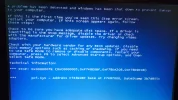
I wanted to install win xp pro onto a Del latitude laptop D630 which originally had vista installed. I however came across this error message, is there anything I can do?
 

Attachments

  • DSC_1595.webp
    DSC_1595.webp
    1.5 MB · Views: 232
Solution
You can still inject the drivers into the installer and that should work.

Neemobeer

Windows Forum Team
Staff member
Joined
Jul 4, 2015
Messages
8,995
Likely due to the computer having a SATA drive which XP didn't support out of the box.

Two options
Load the driver during the install or inject the driver into the boot disc
Look in BIOS for a drive emulation mode and change it to Legacy or IDE
 

anotherwindowsuser

Well-Known Member
Joined
Jun 3, 2020
Messages
345
Thread Author #3
Sadlt it would appear I can't do either of these, the installation doesnt get t anywhere amongst the likes of changing settings, and no mention of ide or drive emulation in the bios. Thanks for your response though.
 

Neemobeer

Windows Forum Team
Staff member
Joined
Jul 4, 2015
Messages
8,995
You can still inject the drivers into the installer and that should work.


Solution