
The reporting arrives three days before OpenAI’s planned shutdown of ChatGPT Atlas on August 9, 2026. OpenAI has confirmed that it is retiring Atlas and moving its browser-based agent work into ChatGPT and Codex, but the company’s published support material still specifically names the ChatGPT desktop app, the Codex in-app browser, and Chrome support. It does not yet announce Edge support, identify supported Edge channels or versions, or describe availability by plan, region, and workspace policy.
That gap is important. PiunikaWeb’s finding appears to document a real client-side rollout, but it is currently the only report pinning the change to version 26.730.61639 and to the “More browsers” menu. OpenAI has not issued release notes explaining whether Edge support is broadly enabled, staged behind an account flag, restricted to Windows, or limited to the newer unified desktop app.
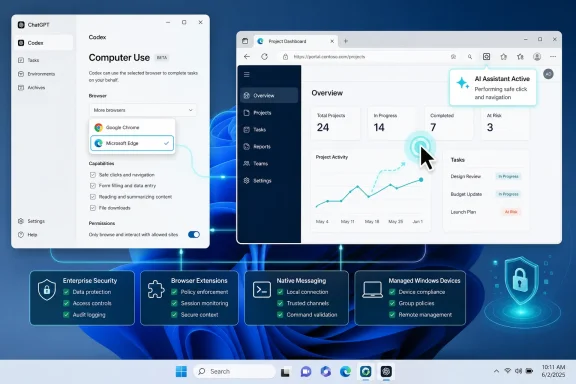 Edge support is a practical Windows distribution move
OpenAI is not building a second browser engine here. Microsoft Edge and Google Chrome are both Chromium-based browsers, and Microsoft documents that Chromium browsers share most extension APIs and extension packaging. That means a Chrome-oriented extension can often be adapted to Edge with far less engineering work than would be required for Firefox or Safari.
The feature should therefore be read as an integration and support decision, rather than evidence that OpenAI has suddenly solved browser automation across every major browser. Edge is the most obvious next target because it is present on supported Windows installations by default, shares Chrome’s extension model, and already participates in the same category of native-messaging integrations that connect browser extensions to desktop software.
That gives OpenAI a far easier route to reach Windows users than Atlas ever did. Instead of persuading a user to download, sign into, and trust a standalone browser, it can place an extension bridge into the browser that is already configured with corporate profiles, bookmarks, saved passwords, enterprise policies, and single sign-on sessions.
For ordinary personal users, that reduces friction. For IT departments, it creates a more complicated decision: the agent is now closer to the browser employees already use for line-of-business applications, internal portals, Microsoft 365, Azure administration, and vendor dashboards.
“Computer Use” and “Browser Use” are not interchangeable labels
OpenAI’s terminology is already muddy enough that administrators should avoid treating the Edge entry as a blanket promise of browser automation. Its current Codex documentation distinguishes between several related capabilities: Computer Use, Codex’s in-app browser, Browser Use, and a developer mode that gives controlled access to Chrome DevTools Protocol features.
OpenAI’s support documentation says its Browser Use developer mode works with Chrome and Codex’s in-app browser. It describes access to browser debugging details such as console output, network activity, page state, and JavaScript performance. The same document warns that full Chrome DevTools Protocol access can expose sensitive browser internals and requires explicit approval before Codex uses it on a website.
PiunikaWeb is describing Computer Use in the desktop app’s settings, where the agent is said to operate the Edge browser through an installed extension. That is a different technical and policy surface from the officially documented Chrome developer mode. The distinction determines what an organization can safely allow.
A browser agent that can visually inspect a page and click buttons has meaningful power. An agent that can also access developer tooling, network requests, page internals, and JavaScript execution context has a substantially broader view into authenticated web applications. OpenAI has not explained whether the new Edge path supports the same developer-mode functions as Chrome, whether its permissions are narrower, or whether the Edge integration runs under a distinct native host and policy model.
Until OpenAI publishes that detail, businesses should not assume that “Edge support” means feature parity with Chrome, nor assume it is confined to low-risk visual automation.
The missing rollout details matter more than the Install button
The reported setup path is straightforward: open the ChatGPT and Codex app settings, select Computer Use, expand “More browsers,” and install the Edge extension. But the installation itself is the least consequential step. The unanswered questions are about entitlement, policy, and data handling after that extension has connected a browser profile to an autonomous agent.
OpenAI’s own documentation says feature availability can vary by plan, region, device, browser, and workspace settings. It also says local workflows run on the user’s device, while cloud tasks run in OpenAI-managed environments. For ChatGPT Plus and Pro users, OpenAI says conversations may be used to improve its models unless the user disables training in ChatGPT data controls; business, enterprise, and education customers have different default data-use terms.
Computer Use introduces additional sensitivity because the service may process screenshots taken during a task. Screenshots can capture customer data, admin consoles, source code, account identifiers, invoices, internal dashboards, browser-based secrets, or on-screen multifactor authentication prompts. An organization that has already approved normal ChatGPT use has not necessarily approved an agent capable of seeing and acting within a signed-in Edge session.
Administrators should also expect the extension to be governed by the same controls that already complicate browser deployment on managed Windows PCs:
- Microsoft Edge extension allowlists and blocklists can prevent the OpenAI extension from installing or activating.
- Native messaging hosts may require separate registration and scrutiny because they allow a browser extension to communicate with local desktop software.
- Conditional Access, data-loss prevention rules, and web-isolation products can alter what the agent can load, read, or submit.
- Shared Windows devices and shared browser profiles are particularly poor candidates for browser-control features because the agent inherits whatever access the active profile has.
There is evidence from earlier public Codex issue reports that Windows browser integrations have not always behaved predictably. Users reported cases where the Codex desktop app detected installed browser components yet exposed only its in-app browser, or where policy messages blocked navigation without a clear explanation. Those reports are not proof that the new Edge option is unreliable, but they show why an “Install” button should not be mistaken for a deployment-ready guarantee.
Atlas is disappearing before the replacement is fully documented
The Edge move fits OpenAI’s stated Atlas transition strategy. OpenAI says Atlas will stop working on August 9 and recommends that users move browser-based agent work to the ChatGPT desktop app, Codex, or Chrome-based assistance. It also warns that Atlas bookmarks, open tabs, and browsing history will not transfer automatically.
The company’s own migration guidance is more specific about data loss than it is about replacement-browser support. It tells users to export bookmarks before the shutdown, save important pages manually, and avoid treating cookies or session files casually. It does not publish an equivalent Edge deployment guide, an Edge extension listing, a compatibility matrix, or an explicit statement about whether Edge can replace Atlas workflows on managed Windows systems.
That means Atlas users should deal with the deadline as a separate operational task. Export the bookmarks, preserve important URLs, and record workflow requirements before August 9. Do not wait for the Edge integration to become visible in one desktop-app build and assume it will migrate data or reproduce all of Atlas’s behavior.
The broader strategy is clear even if the release notes are not: OpenAI is retreating from maintaining a standalone browser and moving browser control into the desktop agent clients and browsers people already use. Edge is the logical Windows endpoint for that strategy, but the rollout currently looks ahead of its documentation.
For now, the sensible conclusion is narrower than the headline. Edge appears to have become an available Computer Use target in the latest ChatGPT and Codex desktop app observed by PiunikaWeb. It is not yet a documented, fully specified Edge platform commitment from OpenAI. Windows users can test it on a non-critical profile; IT administrators should wait for OpenAI to publish supported versions, permissions, data boundaries, and enterprise controls before treating it as suitable for production browser automation.
