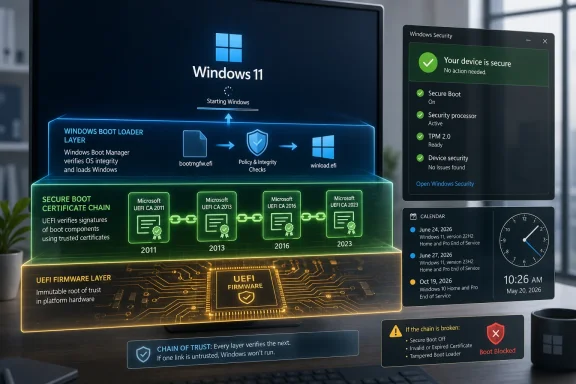
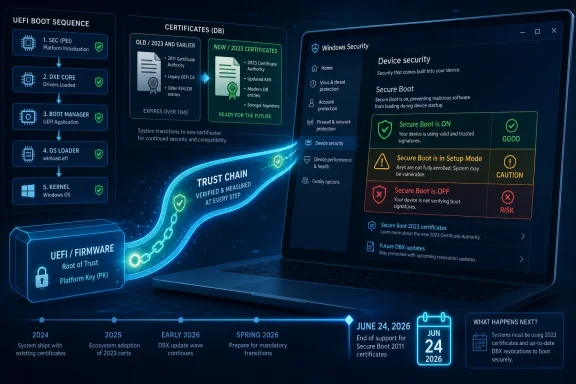
Microsoft’s 2011-era Secure Boot certificates begin expiring on June 24, 2026, affecting Windows 10, Windows 11, Windows Server, and managed Windows devices that still rely on those trust anchors for early-boot validation. The practical message is simple: install current Windows updates, check certificate status where available, and do not treat the date as a fake internet panic. The more interesting story is that Microsoft is trying to rotate a foundational PC trust system without reminding everyone how much of modern Windows security now depends on firmware behaving correctly. This is less a one-day apocalypse than a slow test of whether the Windows ecosystem can service the layer underneath Windows itself.
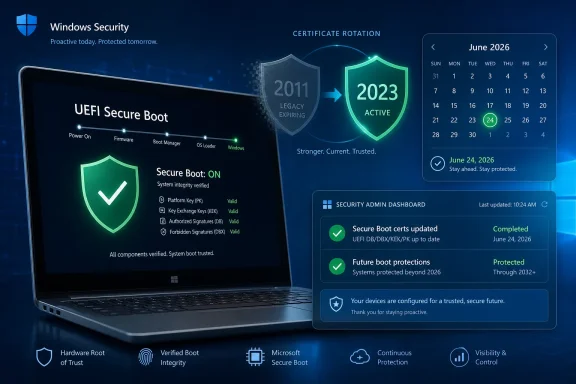 The Deadline Is Real, Even If the Doomsday Version Is Not
The easy version of this story is the alarming one: Secure Boot certificates expire tomorrow, and unpatched PCs may stop booting. That version travels well because it is blunt, urgent, and not completely detached from reality. But it also flattens the actual risk into the kind of “your PC will be bricked at midnight” framing that Microsoft has spent the past few weeks trying to tamp down.
The more accurate version is more awkward. Microsoft’s original Secure Boot certificate authorities, introduced in the Windows 8 era and dated from 2011, are aging out in 2026. Some begin expiring in June, while other related Secure Boot certificates continue into October 2026. If a device does not receive the newer 2023 certificate authorities, it may continue to boot and continue receiving ordinary Windows updates, but it can fall into a weaker security posture for future boot-level protections.
That distinction matters. Secure Boot is not a subscription switch that turns off Windows when a calendar page flips. It is a chain of trust stored partly in firmware, used to decide which pre-operating-system components are allowed to run before Windows proper takes control.
The risk, then, is not just “will my laptop start on June 25?” It is whether that laptop can keep receiving new protections against bootkits, vulnerable boot managers, and early-startup tampering after Microsoft’s old signing infrastructure reaches end of life. That is a subtler problem, but for administrators and security-conscious users it is arguably more important than a dramatic one-day failure.
Secure Boot Was Always a Promise About the First Few Seconds
Secure Boot exists because the first few seconds of a PC’s life are unusually powerful. Before Windows Defender, before your EDR agent, before BitLocker has fully joined the party, firmware and bootloaders decide what code gets to run. If an attacker can wedge malicious code into that path, the operating system may begin life already compromised.
That is why Secure Boot was controversial when it arrived and why it remains important now. It gave Windows PCs a way to reject boot components that were not signed by trusted authorities, moving part of the security boundary into UEFI firmware. For normal users, that translated into a quiet checkbox in firmware settings or a green status indicator in Windows Security. For Linux users, dual-booters, hardware vendors, and anti-cheat developers, it became a permanent negotiation over who gets trusted at boot.
The certificate expiration exposes the uncomfortable side of that design. Trust anchors are not timeless. They are issued, embedded, distributed, and eventually retired. A certificate authority that looked like sensible infrastructure in 2011 becomes operational debt in 2026.
Microsoft’s task is therefore not merely to ship another Patch Tuesday update. It must update trust material that may live in firmware variables, interact with OEM implementations, coexist with BitLocker, and work across a zoo of consumer laptops, desktops, virtual machines, servers, embedded systems, and devices that spent years in closets. That is why this deadline deserves attention even if the average fully updated Windows 11 machine will likely sail through it without drama.
The New Certificates Are Not Just Paperwork
The certificate refresh moves Windows systems from the 2011 Secure Boot certificate authorities to newer 2023 authorities. The names vary by role: keys used to authorize updates to Secure Boot databases, certificates used to validate Windows Boot Manager, and certificates used for third-party UEFI applications and option ROMs. Those details sound bureaucratic until something in the chain fails.
Secure Boot relies on several pieces. The
KEK, or Key Exchange Key, authorizes updates to Secure Boot databases. The
DB contains allowed signatures. The
DBX contains revoked signatures, which matters when Microsoft needs to block old or vulnerable boot components. The whole arrangement lets Windows evolve its early-boot defenses without asking every user to become a firmware engineer.
That is the ideal. The 2026 expiration is where the ideal meets reality.
If a system receives the updated certificates successfully, little changes from the user’s perspective. Windows keeps booting, Secure Boot remains green, and future revocations or boot-manager updates have a path forward. If a system does not receive them, it may still work, but Microsoft’s ability to keep protecting the boot path is degraded.
This is why “my PC still boots” is not the same as “my PC is fine.” Security failures often look like normal operation until the day they stop being theoretical. A system that cannot accept future Secure Boot database updates is not necessarily broken; it is becoming harder to defend.
Microsoft Is Trying to Rotate the Tires While the Car Is Moving
The certificate rollout has been gradual because a sudden ecosystem-wide Secure Boot change would be reckless. Microsoft has been pushing updates through Windows Update, adding status indicators, publishing enterprise guidance, and coordinating with OEMs. The company’s language has also shifted from broad warnings to more careful reassurance: devices without the new certificates should generally continue to start and receive standard Windows updates, but they may not receive future boot-level protections.
That messaging is a balancing act. If Microsoft sounds too calm, users ignore the update and administrators push the work into the next quarter. If it sounds too severe, headlines turn into “Windows PCs will be bricked tomorrow,” which can trigger exactly the kind of panicked manual changes that cause avoidable outages.
The biggest practical problem is that Secure Boot is not purely a Windows feature. It is a Windows-and-firmware-and-OEM-and-enterprise-policy feature. Microsoft can deliver updated certificates, but firmware has to accept them, devices have to be in support, management tools have to apply them correctly, and administrators have to avoid mixing certificate updates with other risky boot-layer changes.
This is why Microsoft’s enterprise guidance emphasizes testing, firmware updates, representative pilot groups, and monitoring. In a small home environment, “install Windows Update” is probably the right instruction. In a fleet of thousands of laptops and servers, that sentence becomes a project plan.
A rushed Secure Boot update is not just another cumulative update with a reboot. It can interact with BitLocker recovery, virtualization-based security, Hyper-V configurations, older firmware, and vendor-specific boot behavior. The deadline matters, but so does not turning a security maintenance window into a self-inflicted outage.
Windows 10 Is the Awkward Guest at the Security Table
Windows 10 complicates the story because its mainstream support story has already moved into the afterlife. Microsoft ended standard support for Windows 10 on October 14, 2025, though some systems continue receiving security updates through Extended Security Updates or long-term servicing channels. That means “Windows 10 is affected” is true, but incomplete.
A supported Windows 10 system can receive the certificate updates through Microsoft’s servicing channels. An unsupported Windows 10 system may not. For households that decided Windows 11’s hardware requirements were arbitrary or annoying, this is another reminder that security support is now entangled with platform eligibility.
That will not win Microsoft any sympathy from users with perfectly functional PCs that missed the Windows 11 cutoff. But Secure Boot is precisely the kind of feature that makes the company’s hardware posture less abstract. Firmware capability, TPM support, boot chain integrity, virtualization-based protections, and update servicing are all part of the same security platform Microsoft wants Windows users to inhabit.
The uncomfortable truth is that unsupported Windows 10 machines are not all equally risky. Some are recent enough to have competent firmware and may be technically capable of handling the new certificates. Others are old, neglected, or vendor-abandoned. But Microsoft’s servicing model does not grade devices by vibes; it grades them by support status and update eligibility.
For WindowsForum readers, the practical dividing line is not “Windows 10 versus Windows 11.” It is “in support and receiving updates versus marooned.” If a Windows 10 machine is enrolled in ESU or running a supported LTSC/IoT channel, it belongs in the update plan. If it is an unsupported daily driver, the Secure Boot deadline is another reason to stop pretending that “it still works” is a security strategy.
The Real Risk Is the Machine You Forgot You Owned
The PCs most likely to cause trouble are not the ones sitting on desks and rebooting every month. They are the machines in storage, the lab systems that only come online for quarterly testing, the kiosk in the corner, the Hyper-V host nobody wants to touch, the medical or industrial PC tied to vendor validation, and the executive laptop that has postponed updates since spring.
Secure Boot certificate rotation punishes neglect because it targets a layer that is easy to forget. Users understand browser updates. Administrators understand monthly cumulative updates. Firmware trust stores live in the uncanny valley between operating system and hardware, which makes them everybody’s dependency and nobody’s favorite maintenance task.
That is why the “tomorrow” framing is useful even if it is imprecise. It creates a moment for inventory. Which devices have Secure Boot enabled? Which are receiving updates? Which have firmware updates pending from OEMs? Which are in remote locations? Which are encrypted with BitLocker and likely to scream for a recovery key if the boot chain changes in a way the TPM does not like?
The machines that miss this transition may not fail immediately. That is exactly why they are dangerous. A system that continues to boot after the deadline can lull an organization into thinking there is no issue, only to discover months later that a future Secure Boot revocation or boot-manager change cannot be applied cleanly.
The Windows ecosystem is full of devices whose operational success is measured by silence. They do not complain until a maintenance window, a vulnerability, or a compliance audit forces the issue. Secure Boot certificate status should now be part of that audit.
Firmware Is the Part of Windows Microsoft Does Not Fully Control
Every big Windows security shift eventually runs into the same wall: Microsoft can define the platform, but OEMs ship the machines. Secure Boot certificate rotation is a case study in that dependency. The update may arrive through Windows Update, but some devices need firmware support, OEM updates, or vendor-specific remediation before the change can be applied safely.
That is why older devices and certain managed systems deserve extra attention. A laptop can be “compatible with Windows” in the everyday sense and still have firmware behavior that makes Secure Boot servicing fragile. A server can be patched at the OS layer and still depend on vendor firmware packages for the underlying trust store.
This is not new. Firmware has been the messy basement of PC security for years. UEFI vulnerabilities, vulnerable bootloaders, inconsistent revocation behavior, and vendor lag all sit below the operating system’s glossy update UX. The difference now is that certificate expiration gives the problem a calendar.
The PC industry loves long support tails when selling hardware and hates them when infrastructure needs rotation. Secure Boot’s 2011 certificates lasted roughly fifteen years, which is generous by most technology standards. But long-lived trust creates its own trap: everyone has time to build assumptions around it, and then everyone is surprised when the end date becomes operationally real.
Microsoft’s newer 2023 certificates are not merely a refresh for neatness. They are a foundation for the next cycle of boot security. The question is whether the ecosystem can carry every still-supported machine across the bridge without leaving too many awkward edge cases behind.
The BlackLotus Shadow Still Hangs Over This Story
Secure Boot certificate expiration would matter even in a quiet threat landscape. It matters more because the last few years have shown that boot security is not theoretical. The BlackLotus UEFI bootkit and related Secure Boot bypass concerns forced Microsoft into staged mitigations involving updated boot components and revocations.
Those mitigations are difficult because revoking trust is dangerous. If Microsoft blocks an old boot manager too aggressively, systems can fail to boot. If it moves too slowly, attackers have more room to reuse vulnerable components. The Secure Boot database and revocation machinery are how Microsoft threads that needle.
This is why the 2026 certificate refresh and earlier Secure Boot revocation work belong in the same mental bucket. They are both about maintaining the ability to say “this boot component should no longer be trusted” without breaking legitimate systems. An expired or outdated trust chain makes that harder.
For consumers, that may feel remote. Most malware still arrives through phishing, malicious downloads, compromised credentials, browser exploits, and ordinary user mistakes. But bootkits are high-impact precisely because they operate below the line where typical defenses begin. They are rare compared with commodity malware, but the reason Secure Boot exists is to make them harder to deploy and harder to persist.
Security architecture is not built only for the most common attack. It is built for the attack that changes the rules. Early-boot compromise changes the rules.
The Consumer Fix Is Boring, Which Is Good
For most home users, the right move is intentionally dull: install the latest Windows updates, reboot when asked, and check Windows Security if the device provides a Secure Boot certificate status indicator. Windows 11 has added clearer visibility for Secure Boot certificate readiness in the Windows Security app, which is the sort of minor UI improvement that becomes important only when a hidden trust problem hits mainstream headlines.
Users should also confirm whether Secure Boot is enabled. On many modern Windows 11 PCs it is, because Secure Boot is part of the platform requirements story. On upgraded desktops, custom builds, dual-boot systems, and older machines, the answer may be less obvious.
If Secure Boot is disabled and a user never intends to use it, the certificate update is less immediately relevant. But that is a gamble. A future Windows upgrade, game anti-cheat requirement, corporate policy, encryption configuration, or security baseline may make Secure Boot suddenly necessary. Enabling it later, after the easy automatic update path has passed, could turn a background maintenance task into a manual recovery exercise.
This does not mean everyone should dive into firmware settings at midnight. It does mean users should avoid the lazy conclusion that Secure Boot is optional trivia. On modern Windows, Secure Boot is part of a broader stack that includes TPM-backed protections, virtualization-based security, device encryption, and measured boot assumptions.
The best security maintenance is the kind that feels uneventful. If Windows Update installs the new certificates and the status indicator turns green, that is not anticlimax. That is the system working.
Administrators Need Evidence, Not Reassurance
Enterprise IT cannot manage this deadline by vibes. The job is not to read Microsoft’s reassurance and assume all devices are fine. The job is to produce evidence that devices have received the new certificates, that firmware does not block the update, and that remediation paths exist for machines that fail.
Microsoft’s guidance points administrators toward inventory signals such as event logs, registry values, Intune reporting, Group Policy-based deployment, and controlled rollout methods. That is the right pattern. Secure Boot certificate status should be measured, not inferred from OS patch compliance alone.
The difference matters because a device can install normal Windows updates while still lacking the updated Secure Boot certificates. Patch compliance dashboards may say “green” while firmware trust status says “not yet.” That split is exactly the kind of ambiguity that leads to ugly post-deadline surprises.
Administrators should also be careful with sequencing. Firmware updates, BitLocker, Secure Boot certificate changes, and boot-manager revocations are all individually manageable. Combining them casually in the same maintenance window can multiply the blast radius. A phased rollout across representative hardware is slower, but it is the difference between security engineering and superstition.
Servers deserve special caution. A client laptop that asks for a BitLocker recovery key is irritating. A server or cluster node that fails during boot-layer remediation can become an incident. The correct lesson is not to avoid the update; it is to treat the update with the respect normally reserved for firmware and bootloader changes.
The Deadline Is Also a Communications Failure
The PCWorld warning is useful because many users would otherwise never hear about Secure Boot certificates until something went wrong. But the fact that this story can still be summarized as “certificates expire tomorrow, update or risk boot failure” shows how poorly the industry communicates foundational security maintenance.
Microsoft’s own position is nuanced. The company says the devices that miss the update should generally continue to boot and receive regular Windows updates, while losing access to future Secure Boot protections and potentially encountering issues in higher-risk firmware scenarios. That is accurate, but it is not a sentence designed for human urgency.
The press then does what the press does: it sharpens the message. Sometimes that sharpening is necessary. Users ignore soft warnings. Administrators ignore deadlines that sound optional. But there is a fine line between motivating action and creating a false expectation that every unpatched PC becomes a pumpkin on June 24.
The better framing is this: June 24 is not the day Windows dies; it is the day the old trust infrastructure starts aging out in public. Some pieces expire in June, others later in 2026, and Microsoft plans to continue delivering updated certificates. But the automatic, low-friction path depends on devices being supported, updated, and able to accept the change.
That framing is less viral. It is also more useful.
The June 24 Lesson Is Bigger Than Secure Boot
Secure Boot certificate expiration is part of a broader pattern in Windows: Microsoft is moving more security assumptions into hardware-backed, firmware-aware, cloud-managed layers. TPM 2.0, Pluton on some devices, virtualization-based security, memory integrity, kernel-mode driver restrictions, Smart App Control, and Secure Boot all point in the same direction. Windows security is no longer just an operating-system patch story.
That direction has benefits. Attackers have spent decades abusing the openness of the PC. Locking down the boot path, requiring stronger hardware primitives, and revoking vulnerable components are rational responses to real threats. A Windows machine in 2026 faces a different world than a Windows machine in 2011.
But the costs are also real. The more security depends on firmware and vendor coordination, the more users are exposed to opaque compatibility boundaries. A perfectly functional PC can be stranded by support policy. A firmware bug can block a security improvement. A certificate rotation can become a fleet-management project.
This is the bargain modern Windows has chosen. It is more secure when everything lines up and more brittle when the ecosystem frays. The Secure Boot certificate deadline is a stress test of that bargain.
For enthusiasts, this is also a reminder that the old PC freedom-versus-control debate never really ended. Secure Boot can protect users from malware and protect game developers from kernel-level cheating. It can also complicate alternative operating systems, custom boot chains, and hardware reuse. The same mechanism that raises the floor can narrow the path.
A Green Secure Boot Screen Is the New Patch Tuesday Receipt
The practical response to this deadline should be proportionate. Do not panic. Do not ignore it. Do not assume that a booting PC is a fully remediated PC. And do not wait until a future boot-security update fails to learn whether your firmware trust store is stuck in 2011.
For individual users, the task is simple enough to finish with coffee. For administrators, it belongs in the same operational bucket as firmware readiness, BitLocker recovery preparedness, and device lifecycle planning. For anyone still nursing unsupported Windows 10 hardware, it is one more warning that the security perimeter has moved below the place where old habits can reach it.
The Calendar Is Only the First Warning Bell
Here is the concrete version of the story worth carrying into tomorrow:
- Windows devices that still rely on 2011-era Secure Boot certificates need updated 2023 certificates to preserve future boot-level protections.
- June 24, 2026, is important, but it is not a universal midnight bricking event for every Windows PC.
- Fully updated, supported Windows 11 and supported Windows 10 systems are the least likely to require manual intervention.
- Unsupported Windows 10 systems, older firmware, stored devices, servers, and managed fleets deserve closer inspection.
- Administrators should verify Secure Boot certificate status directly rather than assuming ordinary Windows patch compliance proves remediation.
- Users who may want Secure Boot later should not casually leave it disabled now and expect the future transition to be painless.
The Secure Boot certificate deadline is not the end of the world, but it is the end of an era in which the PC industry could pretend that trust anchors embedded in firmware were someone else’s problem. Microsoft can keep extending the runway, OEMs can keep publishing guidance, and Windows Update can keep doing quiet work in the background, but every serious Windows shop now has to treat boot trust as living infrastructure. Tomorrow’s deadline should be read less as a cliff edge than as a flare: the security foundation under Windows is being replaced while everyone is still standing on it, and the systems that make that replacement boring are the systems most likely to survive the next boot-layer crisis.

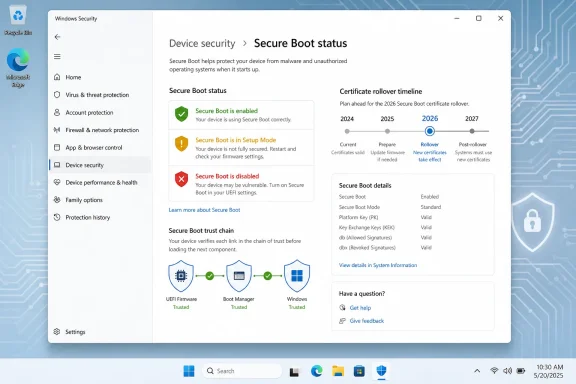 Microsoft Turns a Firmware Deadline Into a Windows Badge