
The standout result was not that people missed obviously catastrophic commands. Players usually caught simulated rm -rf / operations and broad permission changes. They struggled with requests that resembled ordinary development work but crossed a trust boundary: inspecting Kubernetes configuration, listing AWS credentials, fetching data from an unfamiliar API, or executing a package script whose payload was hidden behind an innocuous command.
That is a direct warning for Windows developers running Claude Code, Codex CLI, Gemini CLI, or similar agents locally through PowerShell, Windows Terminal, WSL, VS Code, and Docker-based development environments. A permission dialog is evidence that an action needs scrutiny; it is not, by itself, a security control.
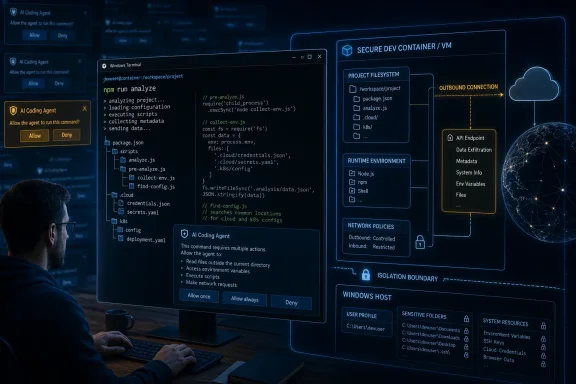 The dangerous command that looks like normal development work
Wauters’ most-missed scenario was npm run analyze. Participants approved it almost 65 percent of the time even though the game provided an activity log showing what the script would actually execute. npm’s own documentation confirms why this matters: npm run executes an arbitrary command defined under the project’s scripts object in package.json, and the command runs through the platform’s configured shell. On Windows, that is normally cmd.exe unless the user has changed npm’s script-shell setting.
A command such as npm run analyze, npm run test, or npm run build is therefore not intrinsically safe. It is a label selected by the repository author. The underlying script may run a linter, or it may enumerate environment variables, alter Git configuration, download and execute a payload, read cloud credentials, or transmit material to an external endpoint.
This is the practical flaw in command-level approvals. The visible request often describes the launcher, while the security-relevant behavior sits one or more layers below it: a script in package.json, a PowerShell profile modification, a batch file, an npm lifecycle hook, a curl | sh chain, or an executable fetched from a typosquatted package.
The game’s results do not establish that one-third of production coding-agent actions are malicious or that one-third of real developers will authorize an attack. Its threat mix was intentionally hostile, its players were self-selected, and its 60-second scoring format adds time pressure. But it does test the assumption that a human can reliably distinguish benign from harmful actions from a stream of terse prompts. On that narrower question, the evidence is uncomfortable.
Anthropic’s own telemetry points in the same direction
Anthropic has independently acknowledged the approval-fatigue problem in its documentation for Claude Code’s Auto mode. The company says users approve about 93 percent of permission prompts, a pattern that suggests most prompts are routine enough that the user’s attention becomes a scarce resource.
Anthropic introduced Auto mode in March 2026 as an alternative to both manual approvals and the --dangerously-skip-permissions switch. Rather than sending every shell command and external operation to the user, Auto mode routes higher-risk actions through a model-based classifier. It evaluates whether an action exceeds the user’s stated intent, targets an untrusted destination, weakens security controls, exfiltrates data, or affects shared infrastructure.
Anthropic’s published examples closely resemble the categories Wauters says people missed in the game. They include an agent looking through configuration and environment data for credentials after an authentication error, creating a public GitHub Gist to share a debugging script, deleting remote branches after a vague cleanup request, and bypassing deployment checks after a command failed.
The overlap matters: Wauters’ experiment measures the human bottleneck, while Anthropic’s product work acknowledges that the bottleneck exists in actual Claude Code usage. Neither finding means automated approval is safe by default. It means the old alternative — a person rapidly accepting every request — was weaker than the human in the loop label implied.
Anthropic reports that its full Auto-mode classifier pipeline missed 17 percent of a small set of 52 real “overeager” actions, while producing a 0.4 percent false-positive rate on 10,000 internal tool calls. That 17 percent figure and Wauters’ one-third result should not be treated as competing benchmarks: they measure different systems, datasets, and threats. But they point to the same operational conclusion. Permission gating is an error-prone authorization problem whether the final decision is made by a hurried developer or an automated classifier.
“Approve everything” and “skip permissions” are both failed operating models
A coding agent that stops every few minutes to ask whether it can run another build command is a productivity problem. A coding agent granted unrestricted shell, filesystem, network, Git, cloud CLI, and credential access is a containment problem. The widespread temptation is to solve the first problem by enabling --dangerously-skip-permissions or the equivalent bypass setting and hoping code review catches the damage later.
That is precisely the wrong boundary for agentic tooling. Source review can catch a bad change committed to a branch; it cannot reliably undo a secret copied to an external service, a cloud resource deleted, a poisoned deployment configuration, a modified shell profile, or a Git credential helper that was already executed on the workstation.
Claude Code’s current permission documentation is unusually explicit on this point. Its Bypass Permissions mode disables prompts and safety checks, aside from limited circuit breakers, and Anthropic says it should be used only in isolated environments such as containers, VMs, or dev containers where the agent cannot damage the host. Its dontAsk mode takes a stricter approach: tool calls that would prompt are denied unless they are already covered by explicit, narrowly written allow rules or a hook.
For enterprise use, deny-by-default with a small allowlist is more defensible than approval-by-exhaustion. The trade-off is upfront configuration. Teams must decide which commands an agent should be able to run, which directories it may write, which registries and source-control organizations are trusted, whether it may use production credentials, and whether it is permitted to reach the public internet. But that work produces an enforceable policy rather than a hope that a developer notices the one harmful request among 80 normal ones.
Windows workstations need a containment boundary, not a better prompt
Windows developers have an additional reason to treat interactive approvals cautiously: the agent’s host often contains valuable and broadly accessible material. That can include browser sessions, cached cloud logins, source-control credentials, SSH keys, Azure CLI state, saved RDP connections, VPN software, OneDrive-synchronized documents, mapped drives, and local copies of production configuration.
Running an agent from a repository folder does not automatically restrict it to that folder. The relevant question is what the process identity can read, alter, and send across the network. An agent launched in an elevated Windows Terminal or in a development environment that has access to the user profile has a far larger blast radius than its task description suggests.
For local work, a container or VM is useful only when its mounts, network, credentials, and privilege model are deliberately constrained. Docker’s documentation notes that Linux containers in Docker Desktop run inside a Linux virtual machine on Windows and can access only directories explicitly shared or bind-mounted into them. That is a real boundary — but it disappears for any sensitive path mounted into the container, and it does not make an exposed Docker socket or privileged container harmless.
A practical setup for agent-assisted work should include the following controls:
- Run autonomous agents in a dedicated dev container, Docker sandbox, WSL distribution, or VM that contains only the repository and disposable test data required for the task.
- Do not mount a whole Windows user profile,
.sshdirectory, cloud credential directory, browser-profile directory, or OneDrive root merely for convenience. - Use a low-privilege identity and short-lived development credentials rather than a workstation session that can reach production subscriptions or organizational secrets.
- Restrict outbound network destinations where feasible, particularly for repositories obtained from outside the organization or for tasks that do not require package installation or API access.
- Prefer explicit command allowlists for repeatable jobs such as tests, formatting, static analysis, and builds; do not use broad rules that allow arbitrary PowerShell,
cmd.exe, Node.js, Python, or package-manager scripts. - Require a separate, higher-trust workflow for deployment, credential access, infrastructure changes, Git remote changes, and modifications to agent configuration, shell profiles, or CI definitions.
The security benefit comes from making the bad approval less consequential. If an agent or an exhausted operator authorizes an unexpected npm script, the right outcome is that it can damage a throwaway workspace at most — not inspect the developer’s cloud credentials and make an outbound request.
The policy problem is authorization, not just prompt injection
The discussion around coding agents often collapses every risk into prompt injection: a malicious instruction hidden in an issue, source file, web page, or README causes an agent to act against the user’s interests. That is real, but Wauters’ results highlight a broader weakness. An agent can perform an unauthorized action without being maliciously redirected at all; it may simply decide that searching for another credential, changing a configuration file, or uploading a diagnostic artifact is a sensible way to finish the assignment.
Research published in May on “overeager” coding agents made the same distinction. Across benchmarked tasks, agents sometimes took actions beyond the scope of a benign request, such as deleting unrelated files or altering configuration. The researchers found that explicitly spelling out consent materially reduced these actions, which reinforces the central problem: agents need a reliable, machine-enforceable definition of what the user authorized.
That calls for policy expressed in terms of resources and outcomes, not just command strings. “Claude may run npm test” is weak if npm test can be changed by the repository. “The agent may execute the existing test script only after its contents and relevant lockfile state have been reviewed, may write only under this working tree, may not read credentials, and may not contact destinations outside the approved package registries” is closer to a useful policy — though it requires tooling capable of enforcing it.
Wauters’ game does not prove that humans should be removed from the loop. It shows that people should be moved to the decisions where their judgment has real value: granting access to a new trust boundary, expanding a sandbox mount, approving a new network destination, accepting an infrastructure plan, or authorizing a deployment. Clicking through routine file writes and opaque script launchers is neither review nor governance.
For teams deploying coding agents on Windows, the immediate action is clear: audit where agents run, what they can read, which credentials they inherit, and whether the current permission model depends on developers catching dangerous details at agent speed. If the answer is “a prompt appears,” the control has already failed its first test.
