
For organizations that have treated generative AI output as useful but inherently opaque, this is an important evolution. Rather than asking employees to trust that a paragraph accurately reflects a meeting, email, research file, or internal policy document, Copilot can surface a connection between generated prose and the referenced source material. That does not turn every generated sentence into a verified fact, nor does it replace normal editorial review. It does, however, move Microsoft 365 Copilot closer to a workflow in which users can investigate why the AI wrote something before they decide whether to keep it.
 Overview: From AI Drafting to Reviewable AI Drafting
Copilot in Word has long been positioned as a writing assistant that can start drafts, revise selected passages, summarize long material, and answer questions about a document. Microsoft’s current Word documentation describes the product as an in-app assistant that works in the document canvas and Copilot chat pane, allowing users to create content from prompts, outlines, notes, and referenced files. Microsoft Support also emphasizes that Copilot can draw on work context such as files, emails, and meetings when available to the signed-in user.
The new citation behavior matters because drafting and verification have traditionally been separated. A user could ask Copilot to prepare a project update using a file, then manually reopen that file, search for the relevant section, and decide whether the generated wording was faithful. That process can be manageable for a short memo, but it becomes cumbersome in proposal writing, executive reporting, policy documentation, customer briefings, and other work that combines several source documents.
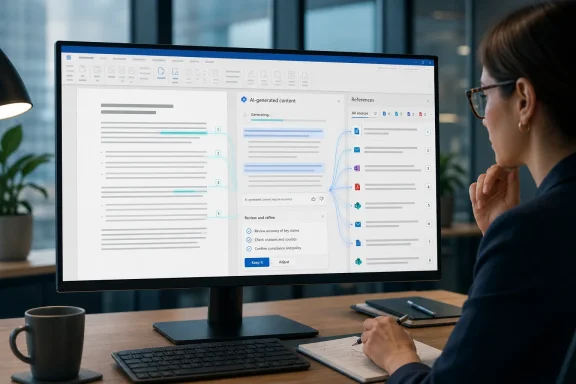
Inline citations change the interaction model. They can make source checking part of the writing flow rather than an after-the-fact audit. In practical terms, a reviewer can encounter a generated claim in Word, inspect its associated reference, compare the wording against the underlying evidence, and either preserve, edit, or remove the statement.
This is not the same as Word’s traditional academic citation system. Word already supports manually managed bibliographic citations in formats such as APA, Chicago, IEEE, ISO 690, and MLA, with a source manager and bibliography tools designed for formal research papers. Microsoft’s Word support guidance explains that those citations are inserted and maintained by the document author. Copilot’s new citations, by contrast, are designed to disclose the grounding material used by the AI while producing a draft.
That distinction is essential. A Copilot citation can establish provenance for generated content; it should not automatically be interpreted as a publication-ready scholarly reference, a legal authority, or proof that the source fully supports every nuance of the surrounding sentence.
What Roadmap Item 380842 Delivers
The roadmap item applies to Microsoft Copilot for Microsoft 365 and Word on desktop, with general availability in the worldwide standard multi-tenant environment. The stated feature is direct: when drafting through the inline canvas Copilot experience with referenced sources, Copilot includes citations in generated text to indicate the references behind the information. Microsoft 365 Roadmap ID 380842
The wording points to a specific workflow, not a blanket promise that every Copilot capability in every Word surface will always show citations. The key elements are:
- Inline canvas Copilot experience rather than an unrelated chat-only workflow.
- Drafting content, not merely asking a one-off question.
- Referenced sources, meaning material intentionally supplied or selected as grounding context.
- Citations in the generated text, putting the evidence trail beside the prose instead of burying it in a separate response panel.
Microsoft’s broader support documentation shows how this referenced-content model works in Word. A user can type / in a Copilot prompt and choose an existing document as a source; Copilot can also create a new draft based on files, emails, or meetings. Microsoft Support says users may select up to 20 items for Copilot to reference when creating a new document, provided they have permission to access the material in SharePoint or OneDrive.
Those references may include Word documents, PowerPoint files, PDFs, and TXT files in the documented Word drafting experience. The important point is that Copilot is not being asked to invent a report from a generic prompt alone. It is being asked to synthesize information from known organizational material, then show the reader where some of that material came from.
A More Transparent Form of Grounding
In Microsoft’s terminology, grounding is the process of enriching a user’s prompt with relevant content and context before it is sent to a large language model. Microsoft explains that Microsoft 365 Copilot uses Microsoft Graph to access data in the user’s tenant, and that grounding can incorporate information from input files or relevant content Copilot discovers in the user’s authorized work context. Microsoft Learn’s architecture overview describes this as a way to improve the specificity and usefulness of the resulting answer.
A grounded response is not necessarily correct, complete, or appropriately phrased. But it is generally more useful than an ungrounded one because the model has been given a narrower, more relevant evidence base. Citations extend that advantage by making the evidence path more visible to the person responsible for the document.
This matters especially in environments where content has to withstand scrutiny:
- Project management, where status claims must match meeting decisions and delivery plans.
- Human resources, where policy summaries must accurately reflect approved guidance.
- Sales and account teams, where customer proposals require disciplined use of product and contractual information.
- Legal and compliance functions, where an unsupported sentence can create real risk even if it sounds polished.
- IT administration, where technical runbooks and change reports depend on accurate references to specifications, tickets, and prior incident documentation.
How the Feature Fits into the Copilot in Word Workflow
The immediate appeal of cited drafting is that users do not need to build a complicated AI workflow around it. The working pattern remains familiar to anyone who has used Copilot in Word: open a document, invoke Copilot at a blank line or selected text, provide instructions, and decide whether to keep the resulting content.
Microsoft’s instructions for drafting in Word say users can select Keep, Regenerate, or Discard after Copilot produces new content. They can also refine the result with follow-up instructions, such as making it more concise or changing its tone. Microsoft Support explicitly warns that Copilot produces a draft and that users need to verify and modify the details for accuracy, tone, and fit.
With citations available in source-based inline drafting, a stronger workflow emerges:
- Choose deliberate source material. Reference the approved files, email threads, meeting notes, or documents that should govern the draft.
- Give Copilot a bounded assignment. Specify audience, purpose, section structure, tone, length, and any claims that must or must not be included.
- Inspect citations as soon as content appears. Treat the citations as a starting point for review, not as a decorative feature.
- Compare generated claims with source context. Check the full passage, not merely a snippet that seems to align with the sentence.
- Rewrite for precision and accountability. Ensure figures, dates, product names, commitments, exceptions, and ownership statements are worded correctly.
- Apply the document’s established citation policy. If a paper, report, or customer deliverable needs formal APA, MLA, legal, or internal references, use Word’s conventional citation and bibliography features as appropriate.
- Retain human ownership of the final document. The person who accepts the text remains accountable for what the document says.
This workflow makes Copilot more useful for producing an informed first draft while resisting the temptation to mistake fluent prose for verified prose.
Why Inline Citations Are Valuable
Faster Fact-Checking Without Leaving the Draft
The primary benefit is speed. A good writer already validates important assertions against primary material, but conventional AI-assisted drafting can create a detached review loop: generate in one interface, find sources elsewhere, then manually connect the two.
Citations reduce that friction. Microsoft’s support guidance for Copilot Chat shows the broader product pattern: responses include inline citations near the generated information, and users can hover over a citation to open the source in a side pane or initiate a new prompt using that source specifically. Microsoft Support That citation behavior in Copilot Chat provides useful context for Word’s source-aware drafting direction, even though the Word roadmap feature is a distinct canvas experience.
For everyday Windows and Microsoft 365 users, the result could be less time searching through shared folders for the sentence that supported a generated claim. More importantly, it makes it harder to ignore the source-checking step completely.
Better Collaboration and Fewer “Where Did This Come From?” Moments
Collaborative documents often stall because reviewers cannot tell whether a paragraph is based on an approved decision, an old proposal, an unrecorded conversation, or someone’s assumption. AI-generated text can intensify that ambiguity if it arrives without a visible trail.
A citation attached to generated content gives a manager, editor, or subject-matter expert an immediate lead. The reviewer can investigate the referenced file rather than starting an evidence hunt from scratch. That does not settle every disagreement, but it provides a more efficient path to resolving one.
The feature can also make AI use more socially acceptable inside organizations. Employees may be more comfortable reviewing a Copilot-assisted draft when they can see that it was grounded in an internal source rather than produced from a black box.
More Disciplined Use of Organizational Knowledge
Microsoft 365 Copilot’s source selection tools support references beyond standalone files. With the appropriate license and settings, the references menu can surface files, people, meetings, chats, emails, SharePoint content, and connected data sources. Microsoft’s reference-selection documentation notes that, when users do not name a specific source, Copilot may try to determine relevant work content on its own.
That convenience is powerful, but intentional references are better for high-stakes writing. A source-aware draft is most defensible when the author has clearly chosen the authoritative materials that should guide it. In other words, citations offer the most value when they illuminate a purposeful evidence set rather than merely revealing a broad and unpredictable retrieval process.
The Limits: Citations Do Not Eliminate AI Risk
A citation beside a sentence can make generated content more auditable. It does not make the sentence inherently true.
Microsoft’s own documentation is clear that Copilot in Word can make mistakes, misinterpret facts, and produce inaccurate results. Microsoft recommends that users review suggestions before accepting them. Microsoft Support’s Copilot in Word FAQ This is not a minor disclaimer. It is the operating principle that should govern use of the feature.
A Relevant Source Can Still Be Misread
Generative AI may cite a file that is genuinely relevant while still summarizing it incorrectly, overlooking a caveat, combining separate sections, or presenting a tentative estimate as a settled conclusion. The citation tells the reviewer where Copilot found material; it does not guarantee that the generated interpretation is precise.
For example, a source document might say that a deployment is planned for a specific quarter subject to testing. A generated draft might compress that nuance into “the deployment will occur in the quarter.” Both statements may refer to the same source, yet their operational meaning is very different.
This is why reviewers should inspect the full surrounding context. A citation should prompt questions such as:
- Does the source actually support this exact claim?
- Has Copilot retained qualifiers, dates, exceptions, and uncertainty?
- Is the source current enough to use?
- Does a later file supersede it?
- Is the cited material authoritative for the decision being documented?
Citation Coverage May Be Uneven
The roadmap description says Copilot includes citations when drafting content based on referenced sources. It does not promise that every sentence will have a citation, that every claim will point to the best possible source, or that sources will be represented with scholarly citation precision. Users should therefore avoid treating the absence of a citation as proof that a sentence is original, harmless, or unimportant.
The safest editorial practice is to focus review on substantive claims: numbers, promises, dates, risks, customer statements, technical behavior, policy interpretations, and recommendations. Those are the sentences most likely to require an evidence trail and the most damaging if the AI gets them wrong.
Long Inputs Remain a Practical Challenge
Source quality is only one variable; source length and organization also matter. Microsoft warns that when working with long documents, Copilot may focus on the beginning and end of a file and give less attention to material in the middle. Microsoft’s guidance on reference and document lengths recommends splitting longer documents into smaller parts or summarizing them in chunks for more precise results.
That limitation is particularly important for source-cited drafting. A citation may correctly identify a file while failing to disclose that a critical exception on page 80 received little attention because the model concentrated on the executive summary and conclusion. For large technical specifications, contracts, audit reports, or lengthy policy manuals, teams should use focused source excerpts, clear section boundaries, and targeted prompts rather than asking Copilot to absorb an entire repository indiscriminately.
Security, Permissions, and Governance Still Matter
The arrival of citations may encourage organizations to use Copilot with more internal material. That makes Microsoft 365 data governance even more important.
Microsoft says Copilot only surfaces organizational data that a user already has at least view permission to access. Microsoft Learn’s privacy and security documentation states that the quality of Copilot’s access controls depends on the underlying permission models in services such as SharePoint, including the permissions granted through collaboration with external users.
This is a strength and a warning. Copilot is not supposed to bypass access controls, but it can make information that is already over-shared easier to discover, synthesize, and restate. A poorly managed SharePoint site does not become less risky because AI respects its permissions; it becomes a potentially more visible source of context for authorized users.
A Citation Is Also a Disclosure Mechanism
The very transparency that makes citations valuable can reveal which documents, emails, or meetings informed a draft. In a sensitive collaborative environment, that may matter. A reference to an internal investigation, executive meeting, customer escalation, or unreleased planning document could expose context that a document’s intended audience should not see, even when every individual user technically has access to the source.
Teams should therefore decide:
- Which source types are appropriate for Copilot-assisted drafting.
- Whether certain confidential repositories should be excluded or more tightly permissioned.
- How generated citations should be reviewed before documents are shared externally.
- Whether document templates should include a required human verification stage for AI-generated content.
- Which retention, audit, and eDiscovery practices apply to Copilot interactions.
Microsoft notes that Copilot interaction data can include the user prompt, the generated response, and citations to grounding information; this activity history is stored and can be managed through tools including Microsoft Purview. Microsoft Learn also says prompts, responses, and Microsoft Graph data are not used to train the foundation models used by Microsoft 365 Copilot. That is an important enterprise safeguard, but it does not remove an organization’s need to manage access, retention, classification, and review.
Practical Guidance for Windows and Microsoft 365 Teams
The feature is best treated as an upgrade to the review process, not permission to automate authorship without supervision. Organizations that want to gain value from cited Copilot drafting should build a measured practice around it.
For Individual Authors
Use the most authoritative and current materials available. Reference named project documents, approved requirements, final meeting notes, and current policy pages rather than relying on vague prompts or loosely related files.
When Copilot generates text with citations, verify the claims before selecting Keep. Edit the prose so it reflects what the source actually says, not merely what the model appears to have inferred.
For Managers and Editors
Make citation review a normal part of document approval. A clean, confident paragraph should receive the same scrutiny whether it was drafted by a colleague or generated by Copilot.
Set a clear distinction between Copilot source citations and the citations required in final deliverables. A report may still need formal references, direct links, customer-approved evidence, or legal citations even if the drafting workflow displayed internal Copilot references.
For IT and Compliance Teams
Review SharePoint, OneDrive, Teams, and connector permissions before scaling source-grounded Copilot use. Microsoft’s architecture documentation confirms that Copilot operates within existing user authorization and honors controls such as Conditional Access and multifactor authentication. Microsoft Learn Those safeguards are most effective when the existing identity and content governance baseline is sound.
Consider training users on citation literacy. The most important message is simple: a citation is an invitation to verify, not a substitute for verification.
A Meaningful Step Toward Accountable AI Writing
Microsoft’s cited drafting update for Copilot in Word addresses one of the central weaknesses of generative AI in professional writing: the distance between an eloquent answer and the evidence that supposedly supports it. By inserting references into generated inline canvas content, Copilot can make provenance visible at the moment users are deciding whether the text deserves to remain in the document.
The change will not eliminate hallucinations, misread context, stale information, or the risks created by weak data governance. It also will not turn internal work files into academically vetted sources. But it gives authors and reviewers a more practical way to challenge AI-generated claims without abandoning the speed benefits of Copilot-assisted drafting.
For Microsoft 365 users, the most productive approach is neither blind trust nor blanket rejection. Use Copilot to synthesize approved material, use its citations to inspect the path back to that material, and let human judgment determine what survives into the final Word document.
