
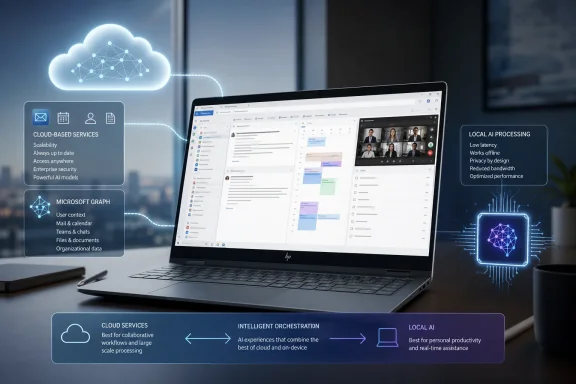
That distinction is more than marketing terminology for anyone choosing a laptop around Microsoft 365. Outlook’s mail-and-calendar workflow works on ordinary supported Windows PCs, Macs, browsers, iOS, and Android devices; buying a Copilot+ PC may bring Windows-specific local AI capabilities, but HP has not established that it accelerates cloud-backed actions such as drafting an Outlook email, summarizing a thread, or preparing for a meeting.
 Outlook remains a practical mail-and-calendar hub
HP’s broad description of Outlook is accurate. Microsoft positions the product as an email client and personal information manager, and the day-to-day benefit is still its ability to keep an Exchange or Outlook.com mailbox, meeting invitations, reminders, contacts, flags, and task lists within one interface.
For Windows users, that integration is especially relevant now that Microsoft continues to push the new Outlook for Windows as the successor to the old Mail and Calendar apps. The new client includes calendar access and Teams meeting scheduling, while Microsoft’s current feature comparison shows task support in both new and classic Outlook. The two clients are not interchangeable, however, and organizations with established Outlook workflows should not treat “Outlook” as one uniform product.
Microsoft’s own task documentation illustrates the practical split. In new Outlook, creating a task opens Microsoft To Do rather than the classic Outlook Tasks module, and the My Day view can surface upcoming calendar events and tasks throughout the app. That is useful for a personal follow-up queue, but Microsoft also documents that To Do does not support every legacy Outlook Tasks field, including start and end dates, percentage complete, multiple priority levels, work hours, colors, and categories.
For a user who handles messages and personal commitments, the combined view is enough. For an executive assistant, project coordinator, or administrator maintaining detailed task metadata, “task management in Outlook” needs a more careful reading than HP’s product roundup gives it. The application can centralize the work, but it does not erase the differences between To Do, classic Outlook Tasks, Planner, and the underlying Exchange mailbox.
Copilot features depend on account, license, client, and mailbox
HP also correctly identifies many functions Microsoft advertises for Copilot in Outlook: draft generation, rewriting and coaching, thread summaries, scheduling assistance, meeting preparation, and inbox triage. Microsoft Support confirms that users can summarize an email conversation, generate a reply or new message from a prompt, receive coaching on tone and clarity, and—in supported configurations—create a meeting invitation from an email thread.
The availability claim needs more precision. Copilot in Outlook is not a blanket feature unlocked by simply installing Outlook or signing into a Microsoft account. Microsoft documents different entitlements for consumer Microsoft 365 subscriptions, work or school accounts with the appropriate Copilot license, and Copilot Chat. Some consumer plans include AI credits and Outlook Copilot capabilities for the subscription owner, while a Microsoft 365 Family subscriber cannot pass those AI features to the other people covered by the family plan.
Work accounts bring another layer of conditions. Microsoft says full Copilot scenarios operate on a user’s primary mailbox and do not extend to archive, group, shared, or delegated mailboxes. It also excludes messages protected with S/MIME or Double Key Encryption, and certain information-rights-management or sensitivity-label configurations can be outside feature support. Those omissions are important in the very business environments HP recommends the EliteBook line for: shared departmental inboxes and protected mail are common precisely where users might want help summarizing and triaging volume.
Client choice matters as well. Microsoft’s July 2026 support notice shows that some Copilot entry points disappeared in classic Outlook for Windows for users who held only a Copilot Chat Basic license, even while web Outlook and new Outlook remained alternatives. Microsoft resolved that particular service-side issue, but the episode is a useful reminder that licensing and client support can change the visible Copilot experience without a hardware change.
Microsoft’s current support material also separates Chat with Copilot in Outlook from paid Microsoft 365 Copilot capabilities. A work or school user without the Microsoft 365 Copilot add-on may be able to use Copilot Chat against limited Outlook data and take some actions, while broader functionality depends on the organization’s licensing, policy, service environment, and rollout status. An IT department should verify the tenant’s actual entitlement rather than infer it from the presence of a Copilot button.
The NPU claim confuses Windows AI with Microsoft 365 Copilot
HP’s most problematic passage says that an NPU-equipped Copilot+ PC will make Copilot in Outlook faster because processing occurs locally rather than relying on cloud resources alone. Microsoft’s public documentation does not support that statement.
Microsoft describes Microsoft 365 Copilot as using large language models with Microsoft Graph and Microsoft 365 applications and services. Outlook-specific documentation repeatedly frames Copilot’s functions around data in the mailbox, calendar, meetings, related files, chats, and organizational context. That design necessarily depends on the Microsoft 365 service for access-controlled data retrieval and generative responses; Microsoft has not published a requirement for a Copilot+ PC or an NPU for Outlook’s email drafting, summarization, coaching, scheduling, or meeting-preparation features.
Copilot+ PCs do have genuine locally accelerated AI features. Microsoft’s Windows documentation identifies on-device models and components—including Phi Silica language models and image-processing components—that are built to use the NPU in supported Windows 11 systems. But Microsoft also explicitly notes that software must be designed to target the NPU in order to benefit from it. A device having an NPU is not proof that every application with “Copilot” in its name uses it.
The practical consequence is straightforward: an HP Copilot+ PC may be a sensible purchase for its battery life, portability, Windows 11 features, security configuration, webcam, or locally accelerated Windows experiences. It should not be sold as a performance upgrade for Outlook’s Microsoft 365 Copilot workflow unless Microsoft or HP can identify the specific Outlook feature, client version, and local model actually using the NPU.
This matters for procurement because the cost difference between a business notebook and a Copilot+ class device can be real, while the promised Outlook benefit is not documented. A company buying laptops for Exchange Online users will usually get more immediate value from sufficient memory, reliable Wi-Fi, a high-quality webcam and microphone, appropriate Microsoft 365 licensing, and tested support for its Outlook client than from an assumed NPU boost to cloud services.
“One place” does not mean one interface everywhere
The more durable point in HP’s guide is that Outlook can reduce switching between a mailbox and a calendar. Teams meeting links can be created from supported Outlook calendar experiences, mobile Outlook synchronizes supported mail, events, contacts, and tasks, and a flagged message can feed a personal follow-up list. For individual users and smaller teams, that is a meaningful operational advantage.
But the experience changes by platform. Microsoft’s own comparison material treats Outlook for PC, Outlook on the web, iOS, and Android as related clients with overlapping—not identical—capabilities. Outlook’s mobile apps are useful for calendar management and message handling, but they are not simply a pocket edition of the full Windows desktop application. The same is true of the new and classic Windows clients, whose feature sets and Copilot entry points continue to diverge.
That should shape support guidance. Administrators should document which Outlook client their users are expected to run, whether the tenant permits connected experiences, which Copilot license is assigned, how protected messages behave, and whether shared-mailbox workflows remain outside the Copilot scenarios staff expect. Without those decisions, “use Copilot to summarize the inbox” can turn into a help-desk ticket when the inbox in question is shared, encrypted, archived, or opened in an unsupported client.
Buy the laptop for the workload, not an unproven Outlook acceleration claim
HP’s laptop recommendations are reasonable at a general level: lightweight systems suit mobile workers, while managed business hardware may better fit organizations handling sensitive mail and frequent Teams calls. The company is also correct that Microsoft 365 Basic does not include the desktop Outlook application, while higher Microsoft 365 and business plans can provide desktop app access depending on the SKU.
The unsupported leap is tying Copilot+ hardware to faster local Copilot in Outlook. Microsoft currently documents Copilot in Outlook as a service and documents Copilot+ PC NPUs for Windows features and applications specifically engineered to use local models. Those are adjacent products, not evidence of a shared execution path.
Outlook remains a solid single workspace for email, calendar, contacts, and personal tasks. For organizations evaluating AI assistance, the decisive checks are the Outlook client, Exchange Online mailbox type, information-protection policy, Microsoft 365 license, and service availability—not whether the laptop carries a Copilot+ badge.
