
Microsoft detailed the change in Message Center post MC1459132, published August 22. Neowin first highlighted the timing, and an independently archived copy of the Message Center notice confirms the affected platform, rollout window, and Edge 154 cutoff. The practical concern is not that Windows 10 is suddenly losing a generic security feature; it is that organizations relying on these two specific policy frameworks in Edge must replace their browser data-protection and isolation workflows before September ends.
The announcement is the final browser-side step in retirements that began years ago. WIP was deprecated in July 2022, while MDAG for Edge and its related isolated-app APIs were deprecated in late 2023. Microsoft removed MDAG from Windows 11 version 24H2, leaving Windows 10—including still-supported LTSC deployments and certain Extended Security Updates estates—as the principal place where an existing Edge configuration could still depend on either technology.
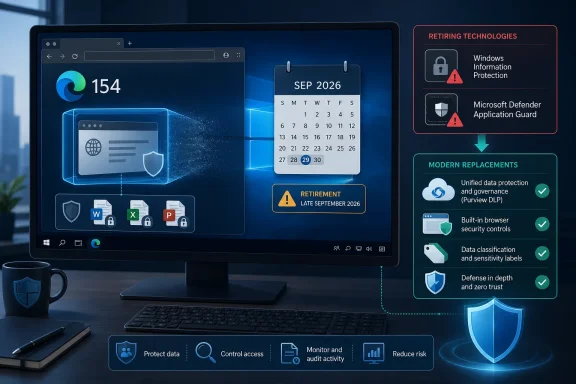 Edge 154 makes the retirement operational
The significant date is not the original deprecation notice. It is the Edge 154 rollout in late September 2026. Microsoft says WIP and MDAG capabilities will no longer function in Edge 154 and later once the worldwide deployment is complete. Deprecation often means a feature stays usable but stagnant; this change means the browser’s old integration is being removed.
Organizations that never turned on WIP or MDAG have nothing to migrate. Both were disabled by default and required administrative setup. MDAG had to be installed as a Windows optional feature or deployed through management tooling, while enterprise use required corporate-boundary policies that identified trusted sites and redirected untrusted browsing into an isolated container.
That narrower scope should not be mistaken for low risk. These are exactly the types of controls likely to remain in older, highly managed Windows 10 fleets: fixed-function enterprise PCs, regulated environments, and long-lived LTSC deployments where a browser policy can persist long after the team that designed it has moved on. Windows 10 Enterprise LTSC 2021 remains in mainstream support until January 12, 2027, and some older LTSC and IoT editions run longer. Edge’s retirement therefore arrives before all supported Windows 10 use cases disappear.
Microsoft’s wording also matters: the notice retires support for WIP and MDAG in Microsoft Edge. It does not announce a September removal of every remnant of the Windows optional feature from Windows 10. Administrators should not assume that a surviving feature checkbox, Group Policy object, CSP setting, or old Intune profile means the control still protects traffic in the current browser. After Edge 154, the browser behavior is the decisive test.
WIP and MDAG protected different things
Although Microsoft is retiring the two technologies together, they addressed different security problems and should not be replaced with a single checkbox.
Windows Information Protection was Windows 10’s enterprise mobile application management layer. It classified enterprise data, encrypted protected files locally, restricted which apps could access that data, and could block or audit actions such as copying enterprise content into personal applications. For example, an organization could allow copy-and-paste between protected business apps while preventing a paste into personal email or unmanaged cloud storage. It also enabled selective removal of enterprise data from an enrolled device without erasing personal content.
In Edge, WIP made the browser part of that protected-app boundary. Its removal means organizations that use Edge as a trusted path for corporate web apps need to confirm what now happens when users download a file, upload it to an unapproved service, copy information between work and personal contexts, print it, or save it to removable media.
MDAG, by contrast, was a hardware-backed browser isolation feature. It used a container to separate browsing of untrusted sites from the host operating system, helping contain a compromise or malicious web content. In managed mode, administrators could define enterprise sites as trusted and send other browsing into the isolated environment automatically.
Microsoft’s current MDAG documentation says the technology is deprecated, no longer available in Windows 11 version 24H2, and not supported in virtual machines or VDI environments without nested virtualization for non-production testing. That history helps explain the retirement, but it also exposes a gap in Microsoft’s recommendation: Edge security features can reduce browser risk, yet they do not recreate the same dedicated hardware-isolated browser session that MDAG supplied.
For organizations that used MDAG chiefly to reduce exploit exposure on unfamiliar sites, Edge’s Enhanced Security Mode, Defender SmartScreen, website typo protection, attack-surface-reduction rules, and a tightly managed extension policy may be sufficient when combined. Enhanced Security Mode reduces exposure to memory-related browser attacks by disabling JavaScript just-in-time compilation on applicable sites and enabling additional operating-system mitigations. But that is defense-in-depth inside the browser process, not a direct replacement for a separate Application Guard container.
Microsoft’s replacement list is a design project, not a migration button
Microsoft recommends Microsoft Purview Information Protection, Microsoft Purview Data Loss Prevention, Endpoint DLP, and Intune app protection policies for WIP scenarios. For MDAG, it points customers to Edge’s built-in security capabilities and another supported first- or third-party isolation solution appropriate for the environment.
That recommendation is reasonable as a destination, but it should not be read as evidence that each product replaces every old WIP policy one-for-one. WIP focused on Windows-level data ownership, local encryption, protected applications, and selective wipe. Purview Information Protection centers on classification and sensitivity labels, while Purview DLP and Endpoint DLP identify sensitive content and apply controls around actions and destinations. The policy model, audit trail, licensing requirements, supported applications, and user experience can all differ.
Microsoft’s current Edge for Business documentation shows that Purview and Endpoint DLP can audit or block file uploads, clipboard use, printing, and transfers to USB or network locations. It also describes browser controls for work and personal profiles, InPrivate sessions, and sensitive data shared to managed or unmanaged cloud apps. Those controls are useful, but they must be deliberately configured. They do not materialize just because an old WIP policy exists in Intune or Configuration Manager.
The replacement path also varies by what the organization was actually protecting:
- Organizations using WIP to stop accidental browser-based data leakage should inventory Edge download, upload, copy/paste, printing, screenshot, and removable-media scenarios, then test whether Endpoint DLP, Edge for Business policies, and Purview sensitivity labels enforce the intended outcome.
- Organizations using WIP for a work-versus-personal browser boundary should evaluate Edge for Business work profiles and Intune app protection policies, which can apply protected clipboard, screen-capture, download, and watermarking controls across the work profile.
- Organizations using MDAG for untrusted-site containment should document which users and destinations were redirected into Application Guard, then decide whether the requirement is best met by hardened Edge configuration, Windows Sandbox for manual investigation, Azure Virtual Desktop, or a separate browser-isolation service.
Microsoft’s own configuration guidance makes clear that some Purview browser protections require more than deploying a DLP rule. Depending on the scenario, admins may need Entra Conditional Access, Edge for Business sign-in enforcement, onboarded applications, defined user groups, and policies that place both the user and the app in scope. A migration that checks only whether a new Purview policy exists can leave users unprotected or, just as damaging, block routine work unexpectedly.
What Windows administrators should check before September
The first task is to find out whether the organization still depends on either feature rather than assuming a deprecation cleanup already occurred. Review Intune’s App and browser isolation profiles, Configuration Manager baselines, Group Policy Objects under Microsoft Defender Application Guard and Windows Information Protection, and any custom configuration service provider profiles. Also inspect Edge policies that define enterprise cloud resources, corporate network boundaries, or Application Guard behavior.
Next, separate configuration leftovers from active use. An old policy in a management console may no longer be assigned, while an active WIP deployment can be hiding in a small device group, a shared kiosk configuration, or a legacy business unit. For MDAG, identify actual isolated browsing launches and the sites that would have been treated as nonenterprise destinations. For WIP, inspect audit activity and test whether corporate files downloaded through Edge remain tagged or whether protected-app restrictions are still being enforced.
Then establish a test ring that runs Edge 154 before the broad deployment reaches production. The important checks are behavioral: can users still access protected web apps, can they safely handle sensitive files, do DLP policies log or block the intended browser actions, and does the replacement isolation design function for users who previously relied on Application Guard? Testing should include personal Edge profiles, InPrivate browsing, unmanaged cloud services, downloads, printing, clipboard transfers, and any approved exceptions that previously depended on WIP boundaries.
Finally, remove or revise obsolete policies once replacement controls are verified. Leaving a dead WIP or MDAG configuration in place creates a false compliance signal: dashboards may show a deployed policy even though Edge no longer implements the control it describes.
Microsoft is giving Windows 10 administrators only until late September 2026 to complete that work. The immediate consequence of missing the deadline is straightforward: Edge 154 will keep updating, but the WIP and MDAG protections attached to that browser will not.