
That distinction matters. A fake software download site does not need to distribute a malicious executable on day one to be dangerous. It can begin with copied branding, generic documentation, SEO-oriented articles, and even links to a legitimate Microsoft Store listing. Once users accept it as an “official” destination, a later change to the page, an advertising redirect, or a swapped installer can exploit that accumulated trust.
For Windows enthusiasts, this is a reminder that safe software discovery is no longer just about checking whether an .exe triggers a warning. It starts earlier: with the search result, the URL, the domain name, the publisher identity, and the route taken to reach the download.
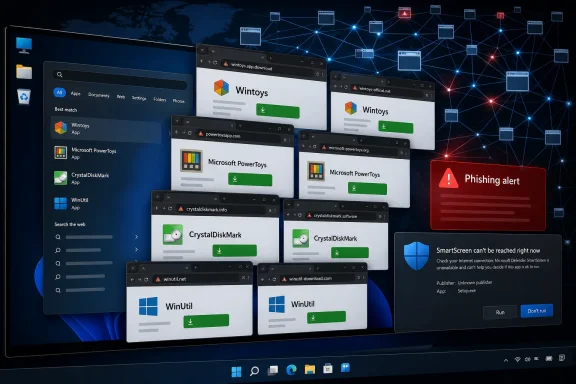 Overview: A network built around familiar Windows app names
The discovery began with Bogdan_X, the developer of the Windows customization utility Wintoys. In a detailed Reddit post, the developer described finding wintoys.app, a domain that used Wintoys branding and an older logo despite not being operated or approved by the project.
According to the developer, the Wintoys impersonation site was constructed with WordPress and populated with inaccurate, generic-looking material intended to appear useful and authoritative. At the time examined, its download button reportedly led to the real Wintoys listing in the Microsoft Store rather than to an obviously altered installer. That makes the site more deceptive, not less: a legitimate destination can function as a credibility-building device for an illegitimate portal. Neowin independently reported the same unusual arrangement and noted that Cloudflare displayed a suspected-phishing warning for the domain.
The page also carried a footer disclaimer stating that it was not affiliated with Wintoys and only provided documentation, guides, and links to official repositories. But a disclaimer at the bottom of a site using an application’s name, imagery, and apparent official positioning does not solve the underlying problem. The practical impression created for a casual visitor remains one of affiliation.
That is the central technique at work here: borrowed legitimacy. The operator does not need to claim outright ownership in every visible sentence. It is enough to occupy the search space around an app name, mimic its visual identity, and make users feel that the URL is an acceptable place to begin.
The scale is what elevates the concern
The Wintoys developer linked a contact address associated with the domain to 72 domains, a group containing names that closely resemble established Windows utilities and developer tools. The reported list includes powertoys.app, power-toys.com, crystaldiskinfo.app, crystaldiskmark.net, winutil.app, easybcd.app, freefilesync.net, spacesniffer.app, hashcat.app, and mimalloc.com, among many others. The original investigation provides domain-registration dates and registrar details for the reported set.
Some of these are not merely generic names. They are names users may actively search after reading a Windows optimization guide, troubleshooting storage performance, setting up a development environment, configuring an RGB device, or looking for an administrative utility. That makes the campaign’s target pool broad: enthusiasts, gamers, IT professionals, developers, and ordinary users following a how-to article can all be exposed.
The domains also vary in obviousness. A name such as powertoys.app may seem plausible because .app is a common top-level domain for software. A domain such as power-toys.com relies on a small visual difference that can be missed in a hurried search-result scan. Others mirror the exact product name while using a different extension, making the deception especially effective against users who assume the first plausible URL must belong to the software’s creator.
Why a harmless-looking download link is not reassurance
The first instinct when visiting a suspicious site is to inspect the download link. If it sends a visitor to the Microsoft Store, GitHub, or an official project page, the visitor may decide the site is harmless.
That is understandable—but incomplete.
A suspicious website that links to a legitimate application can still be harmful in several ways:
- It can collect traffic and improve its standing in search engines.
- It can create brand confusion and divert visitors away from the real developer.
- It can display advertisements, affiliate offers, browser-notification prompts, or misleading “update” buttons.
- It can gather telemetry, fingerprints, or contact details through forms and tracking scripts.
- It can be modified later to redirect users to a different destination.
- It can prepare users to trust the domain enough to ignore security warnings during a future attack.
The Wintoys developer’s own assessment is especially important here: after examining the page source, they said they did not find an immediately suspicious payload at that point, but they also stressed that the site was unauthorized and presented inaccurate information. The Reddit investigation describes the suspected model as gaining traffic first, appearing benign, and tampering with download paths later.
That model fits a basic security reality: the web page is part of the attack surface, not merely the location where a file happens to be hosted. A download can be safe today and unsafe tomorrow without a user changing their behavior at all. The only thing that needs to change is the destination behind a button, the script running on the page, or the advertisement served by a third party.
The legitimacy of the final destination does not authenticate the middleman
A Microsoft Store link does offer meaningful assurance about the application package ultimately installed from the Store. Microsoft states that Store-distributed applications are re-signed by Microsoft and have full SmartScreen reputation, so users do not receive a SmartScreen warning for a Store-installed app. Microsoft’s SmartScreen guidance for developers explains why Store distribution is a strong delivery channel.
But that does not make the referring website official.
The correct conclusion is narrower: if a suspicious site truly redirects to the real Store listing and nothing else occurs, the application package may be authentic. It does not follow that the site is safe to revisit, trustworthy for future updates, reliable for documentation, or acceptable as a place to enter credentials, download companion files, accept browser notifications, or install add-ons.
This difference is critical for software creators as well. Developers may assume that an impersonator cannot do much harm if all current download links are clean. In fact, the impersonator may be cultivating the audience that will later be offered a counterfeit “portable version,” an “offline installer,” a beta build, a mod, a driver update, or a download for users unable to access the Microsoft Store.
The campaign appears designed for search-driven software discovery
Windows application impersonation is particularly effective because many popular utilities have complicated distribution stories. Some are available from the Microsoft Store, GitHub Releases, a developer’s site, package managers, code-hosting platforms, or multiple mirrors. Some projects change names, move domains, or use organization accounts rather than personal names. Others have no polished official website at all.
Those realities create ambiguity—and ambiguity is the scammer’s advantage.
A user looking for a tool might search:
- “download PowerToys”
- “CrystalDiskMark official download”
- “Wintoys Windows 11 download”
- “WinUtil latest version”
- “FreeFileSync installer”
- “Windows debloat tool”
- “mouse mover app”
Search engines often reward pages that match these terms closely, contain extensive explanatory text, load quickly, and appear to answer a user’s intent. A cloned site with a product name embedded in its domain has an obvious opportunity to compete for those results. The Wintoys developer reported that the unauthorized domain surfaced during a recent-results search for the app’s name, demonstrating how routine discovery behavior can reveal these sites. The developer’s account also says some of the related sites were unfinished, suggesting that the infrastructure may be expanding rather than representing a static collection of dormant registrations.
“Documentation” can be an effective disguise
The disclaimer found on the Wintoys impersonation site is revealing because it frames the page as an independent documentation and guide resource. That language gives an operator room to claim that it is not pretending to be the original publisher—even while using the project’s recognizable identity to attract visitors.
Independent documentation is not inherently suspicious. Community wikis, technical blogs, package-manager listings, and tutorial sites all provide legitimate value. The difference is whether the site is transparent about who runs it, avoids misleading branding, clearly distinguishes itself from the project, and links users to verifiable official sources without presenting itself as a substitute for them.
A trustworthy third-party guide usually has a visible editorial identity and a reason to exist beyond capturing the project’s exact product-name traffic. A deceptive clone tends to have weak attribution, generic wording, copied imagery, vague claims, and prominent download calls to action.
The broader malware risk: trust can be weaponized later
The reporting does not establish that every domain in the network is currently delivering malware. That caution is necessary. The immediate, verified issue is widespread unauthorized impersonation and the creation of a domain network around recognizable application names. Neowin’s reporting explicitly noted that the ultimate objective was unclear because the observed domains were not all doing something overtly malicious at the time.
However, the risk is far from theoretical. Microsoft defines malware broadly enough to include trojan software that pretends to be something else in order to convince users to install it; the stated goals can include data theft, identity theft, using a machine to attack others, and other cybercrime. Microsoft’s consumer security guidance also distinguishes malware from potentially unwanted applications—software that may show ads, install unexpected extras, or use system resources for purposes such as cryptomining.
A fake site does not need to jump straight from an official Store link to a ransomware installer. More gradual abuse is possible:
- Traffic generation: Build search visibility through copied or auto-generated application content.
- Trust conditioning: Link to the real app and appear useful enough that users bookmark the domain.
- Monetization: Add advertisements, affiliate redirections, notification prompts, or misleading “recommended” downloads.
- Targeting: Offer special installers, updates, themes, plug-ins, drivers, or tools that are not available through the real publisher.
- Payload delivery: Replace or wrap a trusted download with unwanted or malicious software.
That stepwise approach is why security should not be reduced to an antivirus scan at the very end. By the time a file is downloaded, a user may have already granted notifications, signed into an account, copied a command from a fake guide, or been redirected through several opaque pages.
Windows protections help—but they are not a substitute for URL verification
Windows has meaningful built-in protections for this exact kind of scenario. The App & browser control section in Windows Security includes reputation-based protections designed to assess websites, downloads, files, and applications against known threat intelligence. Microsoft’s Windows Security documentation says Microsoft Defender SmartScreen evaluates sites and downloads against known malicious sites and files, while other controls can help reduce exposure to untrusted applications.
Microsoft also recommends that users obtain apps only from trusted sources such as the Microsoft Store, keep an actively updated antivirus product, use a modern browser, and remain current on Windows, browser, and app updates. Microsoft’s guidance on unwanted software makes the same case directly.
Those controls are important layers, but they have limits:
- A new domain may not yet have sufficient reputation data for immediate blocking.
- A site that links to a legitimate destination may not trigger a download-specific warning.
- SmartScreen warnings can be overridden by users in many configurations.
- Brand impersonation can be persuasive even when the downloaded file is technically clean.
- A user may follow unsafe instructions from a fake site without downloading a malicious executable at all.
For managed Windows environments, Microsoft’s policy guidance recommends configuring SmartScreen to prevent bypassing warnings for suspicious sites and unverified downloads rather than merely showing a warning that users can ignore. Microsoft Learn’s SmartScreen policy documentation notes that the default experience can permit bypasses and recommends stricter settings for organizations.
Smart App Control has value, with practical limitations
Windows 11 users may also encounter Smart App Control, which blocks malicious or untrusted applications and can help block potentially unwanted apps. Microsoft explains that it works alongside other security software and evaluates whether software is trusted before allowing it to run.
However, it is not a universal switch available on every existing PC. Microsoft documents that Smart App Control is intended for new Windows 11 installations and that its evaluation and enforcement behavior depends on the device’s configuration and usage. The technical overview notes that enforcement permits binaries only when they are recognized by Microsoft’s intelligence services or signed with an appropriate trusted certificate.
The practical lesson is simple: keep the protection enabled if it is available, but do not assume it will catch every misleading webpage or every risky decision made before a program is executed.
How Windows users can avoid fake software download websites
The most useful defense is a repeatable verification habit. It should apply whether the app is a well-known Microsoft utility, a small GitHub project, a hardware tool, or a niche Windows customization application.
Start from the developer, not from the search ad
When possible, reach a program through one of these routes:
- The developer’s verified account or documentation.
- The application’s Microsoft Store listing.
- A GitHub organization or repository linked from the developer’s confirmed social or documentation channels.
- A reputable package manager entry that identifies the publisher and package source.
- A previously bookmarked official project URL.
Avoid treating the top search result as proof of authenticity. Search rankings indicate relevance and popularity signals, not ownership or endorsement.
Inspect the domain carefully
Before clicking a download button, look at the full domain—not just the product name visible in the page header.
Be alert for:
- An unexpected top-level domain such as
.app,.net,.pro, or.infowhen the developer normally uses a different address. - Hyphens or altered spelling, such as
power-toysinstead ofpowertoys. - Product-name domains that do not appear in the developer’s own links.
- Pages that use old logos, inaccurate version details, awkward wording, or generic AI-style descriptions.
- “Official download” claims without a clear publisher identity.
- Download buttons that lead to ad networks, file-hosting pages, URL shorteners, or unfamiliar mirrors.
A polished page can still be fraudulent. In fact, visual polish is often part of the problem.
Treat browser and SmartScreen warnings as evidence
Do not dismiss a browser, DNS, or SmartScreen warning merely because the page looks professional or the app name is familiar. Microsoft says that SmartScreen’s reputation-based protection is meant to help identify phishing, malware, and potentially unwanted applications through assessments of sites, publishers, files, and observed threats. Microsoft’s App & browser control guidance describes the setting as a front-line protection for unsafe apps, files, websites, and downloads.
If a supposedly official site produces a warning, stop and find the project from an independently trusted path. The right response is not to click through because the software itself is popular.
Verify the actual installer and publisher
For traditional desktop installers obtained outside the Store:
- Confirm that the installer is digitally signed.
- Check that the publisher name matches the known developer or organization.
- Do not override a “Windows protected your PC” prompt simply because a blog or forum told you the app is safe.
- Compare version information and release notes with the project’s official channel.
- Prefer project pages that publish cryptographic hashes when they are available.
Microsoft notes that unsigned files start without reputation and can require users to choose Run anyway, while Store-distributed applications benefit from Microsoft’s certificate and reputation model. Microsoft Learn’s SmartScreen reputation guidance also advises users to proceed with new signed applications only after verifying the publisher and download source.
What developers and maintainers should do now
The discovery is also a warning to software creators. Smaller Windows projects may be especially exposed because their users often search for the app name instead of navigating from a memorized official domain.
Developers should consider the following defensive steps:
- Publish an unmistakable official-download page. Make it clear whether the official source is the Microsoft Store, GitHub, a project site, or another distribution channel.
- Use consistent branding. A clear publisher name, verified social profiles, and maintained documentation make impersonation easier to spot.
- Link every channel together. The project website, Store listing, GitHub organization, documentation, and social accounts should cross-reference one another.
- Monitor search results regularly. Search the project name, common misspellings, and “download” variants to identify malicious or misleading domains.
- Register high-risk variants where practical. Defensive domain registration cannot cover every possibility, but it can reduce the easiest impersonation opportunities.
- Publish code-signed releases. Signing strengthens the publisher signal that Windows and users can inspect.
- Document recovery guidance. Explain what users should do if they installed a fake build or suspect an unofficial source.
- Report abuse promptly. Notify the registrar, hosting provider, browser-security teams, search engines, and relevant anti-phishing reporting channels.
The Wintoys developer reported that action by the initial registrar did not permanently remove the network. Instead, the domains were moved to a different registrar. The original Reddit post says the group was transferred after the registrar ordered the attacker to move the domains or face suspension. That sequence underscores a frustrating reality: a single takedown may disrupt an operator, but domain ownership and hosting can migrate quickly.
The key takeaway: download trust begins before the download
The fake Windows app website operation is troubling because it exploits ordinary behavior. Users search for a familiar utility, see a familiar name, find a page that appears to explain the software, and click a prominent download button. Nothing about that sequence feels reckless.
Yet the operation demonstrates why a recognized app name is not an authenticity check. A legitimate Microsoft Store link today does not validate the website that sent users there, and a disclaimer buried in a footer does not erase the misleading impression created by copied branding and a product-matching domain.
Windows security features remain essential, especially Microsoft Defender, SmartScreen, reputation-based protection, and stricter enterprise policies that prevent warning bypasses. But the most durable protection is a disciplined software-download routine: use the real developer’s verified channels, inspect URLs before trusting them, keep Windows protections enabled, and abandon any source that feels ambiguous rather than trying to rationalize it.
In an ecosystem where a fake site can look harmless long enough to earn a place in search results, the safest Windows download is not simply one that installs successfully. It is one whose origin, publisher, and delivery path can all be independently verified.
Update: New reporting links the copycat sites to malware delivery (July 30, 2026)
GB News now reports that the lookalike-app network may have progressed beyond traffic-building and brand impersonation into active malware delivery. Citing Check Point Research, the outlet says the operators can use hidden scripts and a traffic-distribution system to selectively redirect certain visitors after a download click, while avoiding scrutiny from researchers and security tools.
The reported payloads include RemusStealer, which targets browser data, stored passwords, and cryptocurrency wallets, and AnimateClipper, which can replace copied cryptocurrency wallet addresses. GB News also says developers of at least two impersonated applications have confirmed that their fake domains are distributing malware.
If confirmed across the broader domain set, this would supersede the earlier assessment that the operation’s immediate objective was unclear and that observed download buttons could lead to legitimate Store pages. Users and IT administrators should treat every listed lookalike domain as potentially hostile, rather than merely misleading, and block access where possible.
