
Neowin first highlighted the timing as Microsoft develops its own context-menu overhaul. The comparison is fair only up to a point. Files has improved the menu inside its own application; it has not sped up Windows 11’s desktop or File Explorer right-click menus. Anyone who wants the benefit across everyday folder launches can enable Files’ optional default-file-manager mode, but the project describes that feature as an experimental registry-based workaround rather than a Windows-supported replacement for Explorer.
 Files 4.2.7 targets the pauses users actually notice
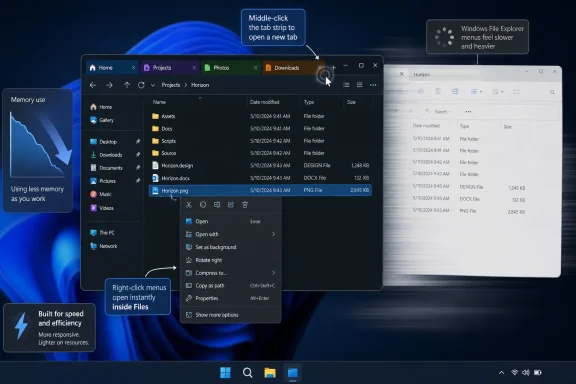
The release is a focused maintenance update rather than a redesign. The headline performance work is the context menu, which is where file-management delays are most conspicuous: a user right-clicks a file, waits for commands and extensions to populate, then decides whether to act. A faster response at that point makes routine actions such as extracting archives, checking Git status, copying paths, or opening a terminal feel immediate.
Files has not published a benchmark, before-and-after timing, or a technical account of what changed in version 4.2.7. Its claim is therefore a product-team assertion, not an independently measured performance result. Still, the project has made the release available to all users, and its GitHub release record and its own announcement match Neowin’s account of the update’s feature list.
The remaining changes address a related pattern: file managers tend to be left open all day, especially by developers and IT staff moving among project folders, shares, downloads, and logs. Files now says it releases more memory when tabs close. That will not necessarily lower the app’s initial footprint, but it should reduce the amount of memory retained after a long sequence of opening and closing locations.
Microsoft has publicly acknowledged that File Explorer needs work in this area. In its March 2026 Windows quality plan, Microsoft specifically committed to lower latency in File Explorer search, navigation, and context menus. Microsoft’s June preview update, KB5095093, also included File Explorer launch-performance improvements and better responsiveness when mounting disk images. Those are meaningful fixes, but neither announcement claimed to deliver a general context-menu acceleration for the stable Windows shell.
The “beat Microsoft” framing needs a boundary
Files can replace many common File Explorer launch paths, including the Windows+E shortcut and folders opened by other apps, through its default-file-manager setting. The project’s own documentation is unusually candid about the method: Windows does not provide a normal setting to select a different system file manager, so Files intercepts relevant Explorer calls through registry changes.
That has two consequences. First, users who leave the option off will only see the new speedup when working inside Files; right-clicking on the desktop, taskbar, Start menu, or a standard Explorer window remains Windows’ territory. Second, even users who turn it on should treat it as a convenience layer, not a wholesale replacement for the Windows shell.
The Files team warns that the workaround can cause issues and recommends backing up the registry before enabling it. That warning deserves more attention than a typical “set it as default” checkbox because Explorer remains entwined with Windows components, common file dialogs, shell extensions, administrative tools, and management workflows. A file manager can intercept common folder launches without taking ownership of every Explorer-dependent experience.
For a managed PC fleet, that makes Files a user-level productivity choice rather than a broadly deployable cure for File Explorer performance. Administrators should test it with endpoint security agents, cloud-storage clients, archive tools, source-control integrations, and any line-of-business application that opens folder locations. The performance claim itself is low risk; the replacement mechanism is the part that can alter expected behavior.
Small tab and selection changes remove repeated friction
Version 4.2.7 also adds middle-clicking on an empty part of the tab strip to open a new tab. It sounds minor, but it brings Files closer to the interaction model users expect from browsers and terminal applications. In repeated navigation work, eliminating a trip to the new-tab button is useful precisely because it happens so often.
The update also improves the handoff from other applications. When an application invokes Files to show a file’s folder, Files will now select the file automatically. That removes the familiar but wasteful second step of visually scanning a folder after choosing an “open file location” command.
This is particularly useful in workflows that start outside a file manager: locating a downloaded attachment from a browser, jumping from an IDE to a build artifact, opening a log folder from a monitoring tool, or tracing a recently generated report. The feature does not create new shell integration, but it makes existing folder handoffs preserve the user’s context rather than merely dumping them into the containing directory.
The release also fixes an issue that could unexpectedly clear text from Files’ filter box. That is a small correction, yet it reinforces the character of this update: v4.2.7 is aimed at keeping high-frequency actions responsive and stateful rather than introducing another layer of UI.
What Windows users should do with this update
Existing Files users should receive the update notification in the application. The project also distributes Files through its website and offers a Microsoft Store edition; its own release note says purchasing the Store version is optional support for development, not a requirement to receive the update.
Users considering Files mainly to escape a slow Windows 11 right-click menu should set expectations correctly:
- The version 4.2.7 improvement applies to the Files context menu, not automatically to the desktop or every File Explorer window.
- Enabling Files as the default file manager can redirect common Explorer launches, but the project labels the registry-based feature experimental and recommends a registry backup.
- The update is most compelling for people who already work in multiple file-management tabs and repeatedly jump to files from other applications.
Microsoft’s planned context-menu changes, as reported by Windows Central from preview builds, appear to address a different and larger target: Windows-wide menu layout, customization, and the performance cost of loaded actions and extensions. Those changes are still preview work, with no firm public date for general availability. Files has shipped its narrower change now.
For Windows 11 power users, that is the practical takeaway. Files 4.2.7 does not solve every slow right-click surface in Windows, but it offers an immediately available improvement for the file-management workflow it controls—and exposes how long Microsoft’s own everyday shell interactions have remained unfinished.
