
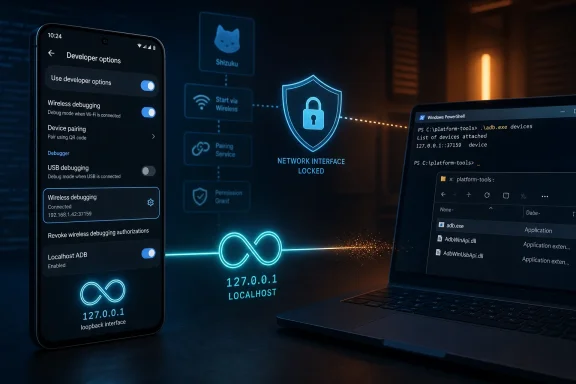
localhost. The proposal is still an active discussion rather than a shipping Android policy, but its consequences could be substantial for tools such as Shizuku, Termux-based workflows, and apps that rely on temporary ADB-level privileges without requiring a rooted device. Android Authority reports that the idea under examination would limit the device-side ADB daemon, adbd, to external interfaces such as Wi-Fi or USB and deny loopback connections including 127.0.0.1.
For Android enthusiasts—and for Windows users who have long treated a PC running adb.exe as a reliable companion to their phones—the discussion is a reminder that ADB is not merely a developer utility. It has become the foundation for a sizable ecosystem of advanced Android workflows. The core question is whether Android can reduce a real wireless-debugging attack surface without forcing legitimate power users back to a tethered computer every time they reboot their device.
That balance matters because the change would not simply affect an obscure command-line trick. It could reshape how root-free Android customization works.
 What Google Is Actually Discussing
The proposal centers on the Android Debug Bridge daemon, known as adbd. ADB operates as a client-server system: the client sends commands, the on-device daemon executes them, and an ADB server coordinates connections on the development machine. Google’s official documentation describes ADB as a tool for installing, debugging, scripting, and accessing a Unix shell on Android devices. Android Developers’ ADB documentation also confirms that the daemon runs on the device while the conventional client runs on a developer workstation.
The new idea is not to eliminate ADB outright. Nor is it, at this stage, a decision to remove Wireless debugging, USB debugging, or normal PC-to-phone Android development. Instead, the discussion concerns which network interfaces adbd should listen on.
According to the reporting and the linked public discussion, engineers are evaluating whether adbd should be restricted to external interfaces—such as Wi-Fi’s wlan0 interface or USB—rather than accepting a connection from the phone itself through the loopback address. The original reporting identifies 127.0.0.1 as the key address that could be blocked under such an approach.
That distinction sounds technical, but it is fundamental:
- External ADB involves another machine connecting to the Android device through USB, Ethernet, or Wi-Fi.
- On-device ADB involves an ADB client running on the same Android device connecting back to its local ADB daemon through
localhost. - Loopback networking is the mechanism that lets software on a device communicate with services on that same device without placing traffic onto the wider local network.
If Android’s adbd daemon refuses loopback connections, a phone can still potentially accept ADB commands from a Windows PC over USB or from a paired workstation on Wi-Fi. However, apps and terminal environments running on the phone would lose the convenient path that makes local, root-free ADB possible.
The public issue appears inaccessible without sign-in through Google’s Issue Tracker, but the proposal and key comments have been documented in Kitsumed’s technical breakdown, which describes a suggestion to bind adbd only to the Wi-Fi interface. That analysis also highlights a broader consequence: a strict wlan0-only model could affect not only loopback access, but potentially specialized setups involving VPNs or Ethernet adapters.
Why localhost ADB Matters
For most Android users, the familiar ADB model is straightforward. Connect a phone to a Windows PC, enable USB debugging, approve the computer’s RSA fingerprint on the handset, and run commands from PowerShell, Command Prompt, Windows Terminal, or Android Studio.
Google’s own ADB guidance makes this security model clear. Since Android 4.2.2, users must unlock the device and explicitly approve an RSA key before that computer can execute ADB commands. The official documentation presents that authorization prompt as a core protection against unauthorized debugging access.
On-device ADB changes the location of the client, not necessarily the privilege level. Instead of adb.exe running on a Windows desktop, an ADB client can run through a local terminal environment or an app-assisted workflow on the phone. It then connects back to adbd through the phone’s local loopback interface.
That capability has practical advantages:
- It removes the need to keep a PC nearby.
- It lets advanced users apply approved commands while traveling.
- It supports device-side scripting and maintenance.
- It can enable root-free system-level workflows that would otherwise demand a Windows, Linux, or macOS host.
- It preserves a middle ground between stock Android restrictions and full bootloader unlocking or root access.
As Kitsumed’s explanation notes, the conventional ADB model assumes two machines: an Android device running adbd and a separate host computer running the client. On-device ADB emerged because that two-device assumption is not always convenient, particularly for users who want to perform development or maintenance from the handset itself.
This is where the issue stops being an abstract networking debate. Modern Android power-user tools have built user-facing experiences around the availability of this local connection.
Why Shizuku Is at the Center of the Concern
Shizuku is often misunderstood as a root tool. It is not. In its non-root form, Shizuku provides a framework through which compatible apps can perform selected operations with the Android shell or ADB identity after the user has manually started the Shizuku service.
The project’s own developer documentation describes Shizuku as an API that lets Java or JNI code run with root or shell (ADB) identity. It supports both rooted and non-rooted devices, although non-root use requires the Shizuku service to be started again after every boot. The Shizuku API documentation specifically states that Android 11 and later allow users to start Shizuku directly on-device through built-in wireless debugging.
That Android 11 milestone was important. Wireless debugging allowed a device to pair through a QR code or pairing code rather than requiring the older USB-first workflow. Google’s ADB documentation states that Android 11 and newer support wireless debugging from a workstation, with pairing and trusted-network controls built into Developer Options.
Shizuku used that platform capability to make root-free advanced access dramatically more accessible. Rather than asking users to open a Windows terminal and repeatedly issue a startup command from a PC, a compatible Android phone can start the service locally after the required debugging setup.
Compatible apps can then offer features that Android normally reserves for privileged components or command-line administration. The exact capabilities depend on the app and Android version, but the ecosystem includes tools for app management, system UI adjustments, permission-related operations, automation, package installation tasks, and advanced diagnostics.
The important limitation is that Shizuku does not permanently root a device. It does not unlock the bootloader, modify verified boot, or magically give every application unrestricted administrative power. It is an intermediary: the user starts a privileged service, then grants individual compatible apps access through that service.
That model is precisely why a loopback restriction could be disruptive. If Shizuku cannot establish or maintain its local ADB-assisted startup route on a non-root phone, the root-free, PC-free workflow becomes unavailable. Shizuku would still have alternatives for some users—root access, a second device, or a Windows PC running ADB over USB—but the elegant “manage it from the phone itself” path could disappear.
The Ecosystem Is Bigger Than One App
The concern is not limited to Shizuku’s own interface. Apps that depend on Shizuku are affected indirectly, because their enhanced features become unavailable when the Shizuku service is not running.
Examples cited in Kitsumed’s overview include projects such as App Manager, Canta, aShell, ShizuWall, and libadb-android. These tools cover different use cases, but they share an interest in locally available elevated shell access without permanent root.
Some uses are relatively mundane but valuable:
- Removing unwanted preinstalled applications for a user profile.
- Managing package states and hidden Android settings.
- Running saved shell commands through a mobile-friendly interface.
- Enabling system customization options that OEM interfaces do not expose.
- Giving privacy tools more control without consuming Android’s limited VPN slot.
- Running maintenance commands without a desktop computer.
That does not mean every Shizuku-dependent action is safe or appropriate. The ability to uninstall or disable packages, alter secure settings, or execute shell commands carries obvious risks. A careless command can break notifications, disable essential components, interfere with updates, or make troubleshooting harder.
Still, risk is not the same as illegitimacy. Android’s current model generally requires affirmative user action before ADB-based workflows begin. The debate is about whether the security cost of retaining that flexibility is worth it.
The Security Case Is Real
It would be a mistake to frame Google’s concern as mere hostility toward Android enthusiasts. There is a concrete and recent security event behind the discussion: CVE-2026-0073.
Google’s May 2026 Android Security Bulletin lists CVE-2026-0073 as a Critical remote code execution vulnerability affecting adbd. The bulletin says that security patch levels dated 2026-05-01 or later address the issue, and it identifies affected Android branches including Android 14, Android 15, Android 16, and Android 16 QPR2.
The vulnerability involved a flaw in wireless ADB mutual authentication. NIST’s National Vulnerability Database entry describes a logic error in adbd_tls_verify_cert that could enable a bypass of wireless ADB mutual authentication, leading to adjacent-network code execution as the shell user without user interaction.
That is a serious description. ADB shell access is not equivalent to full root, but it can be powerful enough to expose sensitive device-management functions, alter package behavior, access debugging capabilities, and become a stepping stone in a wider attack chain.
The Google bulletin also makes an important point about the conditions assumed in its severity assessment. It references exploitation in circumstances where platform protections are disabled for development purposes or successfully bypassed. Google’s security bulletin therefore underscores a reality advanced users already understand: enabling developer-oriented functionality can widen the security boundary.
Wireless Debugging Is Designed Around Trust, but Trust Can Fail
Android’s wireless debugging workflow already includes notable safeguards. Users must enable Developer Options, turn on Wireless debugging, pair through a code or QR process, and approve trusted networks. Google’s documentation explains that devices can remember a paired workstation and can be configured to trust a particular wireless debugging network.
Those protections are meaningful, and they are far better than casually exposing an unauthenticated debugging port. But the existence of CVE-2026-0073 demonstrates why Google cannot treat wireless ADB as a permanently solved security problem.
If a flaw lets an attacker bypass mutual authentication on a reachable network interface, the ordinary expectation that pairing blocks unauthorized access no longer holds. Restricting adbd to a chosen interface could reduce the number of pathways from which an attacker can reach it. That is a defensible defense-in-depth goal.
The security argument is especially compelling for devices that move between public Wi-Fi networks, corporate guest networks, hotel connections, conferences, and other environments where nearby attackers may share network visibility. A debugging daemon that listens too broadly is a more attractive target than one tightly bound to a trusted connection method.
Google is right to investigate ways to reduce that exposure. The question is whether a blanket loopback ban is the most proportionate solution.
Why a Blanket Block Could Be an Overcorrection
A decision to prohibit local ADB connections by default could be reasonable. A decision to make them impossible under all circumstances would be much harder to justify.
The strongest argument against an absolute block is that on-device ADB does not appear from nowhere on a typical locked-down Android phone. As Kitsumed’s analysis argues, a malicious app generally needs the user to have already enabled debugging functionality and to participate in the relevant authorization or pairing process before it can obtain this level of access.
That does not eliminate the threat. Social engineering can convince users to enable unsafe settings, and accessibility abuse can automate portions of malicious workflows. Malware installed outside the Play Store can also operate under a different risk profile than ordinary consumer apps.
However, Android already manages several high-risk capabilities through user consent and restrictive defaults rather than by abolishing them:
- Accessibility services can inspect and interact with parts of the user interface.
- VPN applications can route and observe network traffic.
- Overlay permissions can support legitimate multitasking but can also enable deceptive interfaces.
- Device administrator and device-owner capabilities can control important device behavior.
- Sideloaded applications can be useful for testing and enterprise deployment but carry higher supply-chain risk.
The appropriate security design is not always “remove the capability.” Often, it is to make the capability explicit, constrained, auditable, and difficult to activate accidentally.
That principle maps well to local ADB.
An Opt-In Developer Option Is the Sensible Middle Ground
A compromise suggested in the public discussion is a dedicated Developer Options toggle that enables localhost ADB only for users who intentionally choose it. Android Authority’s report notes that developers have proposed an opt-in control that preserves power-user functionality while keeping the secure default intact.
A well-designed version of that option could include several layers:
- Disabled by default
New and existing Android devices should not expose local ADB simply because Wireless debugging is enabled. - Explicit warning language
Android should clearly explain that enabling local ADB may allow trusted debugging tools on the device to gain shell-level capability. - Strong authentication requirements
Enabling the option could require screen-lock verification, a confirmation dialog, and potentially a time-limited authorization process. - Clear status visibility
Android should make it obvious in Developer Options, Quick Settings, and perhaps a persistent notification when local ADB is active. - Simple revocation controls
Users should be able to disable the feature immediately, revoke debugging authorizations, and clear paired devices. - No accidental app-level enablement
A third-party app should not be able to silently toggle the setting or infer sensitive configuration details that could help it target a device.
This approach would not satisfy every security purist, because any opt-in capability can be abused after a user is manipulated. But it would preserve Android’s long-standing developer philosophy: powerful features are available, yet intentionally placed behind technical knowledge, security prompts, and user choice.
What It Means for Windows Users
Windows remains one of the most practical fallback platforms for Android ADB. Google distributes ADB through the Android SDK Platform Tools, and Windows users can run ADB from Command Prompt, PowerShell, Windows Terminal, or Android Studio. Google’s official ADB guide documents both USB and Wi-Fi connectivity, including the pairing process for wireless debugging.
If a loopback restriction eventually ships, a Windows PC would regain importance in several scenarios:
- Starting Shizuku after a phone reboot on a non-root device.
- Running package-management and diagnostic commands.
- Performing root-free device maintenance.
- Connecting through USB when wireless debugging is unavailable or undesirable.
- Recovering workflows that once ran entirely on the phone.
That is not a catastrophic outcome for users who regularly sit near a desktop or laptop. A short USB connection is manageable for many. But it is a tangible regression for users who deliberately chose Android because it could remain self-sufficient.
It also creates a less obvious accessibility concern. A phone-only workflow can be more than a convenience for people without regular access to a PC, for users who travel frequently, or for those whose device is their principal computing platform. Requiring a second machine shifts Android customization from “advanced but portable” back toward “advanced only if you own a computer.”
That is a poor fit for the reality that modern smartphones are often the primary computing device for millions of people.
What Android Enthusiasts Should Do Now
The immediate advice is simple: do not panic, and do not treat this as an already-shipping Android restriction. The discussion is public, active, and unresolved. Android Authority’s reporting is explicit that no final decision has been reached.
There are, however, sensible steps for users who rely on Shizuku or on-device ADB:
- Keep Android security updates current. Devices with the May 2026 patch level or later address CVE-2026-0073, according to the Android Security Bulletin.
- Disable Wireless debugging when it is not needed. Android provides controls to turn it off and revoke debugging authorizations. Google’s documentation explains both the paired-device removal process and the broader authorization reset.
- Avoid enabling debugging on untrusted networks. Treat public Wi-Fi and unfamiliar shared networks as unsuitable places for active developer services.
- Keep a Windows ADB setup available. Installing the official Platform Tools and verifying a USB ADB connection is prudent contingency planning, not an overreaction.
- Document your actual use case. Users who depend on local ADB for development, accessibility, privacy, or device maintenance can provide constructive, technically specific feedback through the relevant public tracker discussion rather than flooding it with generic objections.
- Do not grant Shizuku access indiscriminately. Review which apps receive access, install only from trusted sources, and revoke permissions for tools no longer in use.
The broader lesson is familiar: a tool powerful enough to make Android more flexible is powerful enough to deserve disciplined handling.
Android’s Openness Is Being Redefined, Not Yet Removed
The real significance of the on-device ADB debate is philosophical. Android has long offered a spectrum between the locked-down consumer experience and full device ownership through bootloader unlocking and root. ADB and Shizuku occupy the middle ground—more capable than ordinary apps, less invasive than modifying the operating system.
That middle ground is valuable. It lets enthusiasts remove bloat, developers test workflows, privacy-conscious users refine app behavior, and advanced users solve problems without permanently weakening verified boot or installing a root framework.
Google’s concern over adbd exposure after a critical wireless ADB authentication flaw is legitimate, and the company should not ignore attack surfaces that can lead to shell-level remote code execution. Yet security improvements should be measured by whether they reduce real risk without unnecessarily eliminating legitimate control.
A secure default that blocks local ADB until a user deliberately enables it would be a credible answer. A permanent ban would be a blunter instrument, one that risks pushing users toward less transparent workarounds, more reliance on PCs, or full root solutions that can carry their own security and support costs.
For now, Shizuku and on-device ADB workflows continue to function. The opportunity for Google is to preserve that capability for informed users while making the security boundary clearer and stronger for everyone else.
