
On paper, that makes Googlebook the answer to a question ChromeOS users have asked for years: what would happen if Google treated laptops as a flagship computing category rather than a low-cost route into classrooms and browsers? The answer could be a genuinely distinctive AI PC, one with a cohesive phone-to-laptop experience and a simpler approach to contextual assistance than the fragmented assistants now scattered across Windows, macOS, Android, and the web.
But the emphasis has to remain on could. Googlebook’s early promises are impressive precisely because they reach beyond conventional specifications. They also create a much higher bar for execution. Google needs to demonstrate why an AI-first laptop is better in ordinary use, not merely more animated in a launch video; why its new hardware category deserves to coexist with Chromebooks; and why users should trust Gemini with the context required to make proactive computing useful.
That is a bigger challenge than shipping a well-built laptop.
 A New Laptop Category, Not Just a Premium Chromebook
Google’s own language is deliberate. The company calls Googlebook a “brand-new category of flagship laptops” that brings together the “best of ChromeOS and Android,” promising high-quality materials, higher performance, intelligence features, and deep Android phone connectivity. In contrast, Google describes Chromebooks as ChromeOS devices designed around simplicity, speed, and efficiency. The official FAQ makes that separation explicit.
The distinction matters because ChromeOS has traditionally been defined less by hardware aspiration than by operational restraint. Chromebooks became popular by delivering quick startup, browser-centric productivity, straightforward management, and automatic updates on affordable machines. That model succeeded especially well in education and managed fleets because the device was easy to deploy, difficult to casually break, and comparatively inexpensive to replace.
Googlebook is attempting something more ambitious. It is a move away from the proposition that a laptop should fade into the background and toward an argument that the laptop should actively interpret what is happening on screen. Google’s framing is that “intelligence is the new spec,” a slogan that says much about the company’s priorities. Googlebook’s launch site puts the intelligence layer ahead of display resolution, processor branding, ports, storage, and even battery life.
That could be refreshing if Google delivers practical value. It could also be dangerous if it becomes a convenient excuse for vague specifications and unfinished software.
Traditional laptop shopping may be tedious, but it is at least concrete. Buyers can compare CPU generations, RAM capacity, storage, screen quality, webcam performance, keyboard travel, repairability, I/O, thermal behavior, and battery longevity. An “intelligence” specification is less measurable. Googlebook will need to earn its premium status through the things buyers can feel every day: instant responsiveness, reliable offline behavior, polished window management, meaningful app availability, excellent hardware from partners, and AI features that save time rather than create extra verification work.
The first wave will be partner-built
Google is not positioning Googlebook as a single Pixel-style notebook designed and sold entirely under its own hardware banner. Instead, Acer, ASUS, Dell, HP, and Lenovo are slated to produce the first wave. Google’s product page identifies all five manufacturers, while independent coverage notes that pricing, detailed specifications, and exact model-by-model launch timing have not yet been published.
That multi-vendor approach is a strength. It gives Googlebook the potential to appear in multiple shapes, sizes, price bands, and regional configurations more quickly than a single in-house design could. It also gives business buyers familiar OEM relationships and lets hardware makers compete on displays, chassis quality, battery capacity, ports, support, and enterprise configurations.
At the same time, fragmentation is the historic risk. If one Googlebook has excellent silicon, 16GB of memory, a bright display, and a large battery while another cuts corners to hit a price target, the brand could inherit the unevenness that Chromebook Plus was created to reduce. Google needs clear, enforceable minimum standards—not just a premium adjective—if Googlebook is meant to become a credible Windows laptop and MacBook alternative.
Chromebook History Explains Why This Moment Matters
The road to Googlebook has been long, uneven, and more consequential than it may first appear. ChromeOS began with an intentionally narrow thesis: computing could be safer and simpler if most work happened in the browser and the operating system quietly maintained itself. Google’s Cr-48 pilot hardware in 2010 was the experiment that put that thesis in real users’ hands. Google’s original Chrome OS pilot announcement identified the Cr-48 as the purpose-built pilot machine rather than a conventional retail product.
That browser-first focus gave early Chromebooks a reputation that proved both useful and limiting. They were often inexpensive, easy to administer, and suitable for web-based work. Yet they could also feel constrained, underpowered, and disconnected from the broader desktop software ecosystem. For users accustomed to Windows applications, local files, peripheral flexibility, sophisticated creative tools, and full offline resilience, ChromeOS was not automatically a substitute.
Google spent years removing those limitations one layer at a time.
A pivotal shift came in 2016, when Google announced the arrival of the Google Play Store on Chromebooks. The company explicitly framed Android app support as a way to improve productivity, offline capability, Office-file work, communications, and gaming without abandoning ChromeOS’s speed and security model. Google’s Play Store announcement made clear that the goal was to merge the advantages of Android’s app ecosystem with the laptop form factor.
That integration changed the platform’s trajectory. It did not instantly make every Android app a great laptop experience, and it did not eliminate the gap between a mobile app and a full desktop application. But it established the basic direction that Googlebook now formalizes: Google’s future personal-computing strategy is not built around keeping Android and ChromeOS apart forever.
Chromebook Plus was the missing middle
Google took a more direct run at ChromeOS’s consumer perception in October 2023 with Chromebook Plus. The initiative introduced a performance-oriented tier intended to make Chromebook shopping clearer by establishing a more capable baseline. Google said Chromebook Plus systems would provide higher performance, built-in Google applications, AI capabilities, and a starting price of $399. Google’s Chromebook Plus launch post positioned the category as a meaningful step above the entry-level Chromebook market.
That was an important admission: ChromeOS needed more than affordability to compete for mainstream attention. A cheap laptop with a long update policy can be a sensible purchase, but it rarely feels aspirational. The Chromebook Plus program provided a route toward better screens, faster processors, more RAM, more storage, and more modern features without forcing buyers to sift through a sea of nearly identical low-end models.
Then the hardware caught up with the AI narrative.
Lenovo’s Chromebook Plus 14, introduced in 2025, used MediaTek’s Kompanio Ultra 910 platform and was marketed as the first Chromebook built around that processor. Lenovo said the machine brought 50 TOPS of AI processing capability and supported AI features that could run on-device as well as in the cloud. Lenovo’s launch announcement described it as a hybrid-AI Chromebook, while MediaTek’s platform page emphasized the chip’s dedicated neural-processing capabilities.
The significance of that development should not be overstated, but it should not be dismissed either. It gave ChromeOS hardware a more credible foundation for local AI tasks, reducing the assumption that every intelligence feature must depend on a fast and constant network connection. It also helped demonstrate that Chromebook hardware could be thin, efficient, and powerful enough for more than document editing and browser tabs.
Googlebook is not appearing from nowhere. It is the latest—and boldest—stage of a transition that has been visible for a decade.
The Googlebook Experience Depends on Gemini Being Useful
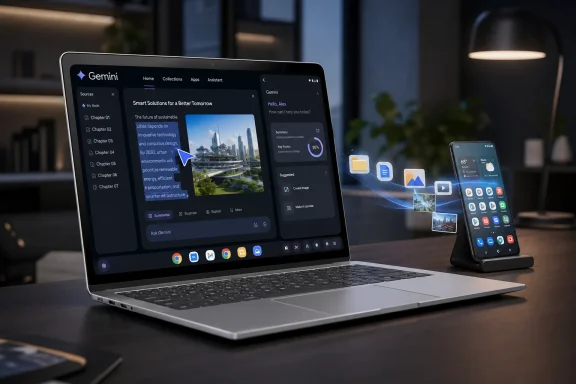
Googlebook’s signature feature is Magic Pointer. Google says users will be able to select something on screen and immediately ask Gemini to explain, compare, or create around it. The product site’s examples include selecting visual material to create a poster or using contextual information to trigger help without manually moving it into a chatbot. Google’s Googlebook page describes the feature as a way to “select anything” and work with Gemini instantly.
The underlying idea is sound. Computers constantly expose context—dates, names, images, prices, reservation details, documents, messages, spreadsheets, files, browser tabs—and people frequently waste time copying that context between applications. A capable contextual layer could remove friction from routine work.
For example, a well-executed Magic Pointer could:
- Turn a date and time in an email into a correctly populated calendar event.
- Compare two product listings while preserving price, specifications, and source context.
- Extract action items from a document and turn them into a task list.
- Explain a chart, formula, selection of code, or highlighted paragraph in place.
- Combine images and text into a rough creative composition without forcing users to export files between apps.
- Translate or summarize selected material without repeatedly opening a separate assistant panel.
Google has also outlined Create My Widget, a feature that allows a user to prompt Gemini to make custom widgets. In Google’s example, a travel widget can collect relevant flight, accommodation, and itinerary information into a tailored dashboard. Googlebook’s official overview presents it as a way to build a widget simply by asking.
This is where Googlebook’s promise becomes more interesting than a generic “AI laptop” label. The best software is often not the software with the longest list of capabilities; it is software that reduces the number of decisions and manual transfers required to accomplish a task. A custom home-screen surface that genuinely brings together information a user already owns could be more valuable than another chatbot window.
The agentic computing problem
However, proactive assistance is much harder than reactive assistance.
A chatbot can be forgiven for answering a bad question badly; the user asked it and can ignore the answer. A system that proposes actions based on ambient context is closer to the operating system’s decision-making core. It needs to know when to intervene, when to remain silent, and when uncertainty is too high to proceed.
Googlebook’s most attractive features will also be the ones that demand the highest reliability. If Magic Pointer misunderstands which date in a thread should become a meeting, mixes up two contacts, overlooks a time zone, or generates an inaccurate comparison, the feature becomes a source of cleanup work. The more deeply Gemini reaches into calendars, files, messages, and workflow actions, the more it must demonstrate accuracy, transparency, and reversibility.
The key design requirements are clear:
- Every meaningful action should be previewable. Users should see the intended meeting time, attendees, location, or file destination before an action is committed.
- Context boundaries must be visible. A user should know which window, file, app account, or connected service Gemini is drawing from.
- Errors need to be cheap to undo. AI-generated organization is only helpful when it does not create an expensive mess to repair.
- The system must recognize uncertainty. “I’m not sure which appointment you mean” is often a better outcome than confidently scheduling the wrong one.
- Manual controls must remain first-class. An intelligent assistant should accelerate existing workflows, not trap users in a new interaction model.
This is the actual test of Gemini Intelligence. The question is not whether Google can produce an eye-catching demo. It is whether Google can make assistance feel dependable enough that users reach for it instinctively rather than cautiously.
Android Integration Could Be Googlebook’s Strongest Advantage
The clearest differentiator announced so far is not necessarily AI. It may be the phone integration.
Googlebook will support Cast My Apps, which Google says will let users open applications from their Android phone on the laptop without installing them on the computer. It will also offer Quick Access, intended to make phone files available through the laptop as though they were locally present. Google’s product page lays out both capabilities as core parts of the Googlebook experience.
If the implementation is fast and seamless, that could solve a real problem in Google’s ecosystem. Android phones are powerful, personal, and packed with apps, but users frequently face unnecessary friction when moving from a phone task to a laptop task. Files are shared through ad hoc transfers, web services, cables, cloud folders, messaging apps, or email. Mobile apps may have information that is not immediately available in a browser. Photos, documents, receipts, downloads, authentication flows, and app-specific data can become stranded on the phone that created them.
A Googlebook that treats the phone as an extension of the laptop—rather than a separate device requiring manual file shuffling—could make Android ownership more valuable.
Independent reporting describes the experience as allowing connected Android phone apps to be used on Googlebook and phone files to be browsed or inserted without manual transfers. Android Central’s report compares the concept to the broader class of phone-to-desktop continuity features already familiar to Apple users.
Why this must be better than existing continuity features
Google is entering a field where users already have expectations. Apple has built years of goodwill around cross-device continuity. Windows has long offered varying degrees of Android integration through Phone Link, notifications, image transfer, messaging support, and app access on compatible phones. The challenge for Google is not simply to add another mirroring feature. It is to make phone integration feel native, stable, secure, and more useful than opening a web version of the same service.
Googlebook has several opportunities to stand out:
- No-install access could reduce clutter and avoid duplicating mobile apps across devices.
- File visibility in the desktop file manager could make transfers feel less like transfers.
- Gemini-aware context could potentially link phone-originated information with laptop workflows.
- A common Android and ChromeOS foundation may help Google avoid some of the awkwardness that comes from bridging separate ecosystems.
But the risks are equally obvious. App casting raises questions about latency, session continuity, multitasking, notifications, permissions, battery drain, account switching, and what happens when a phone goes offline or leaves Bluetooth and Wi-Fi range. Quick Access requires unusually strong privacy boundaries because “as if they live on your laptop” is a powerful convenience claim that can become uncomfortable if users do not understand precisely what is accessible and when.
Google needs to make the security model legible. Phone data should not silently become laptop data. Users need clear device pairing, explicit permission categories, quick disconnect controls, visibility into active sharing, and sensible behavior on shared or managed systems.
Google Must Explain the Googlebook, Chromebook, and Chromebook Plus Relationship
The biggest strategic question is not whether Googlebook can be good. It is whether consumers, schools, businesses, and OEM partners will understand where it fits.
Google’s current explanation is simple in theory: Googlebooks are flagship laptops combining ChromeOS and Android, while Chromebooks remain simpler ChromeOS machines. Google’s FAQ says as much. Yet in practice, it creates a confusing three-tier landscape:
- Chromebook for everyday ChromeOS computing.
- Chromebook Plus for stronger ChromeOS hardware and Google AI features.
- Googlebook for premium Gemini Intelligence, Android integration, and a new combined platform.
The fact that Googlebook launches after Chromebook Plus is both reassuring and potentially awkward. Reassuring, because it suggests Google has already learned that hardware standards matter. Awkward, because Chromebook Plus is still a young brand that was supposed to make ChromeOS laptops easier to understand.
Google’s enterprise messaging tries to reduce the concern. The company says Chromebooks remain a reliable long-term investment for schools and businesses, that ChromeOS will continue receiving ten years of automatic updates, and that organizations will eventually receive several pathways to transition to the new experience. Google’s Chrome Enterprise post explicitly states that no immediate action is required for existing organizations.
That commitment is important. Google’s support policy says Chromebooks receive 10 years of automatic updates, including software and security improvements, though users should still check the specific update schedule for their model. Google’s Chromebook support documentation explains how to find a device’s end-of-update date and notes that feature support may vary for some older devices.
Still, support is not the same as strategic clarity. Customers will want direct answers to several questions before the launch window:
- Will Googlebook run all existing ChromeOS web, Android, and Linux workflows?
- Which Chromebook Plus features will remain exclusive to Plus systems?
- Will Googlebook receive a distinct update cadence and support guarantee?
- Can businesses manage Googlebooks with the same policies, tools, and licenses as ChromeOS fleets?
- How will Android apps behave in a desktop environment?
- Is Googlebook a replacement for Chromebook Plus, a premium companion brand, or a long-term parallel platform?
- Will developers need to target Googlebook separately?
Google cannot leave these questions to retail pages and vague comparisons. It needs a clean, durable message that does not make current Chromebook owners feel as though they bought into a platform approaching an identity crisis.
Privacy, Pricing, and Performance Will Decide the Outcome
The AI PC market has already shown that labels alone do not create demand. Consumers will not pay a premium indefinitely for a specialized key, a glowing design accent, or a chatbot with a new animation. Googlebook must prove that its intelligence layer is useful without being invasive.
That begins with privacy. Features such as contextual selection, custom widgets, connected Gmail and Calendar information, phone-app access, and phone-file browsing require the system to understand a considerable amount of user activity. Google needs to articulate what stays on-device, what is processed in the cloud, what is retained, what is used to personalize future behavior, and how a user can restrict or delete that context.
The company also needs to distinguish between the convenience of integration and the surveillance implications of integration. A laptop that can see more of a user’s digital life can become more helpful. It can also become a system users hesitate to trust with their most personal workflows.
Then there is pricing. Google has not announced prices, detailed specifications, or exact release dates for the initial models. Android Central reports that those details remain forthcoming, while Google’s own site only specifies a fall 2026 arrival. Googlebook’s launch page confirms the broad launch period.
That absence makes it difficult to assess Googlebook’s market position. If the first systems are priced like premium Windows ultrabooks or MacBooks, buyers will expect excellent displays, keyboards, trackpads, webcams, speakers, battery life, build quality, storage, and warranty support. They will also expect desktop-class application support and reliable professional workflows. Googlebook cannot ask customers to accept Chromebook-era compromises while charging flagship prices.
Finally, Google must be disciplined about performance. Local AI capability matters because cloud dependence weakens the promise of an always-available intelligent device. The 2025 Lenovo Chromebook Plus 14 showed that modern Chromebook-class hardware can support more serious on-device AI workloads. Lenovo’s announcement and MediaTek’s Kompanio Ultra materials establish that the platform was designed with a dedicated AI engine in mind.
Googlebook now needs to show what that means in practice. Which Gemini features function offline? Which requests require cloud inference? How quickly do local tasks respond? What happens when an internet connection is weak? Which models run on the machine, and which use Google servers? Those are not niche technical questions. They define whether Googlebook is a dependable laptop with AI enhancements or a cloud terminal with premium branding.
The Opportunity Is Real, but Delivery Is Everything
Googlebook has the potential to be the first Google laptop category that feels like a coherent strategic destination rather than an interesting branch of ChromeOS. The pieces are there: a mature browser platform, Android’s application ecosystem, capable ARM-based hardware, longer support commitments, increasingly sophisticated AI models, and a huge installed base of Android phone users who would benefit from better continuity.
Its best ideas are also its most exposed. Magic Pointer must be accurate and restrained. Create My Widget must build useful interfaces rather than novelty dashboards. Cast My Apps and Quick Access must feel instant and secure. The new platform must preserve the simplicity that made ChromeOS appealing while eliminating the limitations that stopped it from being perceived as a true premium laptop experience.
Google has already acknowledged that Chromebooks remain important, especially for organizations, and its 10-year update policy remains a meaningful advantage in a laptop industry that too often treats long-term software support as an afterthought. Google’s enterprise commitment and consumer support guidance provide a valuable foundation for current users.
But Googlebook is about more than keeping that foundation intact. It is an attempt to establish a new ceiling for Google-powered personal computing. If Google makes Gemini contextual without making it intrusive, makes Android continuity effortless without making it confusing, and makes partner hardware feel consistently premium, Googlebook could finally turn ChromeOS’s long-running promise into a laptop platform people actively aspire to own.
If it cannot, the risk is not merely that Googlebook becomes another premium Chromebook. The risk is that Google adds yet another product name to an already complicated portfolio without solving the central problem: convincing users that its most ambitious laptop is better because of AI, not simply different because it has it.
