
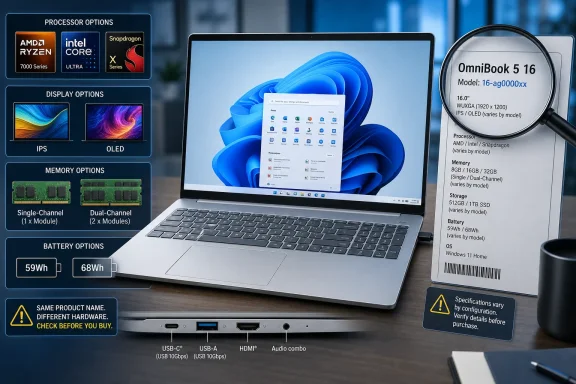
HP’s own support documentation confirms the breadth of the lineup. Depending on internal model family and retailer configuration, the 16-inch OmniBook 5 can ship with Intel, AMD, or Qualcomm processors; 8GB through 32GB of memory; IPS or OLED panels; 59Wh or 68Wh batteries; and a mix of removable and soldered components. In other words, shoppers cannot safely use a review of one SKU to judge the next one on a store shelf.
For Windows users who need a large-screen productivity notebook rather than a gaming machine, RTINGS’ tested configuration looks like a credible low-to-midrange option. But HP’s loose naming makes the model number, panel specification, memory layout, and processor more important than the large “OmniBook 5 16” label on the lid.
 RTINGS Tested the Lower-End Ryzen AI 5 Configuration
RTINGS tested a Meteor Silver HP 16z-cg000 configuration built around the Ryzen AI 5 430, an eight-thread processor with four CPU cores and a 50-TOPS neural processing unit. HP lists the chip as one of several available AMD options in its 2026 OmniBook 5 16 Next Gen AI PC range, alongside the six-core Ryzen AI 7 H 445 and 10-core Ryzen AI 9 H 465.
The review’s conclusion is proportionate to that hardware. RTINGS found the machine responsive for browser-heavy work, Office documents, video calls, and moderate multitasking, with a comfortable keyboard, large touchpad, usable webcam, and broad enough port selection. It also found that the Ryzen AI 5 430 falls behind in heavily multithreaded jobs such as compiling, rendering, and demanding multitasking.
That is the central purchasing distinction. A Windows 11 PC with an “AI” badge and a Copilot+ capable NPU is still constrained by its conventional CPU, memory configuration, storage, and graphics. The Ryzen AI 5 430 provides local AI acceleration, but it does not turn a four-core system into a mobile workstation.
For home-office workloads, that may be perfectly acceptable. For developers running local containers or virtual machines, users who compile sizable projects, or IT professionals who expect to keep several administrative tools, remote sessions, browsers, and test environments open at once, the tested 16GB configuration is a floor rather than a target. RTINGS specifically points toward Ryzen AI 7, Ryzen AI 9, or higher-tier Intel Core Ultra configurations with 24GB or 32GB of memory for heavier work.
The Same Name Covers Meaningfully Different Machines
RTINGS identifies a problem that product listings often bury: HP uses the OmniBook 5 16 name across several internal model families. The reviewed system belongs to the 16z-cg000 family, but HP’s documentation also covers 16-bp0000 systems and other families under the same broad branding.
The component differences are not cosmetic. RTINGS reports that available processor choices span older Intel Core 5 and Core 7 chips, newer Core Ultra models, Qualcomm Snapdragon X processors, standard AMD Ryzen processors, and Ryzen AI chips. Graphics range from Intel integrated graphics and Qualcomm Adreno to AMD Radeon 760M, 780M, 820M, 840M, and 880M. None includes a dedicated GPU.
Display choices are equally varied. The entry-level IPS panel is a 1,920×1,200, 300-nit screen covering only 62.5 percent of sRGB. A better IPS option reaches 400 nits and 100 percent sRGB. OLED versions include 1,920×1,200 panels with different color-gamut specifications, while the top option is a 2,880×1,800 OLED panel rated for up to 120Hz, 500 nits in SDR, and 1,100 nits in HDR.
Those are not interchangeable experiences. A 300-nit, narrow-gamut IPS panel is adequate for basic documents but can look dull beside the OLED models and offers a poorer fit for color-sensitive work. The 2.8K 120Hz OLED configuration is a materially more premium screen than the 60Hz 1,920×1,200 OLED RTINGS tested. Conversely, a buyer attracted by an OLED review can easily end up with an IPS retail configuration if they do not inspect the exact SKU.
Memory is another trap. RTINGS’ review unit uses a 1×16GB DDR5-5600 setup, which means single-channel operation. Other versions use two DDR5 modules, while some Intel and Snapdragon versions use non-upgradeable LPDDR5x memory soldered to the board. A 16GB sticker therefore says little about performance, upgradeability, or long-term usefulness.
The model number is the product. Buyers should treat “OmniBook 5 16” as a starting point for research, then verify the actual processor, exact display, installed memory arrangement, battery capacity, ports, and serviceability before placing an order.
OLED Battery Life Is Real, but So Are the Reflection Problems
On the reviewed OLED configuration, RTINGS measured more than 12 hours of light browsing and roughly 15 hours of video playback. For a 16-inch Windows notebook, that is a strong result, particularly alongside a 68Wh battery and an OLED display. Independent listing data collected by NanoReview also identifies a 68Wh battery, 16-inch 1,920×1,200 OLED display, 60Hz refresh rate, and 300-nit brightness for the reviewed-style configuration.
The limitation is visible in RTINGS’ own account: the glossy OLED panel struggles with direct reflections and has modest brightness. That makes the laptop more compelling for indoor work, travel, and media playback than for a sunlit room, a bright office with overhead lighting, or a desk positioned opposite a window.
Windows Central reached a similar practical conclusion when covering a discounted AMD OmniBook 5 16 configuration earlier this year. Its report described the 2K anti-glare display as a 300-nit panel with 62.5 percent sRGB coverage—specifications that belong to the lower-tier IPS path, not RTINGS’ OLED sample. The distinction reinforces the risk of treating a retailer headline as a full specification sheet.
A buyer prioritizing spreadsheets, browser-based admin consoles, and readable text under office lighting may be better served by HP’s 400-nit, full-sRGB IPS option than by the basic OLED panel, despite OLED’s superior contrast. A buyer focused on movies, photo viewing, and indoor personal use will reasonably prefer the OLED variants. The product name alone does not answer that choice.
Integrated Graphics Set the Boundary for IT and Gaming Work
RTINGS found the Radeon 840M adequate for simple and older games at reduced settings, with stable sustained behavior and reasonable heat and noise. It also found it unsuitable for demanding current games, GPU-intensive professional work, complex CAD, heavy 3D rendering, or machine-learning workloads that need real GPU compute capacity.
HP does offer higher AMD graphics tiers in certain versions, including Radeon 860M and 880M options. RTINGS expects those configurations to improve gaming performance, particularly alongside Ryzen AI 7 or Ryzen AI 9 processors. They remain integrated GPUs sharing the platform’s power and memory constraints, however. They do not replace an HP OMEN, a workstation laptop, or any system with a discrete Nvidia or AMD graphics processor.
Windows Central’s coverage of the Snapdragon X version makes the same broader point from another branch of the family: it positioned the OmniBook 5 16 as a productivity machine and explicitly cautioned that it is not built for most PC games. That Snapdragon version reportedly has soldered memory, whereas RTINGS could replace the RAM, SSD, battery, and wireless adapter in its AMD sample. The difference has direct consequences for fleet managers and long-term owners planning memory repairs or upgrades.
For enterprise use, the x86-versus-ARM choice deserves particular care. The Snapdragon models can offer attractive battery efficiency, but Windows on ARM still requires an application and peripheral compatibility assessment for organizations with older line-of-business tools, drivers, VPN clients, security utilities, specialty printers, and niche hardware. The AMD and Intel versions avoid that architecture transition, even if their battery-life profile differs.
What to Verify Before Buying
The OmniBook 5 16’s flexibility can be a strength, especially for buyers who want a Windows laptop with a numpad, a larger display, and more configuration range than a fixed-spec ultraportable. It also makes comparison shopping unusually error-prone.
Before buying, confirm these facts from the retailer’s detailed configuration page or HP’s configuration identifier:
- Verify whether the system has a Ryzen AI 5, Ryzen AI 7, Ryzen AI 9, Intel Core Ultra, standard Intel Core, standard AMD Ryzen, or Snapdragon X processor.
- Confirm the exact panel, including IPS versus OLED, 1,920×1,200 versus 2,880×1,800 resolution, refresh rate, brightness, touch support, and color-gamut rating.
- Check whether 16GB memory is installed as one DDR5 module, two modules, or soldered LPDDR5x memory.
- Determine whether the system has a 59Wh or 68Wh battery, because RTINGS’ excellent battery result came from one particular configuration.
- Confirm whether the memory, SSD, wireless card, and battery are replaceable in the exact internal model family being sold.
- Treat integrated Radeon, Intel, and Qualcomm graphics as productivity graphics unless a specific workload has been tested on the selected configuration.
RTINGS’ review establishes that the AMD Ryzen AI 5 430 OLED model is a competent, long-lasting 16-inch Windows 11 laptop for routine work and media consumption. It also establishes the more important buying lesson: the answer to “Is the HP OmniBook 5 16 good?” depends on which HP OmniBook 5 16 is actually in the cart.
