
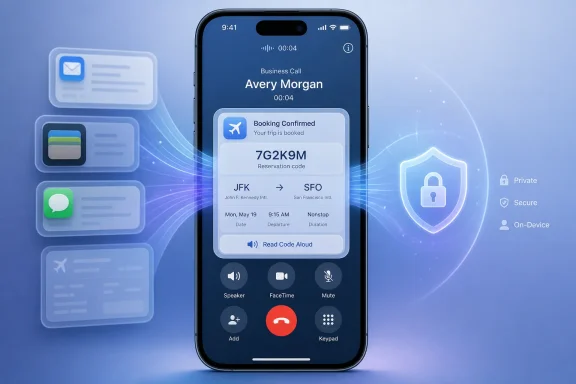
The idea is straightforward. When a user calls a business, iOS 27 can proactively surface information from across their apps that is likely to matter for that conversation. Call an airline, for example, and the Phone app may bring a flight confirmation and reference number directly onto the in-call screen. It can even offer to speak a confirmation number aloud, avoiding the awkward pause spent switching between the Phone and Mail apps while trying to read a long alphanumeric code.
That modest convenience could make Call Context one of the most practically useful features in the iOS 27 beta. It represents a more mature interpretation of personal AI: not generating content for its own sake, but quietly removing friction from a task people already perform.
 A Better Phone App Is Becoming a Real iPhone Selling Point
For years, the smartphone dialer has been one of the least changed parts of the mobile experience. The Phone app handles calling, recents, voicemail, contacts, and perhaps a little spam protection, but it has traditionally remained isolated from the information users need during calls.
That separation is especially obvious when dealing with customer service. An airline, hotel, retailer, bank, utility provider, insurance company, or delivery company often begins an interaction by requesting one of the following:
- A confirmation or booking number
- An order ID
- A tracking number
- A customer account number
- A reservation date
- A flight number
- An address or service reference
- A verification code from an email
The usual workflow is tedious. A person places the call, listens to an automated menu, reaches an agent or bot, then leaves the Phone app to search Mail, Messages, Notes, Wallet, or a third-party app. If the information is buried in a crowded inbox, the wait can become longer and more stressful.
Call Context in iOS 27 is designed to eliminate that scavenger hunt. Instead of asking users to manually locate relevant records, the operating system attempts to recognize the company being called and connect it to useful personal information already present on the device.
This is a natural progression for Apple’s Phone app strategy. iOS 26 brought more meaningful calling tools to the platform, including Call Screening and Hold Assist. Those features focused on reducing the annoyance around unwanted calls and long customer-service queues. Call Context shifts the focus to the active conversation itself.
Together, these additions make the Phone app feel less like a passive dialer and more like an intelligent communications workspace.
How Call Context Works During a Business Call
Apple describes Call Context as an Apple Intelligence capability that can surface relevant information from across apps when a person calls a business. The most obvious example is an airline confirmation code from Mail appearing when the user calls that airline.
In practice, the experience appears to be centered on a contextual card within the call interface. Rather than forcing an abrupt app switch, iOS can present details on top of or alongside the active call controls. That means the information is visible without interrupting the conversation, hiding the keypad, or making users remember where they saved a reservation.
A Practical Airline Example
A flight-change call is an ideal demonstration of why this feature matters. Travelers commonly book a ticket weeks or months before departure, receive multiple emails from the airline, save a boarding pass in Wallet, and perhaps exchange messages about the trip with family or coworkers.
When a change is needed, the airline may request a confirmation number before discussing options. In older versions of iOS, the user would need to find that record manually. In iOS 27, Call Context can recognize the relationship between the outgoing call and relevant airline information, then put the pertinent details on-screen.
The system can also handle more than one likely result. If a traveler has multiple upcoming or recent bookings from the same carrier, Call Context may show a primary card with additional matching records stacked beneath it. That is important because the “most recent” booking is not always the booking the caller wants to discuss.
A quick tap should make the alternate record available instead of requiring a fresh search through Mail.
Spoken Codes Could Be More Valuable Than They Sound
The option to read a confirmation number aloud is a particularly smart touch. Many reservation codes combine letters and numbers in formats that are easy to misread, especially when the person is distracted or talking over a noisy connection.
There are clear scenarios where hands-free readout can be useful:
- Calling an airline while walking through an airport
- Contacting roadside assistance from a parked vehicle
- Speaking with a hotel front desk while carrying luggage
- Handling a retailer return while looking at a package label
- Calling a utility company during an outage
- Managing a booking while using accessibility tools
The capability also signals that Apple is considering the interaction around the information, not merely the retrieval of the information. Finding a code is only half the problem. Delivering it clearly and quickly is the other half.
Why This Is a Stronger AI Use Case Than a Flashy Demo
There is no shortage of AI features designed to impress in product demos. Writing assistants can draft an email, image tools can invent artwork, and chatbots can produce quick answers. These capabilities can be useful, but they also come with familiar limitations: inconsistent outputs, unclear provenance, unnecessary verbosity, and a tendency to solve tasks users may not have wanted automated in the first place.
Call Context has a different character. It is situational, narrow, and immediately understandable.
The feature does not need to compose an essay or decide how to respond to a sensitive message. It needs to perform a smaller job well: infer the company being called, find relevant user information, and make that information accessible at the correct moment.
That kind of ambient intelligence is where personal AI can become genuinely valuable. The ideal outcome is not that users marvel at the system. It is that they complete a call with fewer interruptions and barely think about the technology at all.
Context Matters More Than Raw Search
Traditional search can already find an email containing “Southwest,” “Delta,” “order,” or “reservation.” But a search box still requires the user to stop, formulate a query, select a result, and identify the correct detail.
Call Context changes the sequence:
- The user chooses to call a business.
- iOS identifies the business relationship associated with that call.
- Apple Intelligence looks for likely relevant information.
- The Phone app presents the material before the user explicitly searches.
- The user confirms the correct item and uses it during the call.
This is a small workflow improvement, but it cuts out several repetitive steps. It also reduces the cognitive burden at an inconvenient moment, when the caller may already be navigating a phone tree or explaining a problem to a support agent.
For Windows users familiar with the strengths and weaknesses of system search, the distinction is worth noting. A feature that merely searches local data is helpful. A feature that understands why information may be needed in a particular moment is more powerful—provided its matching logic remains accurate and private.
Apple Intelligence Is the Gatekeeper
Like many of the company’s newest contextual features, Call Context is tied to Apple Intelligence. That means not every device capable of running iOS 27 will necessarily receive it.
The supported-device requirements are a significant part of the story. Apple Intelligence availability is generally limited to newer hardware with sufficient processing capability and memory, including supported iPhone models, select iPads and Macs powered by Apple silicon, and eligible Apple Watch models paired with an Apple Intelligence-capable iPhone.
That creates a familiar split in Apple’s software strategy. iOS 27 may reach a broad range of devices, but its most advanced intelligence features remain exclusive to newer products.
The Compatibility Divide Is Hard to Ignore
There is a reasonable technical argument for this approach. Contextual AI features require local processing, memory, secure data handling, and—in some cases—access to Apple’s private cloud infrastructure. Older hardware may not offer sufficient performance or efficiency for a consistent experience.
Still, consumers do not evaluate feature availability solely through a technical lens. A user with an otherwise functional older iPhone may see Call Context as a simple Phone app improvement, not a demanding AI workload. Being unable to access it can feel like an arbitrary product segmentation decision.
This is especially true because Call Context does not appear, at least on the surface, to demand a complex generative model response. It is more akin to a sophisticated correlation and retrieval feature. Apple may have sound reasons for limiting it, but the company will need to show that the experience is reliable enough on supported hardware to justify the divide.
English-First Availability Limits the Initial Audience
Call Context is also expected to launch in English first. That is common for new Apple Intelligence features, but it remains a meaningful limitation.
Business calls often involve multilingual households, international travel, translated booking emails, and customer-service systems that do not operate in English. A caller could have all of the relevant information on their iPhone but still be unable to use Call Context because of device language, region, or feature availability restrictions.
Apple’s broader language support for Apple Intelligence has expanded over time, but feature-by-feature availability can vary. Users should not assume that enabling Apple Intelligence automatically guarantees access to every contextual capability in every country or language.
Privacy Is the Defining Test
A feature that pulls airline confirmations, order references, account details, and email content into the Phone app has to clear a high privacy bar. The usefulness of Call Context depends on the iPhone having a meaningful view of the user’s digital life. That same requirement makes users understandably cautious.
Apple has built its Apple Intelligence messaging around a mix of on-device processing and Private Cloud Compute for tasks that require more processing capacity. The company’s central promise is that personal context should be used to help the user without becoming an advertising profile or a resource for third parties.
Call Context will be judged on whether it earns that trust in daily use.
What Users Should Expect to Control
For this feature to feel dependable rather than invasive, users need clear and accessible controls over what Call Context can access and when it can appear. The most important considerations include:
- Whether the feature can read data from Mail, Messages, Notes, Wallet, and third-party apps
- Whether access can be limited on an app-by-app basis
- Whether users can disable Call Context entirely
- How long contextual data remains available in memory during a call
- Whether sensitive details appear on the Lock Screen or only after authentication
- Whether a code can be read aloud without an additional confirmation step
- How the feature behaves during screen sharing, Bluetooth calls, or CarPlay sessions
Apple has experience designing granular privacy prompts, but the convenience of Call Context could tempt users to approve broad access without fully considering the implications. The system should make data boundaries intelligible, not bury them inside a dense settings menu.
Accuracy Is a Privacy Issue Too
Privacy is not just about where data goes. It is also about showing the right data to the right person at the right time.
Imagine calling an airline about a family member’s booking, only for the Phone app to surface a different traveler’s confirmation details. Or consider a shared iPad, a family Mac, or a work device with multiple business accounts. Incorrect context can cause confusion at best and expose sensitive information at worst.
The stacked-card approach is useful because it acknowledges ambiguity, but Apple must avoid presenting its first guess with too much confidence. The interface should make it obvious which booking, order, date, traveler, or account is currently selected.
The best version of Call Context will feel proactive without becoming presumptuous.
Where Call Context Could Excel Beyond Travel
Airline bookings make for a compelling demonstration, but the feature’s long-term value depends on how well it generalizes. Business calls generate predictable requests for structured information across many categories.
Promising Use Cases
Call Context could be highly useful for:
- Hotels and vacation rentals: reservation codes, check-in dates, guest names, loyalty account details
- Retailers: order numbers, return labels, delivery status, purchase dates
- Shipping companies: tracking IDs, recipient addresses, shipment references
- Automotive services: repair estimates, service appointments, vehicle identification details
- Medical providers: appointment dates, office addresses, insurance information, referral numbers
- Banks and card issuers: case numbers, fraud alerts, payment references, though this category demands especially cautious handling
- Internet and utilities: account numbers, outage tickets, technician appointment windows
- Government offices: application references, appointment confirmations, case numbers
- Event venues: ticket orders, seat details, parking reservations, membership numbers
Not every category should receive the same degree of automatic access. Financial, health, employment, and government data can be especially sensitive. But the core principle remains sound: if a company is likely to ask for a piece of information, the operating system should reduce the work required to find it.
The Third-Party App Question
Apple’s own apps, including Mail, Messages, Notes, Maps, Wallet, and Calendar, provide an obvious foundation for Call Context. The bigger question is whether the capability will eventually work across third-party apps in a meaningful way.
Many users keep reservations in Gmail, Outlook, TripIt, airline apps, retailer apps, password managers, and corporate tools rather than Apple Mail or Notes. If Call Context is restricted primarily to Apple’s built-in ecosystem, it may work beautifully in curated demos but feel incomplete in the real world.
Apple has signaled that personal context can extend to third-party apps when developers integrate with the appropriate system technologies. That offers potential, but it also introduces variability. The usefulness of Call Context may eventually depend on which developers choose to support it, how consistently they expose relevant data, and how well Apple maintains privacy boundaries.
This is an area where platform maturity will matter more than launch-day polish.
A Feature That Should Push Competitors Forward
Call Context is not the first attempt to make a smartphone more aware of a live communication task. Android vendors have explored call screening, voice transcription, contextual suggestions, and AI-assisted phone features in different forms. Google’s Pixel line, in particular, has made the Phone app a major differentiator through spam detection, Hold for Me, Direct My Call, Call Screen, and related tools.
What makes Apple’s approach notable is the attempt to combine personal app data with the live outbound business-call experience. It is a logical next step for mobile operating systems. Smartphones already contain receipts, tickets, travel plans, messages, contacts, and identity information. The challenge is making that information accessible without requiring users to manually manage it every time.
Windows users may recognize a broader trend here. Across personal computing, the next generation of assistant features is moving away from generic chat windows and toward contextual actions embedded inside existing workflows.
The successful AI product is unlikely to be the one that talks the most. It will be the one that removes the most unnecessary steps.
The Risks of Getting It Wrong
Call Context has the potential to become a favorite iOS 27 feature precisely because its purpose is so obvious. That also means users will notice failures immediately.
If the feature misses the relevant email, chooses the wrong reservation, surfaces stale data, or behaves inconsistently across apps, people may simply return to manual search. The Phone app is not a place where users have much patience for ambiguity. Calls with businesses are already frustrating enough.
There are several areas Apple needs to get right:
- Business identification: Calls to generic numbers, outsourced support centers, and toll-free lines can make company matching difficult.
- Data freshness: Cancelled flights, updated orders, rescheduled appointments, and replaced confirmation codes must not be mistaken for active records.
- Relevance ranking: The system needs to distinguish between a recent confirmation email and the booking actually associated with the call.
- Visibility controls: Personal details should not be exposed to nearby people simply because the user has placed a call.
- Accessibility: Spoken readout, VoiceOver support, text scaling, and reliable screen presentation are essential rather than optional.
- Regional consistency: Business directories, phone-number formats, language differences, and local privacy requirements may affect performance outside the initial English rollout.
The feature should also avoid creating a false sense of certainty. A user still needs to verify the information before disclosing it. Call Context can save time, but it should not obscure the difference between a helpful suggestion and an authoritative record.
The Most Human Kind of Intelligence
The best technology often solves a problem so ordinary that it is easy to underestimate. Looking up a confirmation number while on hold is not glamorous. Neither is switching between a support call and a crowded inbox. But those tiny frustrations happen constantly, and they add up.
Call Context turns the Phone app into a more capable companion during the moments when a phone call actually demands context. It is a focused application of Apple Intelligence that feels less like a chatbot feature and more like a long-overdue improvement to the operating system.
Its value will depend on availability, privacy controls, reliability, and third-party support. It also remains limited by the Apple Intelligence hardware requirements and its English-first rollout. Those restrictions mean the feature will not be universal at launch, even among people running iOS 27.
But the underlying concept is compelling. If Apple can consistently put the right information in front of the user at the exact moment it is needed—without overreaching into personal data or surfacing the wrong record—Call Context could become one of the clearest examples of how mobile AI should work: quietly, securely, and in service of a task people genuinely want to finish faster.
