

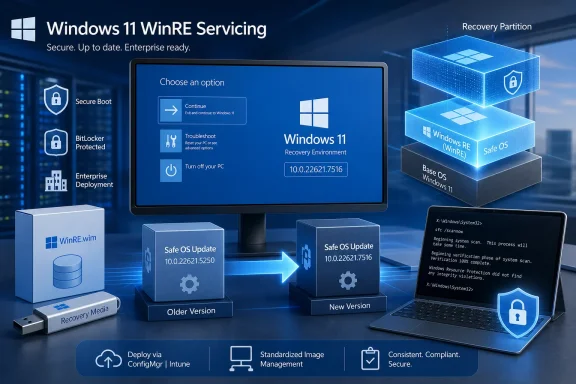
The distinction is important in the August 11, 2026 servicing cycle. Microsoft’s Windows 11 release-health page identifies KB5120240 as the standard August cumulative update for 23H2, while KB5120250 targets the separate Safe OS used by Windows Recovery Environment, or WinRE. A device can therefore report an August operating-system build while its recovery environment carries a different version number and servicing history.
Microsoft’s support entry says KB5120250 applies to Windows 11 version 23H2 and supersedes KB5099551, which was released July 14. The replacement chain checks out: the July package itself replaced an earlier Safe OS update, KB5094156. This is a monthly servicing sequence, not an emergency rollback or a new recovery feature.
KB5120250 updates the recovery environment, not the desktop OS
WinRE is the minimal Windows environment behind Startup Repair, BitLocker recovery, Reset this PC, advanced startup options, command-line repair work, and other pre-desktop recovery tasks. It normally resides on a dedicated recovery partition and is deliberately maintained separately from the full Windows installation.
That separation is why KB5120250 should not be judged by the usual desktop-update signals. The absence of a reboot requirement does not mean the package is cosmetic, nor does the fact that an end user may never see an installation prompt mean the update has no operational relevance. The package updates the recovery image that Windows relies on when the normal operating system cannot start.
Microsoft’s deployment documentation describes Safe OS Dynamic Updates as packages that can be applied to a Windows Recovery Environment image, including offline images maintained by IT teams. During feature updates, Windows Setup can also obtain Dynamic Update content, including Safe OS fixes, so that recovery components are current when the upgrade completes.
For enterprises maintaining custom install.wim files, bare-metal deployment media, task sequences, or recovery-image baselines, that makes KB5120250 a package to evaluate alongside the August cumulative update rather than after it. An image can have current desktop patches yet still carry an older WinRE payload if recovery-image servicing is handled separately.
The 22621.7516 version is expected, even on 23H2
Microsoft instructs administrators to verify KB5120250 by checking for WinRE version 10.0.22621.7516. That number may initially look wrong on a Windows 11 23H2 PC, where the primary OS build uses the 22631 branch. It is not evidence that Microsoft has accidentally supplied a Windows 11 22H2 update.
Microsoft explicitly labels KB5120250 as a Windows 11 version 23H2 update while specifying the 22621.7516 WinRE version. The recovery environment has its own image and versioning, so desktop build numbers and WinRE build numbers should not be assumed to match digit for digit.
The more useful check is whether the intended recovery image was actually updated. Microsoft’s WinRE servicing guidance says that when a Safe OS Dynamic Update is injected into an offline image, administrators should inspect the package list and confirm that the package state is installed. For managed imaging workflows, that verification is more meaningful than simply confirming that the August desktop cumulative update appears in Windows Update history.
A practical deployment review should include the following:
- Confirm that the Windows Recovery Environment remains enabled and that the recovery partition is present after servicing.
- Verify that the installed WinRE version is 10.0.22621.7516 where KB5120250 is intended to be deployed.
- For offline images, confirm that the KB5120250 package is listed as installed before committing the WIM.
- Retest BitLocker recovery and standard startup-repair paths on a representative pilot group when the organization uses older firmware or customized recovery media.
Microsoft says there are no prerequisites for the package and no device restart is required. Those statements simplify routine deployment, but they do not remove the need to test recovery functions in a fleet that depends on BitLocker, OEM firmware controls, or custom WinRE tools.
The Secure Boot warning is broader than this one package
KB5120250’s support page again points readers to Microsoft’s warning about Secure Boot certificates that began expiring in June 2026. That notice should not be read as confirmation that KB5120250 alone updates a device’s firmware-resident Secure Boot certificates. Microsoft’s own Secure Boot guidance describes a broader transition from 2011 certificates to 2023 certificate authorities, with device inventory, firmware compatibility, and certificate-update status all part of the process.
The relationship is still operationally significant. WinRE runs before the normal desktop and participates in recovery scenarios where boot-chain trust is central. Keeping Safe OS components current is sensible while organizations are also remediating Secure Boot certificate status, but it is not a substitute for the certificate remediation work Microsoft recommends.
Microsoft says systems left on the older certificate set may continue to boot and receive routine Windows updates, yet they may lose the ability to validate or protect future early-boot updates. Its support guidance identifies more serious risks in environments where firmware is outdated or certificate updates fail to apply correctly: Secure Boot validation errors, repeated BitLocker recovery prompts, startup hangs, and devices that fail to boot.
That makes testing more important than the low-friction language in the KB might suggest. Microsoft recommends updating OEM firmware before certificate remediation where applicable, piloting across multiple hardware vendors and firmware revisions, and testing BitLocker-enabled devices for boot and recovery problems. Those steps apply to the Secure Boot certificate transition, not specifically to KB5120250, but the two efforts will often land in the same operating-system maintenance window.
23H2’s remaining support window narrows the audience
There is also a lifecycle wrinkle. Windows 11 23H2 Home and Pro reached end of servicing on November 11, 2025, according to Microsoft’s Windows release-health documentation. Microsoft says unmanaged Home and Pro devices on 23H2 are being moved to Windows 11 version 25H2 when eligible.
Windows 11 23H2 Enterprise and Education remain in support through November 10, 2026. Those editions are the clearest target for an August 2026 Safe OS update labeled for 23H2, particularly where upgrade schedules, application validation, regulated deployment rings, or hardware constraints have delayed a move to a newer Windows release.
The support page’s “all editions” wording therefore needs to be read alongside the lifecycle record. It identifies the OS family technically covered by the package; it does not restore monthly servicing entitlement to Home and Pro installations whose 23H2 support ended last November. Administrators with those editions should prioritize the supported feature update rather than build a long-term remediation plan around a 23H2 recovery update.
Microsoft’s page metadata also deserves a brief note: the supplied entry lists a July 30, 2026 publication date despite a title dated August 11, 2026. The substantive release date aligns with the August 11 Patch Tuesday cycle and the concurrent KB5120240 cumulative update. The earlier metadata date appears to reflect publication workflow or page preparation, not an earlier availability date.
KB5120250 is a small but consequential maintenance item: it advances the 23H2 recovery environment to 10.0.22621.7516, replaces July’s Safe OS package, and cannot be removed from an image after application. For organizations still running supported 23H2 Enterprise or Education deployments, the immediate task is to verify the WinRE image in both live devices and deployment media—then keep the broader Secure Boot certificate remediation on its own, properly tested track.
Update: Additional details (August 15, 2026)
Neowin reports that Microsoft says Recovery and Setup Dynamic Updates are downloaded and installed automatically through Windows Update. For KB5120250, that means eligible Windows 11 23H2 devices may receive the Safe OS servicing package through the normal update channel, even though the package targets WinRE rather than the desktop OS.