
The more important practical limit is who can run this branch at all. Microsoft’s 26H1 documentation says the version is intended for select new hardware, beginning with devices built around new silicon such as Qualcomm Snapdragon X2-series systems, and is not offered as an in-place upgrade from Windows 11 24H2 or 25H2. That makes KB5120996 relevant to organizations testing those newer PCs and to owners already running 26H1 hardware, rather than to the far larger installed base waiting for the next general Windows feature update.
Microsoft’s release notes confirm the build number, KB identifier, Release Preview status, and August 14 release date. The company also explicitly separates the update’s contents into gradual and normal rollout sections — an important distinction for anyone trying to verify whether a supposedly included feature should already appear on a particular machine.
 Start menu improvements are reliability work, not a redesign
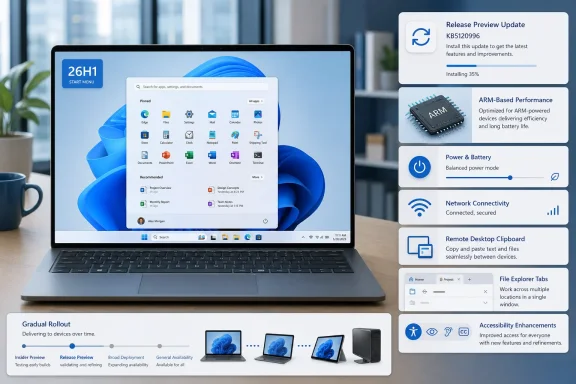
The Start menu portion of KB5120996 is modest but targeted. Microsoft says the update improves retention of the user’s selected Start menu view and makes keyboard navigation more reliable once focus is in the apps list. Those are fixes to state persistence and keyboard handling, rather than the arrival of a new Start layout.
That distinction will matter to administrators and support desks. A user who has repeatedly found Start reverting to a different view after choosing their preferred arrangement may see a genuine improvement; a user expecting the expanded Start menu design Microsoft has tested elsewhere will not find a major interface overhaul in this build.
Microsoft has also refreshed the Start menu account control, the panel opened from the account picture at the lower left, and added a subscription-status badge for people signed in with a Microsoft account. The company frames this as an account-control design update, but it is another visible Microsoft-services signal in a part of Windows that many organizations try to keep simple. It does not apply to local-account users in the same way, because Microsoft says this experience is for Microsoft-account sign-ins.
The practical takeaway is that the Start work in KB5120996 addresses repeatability more than capability: settings should stick, keyboard traversal should behave, and the account flyout will expose more subscription information. Those changes are useful, but the Release Preview label should not be read as a guarantee that every enrolled 26H1 device will receive them immediately.
26H1’s hardware boundary changes the deployment calculation
Windows 11 26H1 is unusual among annual Windows releases. Microsoft says it carries the feature set introduced with the Windows 11 2025 Update, version 25H2, while using a different Windows core to support specific new silicon. Existing 24H2 and 25H2 devices cannot use Windows Update to move into 26H1, and Microsoft says it is not designed to be installed in place on them.
That means an IT team should treat KB5120996 as a quality and feature-validation update for its 26H1 fleet, not as a pilot for an organization-wide migration. The build could still matter considerably to a company rolling out new ARM-based notebooks, but it does not establish a path for moving the company’s current Windows 11 estate to 26H1.
There is a longer-term servicing wrinkle, too. Microsoft says 26H1 machines cannot move to the next annual Windows feature update planned for the second half of 2026 because that release is based on a different core. Microsoft has promised those devices a future update path, but its public 26H1 overview does not identify the exact release or timetable for that transition.
For procurement teams, this makes release validation more important than usual. A 26H1 device may receive normal monthly security, quality, and feature servicing, but its eventual route to a later Windows version is not the same as the path for 24H2 and 25H2 hardware. KB5120996 does not alter that policy; it reinforces that 26H1 is an actively serviced but specialized branch.
Local AI component removal arrives with a narrow scope
One of the more consequential additions in the gradual rollout is an option to remove the Image Generation AI component on supported Copilot+ PCs when that component is installed. Microsoft has not described this as a way to remove Copilot broadly, disable all Windows AI experiences, or strip every local AI model from a device. The wording is much narrower: it applies to one named component, on supported Copilot+ PCs, and only where the component is present.
Still, the change is meaningful for managed endpoints. Local AI features increasingly rely on separately serviced components and models, and KB5120996 makes at least one such component more visible as something a user can remove. Organizations with strict application-control, disk-footprint, privacy, or model-governance requirements should verify what management controls accompany that option before treating it as a standardized removal method.
Microsoft’s notes do not say whether removal is exposed to all local users, whether it can be centrally enforced through Microsoft Intune or another management platform, or whether a future Windows update may reinstall the component. Those omissions are significant for enterprise deployment planning. The release establishes user-level removability; it does not, from the published record, establish a documented enterprise lifecycle for the component.
The update also includes Windows Hello Enhanced Sign-in Security support for compatible external fingerprint sensors, extending a previously announced capability beyond PCs with built-in fingerprint hardware. For desktop deployments and docked laptop setups, that could expand the number of systems able to use the stronger Windows Hello sign-in path — provided the fingerprint reader itself supports the feature.
Power settings and update cleanup address operational annoyances
KB5120996 contains a set of changes that will be more useful than flashy for fleet operators. Microsoft says changes made in Settings for display timeout, sleep, hibernation, power-button behavior, sleep-button behavior, and lid-close behavior should now apply across all power plans. It has also restored the setting for the battery level at which Energy Saver turns on.
Those fixes target a familiar Windows management problem: a setting can appear correct in the interface while another active or legacy power plan behaves differently. Administrators using Group Policy, mobile device management, OEM utilities, or custom power configurations should not assume this update eliminates all policy conflicts. But Microsoft is specifically acknowledging that Settings changes had not applied consistently across plans, so it is worth retesting standard laptop power policies on affected 26H1 hardware.
The update also revises Windows Update progress calculations and modifies cleanup behavior to improve performance immediately after an update finishes. Microsoft does not quantify the performance gain or identify which workloads benefit, so this should not be interpreted as a measurable post-patch performance promise. It is, however, an indication that part of the cleanup load has been moved or optimized so that the system should settle more quickly after servicing.
Release Preview is the appropriate place to test those changes before broader deployment. Teams should particularly watch devices with custom sleep and lid-close policies, shared laptop configurations, and systems where post-update responsiveness has generated help-desk calls.
Remote sessions, DHCP, printing, and Explorer get the widest fixes
The longest list in KB5120996 is made up of targeted reliability work. Microsoft says DHCP renewal is more reliable in scenarios involving NACK responses from the DHCP server and on systems using Modern Standby. That is a concrete networking improvement for mobile devices that wake and rejoin managed networks, though the company does not name affected adapters, drivers, or DHCP server products.
Remote workers may also benefit from improved clipboard reliability in certain Remote Desktop and Azure Virtual Desktop sessions. As with the DHCP fix, Microsoft provides no troubleshooting signatures, error codes, or affected client versions. Administrators who have been tracking clipboard failures should test this build against their own RDP and AVD configuration rather than assuming every clipboard issue has the same cause.
Microsoft also cites faster printing for IPPS printers, improved detection of time-zone changes, updated daylight-saving data for Beirut, Casablanca, Jerusalem, and Nuuk, and better system sounds in dark mode. The daylight-saving changes have immediate value for multinational organizations and travelers because time-zone errors can affect scheduled meetings, authentication logs, task execution, and policy timing.
File Explorer and the Windows shell receive some of the most broadly relevant fixes. The gradual rollout includes properly scaled file-size units in Details view, middle-clicking folders into new tabs from the address bar and Home, fixes for a gray flash and unexpected scroll position in Home, and clearer Recommended thumbnails. Microsoft also says explorer.exe is more reliable around Jump Lists, recent files, file and folder sharing, Task View, and multiple desktops.
The low-memory work is worth noting separately. Microsoft says the sign-in screen, Lock screen, Start menu, and taskbar should operate more reliably when system memory is constrained. On systems with aggressive browser use, virtual desktop workloads, or large local AI workloads, this is a more meaningful change than cosmetic Start menu adjustments because failures in those shell components can make a functioning PC feel unusable.
KB5120996 is available now to Windows 11 26H1 Release Preview participants, but its visible additions will arrive in phases. For the limited population of 26H1 devices, the immediate job is straightforward: install the build in a controlled ring, confirm power-policy behavior and remote-session reliability, then verify whether the gradual Start, account-control, AI-component, and accessibility changes have actually reached the test hardware.
