
That is the central weakness in the argument laid out by How-To Geek’s “PC makers are ruining Windows” editorial. The editorial is right to identify PC makers, component brands, and fragmented support as sources of frustration that users experience as Windows failures. But Microsoft does not need to take direct control of laptop industrial design or open Apple-style retail stores to change the outcome. It already owns the certification, distribution, and support entry points that make vendor behavior part of the Windows experience.
The LG episode is a reminder that the boundary between “Microsoft’s problem” and “the manufacturer’s problem” is largely invisible to the customer. If Windows Update or the Microsoft Store infrastructure installs a vendor application after a monitor is connected, the customer reasonably sees Windows as having installed it. A vendor’s logo on the pop-up does not absolve the platform owner whose delivery system enabled it.
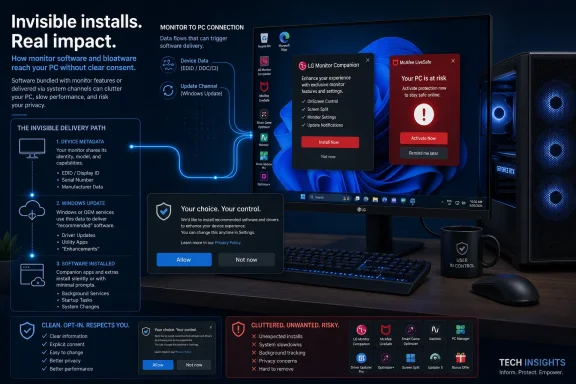 The LG monitor fix addressed the ad, not the permission model
Ars Technica, TechSpot, Windows Central, and other outlets independently reported that LG’s Monitor App Installer could arrive when compatible monitors were connected to Windows PCs, with the application displaying prompts promoting a McAfee trial. The reports matter because the software did not arrive through the usual, legible path: a user visiting LG’s site, downloading an installer, accepting a license, and choosing components.
Microsoft’s own Windows hardware documentation describes this capability plainly. Hardware Support Apps and the older device-metadata system allow a manufacturer to associate an app with a physical device. When that device is first connected, Windows can fetch its metadata, download the related app, and install it in the background. Microsoft warns developers that the process provides no installation notification and can confuse users.
That documentation also undercuts the convenient explanation that LG somehow found an obscure loophole outside Microsoft’s view. The platform was designed to make companion software easy to distribute. The idea has legitimate uses: printer utilities, camera controls, headset configuration, color calibration, firmware notices, and accessibility features can all benefit from a more direct setup path. But Microsoft built the system to treat an app as a natural extension of a device, even when the device functions perfectly well without it.
LG’s reported concession was narrower than a prohibition on the practice. The McAfee pop-up was to be disabled; neither Microsoft’s public statement nor the reporting established that the automatic app installation channel was being shut down, that the LG application would be removed from systems already affected, or that other promotional content would be barred. The immediate nuisance may be gone, but the platform rule that made it possible remains.
Windows should not silently install optional software merely because hardware was connected. A keyboard, monitor, mouse, webcam, or motherboard is not consent to a marketing relationship between the hardware maker and a third-party software vendor.
Microsoft should require an explicit Windows consent screen before installing any peripheral companion app that is not essential to basic device operation. That screen should name the publisher, explain why the app is needed, describe its privileges, and make “Not now” the default-safe choice. Apps that contain advertising, subscription offers, affiliate links, telemetry beyond what is needed for device function, or bundled third-party promotions should lose automatic-install eligibility altogether.
This does not require banning vendor utilities. It requires restoring the distinction between a driver that makes a device work and an application that a vendor would like to place on a customer’s PC.
Windows certification tests compatibility, not whether a PC is pleasant to own
The broader claim that PC makers are “ruining Windows” needs a little precision. There are excellent Windows laptops, desktops, handhelds, workstations, monitors, docks, and peripherals, often at price points and with configurations Apple simply does not offer. Windows’ openness is valuable precisely because Microsoft does not dictate a single chassis, a fixed port selection, or a narrow processor lineup.
The problem is that the Windows Hardware Compatibility Program does not mean what shoppers often assume it means. Microsoft’s program is focused on whether hardware, drivers, and systems meet Windows compatibility and reliability requirements. It has real value: driver-signing controls, Hardware Lab Kit testing, firmware requirements, and the Windows 11 baseline reduce the chances that a newly sold PC is fundamentally incapable of running the operating system.
But certification is not a guarantee that a laptop has an acceptable display, usable trackpad, durable hinge, sensible cooling profile, adequate memory, or enough storage headroom for years of Windows feature updates. Microsoft’s published Windows 11 minimums remain a floor: 4GB of RAM, 64GB of storage, a 720p display, and supported security capabilities. A device can meet those requirements and still provide an experience that makes Windows look slow, cramped, dim, or unreliable.
That gap is where the How-To Geek editorial’s criticism is strongest. The problem is not that every inexpensive Windows PC must imitate a Surface Laptop or a MacBook. It is that the Windows badge has become compatible with too many machines that technically qualify while being poor long-term purchases.
Microsoft has shown it is willing to set hard technical baselines when it believes the platform needs them. Windows 11’s TPM 2.0, Secure Boot capability, processor support list, and storage requirement were controversial precisely because they limited what OEMs could sell with the current Windows release. The company should apply the same confidence to a higher-tier program aimed at the user experience rather than only boot security and driver compatibility.
A meaningful “Windows Recommended” or similarly named tier should require specifications that are concrete enough to be useful: a storage floor above bare-minimum capacity, reasonable memory configurations, modern standby behavior that does not destroy battery life, display quality thresholds appropriate to a device class, and published firmware-support commitments. Microsoft should also require vendors to identify when a machine’s soldered storage or memory forecloses practical upgrades.
The distinction is important. Microsoft should not tell every manufacturer how to build a laptop. It should tell manufacturers that they cannot market a machine as a premium Windows experience while delivering a configuration that is predictably compromised on day one.
OEM software should be judged by what it does after first boot
Preloaded trial antivirus, gaming launchers, support assistants, retailer offers, duplicate cloud-storage clients, and “system optimization” tools have long been accepted as the price of buying a Windows PC. The business rationale is easy to understand. OEM margins are thin, and a software-placement deal is revenue.
The customer’s side of that equation is harder to defend. The value of a new Windows PC is reduced when its first hours are spent dismissing promotions, removing redundant utilities, untangling notifications, and figuring out whether a warning came from Microsoft Defender, the vendor’s security suite, or a third-party trial product. The support burden then shifts onto the same customer who never asked for the software.
Microsoft already permits OEMs to preinstall applications and to promote them through their own stores and the Microsoft Store. The company therefore has leverage, whether or not the relevant commercial agreements are public. It can make clean setup a condition of Windows distribution privileges and of participation in consumer-facing certification and marketing programs.
The enforcement standard should be behavioral, not aesthetic. A vendor should be free to include a support application that checks warranty status, offers BIOS updates, manages battery charging limits, or controls hardware-specific features. It should not be able to use that application as a recurring advertising surface, a lead generator for paid support, or a delivery mechanism for unrelated partner offers.
A practical policy would separate software into three categories:
- Essential drivers and firmware tools could be delivered automatically where necessary for the device to operate safely and correctly.
- Vendor utilities that add optional features could be offered during setup or after connection through a clear opt-in prompt.
- Promotional software, antivirus trials, games, retail offers, and unrelated subscription pitches should require a separately initiated install from the customer.
Microsoft should also require an OEM reset image to offer a clean Windows option during recovery. Consumers who have paid for a specific vendor’s hardware should not have to download a generic Microsoft installer, hunt for drivers, and give up manufacturer recovery tools merely to escape the manufacturer’s own software bundle.
The support maze is built into Windows’ OEM model
The editorial’s support criticism also has a concrete foundation. Microsoft’s own support documents frequently direct customers to contact the device manufacturer for firmware, Secure Boot, and hardware-specific problems. That is logical: Microsoft cannot rewrite Lenovo firmware, replace an HP battery, or diagnose a failing Dell display cable.
Yet Microsoft also allows OEMs to place their own support website or support app at the top of the consumer Get Help experience. In effect, Windows directs a customer into the manufacturer’s support channel before the person has established whether the problem is Windows, a driver, a firmware update, a bundled utility, or the physical device.
That is not inherently wrong, but it produces a predictable failure mode. The PC maker can blame Windows, Microsoft can point to the OEM, and the component vendor can demand a separate escalation path. The user is left collecting logs, reinstalling drivers, and repeating the same troubleshooting script to three companies.
Microsoft does not need to assume liability for every hardware defect to improve this. It should require certified OEMs to expose a standardized support record in Windows: model number, warranty status, BIOS and driver versions, known compatibility holds, installed OEM utilities, and a one-click package for collecting diagnostic data. The same record should be visible to Microsoft support, the OEM, and the customer.
More importantly, a Windows support escalation should preserve ownership. If Microsoft’s support system identifies a likely OEM firmware problem, it should hand off the case with the diagnostic package and an incident number rather than send the customer back to a generic manufacturer landing page. If an OEM support app has caused a conflict, Microsoft should be able to identify that fact instead of treating the issue as an unexplained Windows malfunction.
That would not produce a single universal help desk. It would remove the most frustrating part of the current arrangement: the customer becoming the courier between companies whose products were sold together as one PC.
Microsoft needs a public standard, not case-by-case intervention
Microsoft’s response to LG was welcome, but a private intervention after public embarrassment is not a policy. It gives hardware makers no published line they cannot cross, administrators no dependable control they can audit, and consumers no way to know whether the next peripheral is entitled to install software silently.
The company should publish a Windows device-app policy that bans automatic promotional installations, requires opt-in for nonessential companion apps, and states what happens when a vendor violates the rule. It should disclose whether an app can be pushed through device metadata, Windows Update, the Microsoft Store, or OEM setup mechanisms. For business customers, it should provide a plainly documented control to block all consumer-style hardware app acquisition without breaking required driver delivery.
That would turn the LG incident from a one-off cleanup into a test case. Microsoft has spent years asking customers to trust Windows with security requirements, cloud-linked setup, Microsoft Store delivery, and increasingly integrated hardware features. The reciprocal obligation is simple: when Windows is the channel that brings software onto a PC, Microsoft must ensure that the software serves the device owner rather than the vendor’s next affiliate deal.
Update: LG pledges to avoid future third-party software recommendations (August 7, 2026)
HotHardware reports that LG has expanded on its earlier response by promising to avoid “third-party software recommendations” in the future, beyond simply disabling the McAfee trial prompts in its Monitor App Installer.
That commitment, if applied consistently to future versions of the app, would address the article’s concern that the company might replace McAfee with another promotional partner. LG also reiterated that McAfee itself was not installed without a separate user consent step. The company has not, however, announced an end to automatic delivery of its monitor companion app through Windows’ device-app mechanisms.
