

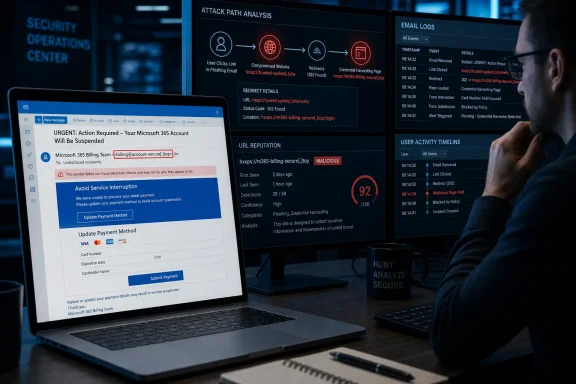
The immediate action for Microsoft 365 administrators is to treat messages from the reported phoneryt.co.za sender domain and links leading to teambill-micro.online as malicious indicators, hunt for them across mail logs, and block them where appropriate. The more important lesson is that the email’s central threat — permanent loss of business data within three days — does not match Microsoft’s published subscription-lifecycle documentation.
MailGuard is the only public source so far reporting the exact sender addresses, redirect chain, landing page, and domain indicators in this campaign. Its reporting is detailed enough for defenders to act on, but organizations should avoid assuming those indicators are the whole operation. Rotating sender names and disposable payment pages are designed to make simple, one-domain blocks short-lived.
The lure borrows a real Microsoft 365 failure mode
The campaign works because a missed Microsoft 365 payment can be a serious operational event. Microsoft documents that an expired, disabled, canceled, or nonpaying subscription can affect access to SharePoint, OneDrive, Microsoft 365 apps, and other services. A user who receives an unexpected billing alert therefore has a believable reason to worry, particularly if the message lands with a finance employee, office manager, or tenant administrator.
MailGuard says the phishing email makes that concern deliberately broad. It names the systems that make a business run — Exchange Online for email, Teams for communications, SharePoint and OneDrive for files, and Office apps for daily work — then frames a payment action as the only way to stop permanent data loss.
But Microsoft’s own published process is materially different from the three-day ultimatum in the lure. For most Microsoft 365 business subscriptions, Microsoft describes a progression from Active to Expired, then Disabled, then Deleted. The precise timing varies by purchase channel, offer, and region; Microsoft has also changed lifecycle handling for some subscriptions purchased through a Microsoft Customer Agreement. Still, the documented process includes an administrative recovery and backup window rather than an automatic wipe three days after a billing message.
For common business subscriptions, Microsoft says users can retain normal access during an Expired period, while a Disabled period limits service access but leaves administrators able to access and back up data. Microsoft’s guidance also states that data may be deleted after the relevant retention window and no later than 180 days in some cancellation scenarios. The details can be inconveniently complicated, but “renew now or all cloud data is permanently deleted in three days” is a pressure device, not a reliable account-status notice.
That discrepancy gives administrators a usable training point: an alarming Microsoft 365 payment email does not establish that the tenant is in danger. A billing admin should sign in through the Microsoft 365 admin center independently and inspect Billing > Your products and Bills & payments. The email link must not be part of that verification process.
Rotating sender names are meant to defeat quick visual checks
According to MailGuard, the messages originate from a rotating set of addresses under phoneryt.co.za, with local parts assembled from familiar-looking Microsoft, Office 365, billing, Australia, and New Zealand terms. Examples reported by MailGuard include addresses using strings such as micro-billing-update-com-au, australia-live-office-update, au-ms-office-live365, and office-micro365-au-nz-update.
The display name and sending address are reportedly identical, which removes one common warning sign: an email that looks like it comes from “Microsoft Billing” but exposes a clearly unrelated mailbox in the sender field. Instead, the campaign relies on people scanning only fragments — office, 365, billing, au — rather than the domain after the @ symbol.
The relevant fact is uncomplicated: Microsoft does not send legitimate Microsoft 365 billing notices from phoneryt.co.za. The domain’s resemblance to neither microsoft.com nor the organization’s established cloud-reseller domain should be enough to stop a payment workflow before it begins.
This is also a reminder that mailbox display names provide almost no meaningful proof of origin. Microsoft’s anti-phishing protections can evaluate spoofing and domain impersonation, but users often see the branded display name before they see authentication results, message headers, or the actual sender domain. The campaign is exploiting that gap between what the mail client highlights and what the message really says.
The redirect chain shifts the attack from email fraud to card theft
MailGuard reports that the embedded link initially passes through a compromised legitimate web host before redirecting the victim to teambill-micro.online, described as a newly registered phishing domain. That intermediate hop is worth attention because it can complicate both automated scanning and human judgment.
A recipient who inspects only the first destination may see a legitimate, but compromised, website. A security product that has reputation data for the initial host but not the final destination can also receive a weaker signal than it would from a direct link to a known malicious domain. Microsoft has previously documented phishing operations using redirect chains, including chains that insert CAPTCHA or other intermediary pages to slow automated analysis and lend a false air of legitimacy.
The landing page reportedly imitates Microsoft 365’s billing and payment-method interface rather than a Microsoft sign-in screen. MailGuard says it asks for an email address, full payment-card number, expiration date, CVV, cardholder name, and billing address, then presents a staged “processing” sequence.
That design changes incident priorities. This is a payment-card compromise first, based on the form fields MailGuard described. The supplied account email can help criminals tailor follow-up phishing or impersonation attempts, but the reported page is not principally a password-harvesting portal. Security teams should not minimize the event merely because a victim did not enter a Microsoft password.
A false payment confirmation screen also has a practical purpose beyond visual polish. It gives the operator time to submit collected data, makes the transaction feel finished, and keeps the victim from immediately revisiting the legitimate billing portal to notice that nothing has changed.
What to do if the message reached your tenant
Organizations that received one of these messages should preserve a copy with full headers before deleting it. The headers, URLs, redirect parameters, recipient list, and delivery timestamps are useful for message-trace searches and for determining whether a single employee received the lure or whether it reached multiple mailboxes.
Microsoft’s Defender documentation allows administrators to submit confirmed phishing messages and malicious URLs through the Defender portal. A submission can also create Tenant Allow/Block List entries for the sender domain or URL. Microsoft says a blocked URL or domain can cause related messages to be classified as high-confidence phishing and quarantined, even when a message otherwise appears to come from a legitimate sender.
For the indicators published by MailGuard, the response should include the following:
- Block the reported sender domain and the known malicious URL or domain in Microsoft Defender, the secure email gateway, DNS filtering, and web proxy controls, while recognizing that the actor can rotate infrastructure.
- Use Exchange message trace and Defender’s email investigation views to search for
phoneryt.co.za, the reported sender variants, the original link, andteambill-micro.online; do not rely only on users reporting messages. - Purge confirmed copies from affected mailboxes where the tenant’s licensing and investigation tools permit it, then submit the original samples to Microsoft so its filtering systems receive the indicators.
- Review mail-flow rules, anti-spam allow lists, and third-party gateway bypasses if the messages were delivered. An overly broad allow entry can undermine normal phishing checks.
- Notify finance, procurement, executive assistants, and tenant administrators specifically. Those groups are more likely than a general employee to believe they own an urgent subscription-renewal task.
Blocking the sender alone is insufficient. MailGuard’s account of rotating local parts shows why. A domain-level block may stop the addresses observed today, but the operators can move to another compromised domain, another sender infrastructure provider, or another payment-page hostname tomorrow. Defenders should therefore retain the email’s textual fingerprints: the subject, three-day deletion language, claimed suspension of the named Microsoft services, and payment-renewal framing.
A submitted card requires a financial response, not only an IT ticket
Anyone who entered card data on the counterfeit page should contact the card issuer immediately, state that the full card details and CVV were provided to a phishing site, and follow the issuer’s process for replacement or transaction monitoring. Reporting only an unexpected charge is weaker than reporting a compromised card, because the card remains usable by the criminals until it is blocked or replaced.
The organization should also determine whether the card was a corporate payment method used for Microsoft 365 or other SaaS subscriptions. Replacing a corporate card can trigger legitimate payment failures, so finance and IT need to coordinate: secure the payment instrument first, then update real subscription billing through the known Microsoft 365 admin center or through the organization’s authorized Cloud Solution Provider.
If the employee also entered a Microsoft password anywhere during the incident, or reused the same password on another page, the response must expand to account containment: reset the password, revoke active sessions, inspect MFA changes and mailbox forwarding, and review sign-in activity. That is a separate escalation from the card form MailGuard described, but it is a reasonable precaution because phishing campaigns frequently vary their pages over time.
The campaign’s strongest deception is not its Microsoft styling. It is the claim that normal business safeguards — checking the tenant, confirming the invoice, involving the billing owner — must be skipped because disaster is three days away. Microsoft’s documented subscription lifecycle leaves room for administrators to verify and recover. The phish succeeds only if the recipient accepts the deadline before checking the account through a trusted path.