
InsiderPH reported August 20 that PLDT and Smart are expanding their AI work with Microsoft, emphasizing meeting summaries, draft communications, information analysis, and faster routine decisions. Microsoft had already described the 1,000-seat rollout on August 10 in its Philippines Work Trend Index coverage, where PLDT and Smart presented the effort as an example of moving AI from contained experiments into daily work.
The two accounts align on the essential point: Copilot is in production at PLDT and Smart. But they also expose the difference between an AI announcement and an operational result. The public material identifies licenses, intended use cases, training, and governance; it does not disclose the commercial value of the arrangement, which teams received seats, the technical controls applied to company data, an adoption rate, or independently audited productivity outcomes.
For Microsoft 365 administrators, the useful lesson is straightforward. PLDT’s deployment is a meaningful regional customer win for Microsoft, but it remains a deployment program whose success will be decided by permissions, data hygiene, measurable workflow changes, and sustained use—not by the initial purchase of 1,000 licenses.
 The public record shows a rollout, not a newly defined deal
The wording around the announcement deserves care. InsiderPH characterizes the effort as a partnership designed to scale AI adoption. Microsoft’s August 10 account says PLDT and Smart had “recently rolled out” 1,000 Microsoft 365 Copilot seats and featured the telco group at a Manila briefing tied to Microsoft’s 2026 Work Trend Index.
Neither public account sets out a new contract term, a multi-year commitment, a fresh Azure consumption agreement, or a timeline for a later phase. There is also no disclosed price. That does not make the deployment unimportant; it means readers should treat “partnership” as a description of the companies’ continuing enterprise relationship rather than evidence of a newly quantified commercial deal.
PLDT’s own 2025 reporting provides useful context. The company said 11,820 employees—90.2% of the workforce counted for that training disclosure—completed AI-related training during 2025. It also said 4,288 employees received applied productivity training that included Microsoft Copilot enablement and its internal Everyday AI program. That capability-building work substantially predates the latest 1,000-seat rollout.
The sequence matters. PLDT and Smart appear to have trained a broad base in AI concepts and workplace use before allocating the more limited set of paid Microsoft 365 Copilot licenses. For IT leaders, that is a more defensible deployment pattern than granting licenses across a company before identifying roles, datasets, and repeatable tasks that can benefit from them.
Finance and customer operations will test whether the seats deliver value
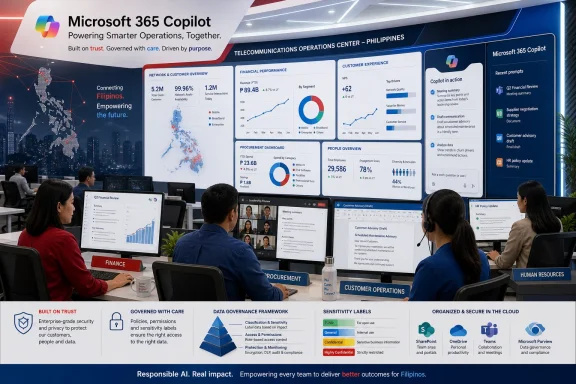
PLDT and Smart say teams are using Copilot to accelerate finance and procurement reviews, synthesize customer feedback, draft communications, summarize meetings, and reduce repetitive internal work. Those are plausible Microsoft 365 Copilot workloads because they are concentrated in the apps and data stores already familiar to office employees: Outlook, Teams, Word, Excel, SharePoint, and OneDrive.
But the announcement does not identify a specific process baseline or outcome. It does not say, for example, whether procurement reviews are shorter by a measured percentage, whether customer-response times have changed, how often generated output requires correction, or whether the work is being redistributed rather than removed. It also does not say how PLDT and Smart will separate time saved by Copilot from time saved by process redesign, automation, training, or staffing changes.
That missing measurement is where many enterprise AI projects become difficult to assess. A user can save time creating a meeting recap while another employee spends time validating it, resolving an incorrect summary, or searching for information that was poorly organized in the first place. Counting prompts, chats, or licenses gives administrators an adoption signal; it does not establish business impact.
Microsoft’s own administration tools distinguish between provisioned users and habitual users. Its AI Adoption Score uses an engagement threshold of an average of three days of Copilot use per week over 28 days, while the Microsoft 365 Copilot adoption report is designed to show use by group, application, and feature. PLDT and Smart have said they will measure business impact, but have not disclosed their chosen metrics or a target date for reporting results.
A practical scorecard for this deployment should include more than weekly active users:
- The company should measure task completion time and error or rework rates for each selected workflow before and after Copilot is introduced.
- The company should track whether employees retain usage after initial training rather than relying on a short-lived launch spike.
- The company should publish whether customer-facing summaries and drafted responses require human edits, escalations, or compliance review.
- The company should compare licensed and unlicensed control groups where possible, so gains are not automatically credited to the AI tool.
Without those measures, the headline remains a deployment milestone rather than proof that the deployment has improved operations.
Copilot’s permission model makes data cleanup part of the project
PLDT and Smart’s repeated reference to governance is more consequential than the usual AI-announcement language. Microsoft 365 Copilot works within the existing Microsoft 365 permission model: it can retrieve data a signed-in user already has permission to access, but it does not receive a blanket right to see the tenant’s data.
That design protects against one class of exposure, but it creates another operational concern. Copilot can make existing oversharing easier to discover. A broad SharePoint group, an old “anyone with the link” file, a poorly managed OneDrive folder, or a former project site can become much more visible when users can ask natural-language questions over work content.
Microsoft’s current deployment guidance explicitly tells administrators to examine SharePoint and OneDrive sharing settings, identify ownerless and inactive sites, find potentially overshared content, apply sensitivity labels, and use audit tooling before broadly enabling Copilot. Microsoft also recommends using its Purview and SharePoint Advanced Management controls to locate high-risk files and restrict discovery of sensitive material.
For a telecommunications operator handling customer information, commercial data, employee records, network planning, and supplier material, that is not an optional polish step after rollout. It is part of the rollout. PLDT and Smart have not disclosed whether they have completed a SharePoint permissions remediation, what information categories are excluded from Copilot grounding, whether Purview sensitivity labeling is enforced, or how they audit prompts and generated content.
The absence of those details is not evidence that the controls are missing. It is, however, a reason other enterprises should not copy the visible part of the project—the 1,000-seat purchase—without copying the less visible governance work required to make it safe.
The next phase needs named workflows, not broader access alone
PLDT and Smart say they intend to pursue more advanced AI uses in network operations, enterprise services, and AI-powered automation. Those are potentially higher-value applications than drafting an email or summarizing a Teams call, but they are also a different class of project.
Microsoft 365 Copilot primarily works across productivity data and applications. Applying AI to network operations may require integration with operational-support systems, telemetry platforms, trouble-ticket data, inventory systems, knowledge bases, and tightly controlled automation tools. A Copilot license can be a useful interface for employees, but it is not by itself an architecture for diagnosing network faults or changing live infrastructure.
That distinction should shape PLDT’s next disclosures. If the group moves from employee productivity into network operations, readers and customers need to know whether AI can recommend actions only, execute approved runbooks, or make changes autonomously; what human approval is required; which systems provide the source data; and how the company will handle erroneous or incomplete model output.
For now, the confirmed development is narrower and more credible: PLDT and Smart have moved 1,000 Microsoft 365 Copilot seats into practical business use while building an internal training and governance program around them. The next meaningful milestone will be a public accounting of sustained adoption, workflow-specific results, and the safeguards used before the telco group puts AI closer to customer service and network operations.