

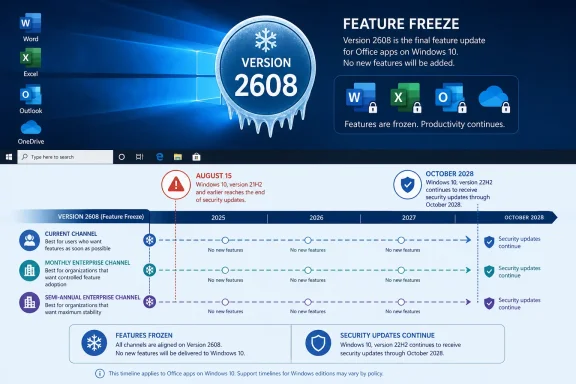
For home users on the Current Channel, Version 2608 is the relevant August 2026 cutoff. Microsoft’s update-history page shows Current Channel Version 2607, build 20228.20190, was released on August 11. It identifies Version 2608 as the next service boundary, but it does not publish the exact day Version 2608 will reach Current Channel. The common assumption that it will arrive “in two weeks” is therefore a schedule estimate, not a date Microsoft has committed to publicly.
For businesses, the timing depends on the Microsoft 365 Apps update channel, a distinction that matters more than the headline implies. Microsoft’s published Windows 10 plan gives Monthly Enterprise Channel and Semi-Annual Enterprise Channel users until October 13, 2026 before Version 2608 becomes their final feature release. That leaves IT departments with a modest planning window, but it does not create a new operating-system support period.
Microsoft is also drawing a separate line under OneDrive. The OneDrive desktop sync client will continue to receive feature updates, bug fixes, and security updates on Windows 10 22H2 through October 10, 2028. Devices on Windows 10 21H2 or earlier lose OneDrive sync-app updates on August 15, 2026 — three days from now. Existing installations may keep working, but Microsoft explicitly says future functionality is not guaranteed.
The important correction is this: Microsoft 365 support through 2028 is not Windows 10 support through 2028. Windows 10 reached end of support on October 14, 2025. Microsoft is maintaining Office security updates as a transition measure, but its support rules already limit what customers can expect when a defect appears only on Windows 10. Microsoft says support will recommend moving to Windows 11; if that cannot happen, assistance may be limited to troubleshooting and workarounds, with no avenue to file a product bug or request a new feature.
Version 2608 freezes features, not Word and Excel
The immediate consequence is far less dramatic than an Office shutdown. Word, Excel, PowerPoint, Outlook, OneNote, Access, and the subscription editions of Project and Visio will not stop launching when Version 2608 arrives. Users will retain their existing files, licenses, local integrations, and normal Microsoft 365 service connectivity while the client remains within Microsoft’s stated security-update period.
What disappears is the normal stream of client features. Microsoft’s wording specifically includes Copilot support “where eligible” among the capabilities that continue only until Version 2608. A Windows 10 device that stays on the frozen build may still use supported services and features already available in its installed client, but it will not receive future desktop-app additions delivered through later Microsoft 365 releases.
That matters most for organizations that have tied training, templates, add-ins, or workflows to newly shipped Microsoft 365 capabilities. The risk is not that every Windows 10 user suddenly loses access to a spreadsheet. The risk is divergence: a newer Microsoft 365 feature may be available to Windows 11 users while the same employee on Windows 10 remains on Version 2608, with no supported route to obtain the client-side update.
Microsoft’s release-history entry confirms that Version 2607 is current today. It also shows the usual channel separation: the August 11 release placed Current Channel, Monthly Enterprise Channel, and Semi-Annual Enterprise Channel Preview on Version 2607, while Semi-Annual Enterprise Channel remains on an older release line. Administrators should not assume that an Office version visible on one pilot PC indicates what has reached every deployment ring.
OneDrive has a nearer and sharper cutoff
The OneDrive change is more urgent for the small number of PCs that remain on Windows 10 versions older than 22H2. Microsoft’s Message Center notice, MC1426708, says that beginning August 15, the OneDrive sync app on Windows 10 21H2 and earlier will receive no more feature updates, fixes, or security patches. The Register and PCWorld have independently reported the same schedule.
There is no Windows 10 version 22H1, despite an early inconsistency in the Message Center item’s title. Microsoft’s updated notice and the body of its documentation correctly refer to Windows 10 21H2 and earlier. That correction is worth noting because endpoint inventories and upgrade targeting should use the actual version boundary: 21H2 or older is affected; 22H2 is the supported Windows 10 baseline for OneDrive updates.
This is not a declaration that files will stop syncing on August 15. Microsoft says existing OneDrive installations may continue to function, and the web interface remains available through a supported browser. But the client will be stuck in place without fixes, a familiar pattern that turns from tolerable to disruptive when a service-side change, authentication revision, certificate issue, or sync defect eventually arrives.
The OneDrive policy is more generous to Windows 10 22H2 than the Microsoft 365 Apps policy is. On 22H2, OneDrive continues to receive feature updates through October 2028, while Microsoft 365 Apps freeze at Version 2608. That difference means administrators should avoid describing Windows 10 as one uniform “no new Microsoft features” platform. The client support rules now vary product by product.
Windows 10 22H2 is the minimum holding position
Windows 10 22H2 is already the final general-release version of Windows 10, and it is now the line Microsoft uses for both OneDrive continuity and Windows 10 Extended Security Updates eligibility. A PC on 21H2 cannot simply be treated as a lower-priority Windows 10 machine until a broader Windows 11 program is ready; from August 15, it is outside the OneDrive desktop client’s update path.
For IT teams, the practical first step is straightforward: identify devices by actual Windows version rather than merely filtering for “Windows 10.” Intune, Configuration Manager, and other endpoint-management tools should separate 21H2-and-earlier systems from 22H2 systems, then identify which of those devices run the OneDrive sync client and Microsoft 365 Apps.
A concise remediation order is:
- Upgrade Windows 10 version 21H2 and earlier to Windows 10 22H2 immediately where Windows 11 deployment cannot yet proceed.
- Confirm that Windows 10 22H2 machines needing continued OS security patches are enrolled in the appropriate Extended Security Updates program.
- Record the Microsoft 365 Apps update channel for every Windows 10 cohort, because Current Channel and enterprise channels reach the Version 2608 feature freeze on different schedules.
- Test critical Office add-ins, document-management integrations, and Copilot-dependent workflows against Version 2608 before later Windows 11 migrations introduce a separate change variable.
- Tell users on older Windows 10 releases that OneDrive on the web is a fallback, not an equivalent replacement for managed desktop synchronization.
There is also a financial and lifecycle trap in treating Version 2608 as a reason to defer Windows planning. Microsoft’s commercial Windows 10 ESU program can provide critical and important security updates for eligible 22H2 devices for up to three years after Windows 10’s October 2025 end of support. Consumer ESU coverage, however, runs only through October 12, 2027. Office security updates through October 2028 and OneDrive updates on 22H2 through October 2028 do not extend consumer Windows security coverage by another year.
Microsoft’s support posture has already changed
Microsoft’s documentation makes clear that this is not merely a feature-marketing decision. Since Windows 10 left support on October 14, 2025, Microsoft 365 support incidents that reproduce only on Windows 10 have occupied a reduced-support category. Customers can still open cases with a valid subscription, but Microsoft may ask them to reproduce on Windows 11, offer only limited workarounds, and decline to accept product bugs from the unsupported configuration.
That position changes how a frozen Microsoft 365 client should be handled in regulated or tightly managed environments. Security patches reduce exposure to known Office vulnerabilities, but they do not guarantee timely root-cause fixes for Windows 10-specific reliability failures. A line-of-business workflow that depends on Outlook, Excel add-ins, OneDrive Files On-Demand, or a document-management connector may be technically usable while becoming progressively harder to support.
Windows Latest characterizes the change as Microsoft applying pressure to Windows 10 holdouts. The record supports the narrower conclusion: Microsoft is using its Microsoft 365 servicing model to make Windows 11 the only path for future Office client features, while preserving a defined security-maintenance runway for systems that cannot move immediately. The OneDrive policy reinforces that message by giving 22H2 a temporary reprieve and cutting older Windows 10 releases off the sync-client update stream now.
For most users, the next visible event is Version 2608 reaching Current Channel later this month. For administrators with Windows 10 21H2 or older devices, the deadline arrives first: after August 15, the OneDrive sync client on those PCs has no supported update path, and Windows 10 22H2 becomes the minimum acceptable stopgap rather than an optional cleanup target.
Update: Version 2608 has entered Microsoft 365’s Release Preview stage (August 13, 2026)
XDA Developers reports that Microsoft 365 Apps Version 2608 is now progressing through the Release Preview channel. That does not establish a public Current Channel release date, but it confirms the feature-freeze build is in its final pre-release servicing stage rather than merely being the next numbered release.
For Windows 10 administrators, this narrows the planning window: once Version 2608 is promoted to stable for a device’s assigned channel, that device remains on the build and receives Microsoft 365 security updates only through October 10, 2028. Organizations should use Release Preview deployments to validate essential add-ins, document workflows, and Copilot-dependent processes before the stable rollout fixes Windows 10 clients to the final feature baseline.