

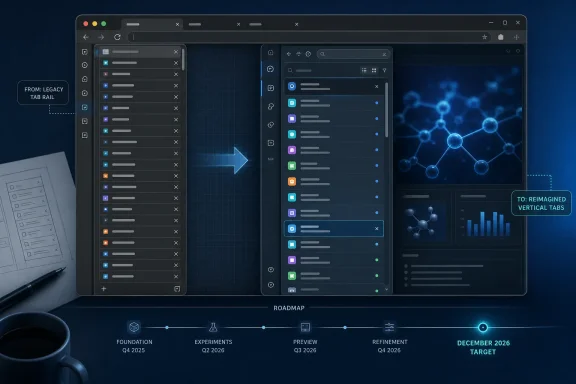
For users who keep dozens of research, development, helpdesk, or documentation tabs open, the important news is not that vertical tabs are gaining one named feature. It is that Edge’s existing side-tab interface is being reimplemented across the components that determine how it opens, collapses, renders, responds to tab actions, and fits into the browser window. Microsoft has not published screenshots, a feature list, supported builds, or an Insider-channel schedule, so the December date should be treated as a roadmap target rather than a commitment to a particular Edge release.
Microsoft lists the item as “in development,” slated for worldwide standard multi-tenant general availability. The company also says no administrative action is required.
A rewrite hidden behind a vague roadmap entry
The roadmap description is unusually technical for a browser-interface announcement. Microsoft does not merely say that it will “improve” vertical tabs; it says it is reimplementing capabilities across the pane, layout, controls, behaviors, visual treatments, and customizations made by the application embedding those controls.
In practical terms, each category describes a place where a vertical-tab redesign can change the experience even if the central premise remains the same: tabs listed down the side of the browser instead of across the top.
The pane governs the side rail itself, including expanded and collapsed states. Layout determines the relationship among the tab rail, title bar, address bar, toolbar, and window controls. Controls cover the buttons and interactions for creating, pinning, closing, searching, and switching tabs. Tab behavior covers the more consequential details: what remains visible, which item receives focus, and what happens as tabs are moved or restored.
“Visual treatments” is Microsoft’s term for presentation details such as spacing, selected-tab state, hover effects, icons, separators, and animation. The least clear phrase is “embedder customizations.” Microsoft has not explained it, but in browser UI terminology an embedder is the application layer that hosts browser components. That wording suggests the project reaches below the visible sidebar and into how Edge adapts the tab interface to its wider window chrome and product-specific UI.
The entry does not claim a performance improvement, better accessibility, new tab grouping, hierarchical tabs, or a change to Edge’s tab synchronization model. Readers should not infer any of those features from a rebuild announcement alone.
Existing management controls appear to remain relevant
The most immediate question for enterprise administrators is whether the rewrite changes the policy surface. Microsoft’s Edge policy documentation currently identifies VerticalTabsAllowed as the setting that determines whether users can access the vertical layout. When the policy is enabled or left unconfigured, Edge retains its conventional top-tab layout by default while allowing users to turn on vertical tabs; when disabled, the side-tab layout is unavailable.
That policy has supported Windows and macOS since Edge 88. Microsoft’s roadmap says no admin action is required, which strongly indicates that organizations will not have to deploy a new policy simply to receive the refreshed interface. It does not, however, amount to a promise that existing behavioral details, recommended-policy guidance, or future management controls will remain unchanged.
Admins who intentionally block vertical tabs should therefore not remove VerticalTabsAllowed from their baselines on the assumption that the feature is being replaced. The documented policy is still the authoritative control today, and the roadmap does not announce its retirement. Equally, organizations that leave the setting unmanaged should expect users to encounter UI changes once the rebuild arrives, because Edge updates itself outside a traditional Windows feature-update cycle.
This distinction matters for support teams. “No admin action required” means there is no announced deployment prerequisite; it does not mean there will be no user-visible difference to explain, document, or test.
Microsoft has set a date, but not a release channel or a build
The roadmap’s December 2026 general-availability target is specific enough to put the work on planning calendars, but it leaves out the details IT departments normally need for validation. Microsoft has not named an Edge version, provided a Canary, Dev, Beta, or Stable milestone, or said whether the work will appear gradually through feature configuration.
That omission is especially relevant because Microsoft has recently described a faster, continuous Edge update cadence. In June, the Edge team said it was moving away from a single monthly feature drop toward a steadier stream of capabilities. A December roadmap target may therefore describe when the rebuilt vertical-tabs experience begins reaching the standard population rather than when every affected device receives the exact same interface.
Microsoft’s own support guidance on visual changes to Edge makes the same operational point: browser layout and controls may change gradually, and users may not see identical interfaces at the same time. The company has provided no rollout scope for Roadmap ID 569217 beyond “Worldwide (Standard Multi-Tenant).” It has also not said whether consumer Edge, Edge for Business, managed Windows devices, and macOS devices will receive the reimplementation simultaneously.
For now, an administrator cannot sensibly create a version-based deployment ring around this item. The useful preparation is more mundane: keep a test profile with vertical tabs enabled, preserve any policy that governs it, and watch Edge Insider release notes for the first build that identifies the new implementation.
The practical test is interaction stability, not a new coat of paint
Vertical tabs are an established Edge feature, not an experimental addition. Microsoft’s current product documentation promotes them as a way to place tabs in a side pane, scan site titles more easily, and switch back to the horizontal strip when desired. That existing flexibility sets a baseline Microsoft will need to preserve.
A full implementation change creates risk at the seams rather than in the headline feature. Pinned tabs, collapsed panes, keyboard focus, drag-and-drop tab movement, window controls, screen-reader navigation, title-bar behavior, and extensions or web apps that interact with the browser’s tab strip are the areas worth watching once preview builds surface. None are identified as known issues in the roadmap; they are simply the places where rewrites of pane, layout, controls, and tab behavior tend to become visible.
For developers and power users, the absence of announced APIs is also notable. Microsoft has not said that extensions will receive new hooks, that vertical tabs will gain a tree structure, or that the browser will expose additional customization. This is a modernization of Edge’s own interface until Microsoft says otherwise.
The immediate action is limited: there is nothing to install, configure, or enable today. But Roadmap ID 569217 is a clear signal that the vertical-tab experience users know now should be treated as a moving target through the end of 2026, with the first meaningful test arriving when Microsoft identifies an Insider build rather than when the December general-availability label appears.