
The practical payoff is straightforward: a user who was tricked into clicking “Allow” on a deceptive website will no longer have to recognize repeated fake antivirus alerts, find the responsible domain, and manually remove its permission after SmartScreen catches the scam’s next-stage landing page. Edge will sever the notification channel itself and tell the user it has done so.
This is a planned feature, not one available in Edge today, and Microsoft has not published an Edge version number, a release channel, or a more precise rollout date than September. The roadmap also labels the platform simply as “Web,” leaving the initial operating-system and mobile scope unresolved.
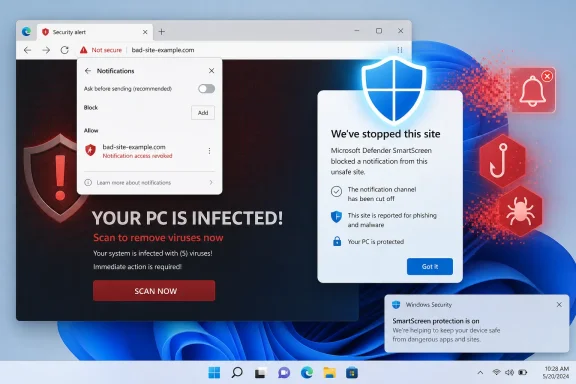 The trigger is the notification’s destination, not the permission prompt
Microsoft’s description matters because it identifies a different enforcement point from Edge’s older anti-spam protections. The new action occurs when a browser notification leads the user to a page that SmartScreen blocks. Edge then stops the notification source from sending additional notifications.
That is a reactive safety net for a familiar scam sequence. A malicious or compromised site persuades a visitor to approve notifications—often behind a bogus CAPTCHA, download warning, or “click Allow to continue” screen. It can then issue Windows-style desktop notifications designed to resemble security warnings from Microsoft, McAfee, or another antivirus brand. The notification links to a phishing page, a fake support page, or a malware-hosting site.
SmartScreen is already built to evaluate URLs and warn or block when a page is associated with phishing or malicious software. Microsoft’s current SmartScreen documentation says the service uses reputation signals, reported malicious sites, page behavior, and related intelligence to determine whether a URL is unsafe. The September change connects that existing verdict to a separate browser permission: web push notifications.
That is a meaningful escalation. A standard SmartScreen interstitial blocks one navigation attempt, while the new behavior removes a delivery mechanism that lets the offending site keep putting bait on the user’s desktop.
Microsoft’s wording leaves one technical point unaddressed: it does not explain whether Edge will revoke the permission for the site that sent the notification when its link points to a different malicious domain. That distinction is important because notification spam operations often use one domain for browser permission and a rotating set of redirect or landing-page domains for the actual fraud. The roadmap promises the “source” will be unsubscribed, but it does not define whether source means the notification sender, the blocked destination, or both.
Edge has blocked notification abuse before, but this closes a later gap
This is not Edge’s first attempt to control abusive notifications. In 2023, the Microsoft Edge team said it was quietly presenting notification prompts from unfamiliar sites in Edge 113 and later, rather than putting the full permission request in front of users. Microsoft also said it had removed notification privileges from known spammy sites and blocked billions of misleading notifications through that work.
Those measures were aimed primarily at preventing permission from being granted in the first place and at taking down senders Microsoft had already identified. They cannot reliably protect every user who approves a request before a site is recognized as abusive.
The roadmap feature acts later in the sequence and uses a stronger signal: SmartScreen has already blocked the site reached from the notification. In effect, Edge is treating that block as evidence sufficient to revoke the sender’s ability to reach the user through future Windows notifications.
That is the missing link in the current workflow. Today, a user who sees fake security warnings may assume the PC is infected, run scans, reinstall a browser, or contact support, even though the immediate problem is often a browser permission rather than installed malware. The browser’s notification permission can persist independently of ordinary browsing history and can continue producing messages long after the site that obtained permission is forgotten.
Microsoft says users will be able to review and restore sites that Edge has unsubscribed. The availability of a restore control is necessary: SmartScreen reputation systems can produce false positives, and legitimate sites can be compromised or redirect users through unsafe third-party infrastructure. Microsoft’s support documentation provides a process for site owners to dispute erroneous SmartScreen warnings, acknowledging that a block can be mistaken.
But the remediation path is still only partly described. Microsoft has not said what notification the browser will display, whether it will identify the sender and the blocked destination, how long the revocation remains visible, or whether a user can restore a site immediately. Those details will determine whether the feature helps support desks diagnose a false positive or merely creates a new, opaque permissions event.
SmartScreen must be enabled for the protection to have a chance to act
The new feature depends on a SmartScreen block, which makes the SmartScreen setting the critical prerequisite. Microsoft documents that SmartScreen is enabled by default in Edge and can be managed through Group Policy, Intune, or other MDM tooling. Users can ordinarily turn it off unless their organization has locked the setting.
If SmartScreen is disabled, Edge cannot receive the SmartScreen verdict that the roadmap says triggers automatic unsubscription. Microsoft has not explicitly documented the new feature’s behavior under that configuration, but the condition described in the roadmap cannot occur without SmartScreen evaluating and blocking the navigation.
For home users, the actionable advice remains uncomplicated: keep Microsoft Defender SmartScreen enabled and do not treat a convincing-looking desktop notification as proof that Windows Security or an antivirus product generated it. The automatic revocation is designed to reduce repeat exposure after a detected malicious destination, but it does not make the first click safe, and it does not guarantee SmartScreen will classify every bad destination before the user provides information or downloads a file.
For IT teams, the change is a useful backstop rather than a policy replacement. Edge already offers a DefaultNotificationsSetting policy that can block all website notifications, plus allow-list and block-list policies for specific URL patterns. Organizations with no legitimate business need for browser notifications can eliminate the category by setting the default to block. Organizations that use line-of-business web applications, Teams-related workflows, monitoring portals, or collaboration tools that rely on web push should instead use a restrictive default and explicitly allow trusted senders.
The key limitation is that Microsoft has not documented how the upcoming automatic revocation will interact with a notification permission enforced by policy. An administrator-managed allow list is meant to override a user’s personal choices; the roadmap does not say whether Edge’s security automation will be able to remove a policy-mandated permission, or whether the policy will continue to permit notifications despite the SmartScreen event. Administrators should not assume this feature will clean up permissions they have intentionally forced through policy.
What users and admins should expect in September
Microsoft’s roadmap commits to worldwide general availability in September 2026, but “in development” is still the listed status. The company has not identified an Edge Stable build, an update week, or whether the change will appear first in a particular Edge channel. No independent outlet has reported additional implementation details as of the roadmap posting.
When it arrives, users who want to inspect a removal—or restore a wrongly removed sender—will be directed to Edge’s notification permissions list under Privacy, search, and services. That is also the right place to manually remove suspicious notification sites before the feature ships.
The more important consequence is operational: Edge will finally connect its malicious-site reputation service to the permission that scam operators exploit to keep re-contacting victims. It will not replace notification policy in managed environments or prevent every deceptive permission request, but when SmartScreen catches the malicious link, Edge is set to remove the sender’s ability to try again.
