

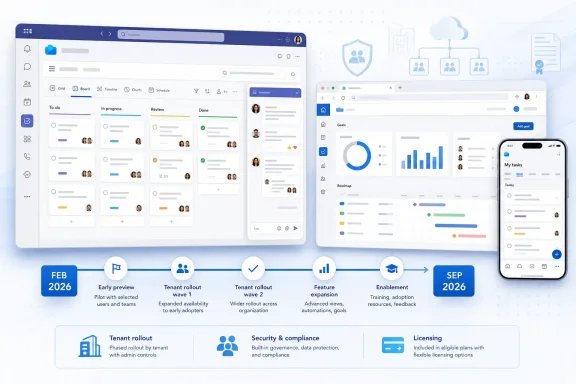
That distinction changes the practical advice. IT administrators should not hold off on testing until September, and existing Planner users should not expect a single cutover date across all tenants. Microsoft’s February announcement explicitly said deployment would take place over “the coming weeks,” while the company’s deployment model historically allows feature availability to vary by tenant, release ring, platform, and licensing. A roadmap date marked “rollout start” is a scheduling signal, not proof that every Microsoft 365 customer will see the change during that month.
The other important correction concerns Goals. The refreshed Planner experience does bring a Goals view into basic plans, but Microsoft’s own February announcement says access requires either a Planner premium license or a Microsoft 365 Copilot license. That is materially different from saying that goal management has become an unrestricted basic-plan capability.
A September roadmap date does not replace the February rollout
Microsoft’s Planner team announced the modernized interface on February 23, describing enhanced navigation, responsive layouts, Goals view, and task chat for basic plans in Teams and on the web. Microsoft said at the time that the changes were already rolling out, rather than previewing a future redesign.
Independent coverage from Office 365 for IT Pros also described the interface as being deployed across Microsoft 365 in late February, with the rollout expected to take weeks to reach all tenants. Neowin reported problems identified by users shortly after the initial release, including reports that a changed checklist-item character limit disrupted Power Automate flows. Those reports do not establish that every tenant experienced the issue, but they demonstrate why a visual refresh should be treated as an operational change when it touches a service connected to automation.
The newly cited Roadmap ID 568791, according to Neowin, places the refreshed Planner experience in development with a September 2026 rollout start. Microsoft’s public Planner roadmap currently lists a number of other active Planner items, including a redesigned My Tasks experience, Planner in Outlook, Planner Agent features, and meeting-to-plan task connections. The public roadmap search results available on August 9 do not independently surface Roadmap ID 568791, so the exact scope, cloud instances, release rings, and platforms associated with that entry cannot yet be confirmed from Microsoft’s primary record.
That absence matters because “redesigned Planner UI” can refer to more than one moving target. Microsoft is redesigning the broad Planner shell, My Tasks, Teams-connected planning workflows, Outlook integration, and AI-assisted task management at roughly the same time. Until Microsoft exposes the full text of the entry consistently in its public roadmap, administrators should avoid assuming that September means a repeat of every February feature—or that it includes premium plans, mobile clients, government tenants, or all Microsoft 365 clouds.
The refresh changes where teams work, not merely how Planner looks
The visible elements Microsoft announced are straightforward: cleaner spacing, simplified navigation, responsive layouts, and a consistent design across Planner in Teams and Planner for the web. Those changes are useful for employees who move between the Teams app and browser, where Planner has often felt like two related products rather than one service.
The more consequential change is Planner’s attempt to consolidate day-to-day work management around a common interface. Microsoft has been folding the old standalone Planner, Project for the web capabilities, Microsoft To Do-style personal task handling, and Microsoft 365 Copilot functions into a single Planner brand. The refreshed UI is part of that consolidation, and it arrives while Microsoft is asking organizations to make larger planning decisions ahead of Project Online’s retirement on September 30, 2026.
For users, this means basic Planner work—boards, tasks, schedules, and lightweight collaboration—will increasingly occupy the same visual space as premium project-management functions. For admins, it means training materials and internal screenshots can age quickly. A help document written around an old Planner navigation scheme may become confusing even if the underlying plan data, memberships, and permissions remain unchanged.
Microsoft has not said that the UI refresh migrates plans, changes ownership, alters Microsoft 365 group membership, or modifies data residency. There is no indication that it is a data migration event. However, interface changes can still break informal processes: employees may lose familiar navigation paths, saved walkthroughs may no longer match screens, and browser-based automation that depends on page layout can become fragile.
Goals remain a licensing feature despite basic-plan placement
Microsoft’s wording around Goals deserves particular scrutiny. The company says the Goals view is being added to basic plans so teams can define objectives, attach work to those objectives, and monitor progress. In Microsoft’s February Planner announcement, however, access to Goals in a basic plan requires a Planner premium license or a Microsoft 365 Copilot license.
Microsoft’s current Planner support documentation is consistent with that boundary. It identifies Goals alongside Timeline and People as views requiring Planner Plan 1 licensing, while its broader premium-plan guidance still places goal management among advanced paid capabilities. In short, a basic plan may now host or surface the Goals experience, but an ordinary Microsoft 365 user without the relevant Planner or Copilot entitlement should not assume that they can create and manage goals.
This is an important distinction for procurement teams. The refreshed interface reduces the visual separation between basic and premium capabilities, but it does not erase the licensing separation. A user can be invited to a plan and still encounter premium indicators or unavailable views. That can make Planner feel more capable during a demonstration than it is for the average licensed employee.
Organizations should test the feature with the licenses they actually assign. Test with a standard Microsoft 365 user, a Planner Plan 1 user, a Planner and Project Plan 3 or 5 user, and a Microsoft 365 Copilot user if those SKUs exist in the tenant. The key question is not whether the Goals button appears; it is whether the intended users can create, edit, view, and report on goals without an unexpected license prompt.
Task chat introduces a second collaboration model
The February Planner update also added task chat with threaded discussion, rich text, reactions, @mentions, and notifications for basic plans. Microsoft said mentioned users receive notifications through the Teams Activity feed and email, while the company moved away from notifying users about every task comment.
That is a significant workflow change for teams that use Planner tasks as lightweight records of decisions. In principle, @mention-only alerts should reduce notification noise. In practice, it also creates a process requirement: participants must know to mention the people who need to act. A manager who writes a task update without mentioning an assignee may assume the message is visible enough, while the assignee may receive no alert at all.
There is another split to watch. Microsoft said premium plans would continue using the existing task-conversation experience, with convergence planned for a later date. That means a tenant can have two distinct ways to discuss work depending on the plan type, even after the visual redesign arrives. For organizations with both basic and premium Planner plans, this is more than cosmetic inconsistency. It affects notification expectations, user training, retention assumptions, and any internal guidance about where project decisions should be recorded.
The September roadmap milestone does not publicly resolve that basic-versus-premium conversation gap. Admins should therefore avoid promising staff that every plan will gain the new chat model at once.
What IT teams should do before the next rollout wave
The sensible response is to treat the refreshed experience as a phased service change already in motion. Do not wait for September to discover that staff have been receiving parts of the redesign since February.
- Review Planner adoption guidance, screenshots, and internal training materials now, especially instructions that tell users where to find plan settings, task discussions, or views.
- Test critical Power Automate flows, Graph API integrations, browser automations, and third-party tools against a newly refreshed basic plan before expanding their use across departments.
- Confirm Goals access with the organization’s real licensing mix, because visibility of the feature does not mean it is included for all basic-plan users.
- Tell users that Teams and web Planner are becoming more visually consistent, but that premium plans may retain different collaboration behavior while Microsoft works toward convergence.
- Use the Microsoft 365 Message Center and the Planner-specific roadmap filters to monitor the tenant’s actual availability, rather than treating September 2026 as a universal delivery deadline.
Microsoft’s September roadmap entry is useful chiefly because it signals that Planner’s redesign is still being actively staged. The evidence available today does not support describing it as a wholly new UI launch next month. The change began in February, availability remains uneven, Goals still has a paid-license gate, and premium-plan task conversations have not yet converged with the new basic-plan chat model.