
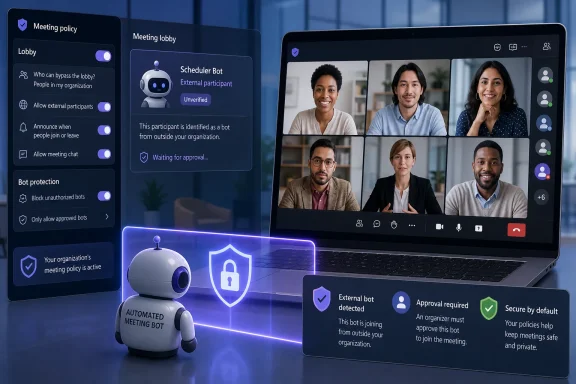
The practical change is simple but important. Teams currently detects some third-party meeting assistants, marks them as bots, and forces them into the lobby even when ordinary attendees can bypass it. Someone with authority to admit attendees must still approve or reject the bot. The new option removes that last manual step for meetings governed by the policy: a bot Teams identifies will be denied entry before it reaches the lobby.
Microsoft says the setting is off by default, so this is not an overnight tenant-wide lockout for Otter, Fireflies, Read AI, or any other external note-taking service. Administrators must explicitly enable it and assign the relevant Teams meeting policy. That opt-in design gives organizations time to identify approved transcription, accessibility, and meeting-intelligence tools before changing the behavior of live meetings.
 MC1459141 closes the organizer-approval gap
The new capability is an extension of Microsoft’s bot-detection work introduced earlier in 2026. Microsoft’s June Teams guidance describes the present behavior as RequireApprovalWhenDetected: Teams examines signals during a join attempt, identifies a suspected external automated participant, labels it, and places it in the lobby pending approval.
That is useful visibility, but it leaves a weak point in the process. In a busy meeting, an organizer or presenter may see an unfamiliar lobby request and approve it reflexively, confuse a bot with a colleague’s assistant, or assume somebody else has reviewed it. For a bot, one mistaken click can mean access to spoken discussion, shared content, and whatever recording or transcription workflow the third-party service runs after admission.
MC1459141 adds an enforcement choice Microsoft describes as automatically blocking identified external meeting bots. The policy applies to Teams meetings hosted by users assigned the policy, which is an operational detail administrators should not overlook. Assigning a stricter policy to a finance employee does not necessarily govern every meeting that employee attends; it governs meetings that person organizes under that meeting-policy assignment.
That makes the most sensible first deployment group fairly clear: users who routinely host sensitive calls. Executive assistants arranging leadership meetings, legal staff, incident-response teams, human-resources leadership, finance, research groups, and procurement teams are more likely to create meetings where an unreviewed transcription bot represents a material governance problem.
The published documentation has not caught up everywhere
There is an unusually revealing documentation gap around this rollout. Microsoft Learn’s English-language page for managing external bots, last updated June 11, lists only two options for ExternalBotAccessMode: AllowBots and RequireApprovalWhenDetected. Its table does not yet show an automatic-block setting.
But Microsoft’s current PowerShell reference for New-CsTeamsMeetingPolicy and Set-CsTeamsMeetingPolicy, including localized Microsoft Learn pages indexed this month, lists a third value: BlockDetectedBots. Those pages also call the non-detection option AllowAllBots, rather than the English external-bots guide’s AllowBots.
The discrepancy does not undermine the rollout notice. MC1459141 explicitly announces the automatic blocking option, and the PowerShell reference confirms the intended BlockDetectedBots policy value. It does, however, mean administrators should avoid copying an old script or assuming every Microsoft Learn page reflects the latest service schema.
There is also a clear documentation error in the current English external-bot article: its PowerShell examples invoke Set-CsTeamsEventsPolicy even though the surrounding text identifies Set-CsTeamsMeetingPolicy as the relevant cmdlet. Microsoft’s meeting-policy documentation and Teams PowerShell release notes support Set-CsTeamsMeetingPolicy, not the events-policy cmdlet, for ExternalBotAccessMode.
For administrators preparing automation, the safe procedure is to inspect the installed MicrosoftTeams PowerShell module and query the meeting policy rather than relying on a blog post or a copied command. The service and documentation can roll out on different schedules, particularly during a staged release.
A basic validation sequence should include:
- Confirm that the tenant has received the new option in the Teams admin center before treating the policy as deployable.
- Use
Get-CsTeamsMeetingPolicyto review the current global policy and any custom policies assigned to high-risk meeting hosts. - Confirm that the available
ExternalBotAccessModevalues in the tenant and installed Teams PowerShell module includeBlockDetectedBots. - Test the policy with a known approved assistant and a controlled external meeting before assigning it broadly.
This blocks detected bots, not every way meeting data can leave
The new control has a deliberately narrow boundary. It applies to identified external meeting bots, not to every external participant, every AI feature, or every way a meeting can be captured.
Microsoft’s own external-bot guidance acknowledges that bot detection is not perfect. Some automated participants may not be recognized, while a human attendee may occasionally be misclassified as a bot. Under the existing approval workflow, organizers can mark a wrongly flagged participant as human in that meeting. With automatic blocking enabled, an organization needs a tested exception process because an incorrectly detected participant may be unable to get past the join stage at all.
That limitation is not a reason to leave the policy unused. It is a reason to describe it accurately. BlockDetectedBots reduces the risk from services Teams recognizes during the join process; it is not an identity-verification system and it does not prove that every admitted participant is human.
It also will not stop a legitimate attendee from taking notes, recording audio locally where permitted, capturing a screen, or using a service that does not present itself to Teams in a detectable bot-like manner. Nor does it replace controls over anonymous participation, lobby bypass, presenter rights, external access, app governance, retention, or data-loss prevention.
Microsoft’s existing guidance recommends limiting the authority to admit lobby participants to organizers and co-organizers. That remains worthwhile even after bot blocking is enabled. A blocked bot solves one type of unwanted join; an overly broad lobby or presenter configuration can still create other paths for unauthorized attendees and risky meeting activity.
Start with policy inventory, not a global switch
The immediate temptation will be to set the global Teams meeting policy to block detected bots. Some organizations may reasonably choose that route, particularly where no third-party meeting assistants are sanctioned. For most enterprises, a staged deployment is safer and gives security teams useful evidence about how employees are actually working.
First, identify external assistants already in use and determine whether any are contractually approved for specific business functions. A blanket block can interrupt accessibility services, customer-facing transcription arrangements, executive workflow tools, and compliance processes that were implemented outside the Teams administration team’s visibility.
Next, create or modify a targeted meeting policy for a limited set of meeting organizers. Microsoft says the feature can be applied through the existing Teams meeting-policy framework to specific users or groups. That allows a security team to protect sensitive hosted meetings without assuming the same restrictions suit every department on day one.
During the pilot, document blocked join attempts, false positives, help-desk tickets, and requests for exceptions. A recurring request for one meeting assistant may reveal a legitimate business requirement that needs procurement and privacy review. It may also reveal shadow IT: users exporting sensitive conversation data to an outside service without a contract, retention schedule, or approved data-processing arrangement.
The point is not to treat every note-taking tool as malicious. The point is to decide centrally which tools may receive copies of company conversations, rather than leaving that decision to a lobby prompt at the beginning of a call.
The policy shifts responsibility to the administrator
Teams’ new automatic-block option is a modest feature change with a substantial administrative consequence. It moves the decision from a time-pressed organizer, who may have seconds to interpret a join request, to a policy owner who can apply a consistent rule before the meeting begins.
Organizations that want the protection should use the remaining August and September rollout period to map approved tools, pilot BlockDetectedBots for sensitive meeting hosts, and update internal support guidance. By the time worldwide deployment is expected to complete in late September 2026, the important question will not be whether Teams can block a bot. It will be whether the organization knows which automated attendees it has chosen to let in.
