
The practical catch is that this is not a new Teams rewards program, and it will not automatically pull in every Microsoft Learn credential or third-party certificate a user has earned. Teams is gaining another display surface for profile data that an organization must already be ingesting and maintaining. For most tenants, the September rollout will therefore be invisible unless IT or HR has done the underlying profile-data work.
Microsoft’s short roadmap description says the change will provide a more consistent experience across Teams and Outlook. That framing is accurate as a destination, but it leaves out the important implementation detail: the badges are owned by their issuing system, not by Teams, Outlook, or an individual employee’s Microsoft 365 profile.
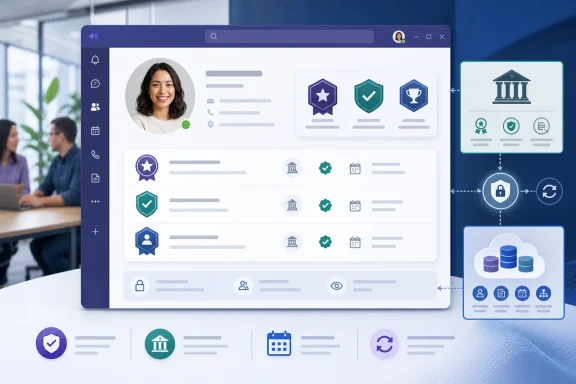 Teams gets a profile-card feature that Outlook received first
Microsoft support documentation for Awards and Certifications describes badges as verified accomplishments shown in Microsoft 365 profile cards. The Overview tab can show up to four recent badges, while the expanded profile card can expose a longer list under its Contacts view. Selecting a badge can show its issuer and award date, with a link back to the source platform where supported.
The Teams roadmap entry matters because the product coverage has been uneven. In May, Topedia reported that Awards and Certifications appeared in Outlook profile cards but not in Teams, Microsoft 365 Copilot Chat’s Org Explorer, or People Search. Office 365 IT Pros reported around the same time that the information appeared in Outlook web, new Outlook, and Teams. Those accounts conflict on whether some Teams users already had access during the earlier rollout.
Microsoft’s own August 5 roadmap entry resolves the operational question for administrators: the company considers the Teams profile-card integration unfinished and schedules its broad general-availability target for September. Tenants that saw badges in a limited Teams context before then should not treat that as evidence of completed, tenant-wide availability.
The Roadmap entry does not list a precise rollout date, build number, client minimum, staged-release schedule, or any requirement for the new Teams client versus legacy deployments. It also names Desktop and Mac, but omits Teams mobile, web, government clouds, and sovereign environments. That is a meaningful omission for organizations that standardize on mobile frontline access or maintain separate Microsoft 365 tenants for regulated workloads.
The badge is a view of source data, not a Teams object
Microsoft’s support guidance is unusually clear on the ownership model. Awards and certifications appear only when an organization has configured a supported source to ingest the records into Microsoft 365 profiles. Microsoft 365 displays the resulting badges, but the source system issues and manages them.
That means a user cannot correct a wrong credential, hide a badge, renew an expired certificate, or delete an entry from Teams. Those changes must occur in the issuing platform or the organization’s connected data source. Microsoft says updates can take up to 24 hours to appear, or longer if the administrator has configured a different crawl frequency.
For IT, this creates a support boundary that should be established before September. A ticket saying “my Teams certification badge is missing” may be a data-quality problem in an HR platform, learning-management system, credential provider, or custom connector rather than a Teams client bug. A ticket saying “my badge is incorrect” belongs with whoever controls that source data, even though the visible problem is inside Teams.
Microsoft Graph’s profile schema shows how much information can sit behind a certification record. A personCertification entry can include a display name, certification ID, issuing authority and company, issue and expiration dates, description, thumbnail, source metadata, and a web address. The Graph resource remains documented in the beta endpoint, an important warning for tenants considering direct automation: the profile-card user experience may be generally available, but the API route used to create or manage the underlying certification object is not described as a stable v1.0 API.
Administrators should avoid building a September deployment plan around the assumption that Teams will manufacture records from existing Entra ID fields. Standard directory values such as job title, department, office location, and manager relationship are not the same thing as the Awards and Certifications collection. The data must exist in the specific profile schema or arrive through a supported connected source.
Visibility is organizational, but the controls live elsewhere
Microsoft says badges are visible to people inside the organization when they open a colleague’s profile card. The company also says recent achievements may be highlighted automatically for 30 days. In a collaboration app, that can be useful: a manager assigning an incident, migration, compliance review, or customer escalation can quickly see that someone has a relevant credential.
It also makes certifications an internal people-data and privacy issue rather than merely a cosmetic profile enhancement. An expired credential, a credential tied to a former role, or a badge that should no longer be visible will become discoverable in the same Teams popover employees use every day. A stale profile record can therefore create false confidence about qualifications, especially where certifications have an expiry date or depend on continuing education.
Microsoft’s documentation says the display is read-only in Microsoft 365 and directs users back to the issuing system to manage visibility. That is sensible from a data-governance standpoint, but it adds friction for end users. A Teams user who needs a profile correction must know which service supplied the record, have access to it, and wait for synchronization.
Microsoft’s broader profile-card administration documentation says profile data can come from Microsoft Entra ID, organizational data in Microsoft 365, Microsoft 365 Copilot connectors for people data, and user-provided information. It also states that a Global Administrator or People Administrator is required for relevant profile-card administration. Where multiple systems provide overlapping people data, administrators can configure source precedence for some profile fields.
Awards and certifications are more specialized than ordinary identity attributes, but the broader lesson still applies: IT needs a named source of truth. Without one, a Teams badge becomes another surface where employees can see conflicting HR, learning, and identity records without any way to determine which team owns the fix.
Copilot turns profile maintenance into an information-quality concern
The significance of this rollout extends beyond a richer Teams hover card. Microsoft says badge data may also be used by Microsoft 365 Copilot when answering people-related questions or summarizing profiles. In other words, once awards and certifications are available in the Microsoft 365 people-data layer, they can influence how Copilot describes employee expertise.
Microsoft does not say in the Teams roadmap item exactly which Copilot experiences will consume badges, how often they refresh, how badge expiration is treated, or whether an administrator can exclude individual certification sources from people-related responses. Those gaps are more consequential than the badge graphics themselves.
A tenant should not expose credentials in profile cards simply because the data is available. It should first decide what each badge means, whether the issuer is trusted, whether expiration is captured, who can revoke or hide it, and whether the credential is appropriate to surface to the entire organization. A training-completion badge, a regulated professional certification, and an internal recognition award may all be technically ingestible, but they should not necessarily receive the same visibility or be treated as equivalent evidence of expertise.
The records also need identity matching that survives routine employee changes. Microsoft advises users to ensure the email address associated with a badge issuer matches their Entra work identity. That is a common failure point after a surname change, domain migration, acquisition, tenant consolidation, or use of a personal email for professional learning.
What Teams administrators should do before September
There is no client-side switch in Microsoft’s roadmap listing for admins to prepare, and Microsoft has not announced a separate licensing SKU or price for badge visibility in Teams. The preparatory work is data governance and validation, not a Teams policy deployment.
- Review whether the tenant already has Awards and Certifications data populated in Microsoft 365 profiles and identify the source system for every record class.
- Test profile cards with a small set of accounts holding current, expired, hidden, and recently issued credentials, rather than assuming a populated learning platform will automatically result in Teams badges.
- Define an owner for data correction, approval, expiry handling, and user support before employees begin finding profile discrepancies through Teams.
- Communicate that badges are read-only in Teams and Outlook, and that removal or visibility changes occur at the issuing source rather than in Microsoft 365.
- Watch the Message Center and Roadmap item 568078 for client coverage and rollout timing, particularly if the organization relies on Teams web, mobile, GCC, or other clouds omitted from the current entry.
Microsoft has positioned the September release as consistency between Teams and Outlook. In practice, it will test whether a tenant’s workforce credential data is accurate enough to be placed directly beside a person’s name in day-to-day collaboration. For organizations that have already connected reliable learning or credential sources, Teams gains a useful way to find qualified colleagues. For everyone else, the new badge area will either remain empty or expose data problems that were previously hidden behind an admin portal.
