
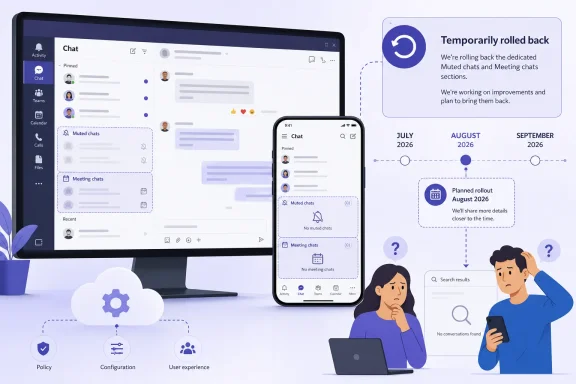
Microsoft has temporarily rolled back the Teams chat-list change that groups muted conversations and meeting chats into dedicated sections, but the feature has not been abandoned and it does have a revised timetable. Microsoft’s own updated Message Center notice for MC1269864 now says general availability is scheduled to begin in mid-August 2026 and finish by the end of September, across Teams desktop, web, Android, iOS, Mac, Worldwide, GCC, GCC High, and DoD tenants.
TechRadar correctly identified the July 20 rollback, but its conclusion that Microsoft had provided no indication of when the feature might return is already outdated. The same Microsoft notice that announces the rollback moves the expected rollout from an earlier May-to-July schedule to mid-August through September. The more important unanswered question is why the company withdrew it after parts of the change had apparently already reached users.
This is a small interface change with a surprisingly large support impact. Teams is altering where conversations appear, not merely adding another filter. For organizations that have spent the past year getting staff used to Teams’ combined chats-and-channels view, a system-controlled relocation of conversations is exactly the sort of change that creates “my chat disappeared” tickets even when no data or access has actually changed.
Microsoft originally published MC1269864 on April 3, 2026, describing two new built-in Teams sections: Muted chats, enabled by default, and Meeting chats, disabled by default. The initial target was early-to-mid May. Microsoft then revised the date several times: to the end of May, late June, the end of July, and finally to a mid-August start with completion by late September.
That sequence matters more than the terse rollback sentence. This was not a feature announced in July and immediately reconsidered; it was a staged rollout whose schedule had already slipped repeatedly before Microsoft said on July 20 that it had been “temporarily rolled back.” Microsoft has not published a technical explanation, known issue, or service-health advisory identifying the blocker.
The public record also shows a mismatch in how broadly the feature has appeared. Microsoft’s Teams support documentation currently describes muted chats as being placed in a Muted section at the bottom of the chat list by default, and it gives users an option to turn that section off. It also describes a setting for placing meeting chats in their own section. Meanwhile, the Message Center characterizes the feature as delayed and awaiting a new worldwide rollout window.
The likely explanation is a partial deployment followed by withdrawal or rework, rather than a clean all-or-nothing rollback. Public reports from Teams users and administrators in June described seeing muted chats consolidated at the bottom of the chat list while other users in the same organizations did not have the option. Microsoft has not confirmed the exact rollout rings affected, so IT teams should not treat the presence or absence of the controls in one client as evidence that the change is fully deployed—or permanently gone.
Microsoft’s documented behavior is particularly worth noting for users who assume muted means invisible. Muted chats can still appear in bold when they contain unread messages. The point is to lower their visual priority and keep them out of the main badge-driven workflow, not to turn them into an archive. A user who needs a chat to disappear until someone posts again still has the separate Hide command; hiding and muting are not equivalent actions.
The Meeting chats section serves a different purpose. It is intended to replace the existing Meeting chats filter at the top of the Teams chat-and-channels list. Rather than temporarily filtering the list to find meeting threads, users who enable the section would get a persistent area below their ordinary chats for those conversations.
There is a consequential difference in notification behavior. Microsoft says unread meeting chats would remain bold and continue contributing to badge counts. Muted chats may be moved out of the main flow, but meeting chats are still treated as attention-worthy. That makes the two sections less of a unified “declutter” system than their names suggest: one reduces ambient noise, while the other gives a frequently scattered class of conversations a permanent address.
That exception is important for project teams and service desks. An administrator may mute a noisy incident bridge, vendor channel, or high-volume support group while still keeping it in a manually created project section for quick reference. Automatically pushing that chat to the bottom of Teams would turn muting into a penalty for organization. Microsoft’s stated exception preserves the manual hierarchy, at least in the intended design.
Users will also be able to switch the built-in sections on or off and drag them to a different position in the list. The Muted chats section is planned to be on by default, while Meeting chats must be enabled by the user. The controls are expected under Teams Settings, in the Chats and channels area.
There is no tenant-level control for either section. Microsoft explicitly says no admin action is required and provides no admin policy to disable the experience, select a default position, force the Meeting chats section on, or prevent muted chats from being grouped. That is a deliberate product decision: this is a personal navigation preference, not an organizational configuration feature.
For IT departments, “no admin action required” should not be read as “no operational effect.” Helpdesk teams will need to distinguish a chat that has been hidden, muted, moved into a custom section, placed in Favorites, or automatically collected in a system section. Those actions leave different traces in the UI and have different notification consequences, but users will often describe all of them as a missing conversation.
Instead, support staff should first check whether the chat is in Favorites or a custom section, whether it has been muted or hidden, and whether the user has the relevant chat-section toggles available in Settings. A browser comparison can still be useful when a user reports inconsistent behavior, but it should be used to separate a client rendering issue from a feature-rollout difference—not as a ritual fix for a Microsoft-controlled UI flight.
Microsoft also has not said whether users who saw the sections before the rollback were returned to the previous Meeting chats filter consistently across every platform. The company’s support documentation continuing to describe the new behavior adds to that ambiguity. Organizations with standardized Teams training material should avoid revising screenshots or instructions until the August rollout actually begins and behavior is stable across their assigned update channels.
The revised date gives Microsoft roughly six weeks, from mid-August to the end of September, to finish the work it pulled back in July. Until then, the feature should be treated as a delayed navigation redesign, not a new way to silence unwanted Teams activity. Users can still mute conversations today; what remains unsettled is whether Teams can move those conversations out of sight without making them harder to find when they matter.
This is a small interface change with a surprisingly large support impact. Teams is altering where conversations appear, not merely adding another filter. For organizations that have spent the past year getting staff used to Teams’ combined chats-and-channels view, a system-controlled relocation of conversations is exactly the sort of change that creates “my chat disappeared” tickets even when no data or access has actually changed.
MC1269864 Has Been Delayed Repeatedly
Microsoft originally published MC1269864 on April 3, 2026, describing two new built-in Teams sections: Muted chats, enabled by default, and Meeting chats, disabled by default. The initial target was early-to-mid May. Microsoft then revised the date several times: to the end of May, late June, the end of July, and finally to a mid-August start with completion by late September.That sequence matters more than the terse rollback sentence. This was not a feature announced in July and immediately reconsidered; it was a staged rollout whose schedule had already slipped repeatedly before Microsoft said on July 20 that it had been “temporarily rolled back.” Microsoft has not published a technical explanation, known issue, or service-health advisory identifying the blocker.
The public record also shows a mismatch in how broadly the feature has appeared. Microsoft’s Teams support documentation currently describes muted chats as being placed in a Muted section at the bottom of the chat list by default, and it gives users an option to turn that section off. It also describes a setting for placing meeting chats in their own section. Meanwhile, the Message Center characterizes the feature as delayed and awaiting a new worldwide rollout window.
The likely explanation is a partial deployment followed by withdrawal or rework, rather than a clean all-or-nothing rollback. Public reports from Teams users and administrators in June described seeing muted chats consolidated at the bottom of the chat list while other users in the same organizations did not have the option. Microsoft has not confirmed the exact rollout rings affected, so IT teams should not treat the presence or absence of the controls in one client as evidence that the change is fully deployed—or permanently gone.
The Change Moves Chats; It Does Not Silence Them
The headline framing around “ignoring” chats oversells what the update does. Teams muting already suppresses ordinary notifications for a conversation. The proposed Muted chats section changes the location of those conversations in the chat list, collecting eligible muted chats at the bottom rather than letting them rise through the standard recent-conversation order.Microsoft’s documented behavior is particularly worth noting for users who assume muted means invisible. Muted chats can still appear in bold when they contain unread messages. The point is to lower their visual priority and keep them out of the main badge-driven workflow, not to turn them into an archive. A user who needs a chat to disappear until someone posts again still has the separate Hide command; hiding and muting are not equivalent actions.
The Meeting chats section serves a different purpose. It is intended to replace the existing Meeting chats filter at the top of the Teams chat-and-channels list. Rather than temporarily filtering the list to find meeting threads, users who enable the section would get a persistent area below their ordinary chats for those conversations.
There is a consequential difference in notification behavior. Microsoft says unread meeting chats would remain bold and continue contributing to badge counts. Muted chats may be moved out of the main flow, but meeting chats are still treated as attention-worthy. That makes the two sections less of a unified “declutter” system than their names suggest: one reduces ambient noise, while the other gives a frequently scattered class of conversations a permanent address.
User-Created Organization Is Supposed to Win
Microsoft has included one safeguard that should prevent the most frustrating version of the feature. Chats already placed in Favorites or in user-created sections are not supposed to move automatically into Muted chats or Meeting chats. In other words, Teams should respect an explicit user filing decision over its own category rules.That exception is important for project teams and service desks. An administrator may mute a noisy incident bridge, vendor channel, or high-volume support group while still keeping it in a manually created project section for quick reference. Automatically pushing that chat to the bottom of Teams would turn muting into a penalty for organization. Microsoft’s stated exception preserves the manual hierarchy, at least in the intended design.
Users will also be able to switch the built-in sections on or off and drag them to a different position in the list. The Muted chats section is planned to be on by default, while Meeting chats must be enabled by the user. The controls are expected under Teams Settings, in the Chats and channels area.
There is no tenant-level control for either section. Microsoft explicitly says no admin action is required and provides no admin policy to disable the experience, select a default position, force the Meeting chats section on, or prevent muted chats from being grouped. That is a deliberate product decision: this is a personal navigation preference, not an organizational configuration feature.
For IT departments, “no admin action required” should not be read as “no operational effect.” Helpdesk teams will need to distinguish a chat that has been hidden, muted, moved into a custom section, placed in Favorites, or automatically collected in a system section. Those actions leave different traces in the UI and have different notification consequences, but users will often describe all of them as a missing conversation.
The Rollback Leaves a Transitional Support Problem
The immediate practical advice is not to ask users to reinstall Teams, clear caches, or reset profiles simply because their muted or meeting chats look different. The intended behavior is cloud-configured and spans desktop, browser, and mobile clients; it is not presented by Microsoft as a local client setting that an administrator can reliably repair by rebuilding an installation.Instead, support staff should first check whether the chat is in Favorites or a custom section, whether it has been muted or hidden, and whether the user has the relevant chat-section toggles available in Settings. A browser comparison can still be useful when a user reports inconsistent behavior, but it should be used to separate a client rendering issue from a feature-rollout difference—not as a ritual fix for a Microsoft-controlled UI flight.
Microsoft also has not said whether users who saw the sections before the rollback were returned to the previous Meeting chats filter consistently across every platform. The company’s support documentation continuing to describe the new behavior adds to that ambiguity. Organizations with standardized Teams training material should avoid revising screenshots or instructions until the August rollout actually begins and behavior is stable across their assigned update channels.
The revised date gives Microsoft roughly six weeks, from mid-August to the end of September, to finish the work it pulled back in July. Until then, the feature should be treated as a delayed navigation redesign, not a new way to silence unwanted Teams activity. Users can still mute conversations today; what remains unsettled is whether Teams can move those conversations out of sight without making them harder to find when they matter.
References
- Primary source: TechRadar
Published: August 7, 2026 at 10:05 AM UTC
Loading…
www.techradar.com - Related coverage: support.microsoft.com
Loading…
support.microsoft.com - Related coverage: windowsforum.com
Loading…
windowsforum.com - Related coverage: techcommunity.microsoft.com
Loading…
techcommunity.microsoft.com - Related coverage: support.microsoft.com
Loading…
support.microsoft.com - Related coverage: techcommunity.microsoft.com
Loading…
techcommunity.microsoft.com - Related coverage: microsoft.com
Microsoft 365 Roadmap | Microsoft 365
The Microsoft 365 Roadmap lists updates that are currently planned for applicable subscribers. Check here for more information on the status of new features and updates.www.microsoft.com
- Related coverage: cdn.techcommunity.microsoft.com
Loading…
cdn.techcommunity.microsoft.com - Related coverage: spaces.collab365.com
Loading…
spaces.collab365.com - Related coverage: windowsforum.com
Loading…
windowsforum.com - Related coverage: endsight.net
Loading…
www.endsight.net - Related coverage: forum.buero-kaizen.de
Loading…
forum.buero-kaizen.de - Related coverage: mwpro.co.uk
Loading…
mwpro.co.uk - Related coverage: linkedin.com
Loading…
www.linkedin.com - Related coverage: m365admin.handsontek.net
Loading…
m365admin.handsontek.net - Related coverage: mwpro.co.uk
Loading…
mwpro.co.uk - Related coverage: utwente.nl
New Features in Teams and Microsoft 365 | Monthly Updates | University of Twente | Service Portal | University of Twente
Microsoft Teams is a platform that doesn’t stand still and it’s not easy to keep track of what has changed. That is why we have listed the most interesting new features for employees and students of the University of Twente. This page will be updated every month.www.utwente.nl - Related coverage: kbworks.eu
Loading…
kbworks.eu - Related coverage: linkedin.com
Loading…
www.linkedin.com