

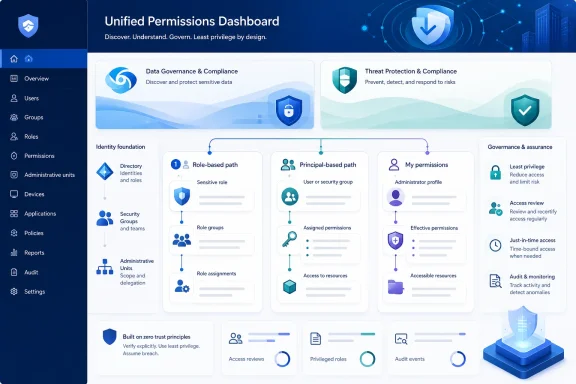
The change does not alter a single existing role group, role assignment, or permission. It changes the administrative evidence available in the portal: an administrator can now start with a sensitive capability, a person or group, or their own identity and see the related Purview role-group assignments without manually walking the relationship in reverse.
Microsoft described the update in Message Center post MC1311975 as a default-enabled UI enhancement for the Microsoft Purview compliance portal and the Microsoft Defender portal. The company says no preparation or tenant-level action is required. That is accurate as far as deployment goes, but it understates the practical work many compliance teams should do once the views appear: validate the effective access that has accumulated through default role groups, custom role groups, Entra roles, and group membership.
The rollout status is ahead of the deployment timetable
The public roadmap says the feature entered preview in June 2026 and reached general availability in July. Its updated entry now calls the change launched and lists all four cloud environments: commercial Worldwide, GCC, GCC High, and DoD.
Microsoft’s June 25 Message Center update supplies the more useful operational date range. It says public preview would run from mid-June through mid-July, followed by general availability beginning in mid-July and completing by mid-August. The distinction is material for administrators opening the portal today and finding the old experience: their tenant may simply be in the last segment of the rollout, rather than excluded from the feature.
Microsoft has not published a tenant-by-tenant rollout tracker, a build number, or an admin control to force-enable the change. The roadmap also lists no platform requirement. For organizations that need to update operating procedures or evidence collection immediately, that leaves the portal itself as the only reliable deployment check.
The visible locations are slightly broader than the short roadmap description suggests. The updated experience appears under Settings > Roles and scopes > Role groups in the Purview portal; Microsoft also says corresponding views are appearing on the Settings page in Microsoft Defender. Teams that administer compliance permissions in one portal and investigate security operations in the other should expect the same basic lookup capability, not a new permissions model.
The new views expose relationships that already existed
Microsoft Purview uses role-based access control. A role grants a set of actions; a role group bundles roles; and users or groups become members of that role group. That seems straightforward until an organization has several compliance solutions, custom role groups, Entra administrator roles, administrative-unit scopes, and security-group assignments layered together.
Before this change, an admin could open a role group and inspect its members and included roles. The difficult task was answering the inverse questions quickly:
- Which role groups include a particular sensitive role?
- Which Purview roles and role groups reach a given user or Entra security group?
- Why does my administrator account have — or lack — access to this page or investigation?
Microsoft’s new lookup modes target those questions directly. The Roles view lets an administrator begin with a Purview role and identify the role groups containing it. The Members view begins with the assigned identity and shows how that identity received access. My permissions exposes the signed-in administrator’s own assigned role groups, including role sources and, where applicable, administrative-unit information.
Independent Microsoft 365 administrator Tobias Asböck, writing at Topedia, reported that the refreshed Role groups area is divided into Role groups, Roles, Members, and My permissions pages. His review says the role-group list now shows counts for included roles and assigned users or Entra ID security groups, while the Members view identifies how an assignment was made. Microsoft’s own announcement confirms the three new lookup directions but does not publish the same level of page-by-page detail.
This is a usability release, but it addresses a real governance burden. A permissions review is unreliable if staff must know in advance which role group to inspect. Starting from the person being reviewed or the capability being questioned is the way auditors and incident responders actually work.
It improves visibility, not effective-permission calculation
The most important limit is that the new UI does not change Purview’s underlying authorization behavior. Microsoft explicitly says existing role-group assignments and permissions remain unchanged. It will not remove stale members, narrow a broad role group, correct an accidental Entra assignment, or create a time-bounded approval process.
That matters because Purview access can still be broader than a role-group screen initially implies. Microsoft’s current Purview permissions documentation states that an Entra role can take precedence at runtime over a scoped Purview role-group assignment. In Microsoft’s example, a user assigned the Compliance Administrator Entra role and a scoped Compliance Administrator role group receives unscoped access from the Entra role. The same principle can apply when Entra and Purview permissions overlap.
The new My permissions view should make these conditions easier to spot, particularly where an Entra administrator role contributes access. But administrators should not treat it as an independent calculation engine or as proof that every downstream service permission is covered. Microsoft is clear that the Purview portal manages access to compliance and governance features available within Purview, while some service-specific permissions — including certain archiving, auditing, and retention-policy permissions — remain managed in the Exchange admin center.
There is another timing issue for organizations using just-in-time access. Microsoft documents that when a security group assigned to a Purview role group is activated through Microsoft Entra Privileged Identity Management for Groups, effective access in Purview can take up to two hours to apply. The new pages can make it clearer whether a group-based relationship exists; they do not eliminate that propagation delay.
Nor do they expand who may manage Role groups. Microsoft says viewing and modifying Role groups requires a Global Administrator or the Purview Role Management role, which is assigned only through the Organization Management role group. A compliance analyst who lacks those rights may benefit from permissions transparency only if their existing role lets them use the relevant view. Microsoft’s announcement calls the feature an improvement for admins, not a broad new self-service permissions audit tool for all users.
The best first use is a targeted access review
The UI change is default-on, so no deployment project is necessary. A focused review is still worthwhile, especially for tenants where access to eDiscovery, Audit, Insider Risk Management, Data Loss Prevention, Information Barriers, or data-governance functions has grown over several years.
Start with sensitive roles rather than attempting to review every default group at once. Use the Roles view to identify every group that carries high-impact capabilities, then compare group membership with the individuals and teams that should retain that authority. From there, use the Members view to check whether access is direct, group-derived, or associated with another administrator assignment.
The practical benefit is speed, but the governance benefit is stronger: a reviewer can preserve the chain of reasoning. Instead of recording that “User A appears in Group B,” the review can document the route from a user or group to a role group and the role that grants the capability. That is more useful during a compliance review and far more useful when an administrator is troubleshooting an unexpected denial or overreach.
Microsoft recommends least-privilege role assignment in its Purview documentation and specifically cautions organizations to minimize the number of Global Administrators. The new interface gives teams a faster way to find candidates for that cleanup, but it does not determine whether a particular role remains justified. That requires review of job responsibilities, case assignments, administrative-unit scope, and permissions administered outside Purview.
Microsoft’s documentation has not fully caught up with the launch
There is a small but notable documentation gap. Microsoft’s Message Center notice said the Purview permissions documentation would be updated before rollout. The current Microsoft Learn article does describe Roles and scopes, built-in and custom role groups, Entra role mappings, PIM for Groups, precedence behavior, and the steps to add or remove members. It does not, however, visibly provide a dedicated explanation of the new Roles, Members, and My permissions views named in the rollout notice.
That omission does not change the product behavior, but it makes internal runbook updates more important. Help-desk and security teams that have screenshots or instructions based on the former Role groups interface should update them after confirming what their tenant displays. Microsoft specifically advised customers to inform compliance and security administrators and revise documentation that references the old UI.
For now, the concrete consequence is straightforward: Purview administrators should see a more navigable map of permissions without any automatic reduction in privilege. As the rollout completes by mid-August 2026, the first task is to use that map to check the access already in place — particularly where Purview role groups, Entra roles, administrative units, and PIM-enabled groups meet.