
The gap matters because “meeting transcription” now covers two very different jobs. One is post-meeting transcription: uploading a recording, correcting speakers, and exporting a Word document or caption file. The other is a live meeting assistant that connects to Outlook and Microsoft Teams, enters calls as a guest or uses a desktop capture app, creates a transcript in real time, and pushes a summary into a CRM or Teams channel. A tool can be very good at the first and poorly suited to the second.
Vook, the only named recommendation in the supplied article, belongs primarily in the first group. Its own documentation emphasizes browser uploads of audio and video, speaker identification, AI summaries, and exports including DOCX, PDF, Markdown, HTML, and SRT. It supports six languages—English, French, Spanish, Italian, Portuguese, and German—not the broad multilingual coverage implied by the unnamed “linguistic precision” alternative in BYOTHE’s copy. Its current site also advertises a free daily transcript, a $13-per-month plan with 10 transcription hours, and a $26 unlimited plan.
For organizations already living in Teams, the better shortlist starts with the question of where the audio, transcript, and meeting metadata must remain—and whether IT is willing to admit an external recording bot into calls.
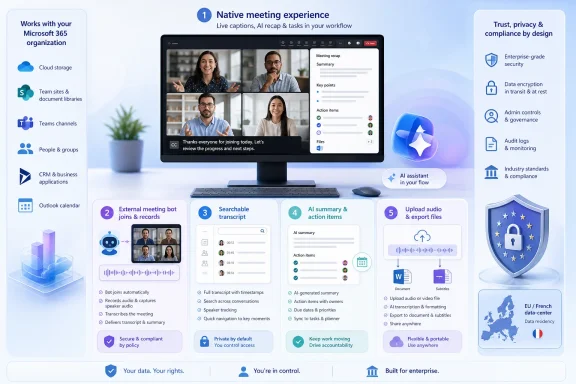 Microsoft Teams transcription and Microsoft 365 Copilot
For a Windows-first organization, Microsoft Teams’ built-in transcription is the default choice before a third-party service enters the conversation. Teams can record and transcribe calls, while Microsoft 365 Copilot can use the meeting content for recap summaries and follow-up prompts, depending on licensing and the organizer’s settings. Microsoft’s current Teams documentation also makes clear that disabling Copilot for a meeting disables recording and transcription with it.
The practical advantage is governance, not novelty. Meeting recordings remain subject to Microsoft 365 storage permissions, OneDrive and SharePoint controls, Purview retention, eDiscovery, and the tenant’s established identity and conditional-access policies. A security team that has already approved Teams does not automatically approve every external AI note-taking provider connected to employees’ Outlook calendars.
There is a catch that users often discover only after rollout: recording and transcription create records that must be managed deliberately. Microsoft says Teams messages, call logs, and other retained content can be governed by retention policies, and legal or eDiscovery holds can suspend ordinary deletion. Turning on transcription is therefore not simply a personal productivity preference; it may alter the organization’s discoverable information footprint.
Teams transcription is the strongest fit when the meeting is already hosted in Teams, participants should see a native disclosure that transcription is active, and the organization has Microsoft 365 licensing and compliance administration in place. It is less compelling for consultants who need one shared archive across Teams, Zoom, Google Meet, Webex, and in-person recordings.
Fireflies.ai for Teams-to-workflow automation
Fireflies.ai is the most operationally useful choice for teams that want meeting output to travel beyond Teams. Its documentation says it can automatically join Teams meetings, produce transcripts and summaries, and post results to selected Teams channels. It also integrates with common downstream systems used by sales, support, recruiting, and project teams.
But Fireflies’ Teams integration exposes a deployment issue that generic “best tools” lists usually skip: its meeting bot is a guest. Fireflies’ July 2026 setup guide tells administrators to enable guest access, configure lobby bypass, consider anonymous join settings, and account for Microsoft’s external-bot detection. In some environments, the bot may appear to organizers as an unverified or suspected external participant awaiting admission.
That is not a defect; it is Teams enforcing a boundary between the tenant and an external recorder. It is, however, a reason to reject a self-service rollout. A user who merely connects a calendar can create an unapproved path for meeting audio, participant names, summaries, and action items to leave the Microsoft 365 environment.
Fireflies says its security program includes SOC 2 Type II, GDPR, and HIPAA-related controls, encryption at rest and in transit, optional private storage, and enterprise retention controls. Those claims are relevant, but they do not eliminate the need to review the data-processing agreement, regional processing terms, deletion behavior, and app permissions. The service says it stores user content including transcripts, summaries, recordings, and related derivatives; those are precisely the assets a company needs to classify before approving automatic capture.
Choose Fireflies where the goal is to turn meetings into distributed work: notes in Teams, summaries in Slack, records in Salesforce or HubSpot, and a searchable shared archive. Do not choose it because “AI transcription” sounds harmless; its calendar connection and guest-bot model deserve an administrator-approved configuration.
Otter.ai and Fathom for individual meeting capture
Otter.ai remains a solid general-purpose option for employees who attend meetings across platforms. Otter’s Notetaker can automatically join Zoom, Google Meet, and Microsoft Teams meetings, and its current feature set includes real-time transcription, automated summaries, slide capture, and conversational search over meeting content. That makes it useful for managers, researchers, consultants, and account teams who need to retrieve a decision made weeks ago rather than merely download a transcript.
The limitation is visible by design: Otter’s Notetaker joins the meeting. Participants may see a bot participant, and hosts may block or remove it. For external customer meetings, that can be either a desirable disclosure mechanism or a distraction that changes the tone of the call. Organizations should set a policy on who may authorize recording and what must be communicated to attendees before relying on automated joining.
Fathom is the stronger alternative for individuals and smaller teams that want polished meeting recaps without building a larger meeting-intelligence program. Fathom’s support material confirms that its desktop application can join Microsoft Teams calls directly, and its integrations page says it produces transcripts, summaries, and action items for Teams meetings. It also supports CRM synchronization for teams that want call details attached to contacts and opportunities.
The practical dividing line between Otter and Fathom is workflow rather than basic transcription quality. Otter is better suited to people who want a broad, searchable repository and cross-meeting AI queries. Fathom is attractive when the desired output is a clean post-call recap, highlight, and follow-up that can be shared quickly. Neither should be deployed tenant-wide without checking identity, retention, sharing, and data-residency terms; individual-friendly sign-up flows are often where shadow IT begins.
Vook for uploaded recordings and European data residency
Vook earns a place on a real five-tool shortlist, but not for the reason BYOTHE suggests. Its value is the upload-and-export workflow for users who already have a recording and need it converted into editable, searchable text. That includes recorded Teams meetings, interviews, hearings, focus groups, training sessions, and field recordings captured away from a desktop.
Vook says its files are hosted in France, encrypted at rest with AES-256, not used to train AI models, and available under a data-processing agreement on request. It also says uploaded audio is automatically deleted after seven days, while users can request deletion sooner. Those statements make it worth evaluating for European organizations or professionals who need an EU-hosted option and do not want a virtual attendee joining a meeting.
Its limitation is equally important: the product material reviewed for this article centers on uploaded files rather than a documented Outlook-calendar, Microsoft Teams, Zoom, or Google Meet meeting-assistant integration. That is a strength for controlled, after-the-fact processing but a mismatch for someone expecting live captions, automatic Teams attendance, or instant channel summaries.
Vook’s advertised “up to 99%” accuracy applies to clear recordings in supported languages. Treat that as a vendor best-case claim, not a guaranteed result. Overlapping speech, poor conference-room microphones, technical names, and strong accents remain the routine failure points of automated transcription. For minutes, legal records, disciplinary meetings, or customer commitments, the transcript needs a human review before it becomes the official account.
The five tools are not interchangeable
A defensible top-five list for Windows users is therefore Microsoft Teams transcription with Microsoft 365 Copilot, Fireflies.ai, Otter.ai, Fathom, and Vook. They are not five versions of the same service:
- Microsoft Teams is the first choice when native Microsoft 365 governance and Teams-hosted meetings matter more than cross-platform automation.
- Fireflies.ai is the choice for Teams-connected meeting capture that must feed collaboration channels, CRMs, and team workflows.
- Otter.ai suits individuals and teams that value searchable meeting history and automated capture across Teams, Zoom, and Google Meet.
- Fathom is a practical fit for concise recaps, highlights, action items, and sales or client follow-up.
- Vook is best treated as a secure, EU-hosted transcription service for uploaded recordings rather than a live meeting bot.
The mistake in the BYOTHE article is not recommending Vook. The mistake is presenting a product category as if feature labels alone were enough to choose among tools. The decision turns on where meetings happen, whether an external bot can enter them, where the resulting records reside, who can search them, and how long they survive. In a Microsoft 365 environment, those are deployment decisions for IT and compliance—not details to resolve after employees have already connected their calendars.
