
The deadline comes from Microsoft 365 Message Center advisory MC1441775, published July 28, and was subsequently detailed by Neowin and Windows Central. The immediate operational problem is not simply that a background migration needs time: Microsoft’s own documentation says the process is triggered when the relevant user starts a Whiteboard session in Teams, a web browser, or the Windows app. Mobile clients do not trigger the process.
For admins, that turns this into an ownership and activation exercise, not a passive retention setting. A board owned by a departed employee, a user on leave, or someone whose OneDrive was never provisioned may remain stranded unless the tenant identifies it and transfers ownership before the cutoff.
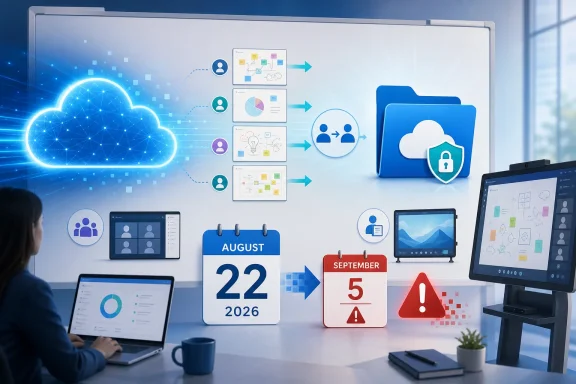 August 22 ends migration, not just support
Microsoft’s timetable divides the retirement into three separate events:
- On August 22, 2026, migration tooling for legacy enterprise Whiteboards is retired, and people using personal Microsoft accounts lose the ability to create or edit Whiteboards.
- On September 5, 2026, remaining legacy Whiteboards are deleted permanently.
- On September 14, 2026, Microsoft deprecates the standalone Whiteboard applications, including desktop and mobile clients, for enterprise use.
The critical distinction is that September 5 is a deletion date, not an extra migration deadline. An organization that waits until late August may still be able to view a legacy board for a short period, but Microsoft says there will be no migration option once the tooling is gone on August 22.
Microsoft’s advisory also uses broader language than the usual “boards created before 2022” shorthand. Most commercial Whiteboard files created after the 2022 storage transition are already OneDrive-backed, but Azure storage can still appear in newer environments. Microsoft’s support documentation specifically identifies Whiteboards initiated on Surface Hub or Microsoft Teams Rooms devices as an exception that can remain Azure-backed. A tenant that searches only by creation date can therefore miss meeting-room boards that users still rely on.
This is especially relevant for organizations that adopted Surface Hubs for workshops, design sessions, clinical huddles, or engineering reviews. Those boards may have outlived their original meeting organizers and may not surface in an ordinary user’s OneDrive Whiteboards folder.
The migration trigger has an owner problem
Microsoft describes the move as automatic, but automatic has conditions. Once the rollout is enabled for a tenant, the migration begins when a user starts a Whiteboard session through Teams, the web experience, or the Windows application. Microsoft says the process may continue across sessions if it is interrupted.
The catch is in Microsoft’s own migration FAQ: migration can be triggered only by the owner of the Azure Whiteboard. A colleague who can see a shared board is not necessarily sufficient to move it. If the owner is dormant or gone, an administrator must transfer ownership to an active user, who can then open Whiteboard and cause the migration to begin.
Microsoft’s WhiteboardAdmin PowerShell module provides the tools for that work. Get-WhiteboardsForTenant can enumerate Azure-hosted boards for a tenant by geography, while Get-WhiteboardOwners helps identify owners and Invoke-TransferAllWhiteboards can transfer a departed user’s boards to another account. The module requires either Global Administrator or SharePoint Administrator privileges, although Microsoft recommends using the least-privileged role that can perform the task.
There is a second caveat that makes a last-minute discovery run less comforting than it sounds: Microsoft documents that Get-WhiteboardsForTenant data is pre-calculated about every two weeks and is not real-time. It is useful for finding the long tail of old content and its owners, but it cannot serve as a minute-by-minute proof that a migration campaign is complete.
Administrators should treat an inventory export as a starting point, then verify the result where it matters: migrated boards should appear as .whiteboard files in the owner’s OneDrive for Business, normally in the Whiteboards folder. Microsoft also provides mapping cmdlets for checking whether Azure boards have corresponding migrated OneDrive boards.
OneDrive changes governance as much as storage
Microsoft says the Azure-to-OneDrive move improves security, revision history, eDiscovery, and availability of new Whiteboard features. Its published comparison is more concrete: Azure-based Whiteboards lack capabilities including retention policies, eDiscovery, data loss prevention, a recycle bin, local data residency, collaborative cursors, a laser pointer, roster information, and last-edited details.
That changes the practical status of Whiteboard content. In Azure, boards behaved more like content held inside the Whiteboard service. In OneDrive, they become files that can be found, shared, moved, retained, and governed through the Microsoft 365 storage model.
That also introduces a permission check that should not be skipped. Microsoft warns that moving a .whiteboard file within OneDrive or to a SharePoint site can change its permissions, and recommends re-sharing it with the intended audience afterward. Teams links and meeting habits built around the legacy board picker may still need validation after the data move.
For compliance teams, the move is broadly beneficial because Whiteboard content can finally fall under controls that are familiar to OneDrive and SharePoint administrators. But that benefit begins only after migration. Boards deleted on September 5 will not become newly discoverable OneDrive records; they will simply be gone.
Recovery documentation does not rescue unmigrated boards
Microsoft’s existing Azure-to-OneDrive migration support article has language about recovering original Azure boards for a limited period after a successful migration. Its documentation is internally inconsistent on the exact window: one section says 30 days, while the FAQ and the Restore-Whiteboard PowerShell reference say approximately 90 days.
That discrepancy deserves attention, but it should not distract from the August 22 deadline. The recovery flow concerns an original Azure copy after a board has successfully migrated to OneDrive. It is not a safety net for boards that remain unmigrated when Microsoft withdraws the migration service, nor for boards permanently deleted after September 5.
Microsoft’s Message Center notice is unambiguous on the latter point: after deletion, there is no recovery or migration option. Admins should preserve evidence of successful migration now rather than assume the later recovery language will apply.
A practical completion check should include:
- Identify Azure-backed boards, including content associated with Surface Hub and Teams Rooms workflows.
- Match each board to an active owner, transferring ownership where the original owner has left or is unavailable.
- Have the active owner open Whiteboard through Teams desktop, Teams on the web, a browser session, or the Windows app before August 22.
- Confirm the migrated board appears in OneDrive and can be opened by the intended collaborators.
- Record or remediate any migration errors, particularly missing OneDrive provisioning and insufficient OneDrive storage.
- Export irreplaceable material separately where business continuity requires an archive independent of the Whiteboard service.
Microsoft’s support guidance says a missing OneDrive assignment and a full OneDrive are both conditions that can prevent migration. Those are ordinary Microsoft 365 administration issues, but this retirement gives them a hard deadline.
Personal-account users face a different shutdown
The enterprise migration is separate from the change affecting people who use Whiteboard with a personal Microsoft account. Starting August 22, those users can no longer create or edit boards. They can view and export content until September 5, when Microsoft says their remaining legacy Whiteboards will also be deleted.
Windows Central reported that Whiteboard itself has begun presenting this timeline to affected personal-account users. Microsoft is not retiring Whiteboard altogether for commercial Microsoft 365 customers; it is steering supported enterprise use toward OneDrive-backed boards accessed through Microsoft Teams. But a personal Microsoft account is not converted into a OneDrive for Business Whiteboard environment by this deadline.
That distinction matters in mixed environments. Contractors, unmanaged devices, executives using personal accounts for ad hoc planning, and users who signed into the Windows app with the wrong identity may have content outside the organization’s normal retention and discovery processes. Enterprise administrators cannot assume their tenant-level migration campaign captures those boards.
By August 22, the question for IT is no longer whether Whiteboard’s Azure-to-OneDrive migration is a desirable cleanup project. It is whether every board the organization needs has an active owner, an available OneDrive destination, and a verified OneDrive-backed copy before Microsoft removes the only supported route out.
