
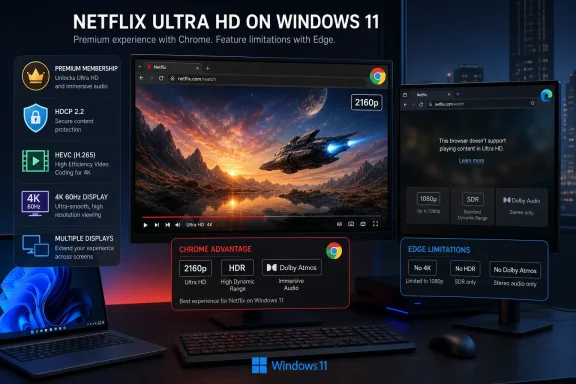
Netflix now lists Chrome 117 or later as supporting up to Ultra HD on Windows. Its Windows support page also retains Microsoft Edge and the Netflix app as the two routes that can deliver 4K with HDR. Chrome’s new ceiling is 4K; Netflix does not list HDR capability next to Chrome, and it says Dolby Atmos on Windows is available through Edge or the Netflix app.
That leaves a simple conclusion for Windows users: Chrome is now an eligible 4K path for compatible hardware, but Edge remains the higher-feature browser choice if the display, title, and subscription support HDR. Users who moved to Edge solely to avoid Chrome’s prior resolution cap can reconsider; users seeking the fullest PC playback stack should not assume Chrome has reached parity.
 Chrome 117 Is a Requirement, Not the Date the Change Began
Netflix specifies Chrome version 117 or newer, which sounds like a browser rollout marker but is not. Google promoted Chrome 117 to the stable desktop channel on September 12, 2023. The version has therefore been broadly available for nearly three years, and nearly every actively maintained Chrome installation will already exceed it.
The meaningful change appears to be Netflix’s server-side entitlement or its documentation, rather than a new Chrome binary that users must install this week. Independent reporting traced the discovery to a social-media post in late July, followed by Netflix’s revised compatibility pages. Netflix has not published a consumer announcement, a rollout date, a changelog entry, or an explanation of why Chrome 117 is the listed floor.
That omission matters for troubleshooting. Updating Chrome is sensible, but a current build alone does not unlock a 4K stream. A machine can be running Chrome 140 or later and still be limited to 1080p or less because Netflix evaluates the entire protected playback chain: operating system, GPU or processor, codec support, display connection, display capability, subscription, account setting, and connection speed.
Netflix’s wording also leaves no basis to conclude that 4K was available to all Chrome 117 users since 2023. The browser version is simply the stated minimum requirement. The public record shows the capability was noticed in July 2026 and formally documented by Netflix afterward; it does not establish precisely when the service began enabling it.
Windows 11 Is Required for 4K, Even Though Netflix Still Supports Windows 10
Netflix’s general browser requirements say its service works on Windows 10 and Windows 11. That is not the same as supporting Ultra HD on both. The separate Ultra HD checklist requires Windows 11 with the latest updates installed.
This is an important distinction for managed fleets and home users who have stayed on Windows 10. A Windows 10 PC can run Chrome 117 or newer and still watch Netflix, but it does not meet Netflix’s published 4K qualification. The same is true for Windows 8 and 8.1 systems, which Netflix says are limited to standard definition playback.
For a Windows 11 PC, Netflix’s current 4K checklist requires all of the following:
- A Netflix Premium plan, with video playback quality set to Auto or High.
- A stable internet connection of at least 15 Mbps.
- Google Chrome, Microsoft Edge, or the Netflix app for Windows.
- An Nvidia GeForce GTX 1050-class GPU or newer, an AMD Radeon RX 400-series GPU or newer, or an Intel 7th-generation Core processor or newer or an AMD Ryzen processor.
- A built-in 4K 60Hz panel or a 4K 60Hz external display using an HDCP 2.2-compatible connection.
- HEVC capability, which may mean installing Microsoft’s paid HEVC Video Extensions package on some Windows 11 systems.
The GPU and CPU wording is easy to misread. Netflix does not require a discrete graphics card in every PC: an Intel 7th-generation Core system or newer, or an AMD Ryzen system, may qualify with compatible integrated graphics and drivers. But Netflix specifically warns that some Windows 11 devices lack the HEVC codec needed for Ultra HD, so sufficiently new silicon does not guarantee successful playback.
The display rules are stricter than “own a 4K monitor.” Netflix requires a 4K, 60Hz display and HDCP 2.2-compatible connection for external screens. More notably, its documentation says every active display must meet the requirements in a multi-monitor configuration. A secondary 1080p monitor, an old dock, an incompatible HDMI port, a receiver, or a capture device can therefore be enough to break the protected path and deny 4K playback.
This is the consequence Netflix does not foreground: the new Chrome support will be most useful to people who already had a fully qualified 4K setup and were switching browsers merely to get the stream they were paying for. It is not a broad 4K unlock for Windows PCs with a 4K display attached.
Chrome Reaches 4K, but Edge Retains the Better Windows Feature Set
Netflix’s own Windows resolution table makes the browser divide unusually clear. Google Chrome is listed for “up to Ultra HD (4K or 2160p).” Microsoft Edge is listed for “up to Ultra HD (4K or 2160p) with HDR.” The Windows Netflix app gets the same 4K-with-HDR designation as Edge.
For HDR-equipped displays, that difference can be more visible than the shift from a high-bitrate 1080p stream to 4K, depending on screen size and viewing distance. Netflix separately says HDR requires Windows 11, supported GPU hardware, current graphics drivers, an HDR-capable display with HDR enabled, the appropriate plan, and at least 15 Mbps. It again notes that every active display must qualify.
The audio split is equally material for a PC connected to an AVR, soundbar, or Atmos-capable display. Netflix says select Dolby Atmos titles are available on compatible Windows machines when using Edge or the Netflix app. Its Chrome documentation makes no corresponding Atmos promise.
In other words, Chrome’s upgrade removes an artificial browser detour for SDR 4K viewing. It does not make the three Windows playback clients equivalent:
| Windows client | Maximum Netflix video listed by Netflix | HDR listed by Netflix | Dolby Atmos listed by Netflix |
|---|---|---|---|
| Google Chrome 117 or later | Up to 4K | No | No |
| Microsoft Edge 118 or later | Up to 4K | Yes | Yes, on supported systems and titles |
| Netflix app for Windows | Up to 4K | Yes | Yes, on supported systems and titles |
| Firefox 111 or later | Up to 1080p | No | No |
| Opera 92 or later | Up to 1080p | No | No |
The Netflix app itself deserves a qualification. Netflix says its Windows app requires Edge to be installed, and it is no longer the independent native client many users may remember. Still, Netflix continues to list it separately for 4K HDR and Atmos support.
Chromebook Support Is More Restricted Than the Initial Reports Indicate
PCMag UK and Mezha correctly identified ChromeOS as a platform where Chrome can play Netflix in 4K, but Netflix’s detailed Chromebook support page imposes a requirement missing from both summaries: the device must be a Chromebook Plus laptop.
Netflix does not say that any Chromebook running ChromeOS 76 or newer qualifies. Its explicit Ultra HD checklist calls for a Chromebook Plus laptop, up-to-date ChromeOS 76 or later, Chrome, a 4K 60Hz built-in or external display, HDCP 2.2 for external connections, Premium-level Ultra HD access, Auto or High playback quality, and at least 15 Mbps.
That is a substantial limitation because many existing Chromebooks have 1080p displays, lack a qualifying external-output path, or are not Chromebook Plus models. The page is titled for Chromebook and Chromebox use, yet its 4K requirements name a Chromebook Plus laptop rather than a Chromebox. Netflix does not explain whether any Chromebox configuration qualifies, so administrators and buyers should not infer 4K eligibility from ChromeOS version alone.
There is another counterintuitive result: Netflix says the Android-based Netflix app from Google Play tops out at 720p on Chromebook and Chromebox hardware, while Chrome in the browser can reach 4K on a qualifying Chromebook Plus device. For the small group with compatible hardware, the browser is therefore the preferred Netflix client on ChromeOS.
macOS and Linux Chrome Users Remain on Lower Tiers
The Chrome change is platform-specific. Netflix’s current support matrix caps Chrome at 1080p on macOS, even with Chrome 117 or later. Mac users seeking 4K must use Safari 14 or newer, run macOS 11 or later for Ultra HD, and satisfy Netflix’s separate hardware and display conditions. Microsoft Edge on macOS is listed at only 720p.
Linux has received no corresponding upgrade. Netflix lists Chrome, Firefox, and Edge at a maximum of 720p on GNU/Linux, while Opera can reach 1080p. Netflix explicitly says it cannot guarantee operation or provide troubleshooting support across the many Linux configurations.
For a Windows enthusiast, that makes the new Chrome status more consequential than it initially appears. Chrome now joins Edge as a 4K-capable browser on Windows, while Microsoft’s platform remains one of the few desktop environments where Netflix publishes a route to browser-based Ultra HD. But anyone paying $26.99 per month for Netflix Premium and expecting the entire advertised 4K HDR package should still use Edge or the Windows app, verify HDCP 2.2 and HEVC support, and make sure every connected display meets the requirement before blaming Chrome.
