
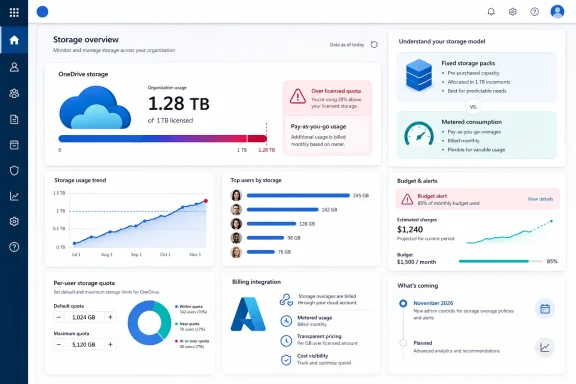
The practical change is narrower than a tenant-wide storage expansion. This is a per-user control: an administrator connects an Azure-backed pay-as-you-go billing policy, then raises the storage limit for particular OneDrive accounts. Microsoft bills the usage above that user’s included license allowance, rather than billing for the entire configured maximum. A user licensed for 1 TB whose limit is raised to 3 TB, for example, incurs charges only after crossing 1 TB—and only for the amount actually used above it.
That distinction makes the service a useful new option for organizations with a small number of video producers, CAD users, litigation teams, research staff, or executives whose working files genuinely exceed ordinary OneDrive entitlements. It is also a response to a more immediate Microsoft 365 change: Microsoft has tightened enforcement of license-based OneDrive quotas, with over-limit accounts becoming read-only until the storage problem is resolved.
 A new metered option beside capacity packs
Microsoft’s roadmap describes the feature as a consumption-based meter that lets admins decide which OneDrive accounts can grow beyond their licensed limits. Microsoft Learn calls the service Microsoft 365 OneDrive Storage and provides considerably more operational detail than the roadmap entry.
The new product sits alongside, rather than replaces, the existing OneDrive Extra Storage add-ons. Those add-ons are fixed capacity packs—100 GB, 500 GB, or 1 TB through 6 TB—that are assigned to a single licensed user. They can be reassigned or cancelled, but cannot be split among users. The pay-as-you-go option instead treats the added portion as variable monthly consumption.
For organizations with predictable, permanently high storage needs, fixed packs may remain simpler to budget and administer. The metered service is better suited to users whose storage needs rise and fall, or to situations where IT does not want to pre-purchase a large block of capacity for an uncertain period.
Microsoft has not published the actual per-GB price in the public documentation attached to this rollout. That omission matters. Administrators can evaluate the control model now, but cannot make a meaningful comparison against capacity packs, a license upgrade, SharePoint storage, or an archival workflow until pricing appears in the Microsoft 365 admin center or a formal rate card.
The admin switch is a budget boundary, not a blanket quota increase
The new capability requires more than a SharePoint administrator changing a OneDrive quota. Microsoft’s documentation says the tenant must have an Azure subscription and resource group, and the person setting up billing needs Owner or Contributor permissions for both. The operator also needs either SharePoint Administrator or Global Administrator access in Microsoft 365.
That setup is a meaningful governance point. Storage changes can be delegated to SharePoint admins, but establishing the billing link requires Azure-side authority. Finance, cloud-platform, and Microsoft 365 teams should decide who owns that workflow before anyone turns it on.
Microsoft says admins can set budget thresholds and cost alerts for pay-as-you-go services. Those should be treated as a first-day requirement, not an optional clean-up task. A generous quota ceiling does not itself generate a charge, but it permits continued growth; a large media library, a sync loop, or an unmonitored retention workload can turn a temporary exception into ongoing consumption.
The supported ceiling remains 25,600 GB per user. That is essentially 25 TB in Microsoft’s quota convention. The new service therefore does not create unlimited OneDrive accounts, and it does not eliminate the need to understand a user’s workload before raising the limit.
Administrators should also remember what counts toward OneDrive usage. Microsoft’s storage-enforcement guidance says version history, recycle bins, and Preservation Hold libraries are included in storage calculations. A user who appears to have less than 1 TB of visible files can still be over quota because versions or compliance-retained content are consuming the account’s space.
The timing and government-cloud labels do not yet agree
There is a discrepancy in Microsoft’s public records that government and regulated-cloud customers should not overlook. The updated roadmap metadata submitted for item 562352 lists Worldwide, GCC, GCC High, and DoD among the cloud instances and sets general availability for November 2026.
But Microsoft Learn’s storage purchasing documentation says Microsoft 365 OneDrive Storage entered public preview in July 2026 for commercial customers and Microsoft 365 operated by 21Vianet in China, while explicitly saying the product is not currently available to education or GCC customers. A separate Microsoft Learn FAQ, updated July 1, says the pay-as-you-go option is not currently available to education and government customers and tells those tenants to use license upgrades, cleanup, or OneDrive Extra Storage capacity packs instead.
The roadmap’s older archived version also listed an October 2026 general-availability target. The current roadmap information supplied here moves that date to November 2026. Roadmap dates are estimates, but a one-month slip is still a useful signal for planning: organizations should not assume a feature shown in a release-ring field is deployable in their sovereign environment today.
For now, the safer reading is that commercial tenants can use or assess the preview, while GCC, GCC High, and DoD availability has not been documented in deployment guidance. Microsoft will need to reconcile its roadmap scope with its administrator documentation before government-cloud customers can treat November as a firm service date.
Quota enforcement makes the service more consequential
This meter arrives shortly after Microsoft corrected OneDrive for Business quota behavior to align accounts more reliably with each user’s license entitlement. In its Message Center notice, Microsoft said that users whose storage exceeds their allowed quota can be placed into read-only mode, preventing writes to existing OneDrive content until the account is remediated.
Microsoft characterizes the change as a bug fix, particularly for cases where user-specific limits were incorrectly retained or refreshed above the license entitlement. For administrators, the outcome is operationally straightforward: older informal quota exceptions are less likely to survive unchanged, and a user who depended on one can lose write access.
The metered service creates a cleaner administrative escape hatch than hoping a manually set quota will remain above the licensed allowance. It supports an intentional exception with a billing connection and a defined per-user maximum. That is preferable to treating a personal OneDrive as an indefinitely expandable holding area.
It is not, however, a cure for poor data placement. Shared project material, departmental records, and team-owned assets should generally reside in SharePoint or Teams-backed sites where ownership, membership, retention, and handover do not depend on a single employee’s OneDrive. Raising a user’s OneDrive limit can preserve an appropriate personal workspace; it does not solve the governance problem created when shared business data lives under one person’s account.
What admins should do before November
Organizations considering the new meter should inventory accounts that are already near or above their licensed OneDrive limit. Microsoft’s own remediation paths remain valid: reduce usage, upgrade the license where appropriate, buy a fixed OneDrive Extra Storage pack, or prepare a metered exception once the service is available for the tenant.
A short preparation checklist is warranted:
- Review high-usage OneDrive accounts and identify whether the data is personal working content, shared team content, inactive material, or compliance-retained data.
- Confirm which licenses set each affected user’s included OneDrive entitlement before changing any quota.
- Set a documented approval process for raising individual storage limits, including who accepts the recurring charge.
- Link billing only after Azure subscription ownership, least-privilege access, cost-center allocation, and budget alerts are in place.
- Test a single controlled account first, including what happens when the billing policy is disconnected while that account remains above its licensed quota.
Microsoft’s documentation is clear on the last point: disconnecting Microsoft 365 OneDrive Storage while accounts are over their licensed quota resumes quota enforcement. In practice, that can mean an account returns to read-only status if the user has not reduced storage or been assigned another eligible capacity option.
The headline is not that every Microsoft 365 tenant can now buy limitless OneDrive. It is that Microsoft is adding a controlled, metered path for individual accounts that have a legitimate need to grow beyond their license allocation. With general availability now penciled in for November 2026—and government-cloud scope still unresolved in the public documentation—admins should use the preview period to establish storage policy and cost controls before the new meter becomes an emergency response to a read-only OneDrive.