
That combination—an app users may not remember installing, access to a local photo library, and an opt-in path to biometric face organization once cloud services are involved—deserves more scrutiny than a routine app update. OneDrive Photos has some genuinely useful ideas, including a polished gallery and smarter photo discovery. But its arrival also underscores a growing Windows 11 problem: Microsoft increasingly bundles distinct experiences into existing components without making the boundaries, installation choices, and privacy consequences sufficiently obvious.
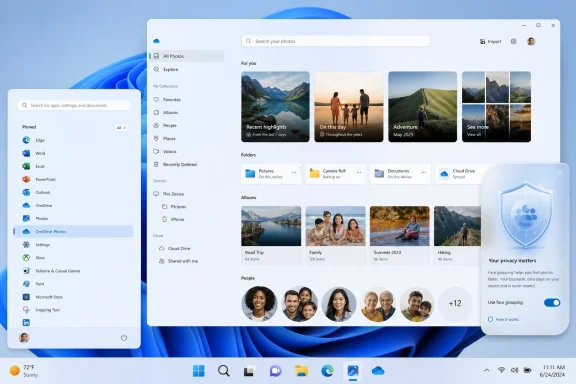 A New Photo App, Hidden Inside an Existing OneDrive Installation
The new OneDrive Photos entry is not presented as a conventional Microsoft Store download or a clearly separate Windows feature. It is tied to the existing OneDrive installation and launches through C:\Program Files\Microsoft OneDrive\OneDrive.App.exe.
That technical detail matters because it changes how users should interpret the app’s presence. OneDrive Photos is not necessarily evidence that a completely independent program has silently appeared from nowhere. It appears to be a new mode or surface delivered as part of the OneDrive client that Windows 11 already places prominently throughout the operating system.
Microsoft has long positioned OneDrive as a built-in Windows component for syncing and protecting files. Its own documentation describes the Windows OneDrive app as a service that synchronizes files between a computer and OneDrive, so they are backed up, protected, and available across devices. Microsoft’s OneDrive support documentation also makes clear that Windows can use OneDrive alongside local storage, rather than treating cloud storage as an entirely separate workflow.
For many Windows enthusiasts, that integration is valuable. OneDrive can make Desktop, Documents, and Pictures available after a PC replacement, a hardware failure, or a move between devices. It can also reduce the friction involved in accessing photos from a phone, browser, or another Windows PC.
Yet the same integration is why a new visual application needs a clearer explanation. A sync client is an infrastructure tool. A dedicated photo gallery, editor, search surface, and people-recognition interface is a more personal application category. Users may accept one while having little interest in the other.
The issue is not that Microsoft has created a photo viewer. The issue is that Windows 11 users may reasonably believe they installed only a sync client, then discover that the same client has gained a prominent new app identity in Start.
What OneDrive Photos Does on Windows 11
At first glance, OneDrive Photos looks like a modern Windows 11 photo-management app. Navigation areas for: are described.
- Moments
- Gallery
- People
- Albums
- Favorites
- This PC
The This PC section is important. The reported behavior suggests that OneDrive Photos can display local images even before the user signs in with a Microsoft account. In that state, it effectively overlaps with the job traditionally performed by Microsoft Photos: browsing images stored on local drives, opening a picture, and carrying out basic actions.
The reported controls are similarly familiar. Users can view an image, share it, mark it as a favorite, copy it, delete it, print it, reveal it in File Explorer, and set it as a desktop or lock-screen image. image editing also makes the overlap with Microsoft Photos especially obvious.
There are display controls, too. The new gallery reportedly offers River and Square layouts, as well as compact or roomy density settings and adjustable thumbnail sizing. Those are small touches, but they point to a real attempt to make OneDrive Photos feel like a purpose-built gallery rather than a stripped-down file-picker window.
A Web Experience Wearing a Windows 11 Coat
The application is reportedly built on WebView2, Microsoft’s embedded web technology. That does not automatically make it a bad Windows app, nor does it mean the application is merely a browser tab. WebView2 allows developers to place HTML, CSS, and JavaScript-based interfaces inside native Windows application windows, using Microsoft Edge as the rendering engine. Microsoft’s WebView2 documentation explains that developers can use it for individual web-powered sections of an app or even for most of the app interface.
There are practical reasons for Microsoft to take that route. A web-driven gallery can share design and feature work with OneDrive’s web experience, roll out server-connected changes quickly, and maintain a more consistent interface across platforms. That may help explain why OneDrive Photos can look visually polished while remaining closely tied to OneDrive’s broader web design.
But WebView2 also affects perception. Windows users often expect a photo viewer to launch instantly, feel deeply integrated with the shell, work predictably offline, and avoid looking like a web service pasted into a desktop frame. A cloud-centered WebView2 application may meet many of those expectations, but it must earn that trust through speed, transparency, and clear controls.
Microsoft’s own guidance recognizes that applications hosting web content need to manage web-to-native interactions carefully. The WebView2 developer guidance specifically notes that developers should closely monitor interactions between hosted web content and the native application to avoid vulnerabilities. That is a development concern rather than an allegation about OneDrive Photos, but it is a useful reminder that “web app” and “desktop app” are not interchangeable concepts from a security or privacy-design perspective.
The Case for OneDrive Photos
It would be easy to dismiss OneDrive Photos as unwanted duplication, but that would miss the legitimate product logic behind it. Microsoft is trying to make the same collection of images usable whether it lives on a Windows PC, in OneDrive, or across several devices. A richer gallery is a natural extension of that ambition.
Better Discovery Is a Real Benefit
Photo libraries grow quickly and become difficult to navigate using folders alone. Dates and filenames may be enough for a technical archive, but they are not always enough for family photos, screenshots, travel images, receipts, product photos, or work reference material.
Microsoft already documents intelligent photo search in OneDrive, saying that its search can use photo intelligence, location information, and other signals to find images in the browser or on mobile devices. Microsoft’s intelligent-search support page gives examples such as finding images through descriptive searches rather than manually digging through folders.
For users with a large cloud-backed library, bringing those capabilities to Windows 11 could make OneDrive substantially more useful. A search for a camping trip, a city, a whiteboard, a conference booth, a dog, or a screenshot category is more approachable than remembering where an image was stored three years ago.
Microsoft also says OneDrive’s photo organization tools can help users browse a customizable gallery and find images based on location, what appears in the photo, or media type such as video, screenshot, and document. Its OneDrive photo-organization guidance describes that broader cataloging model. In other words, OneDrive Photos is part of a larger effort to turn cloud storage into a searchable personal media library.
Local Photos Lower the Adoption Barrier
The ability to browse local photos without signing in is a strategically sensible choice. It means the app can provide some immediate utility rather than greeting users with a blank cloud-library screen and an account prompt.
This may also be useful for people who keep photography archives on secondary drives, external storage, or locally managed folders. A gallery that can pull local images and later connect them with OneDrive could serve as a bridge between traditional PC ownership and cloud backup.
The problem is that this convenience must not obscure the distinction between looking at files already stored on a PC and uploading, indexing, or processing files through a connected cloud account. A well-designed product can support both models, but it should make the state of the user’s files unmistakable at every stage.
Facial Grouping Is the Privacy Line That Matters Most
The most consequential feature in OneDrive Photos is not its gallery layout or its editing controls. It is the People section and the face-grouping capability behind it.
Microsoft describes facial grouping as an AI feature that distinguishes faces from other objects in an image and groups similar faces across photos. Microsoft’s support documentation says users can then name people and search or filter based on those groups. The same document cautions that results depend on image quality and “may not be entirely accurate.”
That caveat should be taken seriously. Face grouping can be useful for locating photos of a child, a spouse, a parent, or a colleague, but it is categorization software—not a source of identity truth. Poor lighting, changing appearances, family resemblance, camera angles, and partial faces can all contribute to errors. A wrong label can be annoying in a personal archive and more troublesome when images include sensitive gatherings, workplaces, schools, or medical contexts.
Microsoft Explicitly Calls the Data Biometric Information
The privacy concern is not speculative. Microsoft’s own description is unusually direct: it says the company collects, uses, and stores facial scans and biometric information from photos through the OneDrive app for facial-grouping technology. Microsoft’s facial grouping documentation states that these data are used to organize photo collections more quickly.
That wording matters because the images may include more than the account holder. A personal photo library can contain children, relatives, friends, visitors, coworkers, classmates, and people captured incidentally in public settings. Enabling a feature that analyzes faces therefore involves a dataset broader than a typical personal preference setting.
Microsoft says that only the account holder can see their face groupings, and that face groupings are not shared when the user shares a photo or album. The company also says it does not use facial scans and biometric information from the feature to train or improve the overall AI model; instead, the information is used to improve results for the user’s own account. Microsoft’s published explanation provides meaningful assurances, and they should not be ignored.
However, those assurances do not remove the need for a deliberate choice. A feature can be private from other album viewers and still be sensitive because of the nature of the data it analyzes and stores.
Consent Is Not a Footnote
Microsoft’s documentation says some regions require user consent before face processing begins. The company’s guidance also says the option can be turned off in OneDrive settings and that facial-grouping data will be permanently removed within 30 days after the feature is disabled.
That is a positive baseline, but it raises a design question for Windows 11: how prominent is the decision at the moment it matters? A vague prompt about “improving photo organization” would not be sufficient. Users should see plain language that explains:
- The feature analyzes faces across photos.
- Microsoft treats the resulting information as facial scans and biometric information.
- Grouping may make mistakes.
- The feature can be disabled later.
- Disabling it triggers deletion of the grouping data within the stated retention period.
- Photos and albums can contain people other than the account holder.
The right model is not buried consent. It is informed, reversible consent.
Why the Microsoft Photos Overlap Is Hard to Ignore
Windows 11 already has Microsoft Photos, a first-party app with photo viewing, browsing, editing, and organization capabilities. OneDrive Photos now appears to cover much of the same ground while tying the experience more tightly to Microsoft’s storage platform.
That makes the user-facing distinction blurry.
If Microsoft Photos is the primary local media application, it should be obvious why a second app is necessary. If OneDrive Photos is intended to become the preferred cloud-connected gallery, Microsoft should say so clearly. If the two are meant to coexist permanently, Windows needs clearer differentiation in Start, Settings, default-app behavior, and documentation.
The current arrangement risks creating a familiar Windows 11 frustration: several Microsoft-branded surfaces with overlapping purposes, different cloud assumptions, and different privacy pathways.
A user should not have to infer the product strategy from an unexpected Start menu search result.
The “Second Photos App” Problem
There is a product-case argument for separation. Microsoft Photos can remain a general Windows image viewer and editor, while OneDrive Photos can be a cloud library focused on synchronization, web-connected intelligence, and cross-device organization.
But that architecture only works when each app has a crisp identity.
Without it, users may reasonably ask:
- Which app should open
.jpg,.png,.heic, and.webpfiles by default? - Which app is handling edits to locally stored pictures?
- Which app is surfacing images from OneDrive?
- Which app provides cloud search?
- Which app has access to face-grouping data?
- Which features still work offline?
- Which application should be removed if the user wants fewer Microsoft photo tools?
These are not merely cosmetic questions. They determine whether Windows feels organized or cluttered.
OneDrive Photos Cannot Be Removed on Its Own
For users who decide they do not want OneDrive Photos, the reported limitation is significant: the Photos experience is tied to the broader OneDrive installation rather than being independently removable.
That means a user cannot simply keep OneDrive’s familiar file-sync client while removing the new gallery interface. The available practical choice is broader: keep OneDrive as installed, or remove OneDrive itself.
Microsoft provides official Windows 10 and Windows 11 instructions for unlinking, hiding, or uninstalling OneDrive. Its support page says users can unlink a PC from OneDrive without losing cloud-stored files, and it also documents uninstalling Microsoft OneDrive from the list of installed apps.
For users who want to remove the client entirely, the process is straightforward:
- Open Settings.
- Go to Apps and then the installed-apps list.
- Find Microsoft OneDrive.
- Select Uninstall and approve the confirmation prompt.
Microsoft says uninstalling OneDrive does not delete the files already stored in the cloud; they remain available through OneDrive on the web. The same Microsoft support guidance also explains that unlinking a computer is the less drastic option for users who want to stop local synchronization without removing the software.
Still, that is a blunt solution. Someone who values OneDrive’s folder backup, Files On-Demand capabilities, or Explorer integration may not want to sacrifice those functions simply to avoid a separate photo experience. It would be better if Microsoft offered a dedicated OneDrive Photos toggle or uninstall option.
What Windows 11 Users Should Check Now
The sensible response is not panic, and it is not blind acceptance. It is a quick audit of what has appeared on the PC, what it can access, and what features are actually enabled.
Check Whether OneDrive Photos Has Appeared
Open Start and search for OneDrive Photos. If the entry appears, launch it and review the sections presented in the sidebar. Pay particular attention to whether it is displaying local folders under This PC, whether a Microsoft account is connected, and whether cloud content is visible.
The reported local-gallery behavior does not, by itself, mean your entire image library has been uploaded to OneDrive. The cloud status of files depends on how OneDrive is configured, including whether Pictures or other folders are being backed up or synchronized. Microsoft notes that Windows users can choose local or OneDrive save locations and change that setting later. Microsoft’s documentation is worth reviewing before making assumptions about where files reside.
Review OneDrive Backup and Sync Choices
Check the OneDrive cloud icon in the system tray, then open Settings and examine the account and backup options. The key question is whether Desktop, Documents, or Pictures folders are being backed up into OneDrive.
Microsoft explains that OneDrive can be configured to synchronize files between a PC and the cloud and that users can alter where Windows saves files. Its support guidance emphasizes that the local-versus-cloud choice is adjustable, not permanent.
A deliberate review is especially important for photographers, creators, and families with large libraries. Uploading a substantial image archive may consume storage, create sync activity, and make cloud organization features more relevant than the user initially intended.
Treat Face Grouping as an Explicit Privacy Decision
If the People section asks for permission to enable face grouping, read the prompt as a biometric-data decision rather than a simple convenience checkbox. The core benefits are clear: faster organization, people-based browsing, and easier search after names are assigned.
But users should enable it only if they are comfortable with Microsoft’s stated collection, use, and storage of facial scans and biometric information for the feature. Microsoft’s description of facial grouping says the feature can be disabled in OneDrive settings and that the associated facial-grouping data will be removed within 30 days after it is turned off.
For households with children, shared family archives, or sensitive personal images, this decision deserves more than an impulsive click-through.
Microsoft Needs to Make the Product Boundaries Clearer
OneDrive Photos could develop into a good Windows 11 experience. Its gallery design, local browsing, cloud-library integration, smart search, and potential for cross-device organization all address real problems. People with large, messy photo collections may find the approach more useful than a traditional folder-based viewer.
The trouble is not the feature set. It is the delivery model.
Windows has trained users to see OneDrive as a background sync and backup service. Turning that same installation into a visible, separately named photo application may be technically efficient for Microsoft, but it creates a transparency gap for users. The company should close that gap with a release note, a first-run explanation, a plain-language privacy screen, and an independent opt-out for the gallery itself.
Microsoft should also define the relationship between Microsoft Photos and OneDrive Photos. The first can remain the default local image viewer and editor; the second can serve as the cloud-connected media library. But that division needs to be explicit, not something users discover after Windows 11 quietly adds another entry to All apps.
The privacy standard should be even higher for facial grouping. Microsoft’s stated promises—that face groupings are visible only to the user, are not shared alongside photos or albums, are not used to train the overall AI model, and can be deleted after disabling the feature—are meaningful safeguards. Microsoft documents those safeguards, but their value depends on users being able to understand and control the feature before it begins organizing a library of faces.
OneDrive Photos is not inherently an unwelcome addition. For some users, it may become the most capable photo browser Microsoft has shipped for Windows 11. Yet convenience does not excuse ambiguity. A modern Windows experience should make it easy to understand what is installed, what is local, what is synced, what is analyzed, and what can be removed.
Update: PCMag confirms OneDrive Photos beta label and folder-selection controls (July 29, 2026)
PCMag has independently confirmed that OneDrive Photos is appearing on Windows 11 PCs, with two of its writers finding the app on their devices. Its listing carries a “New” badge, while the app itself displays an indicator that it remains in beta.
The report also adds an important practical detail about local-library access: users can use an “Add a folder” control to choose specific photo locations for the app. That suggests the local gallery is not necessarily an unrestricted view of every image folder on a PC, though users should still check which folders they have explicitly added.
PCMag also confirms that signing in to OneDrive is required for cloud-backed functions such as backup and access to online photos. Its description of the People tab aligns with Microsoft’s existing privacy guidance: face groups are visible only to the account holder, and the facial-grouping data can be deleted by disabling the feature in OneDrive settings.
Update: New report says OneDrive Photos may be removable as a separate app (July 30, 2026)
Contrary to the earlier report that OneDrive Photos is inseparable from the broader OneDrive client, Tbreak reports that some Windows 11 installations list it as a distinct app under Settings > Apps > Installed apps, with an Uninstall option available.
The outlet says users should search Start or the Installed apps list for “OneDrive Photos,” then use its app menu to remove it where that control is present. This suggests the rollout may vary by device or deployment channel, and that a separate Microsoft Store-delivered package could be involved.
Tbreak also advises users who do not want people-based search to decline the face-analysis prompt. For those who prefer to keep the app installed but avoid it opening images, changing default associations for formats such as JPG, PNG, and HEIC remains the less disruptive option.
Microsoft has not yet documented the rollout method, package identity, or whether standalone removal is universally supported.
Update: Microsoft says OneDrive Photos arrives through OneDrive updates (July 31, 2026)
ZDNET reports that Microsoft has now described OneDrive Photos as generally available, while characterizing its new gallery as a “Photos (Preview)” experience being tested with Windows Insiders in the Experimental channel. Crucially, Microsoft says the feature arrives through an update to the existing OneDrive client rather than through a separate installation.
That statement adds official confirmation to the previously unclear rollout method, but it does not fully explain why the app has appeared on standard, non-Insider Windows 11 PCs. ZDNET says its reporter received it on a production installation, echoing the broader reports of an unexpectedly wide deployment.
Microsoft also reiterated that face grouping is private to the account owner, is not shared, is not used to train AI models, and is deleted within 30 days after users opt out. ZDNET notes that the controls are available through OneDrive’s web-based Photos settings.
The company says it will collect Insider feedback before expanding the experience more broadly.
Update: Report says OneDrive Photos is reaching managed enterprise PCs and may return after shortcut removal (August 4, 2026)
Windows Latest reports that OneDrive Photos is also appearing on Windows 11 enterprise devices managed through Microsoft Intune, not only on consumer PCs. According to administrators cited by the outlet, the app currently requires a personal Microsoft account, leaving organizations that rely on Microsoft Entra work accounts with a Start-menu entry they may be unable to use.
The report also says the feature is delivered through the existing OneDrive client rather than as a conventional Store or MSIX app. That can limit administrators’ ability to manage it through standard app-deployment or Store policy controls.
Most significantly, Windows Latest says deleting the OneDrive Photos shortcut is not a durable fix: the entry can reappear when the OneDrive sync client updates. The outlet attributes that behavior to OneDrive version 26.129.0706.0003 and recommends recurring remediation if organizations choose to remove the shortcut.
Microsoft has not yet publicly confirmed that the enterprise rollout was unintended, nor announced a supported policy for suppressing OneDrive Photos on managed PCs.
Update: Report says face grouping may be active without a new setup prompt (August 4, 2026)
The Windows Club reports that, on one Windows 11 system, OneDrive Photos had already grouped images of family members and friends in its People section when the app was opened. If accurate, that suggests facial grouping may in some cases be enabled or processed before users encounter a clearly separate first-use setup flow.
That observation would make Microsoft’s consent and disclosure design more consequential, particularly for accounts with existing OneDrive photo libraries. Microsoft’s published privacy terms still describe face grouping as controllable through OneDrive settings, with associated grouping data deleted within 30 days of opting out.
The report also supports the view that OneDrive Photos is installed automatically alongside the OneDrive sync client, rather than as an independently chosen app. It says separate removal was unavailable on its test system, so uninstalling OneDrive remained the only way to remove the Photos experience entirely. This conflicts with reports of a standalone uninstall option on some PCs, reinforcing that availability and package behavior remain inconsistent across installations.
Update: Microsoft confirms OneDrive Photos is being pushed through the OneDrive client (August 7, 2026)
Microsoft has told Windows Latest that OneDrive Photos is being force-installed through OneDrive updates and cannot currently be removed separately from the broader OneDrive sync client. The company reportedly plans an update that will add a standalone removal option for the Photos experience, though it did not provide a release date.
Microsoft also told the outlet that the People face-grouping feature is off by default, runs in the cloud only against photos stored in OneDrive, and does not process images that exist only locally on a PC. The company reiterated that it does not train AI models on users’ photos or facial data, and that face-grouping data is permanently removed within 30 days after the feature is disabled.
Windows Latest further reports that Microsoft intended the rollout for consumer PCs, while the appearance of OneDrive Photos on Intune-managed enterprise devices was reportedly unintentional. Microsoft did not publicly confirm that enterprise deployment error.
