

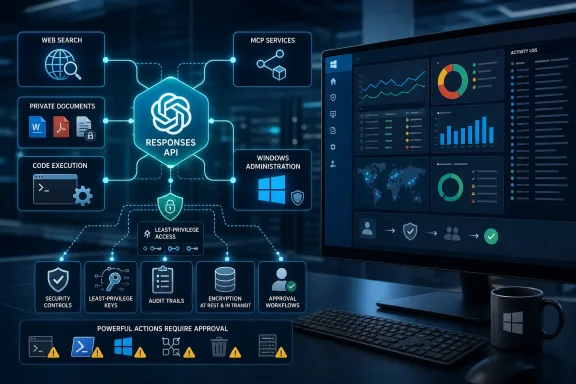
Analytics Insight’s August 10 overview correctly identifies the broad shift from chat-style prompts toward agent workflows. OpenAI introduced the Responses API in March 2025 as a successor-oriented foundation that combines the simpler request model of Chat Completions with tool use and state-management capabilities that had been scattered across earlier APIs. OpenAI still supports Chat Completions, including for GPT-5.6, but positions Responses as the place to start when an application needs hosted tools, durable workflow state, or multiple reasoning-and-action turns.
For Windows administrators and developers, the distinction is practical. A conventional internal chatbot can summarize a runbook or draft a PowerShell command. A Responses-based application can retrieve that runbook, inspect a CSV export of failed sign-ins, calculate the affected-user count, call an internal ticketing function, and return an audit-friendly account of what it did. Each added capability also creates another path for bad data, over-broad credentials, or an unreviewed action to turn an assistant into an operational risk.
The tool catalog is broader than a web-search feature
The Responses API began with web search, file search, and computer use. OpenAI later added Code Interpreter, image generation, remote Model Context Protocol support, background execution, and features for working with reasoning state. Its current documentation also lists hosted shell access, an apply-patch tool, skills, tool search, custom tools, and MCP connectors alongside the original hosted tools.
That expansion makes the API attractive for the kinds of tasks Windows shops actually encounter: document-heavy help-desk work, log analysis, code remediation, inventory reconciliation, and software-development automation. File search can ground an internal assistant in Windows deployment notes, Intune policy documentation, or a curated collection of KB articles. Code Interpreter can inspect uploaded spreadsheets and generate a trend analysis without forcing the application developer to build a separate data-processing pipeline.
The API does not, however, magically connect a model to an organization’s systems. A model can call OpenAI-hosted tools, but internal systems still require either a custom function or a remote MCP server. The developer decides what that tool can access and what parameters it accepts. A function that exposes “run any PowerShell command” is a radically different security decision from a function limited to checking BitLocker compliance on a supplied device ID.
Computer use deserves special caution. It allows a model to propose interactions with a graphical interface, but it should be treated like browser or RPA automation operating under a potentially fallible planner. It is appropriate for tightly sandboxed, low-impact workflows with narrow credentials and human review at consequential steps. It is a poor fit for a broadly privileged Windows admin account clicking through production consoles.
GPT-5.6 changes the economics of tool-heavy work
The newest capability in this story is GPT-5.6’s Programmatic Tool Calling. OpenAI describes it as a way for the model to write and execute small JavaScript programs in a hosted runtime, coordinating eligible tools and processing intermediate results there instead of repeatedly sending every large response back through the model context.
That is a real architectural improvement for workloads such as searching hundreds of documents, filtering large structured results, or aggregating findings from several read-only tools. In a conventional function-calling loop, an application often sends tool output back to the model, waits for another decision, calls another tool, and repeats. Programmatic Tool Calling can reduce those model round trips and avoid paying to re-read intermediate material that the final answer does not need.
OpenAI says financial-research company Rogo saw 24% fewer output tokens and a 28% reduction in task time at the same quality level, while legal-tech company Clio reported a 38% reduction in prompt tokens for multi-step document analysis. Those figures are customer-reported results carried in OpenAI’s launch material, not independently reproducible benchmark results. They demonstrate the potential direction of savings, but they should not be inserted into a business case as an expected outcome for an internal help-desk or endpoint-management workflow.
GPT-5.6 also brings multi-agent support to the Responses API as a beta feature. A primary model can send separate tasks to concurrent subagents and synthesize their work. That can lower elapsed time when the job genuinely separates into independent workstreams—such as comparing a change request against a security standard, a deployment plan, and a set of historical incidents.
It does not make every workflow faster or cheaper. Splitting a single diagnosis across several agents can duplicate context, expand token use, and produce conflicting recommendations that the coordinating agent must reconcile. Multi-agent designs are best reserved for work that can be decomposed cleanly, with explicit limits on which tools each subagent may use.
The published token prices omit several budget traps
OpenAI currently offers GPT-5.6 in three tiers: GPT-5.6 Sol for complex professional work, GPT-5.6 Terra for a balance of capability and cost, and GPT-5.6 Luna for high-volume, cost-sensitive use. All three list a 1.05 million-token context window and a maximum output of 128,000 tokens.
The advertised text pricing per million tokens is straightforward:
- GPT-5.6 Sol is priced at $5 for input and $30 for output.
- GPT-5.6 Terra is priced at $2.50 for input and $15 for output.
- GPT-5.6 Luna is priced at $1 for input and $6 for output.
There are two details easy to miss in high-level explainers. First, the bare gpt-5.6 alias routes to GPT-5.6 Sol, the most expensive tier. Teams wanting Terra or Luna need to specify those models directly rather than assuming the unsuffixed name will select a balanced or economy option.
Second, output costs six times as much as input across the family. A sprawling remediation report, verbose intermediate reasoning summary, or multi-agent synthesis can therefore cost more than the document corpus that initiated it. Long prompts also become materially more expensive: OpenAI’s model pages say requests with more than 272,000 input tokens are billed at twice the normal input rate and 1.5 times the normal output rate for the entire request.
Prompt caching helps repeated workflows, but it is not a free feature. Cached reads receive the stated 90% input discount, while cache writes are billed at 1.25 times the normal input rate. Tool-specific charges—for example, search and computer-use calls—sit outside the text-token prices. A production cost model needs to track model tokens, tool invocations, retries, background work, and the number of agents used per task.
Data retention and MCP are the missing part of the agent story
The most consequential omissions in Analytics Insight’s otherwise useful overview are retention and third-party data handling. OpenAI’s data-controls documentation says Responses API data is stored as application state for at least 30 days by default, or when the store parameter is true. API data is not used to train OpenAI models by default, but “not training on it” and “not retaining it” are different controls.
Organizations approved for Zero Data Retention can have store treated as false, but several Responses features remain incompatible with that setting. Background mode retains response data for roughly 10 minutes to support polling. Code Interpreter cannot be used under Zero Data Retention. Extended prompt caching also requires stored application state and is not Zero Data Retention eligible.
Remote MCP deserves the same vendor review normally applied to a SaaS integration. OpenAI explicitly says data sent to an MCP server is subject to that third party’s retention policies. Using MCP to reach Microsoft Teams, Outlook, SharePoint, Google Drive, or an in-house system changes the data path; it does not merely add a convenient tool to the model.
The API can request approval before an MCP action, and developers can configure approval policies. That is useful, but it should not be mistaken for a complete control framework. A sound implementation should use service identities with least privilege, expose read-only operations separately from write operations, log every tool call and argument, and require human approval for actions that change a tenant, device, ticket, mailbox, or access-control setting.
A safer Windows-focused deployment pattern
The sensible first deployment is a read-oriented internal assistant, not an autonomous administrator. Start with a narrow problem such as correlating Windows Update failures from a sanitized endpoint export with the organization’s approved remediation documentation. Give the assistant file-search access to a curated knowledge base, let it use code only in an isolated environment for analysis, and return a recommendation that a technician reviews.
When a workflow needs to interact with an internal system, offer purpose-built functions rather than a generic shell. A function that retrieves the status of a named Intune device, opens a ServiceNow ticket with a fixed schema, or queues an approved remediation package can be audited and constrained. A universal function that accepts arbitrary commands, file paths, registry changes, or Graph API requests cannot.
Teams moving existing OpenAI integrations should test the Responses API as a workflow migration, not a mechanical endpoint swap. Measure completion rate, action accuracy, tool failures, average token use, and the frequency of human overrides. Pin model behavior where OpenAI makes snapshots available, and test GPT-5.6 Sol, Terra, and Luna against the same internal evaluation set before assigning one of them to a production route.
The Responses API makes agent-style software easier to assemble, and GPT-5.6’s tool orchestration can make some of it cheaper to run. The operational gain will come from constrained tools, controlled data paths, and measurable approval gates—not from giving a model a larger menu of systems it can touch.