

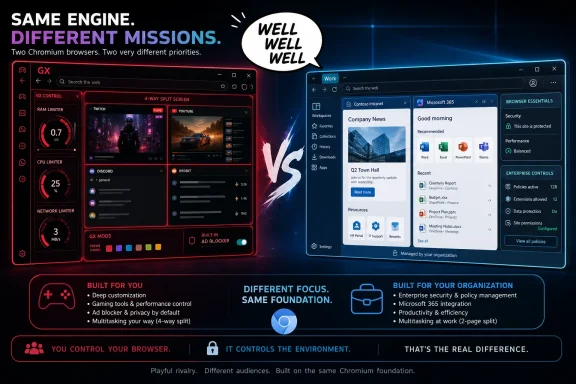
There is no new Opera GX build, Edge release, pricing change, or security advisory attached to the post. Know Your Meme identifies the original as a TikTok upload from Opera GX’s official account, but the original TikTok page was not independently accessible during reporting, and no other outlet has reported a wider campaign or product launch tied to the exchange. Treat it accordingly: this is brand banter, not a browser roadmap.
The useful part is what the joke exposes. The meaningful Opera-versus-Edge decision is no longer about whether either browser can render a modern website or use the same extension base. It is about whether a Windows user wants a browser organized around consumer customization and bundled conveniences, or one built for Windows integration, Microsoft account services, and managed deployment.
The shared Chromium base narrows the technical gap
Opera’s own extension documentation says Opera is based on Chromium and can run Chromium CRX extensions where the relevant APIs are supported. Microsoft’s Edge documentation makes the same point from the other side: Edge is built on Chromium, and its enterprise extension guidance explicitly accommodates Chrome Web Store extension update URLs.
That common base has practical consequences. Most sites that work in one will work in the other; web developers are generally testing against the same underlying browser engine family; and users are not choosing between two incompatible extension worlds. A move from Opera GX to Edge, or Edge to Opera GX, should not normally require rebuilding bookmarks, passwords, or a catalogue of mainstream Chromium extensions from scratch.
It also puts the “evil version” gag in perspective. Opera GX is not an alternate implementation of the web in the way Firefox remains distinct from Chromium browsers. It is a heavily branded, feature-layered Chromium browser. Edge is Microsoft’s Chromium browser, supplied with Windows and connected much more closely to the company’s security, identity, and productivity stack.
For a home user, that division can look cosmetic: GX Control controls, themes, sidebar services, Workspaces, gaming-oriented presentation, and content integrations on one side; Copilot, Microsoft 365 connections, Collections, vertical tabs, and Windows-facing features on the other. For an IT department, it is much less cosmetic. Edge arrives with Microsoft’s policy reference, release channels, security baseline material, endpoint controls, and an administrative model designed for managed Windows fleets.
Opera’s Edge comparison page overstates the distance
Opera’s current “Opera vs Edge” comparison page presents Opera as decisively ahead in privacy, security, and customization. It makes several valid distinctions—Opera includes a native ad blocker and browser-only VPN service, while its paid VPN Pro expands protection beyond the browser—but the page also contains claims that do not match Microsoft’s own product record.
The clearest error concerns split-screen browsing. Opera says Edge does not have an integrated side-by-side tab feature, while promoting Opera’s ability to display up to four tabs at once. Microsoft’s Edge policy documentation says the SplitScreenEnabled policy has supported Edge on Windows and macOS from version 117 onward and lets users open two web pages within one tab. In other words, Edge has had built-in two-page split screen for years; Opera’s “no built-in side-by-side tab feature” claim is simply wrong.
Opera does retain a differentiator in scale. Its Split Screen implementation supports up to four tabs, while Microsoft’s documented Edge split-screen feature is a two-page arrangement. That is a legitimate distinction, and it is the kind of precise comparison Opera should make. Claiming Edge lacks the feature altogether turns a useful comparison into unreliable marketing.
The uninstall claim also needs a regional qualification that Opera omits. Microsoft’s U.S. support material says Edge is a core Windows component and cannot be uninstalled on standard Windows installations. Yet Microsoft’s Edge Update policy documentation says users in the European Economic Area can uninstall Edge, and Microsoft introduced that ability through its Digital Markets Act compliance work. Opera’s blanket claim that Edge “can’t be uninstalled” is broadly accurate for U.S. Windows PCs, but false as a global statement.
That omission matters because browser comparison pages often become a quick reference for users making a migration decision. A vendor is entitled to make the best case for its product. It is not entitled to erase a competing feature that has existed since Edge 117 or ignore a region-specific policy change that directly contradicts its headline claim.
The VPN comparison is more nuanced than the meme suggests
Opera’s free VPN is a meaningful convenience feature for users who need browser traffic routed through another region without setting up a separate account. Opera says the service is unlimited, browser-only, and encrypts the connection between the browser and its VPN server. Its own documentation also makes the limitation clear: it does not protect traffic from other Windows applications.
Opera VPN Pro is the separate paid offering. Opera says VPN Pro protects traffic across the device and can cover up to six devices. In short, the free service is a browser privacy tool; the paid service is the company’s fuller device-level VPN product. Users should not mistake either one for an enterprise remote-access VPN or for a complete answer to endpoint privacy and traffic-control requirements.
Opera’s comparison page contrasts this with Microsoft Edge Secure Network, describing Edge’s service as capped at 5 GB monthly, requiring a Microsoft account, and limited in its availability and routing behavior. Microsoft’s own public record has been less straightforward: Secure Network has been presented as a preview feature with limited rollout by region and account. For Windows administrators, that means it should not be treated as a standardized, broadly deployable Edge capability without testing on the actual tenant, geography, Edge channel, and account type involved.
The real consequence is simple. Opera has a more immediately visible built-in privacy feature for individual users who want browser-only traffic protection. Edge is a poor choice if that specific feature is the deciding requirement. But neither browser’s consumer VPN feature substitutes for a managed VPN, secure web gateway, network policy, or endpoint data-protection program.
Edge’s advantage is manageability, not a meme comeback
Microsoft’s strongest case for Edge is not that it can out-snark Opera GX. It is that Edge is a browser IT teams can configure and govern at scale.
The Edge policy system covers browser capabilities including split screen, extensions, update behavior, security settings, and more. Microsoft publishes stable and extended-stable release documentation, administrative templates, deployment guidance, and security material. Its security documentation also ties Edge into Microsoft’s broader protection stack, including phishing and malware defenses and Microsoft 365-oriented data controls.
That does not make Edge automatically preferable on every Windows PC. Consumer users who value a built-in ad blocker, a browser VPN, messaging shortcuts, workspace-style browsing, and aggressive interface customization may reasonably prefer Opera or Opera GX. But an organization using Microsoft Entra ID, Microsoft 365, Intune, Defender, or a formal browser-policy posture should begin with Edge as the default evaluation target because the deployment and support model is already there.
The mistake would be to turn a social-media gag into a security conclusion. Opera GX’s consumer features do not make it an “evil” Edge, and Edge’s Windows integration does not make it the objectively superior browser for every individual. They are different packages built on a shared Chromium core.
The actual Opera-versus-Edge choice
For a personal Windows PC, Opera GX makes the clearest case when the user wants browser-level conveniences without assembling them from extensions: ad blocking, customizable appearance, media and messenger integrations, Workspaces, and its browser-only VPN. Its appeal is that the browser arrives preloaded with opinionated features.
For a Windows environment that has to be deployed, updated, audited, and supported, Edge has the clearer operational case. It is designed around Microsoft’s release channels and policy controls, integrates directly with the Microsoft account and Microsoft 365 services many organizations already use, and offers documented configuration options that administrators can apply across a fleet.
Opera GX’s August 11 jab succeeds because the two browsers are close enough for the comparison to feel plausible. The follow-up “well well well” works because Edge is no longer the isolated, legacy-browser punchline it was before the Chromium rebuild. But Opera’s own comparison material shows why users should look past the joke: its page minimizes or misstates capabilities Edge already has.
The concrete takeaway is to choose on deployment model and workflow, not on the premise that one browser lacks basic Chromium-era functionality. Edge already has split-screen tabs; Opera GX still has the broader four-tab layout and a more consumer-oriented feature set. The rivalry is real, but the gap is narrower—and Opera’s marketing page is less reliable—than the meme implies.