
The practical change is potentially significant: a payroll and HR provider is moving from being a destination system to becoming an action-capable service inside a Microsoft tenant. But the announcement leaves out the deployment information that will determine whether this is a useful integration or an additional governance project for IT: the WISE app’s distribution method, Microsoft Entra permissions, Microsoft 365 licensing requirements, supported Paychex products, availability by tenant type, and pricing.
Paychex’s own fiscal 2026 filing provides independent confirmation that WISE is more than a newly branded chatbot. The company says it launched WISE as an AI-powered, agentic intelligence engine across Paychex Flex, Paycor and SurePayroll, with roughly 600 AI features and agents in its products and operations as of May 31, 2026. The Microsoft integration is the first disclosed expansion of that engine beyond Paychex’s own interfaces.
For Windows and Microsoft 365 administrators, the important point is that “available in Copilot and Teams” is not the same as “ready for broad employee deployment.”
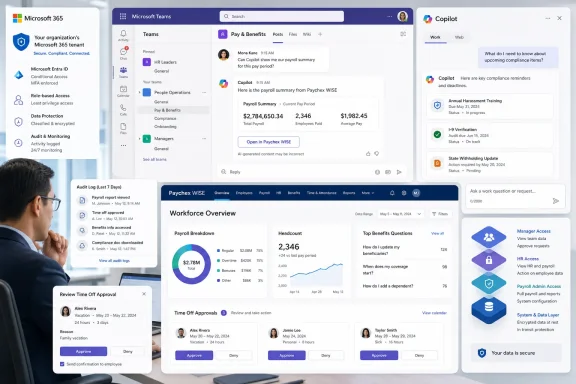 WISE moves HR actions into the Microsoft 365 control plane
According to the announcement, users can ask WISE for workforce data such as headcount, turnover and benefits utilization; receive guidance on deadlines, open enrollment and policy changes; and initiate actions including time-off approvals. Paychex also says the integration can route benefits questions to the appropriate resource.
Those capabilities would make WISE more consequential than a reporting connector. A read-only connector that surfaces an employee handbook or payroll FAQ creates a search and access-control problem. A service that can approve requests, expose workforce information, or direct employees through benefits workflows becomes part of the organization’s operating process.
Microsoft’s documentation makes clear that third-party Teams apps and agents can require several distinct permission models. Apps may work with delegated permissions on behalf of the signed-in user, application permissions that operate with their own organizational access, or resource-specific consent tied to a particular team, chat or user context. Microsoft advises admins to review an app’s requested permissions and data-handling information before allowing it for users.
That is especially relevant with HCM data. Payroll, benefits enrollment, time-off balances, employment status and workforce analytics are rarely governed by one simple access rule. An employee may be entitled to see personal benefit elections but not departmental utilization. A manager may approve direct reports’ leave but not query broader turnover data. HR, payroll and benefits teams often operate under separate role assignments altogether.
Paychex has not publicly specified how WISE maps those existing roles and data boundaries into Microsoft 365 Copilot and Teams. It has also not said whether the integration uses a Teams app, a Copilot agent, a Microsoft 365 Copilot connector, an API-backed action extension, or some combination of those mechanisms. Each produces a different administrative and audit trail.
Microsoft 365 licensing is the unanswered deployment question
The announcement describes WISE as available “within Microsoft 365 Copilot and Teams,” but it does not identify the Microsoft licenses required to use the experience. That omission matters because Microsoft distinguishes sharply between its included Copilot Chat offering and licensed Microsoft 365 Copilot capabilities grounded in organizational data.
Microsoft says Microsoft 365 Copilot is a separately licensed work product that can use Microsoft Graph data and operate within apps such as Teams, Outlook, Word, Excel and PowerPoint. Copilot Chat is more widely included with eligible Microsoft 365 subscriptions, but without a Microsoft 365 Copilot license it cannot access a user’s shared enterprise data, individual work data or external data indexed through Microsoft Graph connectors.
The WISE announcement does not say whether Paychex customers need a Microsoft 365 Copilot license for every WISE user, whether WISE can run through Copilot Chat, or whether Teams access will be available independently. It also does not identify which Microsoft 365 commercial, government or frontline-worker plans are supported.
That is not a cosmetic pricing detail. Many Paychex customers are small businesses, while Microsoft 365 Copilot licensing and deployment have often been managed selectively rather than assigned to every employee. If WISE’s useful functions require full Microsoft 365 Copilot licenses, the cost and rollout model differs materially from a Teams-only application. If it works as a third-party Teams agent without that license, the governance emphasis shifts toward the app’s permissions, Paychex entitlement and identity integration.
No public Microsoft announcement or product documentation located for this rollout identifies WISE as a named Microsoft 365 Copilot agent, Teams Store app or connector. That does not disprove availability; vendor integrations frequently appear before broad documentation is indexed. It does mean administrators should treat Paychex’s availability claim as an invitation to validate the actual deployment package, not as evidence that the required tenant setup is routine.
The “autonomous actions” language requires a human approval boundary
Paychex has described WISE elsewhere as capable of moving beyond suggestions to autonomous execution, while its annual filing says that work is subject to human-in-the-loop oversight and governance. The new Microsoft integration uses similarly ambitious language, promising “actions” in the flow of work.
The submitted announcement gives one concrete action: approving time-off requests. It does not say whether WISE can submit an approval directly, draft an approval for a manager to confirm, or redirect a manager to a Paychex workflow where ordinary approval controls apply. It likewise does not explain what “routing benefits questions” means in practice: answering from approved content, opening a service ticket, assigning an HR case, or forwarding employee information through Teams.
Microsoft’s own recent Copilot documentation is instructive here. Its agent-style features can send messages, schedule meetings and manage files, but Microsoft says users approve actions before they are performed and warns users to verify recipients, dates and content. Paychex says WISE is expert-backed, but an answer framed as compliance guidance still needs an accountable owner when it influences employment decisions, benefits enrollment or leave administration.
Paychex’s SurePayroll privacy policy includes a more direct warning: it says AI-generated content is not guaranteed to be accurate, should be confirmed by users, and is not intended to replace or substantially assist legal, financial or employment decisions. That language creates a real constraint on the Microsoft 365 pitch. A WISE prompt may make compliance information easier to reach in Teams, but it does not convert the output into legal advice or eliminate the need for managers and HR staff to validate a decision.
The safest early deployment is therefore narrow: personal employee self-service, approved policy retrieval, case routing, and manager actions already subject to established Paychex authorization. Broad workforce analytics and workflow approvals should wait until the organization has verified exactly what WISE displays, changes and logs.
Paychex has a credible reason to make Microsoft its first channel
The Microsoft move also reveals what Paychex is trying to do with its Paycor acquisition. Paychex completed the Paycor acquisition in April 2025, and its current portfolio now spans SurePayroll, Paychex Flex and Paycor. The company says those platforms serve differing business needs, with SurePayroll positioned for smaller payroll customers and Paycor serving more complex HCM users.
WISE gives Paychex a shared AI layer across that product lineup. Microsoft 365 gives it a common user interface across them. Rather than persuading customers to open yet another HR portal for a deadline, workforce metric or approval, Paychex can surface the prompt in the chat and productivity environment where managers already work.
That makes Microsoft a logical first ecosystem partner, but it also raises the stakes for identity, provisioning and offboarding. A Paychex administrator must know whether a departed manager loses WISE access immediately when their Entra account is disabled, when their Paychex role changes, or only after a separate synchronization process. The announcement does not address identity lifecycle behavior, audit logging, retention of Copilot conversations, data residency, or whether prompts and results appear in Microsoft Purview controls.
Microsoft provides tenant administrators the ability to allow or block specific Teams apps and agents, apply app-permission policies to selected users, and review requested permissions. For organizations that block third-party applications by default, WISE will not simply appear because a business unit wants it. It will require an app review.
Before enabling WISE for a pilot group, administrators should obtain the following from Paychex:
- The exact Teams app, Copilot agent, connector or integration identifier used in the tenant.
- A complete list of Microsoft Entra, Teams and resource-specific permissions requested by the service.
- The applicable Microsoft 365 and Paychex licensing prerequisites, including whether Microsoft 365 Copilot licenses are required.
- A product-by-product feature matrix for SurePayroll, Paychex Flex and Paycor rather than a single “Paychex customer” claim.
- Documentation on role mapping, identity provisioning, offboarding, audit events, retention and data residency.
- A precise description of every action WISE can initiate, whether a person must approve it, and where the system of record logs the result.
Availability is announced; operational details are still missing
Paychex’s public materials establish that WISE is a major component of its AI strategy rather than an experimental side feature. The Microsoft 365 rollout is also a meaningful escalation because it brings HR and payroll intelligence into the same Windows, Teams and Copilot environments where information workers handle daily requests.
Yet the vendor has announced the user-facing benefits before publishing the enterprise facts administrators need to approve it. There is no stated rollout schedule, no public availability matrix for Paychex’s three platforms, no identified license bundle, and no disclosed permission model. There is also no public explanation of how “real-time” workforce data is synchronized, or what happens when a Copilot request conflicts with the source-of-record role controls in Paychex.
For now, WISE in Microsoft 365 should be handled as a third-party HR system integration with potential write access, not as another optional Copilot prompt. The next concrete milestone is not a marketing expansion to more channels; it is a deployable app record, a permissions manifest, and a supported configuration that lets IT prove which employees can see—and act on—which workforce data.
