
The new roadmap entry, published August 27, 2026, is marked In development, not rolling out. It does not provide an exact September release date, affected Planner license tiers, screenshots, supported fields, color-rule limits, or deployment controls. Admins should therefore treat it as a roadmap signal rather than a feature they can enable or train users on today.
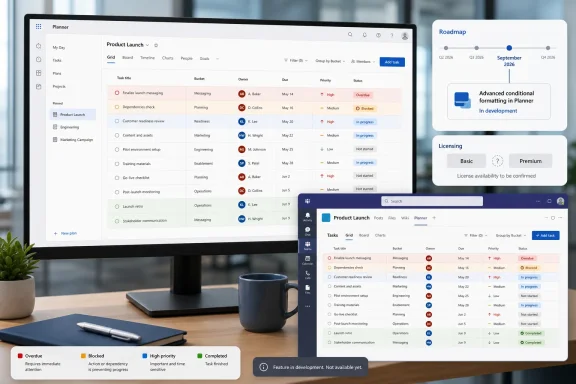 Conditional coloring is already documented in Premium Planner
Microsoft Support’s current Planner plan comparison puts conditional coloring alongside milestones and custom fields in the Premium-only column; Basic plans do not include it. Its separate documentation for advanced Premium capabilities says users can create rules on plan fields to visually highlight patterns in plan data.
This is not a new concept in Microsoft’s work-management stack. The Microsoft Project team described “Grid Conditional Coloring” in a February 3, 2023 update for Project for the web, using almost the same language: rules on project fields that highlight patterns in data. Project for the web’s capabilities were subsequently folded into the broader Planner product and its Premium plans.
That history makes roadmap item 569476 unusually opaque. The entry’s description reads as though it could be a net-new Planner feature, but Microsoft’s own support material says the core function already exists for Premium plans. The record does not establish whether September’s change is an expansion to Basic plans, an interface redesign, support in a new Planner surface, broader rule criteria, or simply a staged general-availability listing for a capability that has already appeared for some customers.
For users currently paying for Premium Planner, the practical conclusion is straightforward: do not assume the September entry gives your plan a new entitlement. Conditional coloring may already be available depending on the plan type and the particular Planner experience in use.
The license question matters more than the color palette
Conditional coloring is valuable when teams use Planner as a working status board rather than a simple checklist. A rule that makes blocked, overdue, high-priority, or approval-pending work visually prominent can reduce the need to repeatedly filter, group, or manually inspect long grids of tasks. It becomes especially useful when custom fields carry operational signals such as risk level, business owner, deployment ring, or a go/no-go flag.
But these benefits depend on which plans can use the feature. Basic and Premium Planner plans remain materially different products. Microsoft’s comparison page says both plan types support core grid, board, charts, filtering, grouping, task notifications, plan copying, Excel export, and Assigned to me views. Premium is where Microsoft places custom fields, dependencies, Timeline/Gantt, critical path, sprints, goals, task history, and conditional coloring.
If roadmap item 569476 brings rule-based coloring to Basic plans, that would be a meaningful reduction in the gap between lightweight team task lists and Premium project-management plans. If it instead updates only the current Premium experience, it is a smaller usability release. Microsoft has not disclosed which interpretation is correct.
That omission also affects purchasing and governance decisions. Organizations considering Planner Premium licenses for task visibility should not delay a justified purchase on the assumption that September will make the same controls available to Basic users. Conversely, organizations that already have Premium licenses should verify whether the feature is present in their tenant before treating the roadmap date as a rollout deadline.
Teams and web are named, but rollout details are absent
The roadmap item lists Teams and the web among its platforms, with general availability targeted for September 2026 in the worldwide standard multi-tenant cloud. It does not name Planner’s mobile clients, Government Community Cloud environments, Department of Defense environments, or Microsoft 365 operated by 21Vianet. It also does not say whether the capability will appear simultaneously in the Planner web app and Planner inside Teams.
That distinction matters for support teams. A Planner workflow designed in the browser can be difficult to standardize if users spend most of their day in the Teams app and the configuration controls or visual indicators do not arrive there at the same time. Microsoft’s roadmap metadata often identifies intended platforms but does not constitute a promise of day-one parity across every client.
There is also no stated tenant-level switch, PowerShell setting, Microsoft Graph control, or admin-center policy tied to the change. Based on the information published so far, this looks like a user-facing service update rather than something administrators will deploy through an update ring or package to managed Windows devices. The “Surface Devices” label in the roadmap metadata should not be read as a separate downloadable Surface application or Windows feature.
What Planner owners should do before September
Planner administrators and project owners can use the intervening time to separate a real workflow requirement from a visual preference. Conditional formatting works best when the team agrees on a limited set of fields and values that carry operational meaning. If every task receives a color, the board merely gains another layer of noise.
A short readiness check is enough:
- Confirm whether the affected plans are Basic or Premium, because Microsoft currently documents conditional coloring as Premium-only.
- Inventory any custom fields used to represent priority, risk, approvals, deployment state, or escalation status, since these are the most likely candidates for consistent visual rules.
- Test the existing Premium experience in both Planner for the web and Planner in Teams before changing documentation or user training.
- Avoid building automation that relies on the September feature until Microsoft specifies supported rule fields and whether the visual state is exposed through its APIs.
Microsoft’s September target is close, but the roadmap entry leaves the essential question unanswered: who gets a capability that Microsoft already describes as available in Premium Planner? Until Microsoft updates the item with scope and licensing details, organizations should regard it as an incomplete announcement—not evidence that Basic Planner plans will gain conditional coloring next month.
