

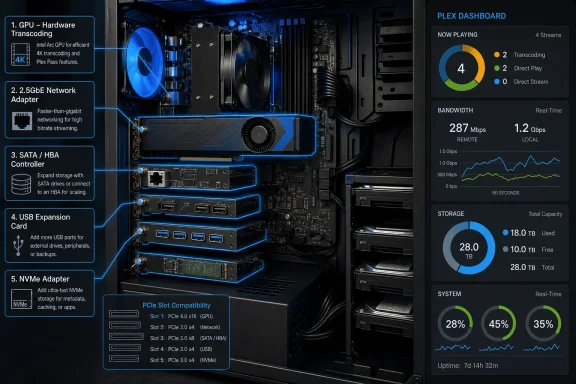
The most consequential recommendation is the Intel Arc GPU, because hardware transcoding can transform an old CPU-bound Plex server into one that can serve incompatible clients without pegging the processor. Plex’s own documentation confirms that hardware-accelerated streaming requires an active Plex Pass subscription, compatible hardware and the server-side setting to be enabled. It also says Plex can fall back to software when a codec, profile, resolution, subtitle treatment, or hardware path is unsupported.
Intel’s Arc A-series media engine does support hardware encode and decode for modern formats including H.264, HEVC, and AV1. That makes a used Arc card a credible option for a Windows Plex host with an old integrated GPU. The catch is that Plex’s hardware-transcoding documentation describes the engines it selects on Windows—Intel Quick Sync, NVIDIA NVENC, and Windows Media Foundation—but does not offer a model-by-model Arc compatibility guarantee. The hardware is capable; a buyer should still test the specific card, driver, operating system, Plex Media Server release, and source files they intend to use.
More importantly, an Arc A380 is not an upgrade for any spare slot. Intel specifies the A380 as a PCIe 4.0 x8 device installed in a physical x16 slot. A small x1 slot that might accept a SATA, USB, or Ethernet card will not take it. Old prebuilt desktops also introduce practical limits that the How-To Geek roundup does not address: low-profile case clearance, a power supply with little headroom, legacy BIOS behavior, and the absence of a usable PCIe x16 slot.
The useful takeaway is narrower and stronger: a discrete Arc GPU is the first card to consider only after Plex Dashboard shows the server is repeatedly transcoding and the CPU is the limiting resource. It is not a universal Plex performance upgrade.
Hardware transcoding fixes conversion, not every playback problem
Plex has three basic paths for playback: Direct Play, Direct Stream, and transcoding. Direct Play sends the original file to a client essentially unchanged; Direct Stream can remux compatible audio and video into a different container; transcoding converts media because the client, its settings, selected subtitles, bandwidth limit, or codec support demands it.
That distinction changes the value of a GPU. A household whose Apple TV, Shield TV, smart-TV app, browser, and mobile clients all Direct Play the library will see little benefit from an Arc card during normal playback. The server may become more capable, but it has not solved an active problem.
Conversely, hardware acceleration is valuable when the server regularly converts HEVC or 4K video for remote viewers, mobile devices, web browsers, older televisions, or subtitle combinations that force video burn-in. Plex notes that unsupported hardware decoding falls back to software, so a GPU should be treated as acceleration rather than a promise that every troublesome file will become effortless.
How-To Geek is right to steer buyers away from assuming an old integrated GPU is equivalent to a current media engine. But it understates the subscription cost and setup dependency. Hardware acceleration is a Plex Pass feature, and simply fitting the card does not enable it; the administrator must turn on “Use hardware acceleration when available” in the Plex server’s Transcoder settings and verify the result during actual playback.
For Windows users, the practical test is simple: start a stream that Plex reports as transcoding, then inspect the expanded playback information and GPU activity in Task Manager. If Plex Direct Plays the file, no amount of GPU utilization is required. If it transcodes in software despite the card, investigate the driver, server settings, codec limitations, and subtitle behavior before buying more hardware.
A 2.5GbE card helps only where Gigabit is actually saturated
The TP-Link TX201 highlighted by How-To Geek is a reasonable basic 2.5GbE PCIe adapter. It uses a single RJ45 port and supports 100Mbps, 1Gbps, and 2.5Gbps links, so it can be introduced into a Gigabit network without replacing everything on day one.
But a faster NIC does not make a Plex stream faster by itself. A direct-play video is constrained by the slowest link between the storage, Plex server, switch, router, Wi-Fi access point, and client. If a server receives media from a NAS over a 1GbE connection, a 2.5GbE card in the server changes nothing until the NAS and the intervening switch—or a direct point-to-point link—are upgraded too. If the target is a television with 100Mbps Ethernet or inconsistent Wi-Fi, the client-side connection remains the limit.
The same applies to remote streaming. A 2.5GbE adapter does not improve a home internet connection’s upload capacity, which is frequently the real ceiling for off-site Plex access.
There are valid use cases. A multigig network is useful where the Plex host reads high-bitrate media from a NAS while serving several local clients, performs large library transfers, backs up data across the LAN, or doubles as a general-purpose file server. It can also remove a measurable bottleneck when several concurrent streams share the server-to-NAS path.
Still, Plex’s own explanation of Direct Play makes the first diagnostic step clear: determine whether clients are being sent original files or are forcing transcodes. Buy a faster NIC after measuring a network bottleneck, not because the library contains 4K files. One well-supported direct-play stream is not a general argument for rebuilding a functional Gigabit network.
More drives require a controller decision, not just more ports
Storage expansion is the other genuinely useful category in How-To Geek’s list. A PCIe SATA adapter can add a couple of drives cheaply, and a proper host bus adapter, or HBA, can connect a much larger array of SATA or SAS disks. That is a practical route for a Plex machine whose motherboard has only two to four SATA ports but whose case still has drive bays.
The article blurs an important distinction, however, by grouping simple SATA expansion cards, HBAs, and RAID-capable controllers together. They are not interchangeable products.
A basic two-port SATA card is appropriate when the requirement is merely two additional hard disks on a conventional Windows Plex server. A serious HBA, such as a Broadcom/LSI SAS controller, generally uses internal mini-SAS connectors and breakout cables to attach multiple SATA drives. Broadcom’s 9300-8i, for example, supports eight internal SATA/SAS ports. It is a different class of equipment, with different cooling, cabling, firmware, PCIe-lane, and physical-slot requirements than a low-cost x1 SATA card.
For an ordinary Plex installation on Windows, RAID functionality is not automatically a benefit. Plex’s media library should already be backed up independently; hardware RAID neither substitutes for backups nor protects the server’s database and metadata unless those are included in a broader backup plan. Storage-focused platforms such as TrueNAS also generally favor an HBA operating in direct-drive passthrough or JBOD mode rather than a RAID controller abstracting the disks from the operating system.
The missing cost detail matters here. How-To Geek calls the cards cheap but supplies no price range, drive-count target, controller model, cable requirement, or warning about used enterprise HBAs that may need active airflow. The sensible purchase path is to decide first whether the server needs two additional SATA drives or an eight-drive storage subsystem. Those are separate projects.
USB and NVMe cards solve maintenance and responsiveness
A PCIe USB card is the most flexible suggestion in the roundup, particularly for small-form-factor machines with scarce internal bays. It can add ports for external backup drives, removable media, USB Ethernet adapters, UPS monitoring, or temporary ingest storage without loading the motherboard’s existing controller.
The advertised speed needs to be read carefully. USB-IF defines USB 3.2 Gen 2x2 as two 10Gbps lanes for a 20Gbps signaling rate, but the full path must support that mode: host card, USB-C cable, enclosure, and attached drive. Plugging a conventional 5Gbps or 10Gbps external drive into a 20Gbps card does not make the drive faster. Many inexpensive USB-C storage devices are limited well below Gen 2x2’s headline rate.
For Plex, USB expansion is generally about convenience and capacity, not streaming performance. External disks can work well for a modest library, but they add a disconnect risk that internal SATA or SAS storage avoids. A Plex server should not put its only copy of an irreplaceable media collection on a removable drive and call the job finished.
The NVMe adapter recommendation is more directly connected to Plex’s day-to-day responsiveness. On Windows, Plex stores its server data under the user’s local application-data directory by default. That directory includes the database, artwork, metadata, cache, and related server files; Plex acknowledges that metadata, especially artwork, commonly accounts for much of its size.
Moving the Plex data directory to a fast internal SSD or NVMe drive can improve browsing, library maintenance, thumbnail handling, and database activity when the existing system drive is a mechanical disk or a cramped SATA SSD. It can also keep a growing metadata collection from consuming the Windows boot disk.
But this is another upgrade with a missing qualification. A PCIe NVMe adapter may provide storage even when an old motherboard lacks an M.2 socket, but booting Windows from it depends on motherboard firmware support. Plex does not need the NVMe disk to be bootable: the better low-risk use is to retain the working Windows boot drive and relocate Plex’s data directory to the new internal SSD. Plex warns against putting that data directory on a network share because unpredictable or broken behavior can result.
The five cards are best understood as a troubleshooting menu, not a shopping list. Check Plex Dashboard first, confirm whether the pain is transcoding, network throughput, drive capacity, USB connectivity, or slow metadata access, then spend the one available PCIe slot on that problem.
For many old desktops, the winning combination will be less dramatic than the headline suggests: a modest NVMe adapter for Plex metadata, a two-port SATA card for library growth, or no card at all after clients are configured to Direct Play. The Arc upgrade earns its slot when the server is actually converting video—and when the machine has the physical slot, power, firmware support, drivers, and Plex Pass needed to use it.