
BGR’s comparison reaches the same broad verdict, but its claim that Windows handheld owners must manually remove “bloat” for acceptable performance needs more scrutiny. Debloating Windows 11 should not be treated as a setup requirement for the ROG Xbox Ally. It is an unsupported tuning exercise that can complicate Windows servicing, driver installations, Microsoft Store components, Game Pass, and troubleshooting—precisely the things a new handheld owner should not have to repair.
The more consequential distinction is simpler: Steam Deck OLED buyers trade away parts of the PC game catalog for a coherent appliance-like experience. ROG Xbox Ally buyers get substantially wider native PC compatibility, including Xbox PC games, Game Pass installs, Epic Games Store titles, GOG releases, mods, and games that need Windows anti-cheat—but they accept a device with several overlapping control planes.
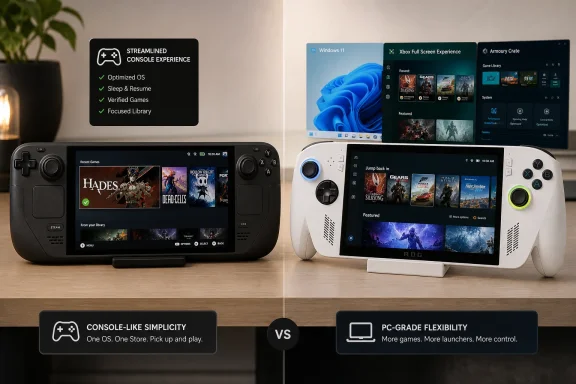 SteamOS makes the first hour easier
Valve designed SteamOS 3 around the Steam Deck’s controls rather than adapting a desktop operating system to a 7.4-inch screen. The Steam Deck OLED wakes directly into Steam’s game interface, where the library, store, downloads, controller configuration, performance overlay, and sleep controls all live in a largely consistent navigation model.
That consistency is especially valuable for a beginner. The Deck’s compatibility system is imperfect, but it answers the first question a buyer needs answered before installing a game: will it work on this device without effort? A “Verified” designation is not a promise that every game will run flawlessly forever, but it is a meaningful pre-purchase filter. Valve also exposes why a title is merely “Playable” or marked Unsupported, making the limitations visible before a new owner has sunk time into a download.
The Steam Deck OLED’s sleep behavior is another practical advantage that spec sheets tend to undersell. Pressing the power button suspends the active game; another press resumes where the player left off. Valve has built this into SteamOS, and it changes how the machine feels in daily use. A player can put down a single-player game during a commute or between errands without treating every interruption as a shutdown sequence.
The OLED model also has a 7.4-inch, 1280-by-800 HDR OLED panel with a 90 Hz refresh rate, a 50 Wh battery, Wi-Fi 6E, and two trackpads. The trackpads are important for beginners in a way raw processor figures are not: when a game or launcher expects a mouse cursor, the Deck gives the user a direct input method rather than forcing every task through a touchscreen or controller emulation.
SteamOS does have a desktop mode based on KDE Plasma, and experienced owners can use it for mods, emulators, alternate launchers, and manual fixes. But that is optional territory. A novice who stays within Steam’s verified catalog is not expected to learn Linux commands to play games. BGR is right that advanced tinkering can become more technical on SteamOS; it is wrong to let that niche use case define the normal Deck experience.
The Windows catalog is the ROG Xbox Ally’s real advantage
The white ROG Xbox Ally runs Windows 11 Home on AMD’s Ryzen Z2 A processor, with 16 GB of LPDDR5X memory, a 512 GB SSD, a 7-inch 1080p 120 Hz IPS display, and a 60 Wh battery. Asus and Microsoft position it as a handheld that powers directly into the Xbox Full Screen Experience rather than the traditional Windows desktop.
That new interface is real progress. It offers controller-oriented navigation, Game Bar access, a handheld compatibility program, and a central view of installed games. Asus says the Ally can access supported PC games from Xbox and other stores, while Wired found that the Xbox app aggregates installed titles from Steam, Epic, GOG, and other clients into its library view. For someone who already owns games across several stores—or who wants native PC Game Pass downloads rather than cloud streaming—that freedom is decisive.
Windows also removes a major SteamOS limitation: developers do not have to approve a Proton or Linux compatibility path for the game to run. A ROG Xbox Ally can install the ordinary Windows release of a game, use its standard launcher, and accommodate most PC mod tools with far fewer compatibility layers in the way. That makes it the better first handheld for a buyer whose must-play list includes Game Pass titles, Epic exclusives, heavily modded games, or multiplayer releases that require Windows.
But the word “access” needs qualification. Installing a storefront is not the same thing as making it pleasant on a handheld. Steam’s interface is controller-native. Several other PC launchers still assume a mouse, keyboard, and large desktop display. Microsoft’s April 2026 update added Gamepad Cursor through Game Bar to make web browsers, music apps, and third-party storefronts easier to navigate, an acknowledgement that controller support remains uneven outside the Xbox shell.
The ROG Xbox Ally also cannot display every console purchase automatically. As Wired noted in its review, an Xbox account’s library on the handheld is limited to PC-compatible purchases, including Xbox Play Anywhere titles. Buyers moving from an Xbox Series console should check their owned games individually rather than assume that a console library transfers wholesale to Windows.
Xbox Full Screen Experience improves Windows, but does not replace it
Microsoft and Asus have made visible efforts to reduce the Windows handheld tax. The Xbox Full Screen Experience starts first, foregrounds the controller interface, and lets players switch to desktop mode when they need a conventional PC. Recent updates added better dock behavior, controller-accessible display settings, improved vibration options, and a more capable shared game library.
Microsoft also says it has introduced Default Game Profiles and optimized hundreds of popular games for handheld play. Those are useful guardrails for a newcomer who does not want to choose a wattage mode, frame cap, resolution, upscaler, and graphics preset from scratch before every game.
Yet the ROG Xbox Ally still has three places a user may need to understand: the Xbox full-screen interface, Windows 11 itself, and Asus Armoury Crate SE. Armoury Crate controls device-specific functions such as power profiles, controller mappings, frame-rate limits, lighting, and performance monitoring. Windows handles core operating-system updates and many app components. The Xbox app and Game Bar introduce another layer of updates and settings.
This is not simply an old complaint about Windows handhelds that Full Screen Experience has solved. Microsoft’s own April update instructions tell owners to keep Armoury Crate SE, the Xbox PC app, Game Bar, and Windows 11 current. Wired independently reached the same conclusion in testing, describing the learning curve created by separate Xbox, Windows, and Armoury Crate interfaces. Windows Central likewise reported that some updates could appear through MyASUS, Windows Update, or the Microsoft Store, with the Store requiring an exit from Full Screen Experience.
For a technically confident owner, that is manageable and often worthwhile. For a beginner, it means the Xbox-style front end is a convenience layer, not a sealed console operating environment. A game that will not launch may require checking a Windows dialog, a launcher update, a driver, an Armoury Crate profile, or a Microsoft Store component. The player has more control, but also more places to look when something goes wrong.
Anti-cheat is a SteamOS limitation, not a reason to misdescribe it
BGR is right to warn that SteamOS cannot run every competitive multiplayer game. Fortnite, Call of Duty: Warzone, and Apex Legends remain unsuitable for native SteamOS play. Steam’s current compatibility record marks Apex Legends Unsupported on Steam Deck and SteamOS because of an unsupported anti-cheat or multiplayer service. Epic has long declined to support native Fortnite on Steam Deck, while Activision’s RICOCHET system uses a PC kernel-level driver for Warzone.
The distinction matters because “kernel-level anti-cheat” is not a complete explanation for every SteamOS incompatibility. SteamOS game support is decided title by title, and anti-cheat vendors can support Proton and Linux when publishers enable it. Epic Online Services has offered Linux, macOS, and Steam Deck anti-cheat support to developers for years. The blockage is often a publisher or game-specific decision, not an immutable technical law of Linux.
A beginner should therefore make a literal list of must-play games before buying. If Fortnite, Warzone, Apex Legends, a specific Game Pass download, or a favorite modded Windows game appears on it, the ROG Xbox Ally is the practical choice. Installing Windows on a Steam Deck or relying on cloud streaming defeats the purpose of choosing the simpler platform in the first place.
If the list is chiefly Steam single-player games, indies, older PC titles, and multiplayer games that carry Valve’s Verified or Playable designations, the Steam Deck OLED gives the buyer the more dependable starting point. Its smaller compatible catalog is clearly signposted, its default interface is coherent, and its sleep behavior works as an everyday console feature rather than another PC problem to solve.
The deciding question is not which handheld has the better logo at boot. It is whether the buyer wants to manage a Windows PC that happens to be portable, or a portable game machine that happens to be a PC.
