

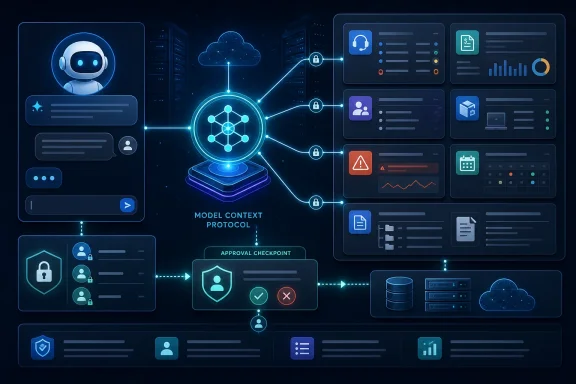
AiThority published the announcement on August 11, reporting that Syncro has joined Anthropic’s Claude connector ecosystem while making its MCP server available across the customer base. Syncro’s own public MCP tools documentation, updated August 5, confirms a substantial server surface: it exposes ticket, billing, customer, contact, asset, alert, appointment, product, user and documentation-search functions. This is much more consequential than adding a chat pane to a PSA or RMM product because it exposes operational actions to the assistant layer technicians are increasingly using.
The more important finding is where Syncro’s announcement needs to be read carefully. The company’s published documentation still contained instructions describing the Claude connector as Early Access and “not yet listed” in Claude’s Connectors Directory. Anthropic’s public connector-directory material confirms that Claude supports published remote connectors and that the directory contains hundreds of MCP servers, but it does not independently identify Syncro as a listed connector. That may simply reflect documentation lag on a launch announced hours ago, but MSPs should not mistake “available through MCP” for a verified one-click Claude directory installation until it appears in their Claude tenant.
The MCP server reaches into financial and service records
Syncro’s MCP server is not limited to ticket summaries or knowledge-base lookup. Its current tool reference describes the ability to search, create and update tickets; create ticket comments and time entries; retrieve and modify customer and contact records; examine assets and RMM alerts; schedule appointments; and create or update invoices and products.
That matters because the blast radius of an AI connection is defined by the tools it can invoke, not by the friendliness of the prompt box. An assistant with access to Syncro can do useful operational work such as locating all unresolved tickets for a client, finding overdue invoices, building a QBR data set, or preparing a technician before a site visit. It can also initiate changes that affect billable time, invoice status, product pricing, customer communications and ticket workflow.
The announcement says read access is immediately available and that every create or update action requires a technician’s sign-off, while permissions never exceed the authenticated user’s Syncro role. Syncro’s July release webinar also stated that the server does not support delete operations, and that organizations can choose which MCP tools to enable. Those are meaningful safeguards, particularly the absence of delete calls.
But “no delete” does not make an integration read-only or low-risk. The tools Syncro has documented include emailing invoices, adding invoice line items, setting invoices as paid, changing product prices, updating asset information, assigning tickets, logging billable time, and adding ticket comments that may or may not be hidden from the client. For an MSP, an accidental or poorly reviewed update can produce an external email, a customer-visible ticket change, or a billing problem without ever deleting a record.
The safe deployment model is least privilege plus visible confirmation, not a blanket enablement for every technician who wants to experiment with Claude, ChatGPT or Copilot.
“Claude connector” and cross-client MCP support are different claims
MCP is an open protocol for connecting an AI host to external tools and data. Anthropic introduced it, but it is no longer exclusive to Claude; Microsoft supports adding existing MCP servers in Copilot Studio, and other AI products have adopted MCP-compatible connection models. Syncro is therefore correct to position a standards-based MCP server as broader than a proprietary chatbot feature.
Still, compatibility does not mean identical availability or controls across every AI product. Claude’s own documentation says remote application connectors are available to paid-plan users, while its directory and enterprise administration features have their own provisioning and identity requirements. Microsoft’s MCP support is documented in Copilot Studio, which is not the same thing as every consumer or enterprise Copilot experience exposing an arbitrary third-party connector. Syncro customers should verify the client, plan, identity path and tenant controls they intend to use before promising a workflow to technicians.
This distinction matters most for organizations that handle client financial records, security incident details, recovery information or internal documentation in Syncro. An MCP server gives an AI assistant access to live data, but the AI provider’s account, retention, training and enterprise-data controls remain a separate policy decision. Syncro itself has advised partners to review their AI provider’s data-handling terms before connecting an MCP server to a live environment.
Anthropic’s July 28 MCP specification update is relevant here. The new specification shifted MCP toward a stateless request/response core and strengthened authorization around OAuth 2.0 and OpenID Connect. Anthropic says the update is intended to make remote connectors easier to deploy and scale while aligning authorization with enterprise identity systems such as Microsoft Entra ID and Okta. That direction helps vendors such as Syncro expose remote business systems more cleanly, but it does not remove the need to decide which users should access which tools.
Syncro’s public tool list shows what administrators should restrict first
Syncro’s technical documentation lists more than 40 tools across the server. It is a credible indication that this is a platform-level API wrapper rather than a narrowly scoped AI feature. It also makes it possible to identify the functions that should be limited during rollout.
A sensible first deployment would enable retrieval and search functions while withholding high-impact write tools until the organization has tested prompts, audit behavior and user training. In practice, that means separating useful data retrieval from billing, outbound communication and record maintenance.
- Ticket and asset lookup can help technicians recover context without changing the service record.
- Invoice retrieval can support account reviews, but invoice creation, payment-state updates and emailing should be reserved for billing roles.
- Ticket updates and time entries should remain restricted to technicians already authorized to make those changes in Syncro.
- Product creation and pricing updates should be unavailable to general support staff because they can affect quotes, margins and future invoices.
- Hidden ticket comments deserve particular attention because they can alter internal case history without being visible to the client.
Syncro says MCP calls inherit the user’s existing platform permissions, which is the correct baseline. Yet role inheritance only works if existing Syncro security groups are already cleanly separated. MSPs that use broad administrator accounts for daily work should treat this rollout as a reason to revisit those roles. A human approval dialog cannot compensate for an account that is allowed to perform too many actions.
The company’s earlier webinar material also said some specific endpoints could be tied to its Team plan even though every plan would receive baseline MCP access. The August announcement says the server is available to all customers, but it does not spell out whether tool availability differs by Syncro subscription tier, whether any connector capability requires a paid Claude plan, or whether every named AI client supports the same approval behavior. Those are operational details that matter more than the headline claim of universal availability.
Automated triage is a separate rollout with a different risk profile
Syncro is coupling the MCP launch with new AI capabilities inside its own product. The company says Automated Ticket Triage & Dispatch reads incoming tickets, calculates priority and recommends a technician based on skills, calendar availability, client history and workload. It also says manual overrides feed back into the system over time.
This should not be conflated with the MCP server. MCP lets an outside assistant access Syncro tools; automated triage is Syncro’s own workflow feature deciding how to prioritize and route incoming work. In Syncro’s July release webinar, the company described triage and dispatch as Early Access, initially offering suggested priority and technician assignment rather than mandatory automatic assignment. The August announcement presents it as newly available, but it does not make clear whether automatic assignment is now generally available, which plans receive it, or whether all customers are being enabled at once.
Syncro also says more than 1,000 customers have used AI Ticket Summaries, generating more than 800,000 summaries and cutting “time-to-action” by an average of 25%. Those are vendor-supplied usage and performance figures; no independent methodology, measurement window, or definition of time-to-action was included in the announcement. They are useful indicators of product adoption, not a benchmark an MSP should assume it will reproduce.
Guided Ticket Resolution, meanwhile, is expected in September 2026, according to Syncro. That timing deserves extra scrutiny because Syncro’s existing Guided Ticket Resolution documentation says its prior version was deprecated in May 2026 as the company transitioned to a next-generation AI implementation. The promised September feature appears to be a replacement or redesign, not simply an expansion of the older guided-resolution workflow.
The immediate consequence is a new access-control project
For Syncro customers, the headline is not that an AI can summarize a ticket. It is that the same assistant can now reach live PSA, RMM and billing data through a standard protocol—and may be able to create or modify records after user approval.
The right next move is to connect a limited test account, enable a minimal set of read tools, test what the AI client displays before executing a write request, and inspect the resulting Syncro audit trail. Only after that should an MSP grant access to invoice, product, appointment and ticket-modification operations. Syncro has delivered a potentially useful integration layer; whether it reduces technician friction or creates a faster route to costly mistakes will depend on the permission model each customer puts around it.
Update: Syncro reportedly now appears as an approved Claude connector (August 14, 2026)
Contrary to the uncertainty in Syncro’s earlier documentation, Channel Insider reports that Syncro CEO Michael George says the company is now listed as an approved connector in Claude. If confirmed in individual Claude tenants, that would turn the previously unverified connector-directory claim into a more straightforward deployment path for eligible Claude customers.
The report also adds that Syncro’s planned Guided Ticket Resolution feature is expected to match issues with known fixes and could automatically resolve up to 20% of tickets. That is a more ambitious claim than the earlier description of a next-generation guided-resolution workflow, but it remains a vendor projection ahead of the feature’s scheduled September 2026 arrival.
For MSPs, Claude directory availability would simplify initial connection, not eliminate governance work. Syncro’s approval requirement and role-based permissions still need testing—especially before enabling billing, client communication, or ticket-write tools.