
The important correction to the “secure network in the cloud” framing is that Tailscale does not replace a home network with a hosted Windows desktop service. It creates an encrypted overlay between enrolled devices, while the Remote Desktop session still terminates on the Windows PC at home. Your host therefore still needs to be powered on, reachable on its local network, and configured to accept RDP. A Windows Home machine can use an RDP client, but it cannot act as Microsoft’s built-in Remote Desktop host; Windows Pro, Enterprise, Education, Windows Server, or another remote-control product is required for that side of the connection.
Microsoft’s own Remote Desktop documentation still describes port 3389 as the default for external RDP access. CISA has repeatedly warned organizations about exposed remote-access services, including RDP, because publicly reachable login pages invite password-spraying, brute-force attempts, and exploitation of unpatched services. The strongest part of Bott’s setup is not that it makes RDP inherently safe; it removes the RDP listener from internet-wide discovery and limits network reachability to devices admitted to the same Tailscale network.
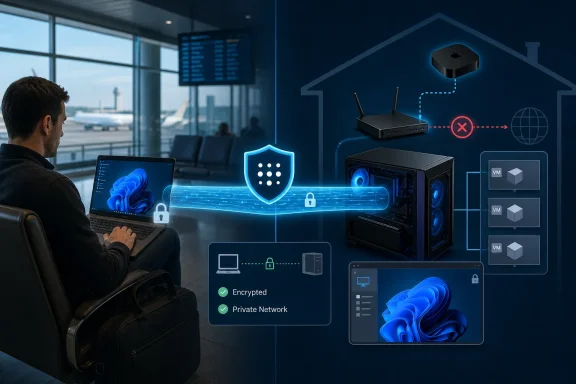 Tailscale avoids the router rule that causes most home-lab risk
The usual home setup for remote Windows access starts with port forwarding: a router receives internet traffic on TCP 3389 and sends it to a desktop or server behind NAT. That approach makes the Windows machine discoverable through the home’s public IP address, even if the user changes the default port. Changing the port is obscurity, not access control.
Tailscale takes a different path. Each enrolled device gets a Tailscale IP address and cryptographic identity, and the client builds encrypted WireGuard tunnels to other permitted devices. In the common case, the travel laptop and Windows PC establish a direct UDP connection after Tailscale helps them discover each other and negotiate NAT traversal. No inbound 3389 rule is necessary at the home router.
That is a material operational advantage for households with carrier-grade NAT, dynamic public IP addresses, or routers they do not fully control. It also means a remote session can survive a change in the home ISP address without updating a dynamic-DNS record or rebuilding port-forwarding rules.
Tailscale’s documentation is explicit that direct connectivity is preferred but not guaranteed. Hotel Wi-Fi, enterprise firewalls, restrictive mobile networks, and “hard” NAT configurations can prevent a direct peer-to-peer path. In those cases, traffic falls back to an encrypted relay connection through Tailscale’s DERP infrastructure, or through a configured peer relay. The relay cannot decrypt the WireGuard payload, but it can add latency and reduce throughput.
For Remote Desktop, that distinction is usually manageable because RDP is designed to work across limited-bandwidth links. It becomes more noticeable with high-resolution multi-monitor sessions, video playback, GPU-intensive virtual desktops, or large file transfers redirected through an RDP session. Windows users should check the connection type with tailscale status or tailscale ping before blaming Remote Desktop itself for a sluggish overseas connection.
The free plan is real, but the trust boundary still matters
Bott’s pricing summary matches Tailscale’s current Personal plan: it is listed as free indefinitely, allows up to six users, supports unlimited user devices, includes up to three ACL groups, and caps ephemeral resources at 1,000 minutes per month. The company’s Standard plan begins at $8 per user per month, which matters less to an individual with several PCs than to a growing small business that needs more users, centralized provisioning, logging, or deeper administrative controls.
“Free forever” does not mean self-hosted or independent of a vendor. Tailscale supplies the control plane that authenticates users, distributes device and policy information, assists with connectivity negotiation, and offers relay infrastructure when direct links cannot be formed. The data path is typically direct and end-to-end encrypted, but enrollment and ongoing operation still depend on Tailscale’s service and on the identity provider chosen for the tailnet.
That identity decision deserves more attention than it receives in many consumer VPN guides. If a user signs in through Microsoft Entra ID, Google, GitHub, Apple, or another supported provider, compromise of that identity account can become a route to enrolling or controlling devices in the tailnet. Multifactor authentication, recovery-code protection, and a review of authorized devices are therefore part of securing the remote-access design, not optional account housekeeping.
For a home lab, the default policy can also be broader than many users realize. Tailscale’s starting policy allows devices in the same tailnet to communicate with one another. That is convenient when every enrolled device belongs to one person. It is less appropriate after adding family members, contractors, colleagues, or test devices of uncertain provenance.
A more deliberate configuration limits a travel laptop to the exact Windows hosts and services it needs. In practice, that can mean permitting the laptop to reach only TCP 3389 on a named RDP host, while denying it access to a NAS administration page, hypervisor console, printer, or router interface. Tailscale now recommends its newer grants model for such policies, although legacy ACLs remain supported.
Windows Remote Desktop remains the service you must harden
A private tailnet protects the route to RDP; it does not compensate for a weak Windows account or a misconfigured Remote Desktop host. The Windows machine should still have Network Level Authentication enabled, a unique strong password for every account permitted to log on remotely, current Windows updates, and no unnecessary local administrator rights.
Remote Desktop should be enabled only for the users who need it. The “Remote Desktop Users” group is preferable to handing out administrator accounts simply because an account needs to connect. On a home lab with virtual machines, it is also worth treating each VM as a separate security boundary: a compromised Insider build should not receive the same unrestricted paths to management systems as a stable admin workstation.
Windows Firewall is still relevant. Tailscale does not automatically make a disabled service reachable, nor does it override a local firewall rule that blocks RDP. Bott’s experience assumes the target PC is already configured to accept Remote Desktop connections locally. Administrators should test that first from another machine on the home LAN, then test via Tailscale, rather than changing several variables while away from home.
The minimal deployment is straightforward:
- Install Tailscale on the Windows PC that will host RDP and on the client device used while traveling.
- Authenticate both devices to the same tailnet and confirm that each appears in the Tailscale admin console.
- Keep TCP 3389 closed at the edge router; do not create a new port-forwarding rule merely because RDP works locally.
- Confirm the Windows host supports incoming Remote Desktop connections and uses Network Level Authentication.
- Connect with Windows App or another RDP client using the host’s Tailscale IP address or MagicDNS name, rather than the home public IP address.
- Review the tailnet policy before adding another user or an untrusted device.
The last point is where a personal convenience tool becomes an administration problem. A single-owner tailnet containing a laptop, two desktops, and several VMs is simple. A tailnet shared across identities needs least-privilege policy, device lifecycle management, and a clear answer for what happens when a phone is lost, a laptop is stolen, or an employee leaves.
Apple TV can be an exit node, but it is a separate feature
Bott’s Apple TV suggestion solves a different problem from remote Windows administration. An exit node routes general internet traffic from a Tailscale client through a selected device at home. A traveler’s browser, app, and DNS traffic can then appear to websites as if it originated from the home broadband connection, rather than the hotel or cellular provider.
Tailscale’s current Apple TV documentation confirms that an Apple TV running tvOS 17 or later can advertise itself as an exit node, with tvOS 18 or later recommended. It also adds an important condition absent from the simple “always on” description: the Apple TV must be configured as a Home hub to remain reachable while asleep. A sleeping or disconnected Apple TV is not a dependable VPN gateway.
An exit node can be useful on untrusted public Wi-Fi, but it carries trade-offs. All selected internet traffic crosses the home connection, so browsing speed is constrained by the home upload rate and the latency between the traveler and home. It can also make troubleshooting harder: a site block, DNS issue, or bandwidth bottleneck may be occurring at either end of the tunnel.
It should not be treated as a guaranteed method of bypassing every regional restriction. Streaming and news services can use account region, payment details, device signals, content licensing, and anti-proxy controls in addition to IP location. The reliable reason to configure an exit node is to use one’s own trusted connection while traveling, not to assume every service will accept a residential IP address as proof of eligibility.
A worthwhile home-lab pattern, with one upgrade path
For the stated use case—reaching personal Windows PCs and VMs while traveling—Tailscale is a sound alternative to publishing RDP to the internet. The free tier is generous enough for a single household or a small independent operation, and its value is not merely cost: it makes remote access workable behind ordinary consumer NAT without asking users to become firewall and dynamic-DNS specialists.
The security gain depends on maintaining the boundary Tailscale creates. Keep router port forwarding off, apply Windows updates, require strong identity protection, restrict new devices, and narrow access rules once the tailnet contains more than one trusted person. For especially sensitive home-lab administration, Tailscale’s Personal-plan Tailnet Lock can add another enrollment control by requiring trusted devices to sign new nodes before they can join.
The immediate consequence is simple: the next time a Windows VM needs attention from a hotel, airport, or another country, the connection can begin with a normal RDP shortcut—without turning the home router into a public RDP gateway.
