
The practical change is larger than another feedback option. Microsoft already lets users report suspicious Teams chat messages and one-to-one calls, but its public documentation limits call reporting to completed or missed one-to-one calls. The planned meeting control fills the gap for the live collaboration setting where impersonation attempts, fraudulent screen shares, malicious meeting chat, and social-engineering pitches can happen in front of multiple witnesses.
Microsoft’s newly published PowerShell documentation also makes clear that this will be an organization-level security control, rather than a private complaint sent only to the meeting organizer. Meeting reports will include “relevant meeting context” and be shared with an organization’s security and compliance administrators for investigation.
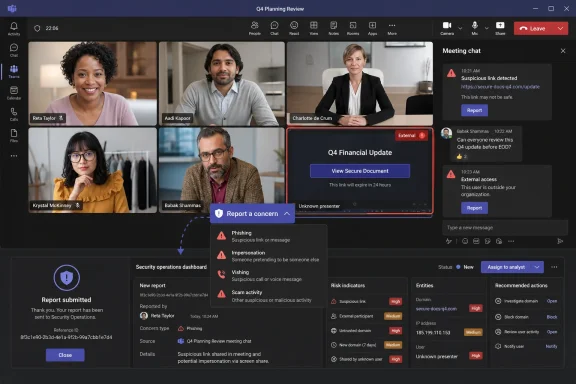 The setting exists before the feature’s stated rollout
The most revealing part of Microsoft’s documentation is that the administrative switch is already named: ReportMeeting. The Set-CsTeamsMeetingConfiguration PowerShell cmdlet describes it as controlling the Report a concern and Report as not a concern options in both the meeting interface and meeting chat. Its documented default value is Enabled.
That does not mean every tenant can use the feature now. Microsoft’s roadmap still gives October 2026 as the general-availability target, and the company has not published rollout dates by client, tenant, or region beyond the worldwide standard multi-tenant designation. Documentation and administrative controls commonly arrive before every client surface is enabled, especially for a capability rolling out across desktop and several mobile and desktop operating systems.
Still, the configuration detail tells administrators something important: this is expected to be tenant-wide, not a per-organizer setting or a meeting-policy exception assigned to selected users. A Teams administrator can inspect the current configuration with:
Get-CsTeamsMeetingConfiguration
Once the feature is live for a tenant, the documented control is:
Set-CsTeamsMeetingConfiguration -ReportMeeting Enabled
The corresponding Disabled value removes the reporting options from the Teams user interface. Organizations that have restrictive meeting configurations, scripted Teams baselines, or configuration-management tooling should check whether those systems will preserve the intended setting after October rather than inadvertently suppressing the new control.
Teams reporting is becoming an investigation pipeline
Microsoft describes user reports as security signals, not merely product feedback. Existing Teams reporting for messages and calls can feed the User reported tab in the Microsoft Defender portal’s Submissions area, where administrators can examine reports and associated alerts. Microsoft also provides a User reported security submissions report in the Teams admin center, under Analytics & reports and Protection reports, for calling, chats and channels, and reported users.
The roadmap says meeting reports will integrate with Microsoft security and administrative workflows, while the PowerShell documentation says reports are sent to security and compliance administrators. Microsoft has not yet published the exact Defender portal view, Teams admin center report category, alert title, retention behavior, or export fields for meeting reports.
That missing implementation detail matters. Existing call-report exports can expose identifiers and context such as the reported caller, call ID, caller tenant and domain, participant list, report timestamp, and user comments. Existing Teams message reports can include the reported message, conversation identity, participant data, sender tenant information, and whether the sender is external. Microsoft has not said whether meeting submissions will provide equivalent participant, organizer, tenant, meeting-chat, recording, transcript, or screen-sharing evidence.
Admins should not assume that a report will automatically remove a participant, end a meeting, revoke an external user’s access, or block a malicious tenant. Microsoft’s published description promises an investigation workflow; it does not describe automatic remediation. Security teams will still need a documented response path for an active event, including who can remove a participant, block an external domain or user, preserve evidence, notify affected staff, and decide whether a meeting recording or transcript requires review.
Existing Teams reporting has two control planes
Microsoft’s current reporting implementation for Teams messages and calls depends on separate controls in the Teams admin center and Microsoft Defender portal. For existing tenants, enabling a user-facing Teams reporting option is not always enough: Microsoft says the corresponding Defender setting must also be on for reports to appear correctly in the User reported area.
The Defender setting, called Monitor reported items in Microsoft Teams, is on by default for new tenants, but Microsoft says existing tenants need to enable it. The destination for reports is separately configurable: reports can go to Microsoft, to an organization’s reporting mailbox, or to both. Microsoft’s default is Microsoft plus the organization’s reporting mailbox.
Microsoft has not explicitly documented whether the forthcoming meeting-report flow will use that exact two-setting architecture. But the company’s decision to describe it as integrated with security and administrative workflows makes it unwise to treat the new Teams menu item as self-contained. A tenant may expose the button to users while failing to route reports to the people responsible for triage if its Defender user-reporting configuration has been neglected.
The current Teams reporting documentation also establishes an important data-handling precedent. When organizations submit Teams messages or calls to Microsoft for analysis, Microsoft says the submitted material can include directly associated content and metadata; for messages, it can include nearby conversation context. Microsoft further says submitted content is stored in secured, compliance-audited U.S. data centers until it is no longer needed, and that Microsoft personnel may review submitted content as part of the analysis process.
Microsoft has not said that meeting reporting will collect the same categories of data. Organizations with strict data-residency, labor, legal-hold, or privacy requirements should wait for the meeting-specific documentation before assuming the scope of a report. They should also decide in advance whether reports should be sent to Microsoft, a monitored internal mailbox, or both.
Mobile support is promised, but parity is not yet documented
Roadmap ID 569207 lists Android and iOS alongside desktop, Linux, and Mac, signaling Microsoft’s intention to make meeting reporting broadly available. But the company’s current reporting documentation is more limited: it identifies desktop and web support for Teams message and call reporting, while its mobile version requirements apply to messages only. Its call documentation remains focused on call history and post-call reporting.
That creates a meaningful unanswered question for October’s rollout. Microsoft has not documented whether mobile meeting participants will be able to report an incident while it is happening, only after the meeting, through meeting chat, or through a different post-meeting surface. It has also not identified whether anonymous attendees, guests, federated users, or external presenters will see the control.
The omission is particularly relevant because external-participant meetings are often where the reporting feature has its greatest value. A malicious meeting invite, a fake vendor presentation, or an impersonator posing as an executive is more likely to involve people outside the tenant. If only internal employees can report, that may be sufficient for internal incident response, but it is a very different product behavior from allowing every attendee to submit a concern.
Microsoft’s established user-reporting feature for Teams messages and calls is not supported in GCC, GCC High, or Department of Defense environments. The new roadmap entry names only Worldwide Standard Multi-Tenant, so U.S. Government cloud tenants should not expect this October rollout unless Microsoft separately announces availability.
Security teams should prepare the human process now
The feature will have the most value when staff know what belongs in a report and when the security team has committed to act on it. A vague “report suspicious activity” button can generate noise if employees use it for ordinary meeting etiquette disputes, unwanted sales outreach, or technical problems. Conversely, employees may not use it during a live impersonation or scam unless training explicitly identifies the situations it covers.
A short internal procedure should distinguish an urgent, active incident from a retrospective report. A user who sees fraudulent payment instructions or a malicious screen-share attempt needs a way to alert security or the help desk immediately; the Teams report should preserve context and create a record, not replace an emergency escalation path.
Administrators should also determine ownership before the rollout:
- The Teams team should verify the tenant-level
ReportMeetingstate and determine whether configuration baselines could reset it. - The Defender and security operations teams should confirm the destination, monitoring, alerting, and triage ownership for user-reported Teams items.
- Compliance and privacy teams should review Microsoft’s eventual description of the meeting data included with a report before enabling external submission to Microsoft.
- Help desk and incident-response staff should have a written playbook for active meetings, including removal of participants, evidence preservation, and employee communications.
Microsoft has supplied the broad outline—a report option in meeting UI and meeting chat, relevant context attached, and delivery to security and compliance administrators—but not the operating manual. By the October 2026 rollout, the critical test will be whether organizations have connected that user-facing button to a staffed, monitored response process rather than leaving it as another Teams control nobody owns.
