
The distinction matters. In today’s Teams environment, intelligent recap features are fundamentally transcript-driven: transcripts power AI-generated notes and tasks, along with features such as chapters, topics, speaker markers, mentions, and other ways to navigate a recorded conversation. Microsoft’s forthcoming option appears designed to preserve the most immediately useful output—the concise AI summary—while avoiding the long-term retention of a searchable, speaker-attributed transcript. Microsoft Support’s recap documentation and Microsoft’s intelligent recap privacy documentation
For Windows users, Microsoft 365 administrators, and Teams meeting organizers, this is more than another Copilot checkbox. It is a potentially important meeting-governance control: one that could reduce the amount of sensitive conversational data retained after routine calls, while still giving participants a practical post-meeting record of decisions and follow-up work.
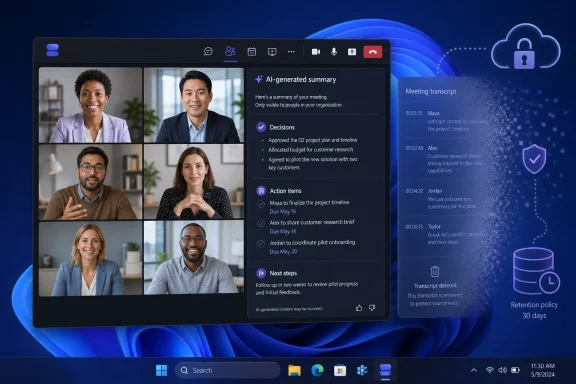 Overview: AI Summary Without a Saved Transcript
According to the roadmap entry, meeting organizers will be able to select the transcript-retention setting before a meeting from Teams meeting options. Organizers and eligible participants will also be able to enable it during the meeting. Afterward, the AI Summary will remain available, but other recap components may not be available, including Chapters, Topics, Mentions, and Audio recap. Microsoft 365 Roadmap
This is an intentionally narrower form of meeting intelligence. It does not promise a complete recap experience with every navigational and media-derived artifact that Teams can generate today. Instead, it separates the business value of a summary—key discussion points, decisions, and next steps—from the retention footprint associated with a full transcript.
That approach could appeal to organizations that have been caught between two valid needs:
- Employees need to catch up quickly after meetings.
- Managers want consistent action-item tracking.
- Legal, compliance, security, or privacy teams may not want a lasting verbatim-style account of every internal discussion.
- Meeting participants may be more comfortable with an AI synopsis than with an indefinitely accessible transcript.
Microsoft lists the feature for Teams and Microsoft 365 Copilot, across Android, iOS, desktop, Mac, and web clients. The roadmap identifies Worldwide (Standard Multi-Tenant) as the target cloud instance, with both General Availability and Targeted Release rings named for the rollout. Microsoft 365 Roadmap
Why Transcript Retention Has Become a Meeting-Policy Issue
Meeting transcription is useful precisely because it is detailed. It gives participants a searchable record, provides source material for summaries, and helps teams revisit language that may matter later. But that same detail can make the transcript a sensitive business artifact.
A transcript may capture unfinished ideas, candid feedback, commercially sensitive discussions, personnel matters, customer details, or statements made without the precision participants might use in a written document. It can also become discoverable under organizational retention, eDiscovery, records-management, and legal processes depending on the tenant’s configuration and applicable obligations.
This does not mean that transcripts are inherently undesirable. For many business functions, retaining them is the right decision. Product teams may need precise feedback, project groups may benefit from searchable design debates, and regulated workflows can require a reliable record. The important point is that not every meeting requires the same level of retained detail.
Teams has long tied its richer recap experiences to recorded or transcribed meetings. Microsoft’s support documentation says the recap surface can include recordings, transcripts, files, notes, custom summaries, agendas, and follow-up tasks. Microsoft Support The new roadmap item signals a change in that default relationship: a meeting may still yield a durable AI-oriented summary even when the transcript itself is not retained after the event.
That is a useful policy distinction. A summary answers what matters now; a transcript records nearly everything that was said. In enterprise collaboration, those are not interchangeable outputs.
What Teams Intelligent Recap Normally Delivers
To understand the trade-off, it helps to separate Intelligent Recap from the basic Teams recap page.
The standard recap layer
Teams recaps act as a central post-meeting workspace. Microsoft says a recap can bring together event materials such as the recording, transcript, shared files, notes, agenda, and follow-up tasks, depending on what was enabled and produced for the event. Microsoft Support
For employees who miss a call, this can reduce the need to scroll through meeting chat, locate shared files, replay a full recording, and reconstruct assignments manually. It is also one reason Teams recap has become increasingly central to the Microsoft 365 meeting experience.
The intelligent layer
Intelligent Recap adds AI-driven capabilities designed to make a completed meeting easier to review. Microsoft describes these features as personalized, AI-powered ways to find relevant moments and identify discussion outcomes. Intelligent recap is available through qualifying Teams Premium and Microsoft 365 Copilot licensing scenarios. Microsoft Support
Current intelligent-recap capabilities may include:
- AI-generated notes that summarize meeting discussions.
- AI-generated tasks that identify suggested follow-up work and likely owners.
- Chapters and topics that organize a meeting into reviewable segments.
- Personalized timeline markers, including name mentions, joins and leaves, and screen-sharing moments.
- Speaker-oriented navigation for reviewing contributions.
- In supported configurations, AI-generated video-oriented recap experiences. Microsoft Support and Microsoft Learn
The planned transcript-free retention option does not appear to replicate all of that. Microsoft expressly warns in the roadmap description that Chapters, Topics, Mentions, and Audio recap may be unavailable. Microsoft 365 Roadmap
That limitation is technically logical. Chapters and topics benefit from detailed, time-aligned transcript context. Mentions depend on identifying where a person’s name was spoken. Audio recap is necessarily more connected to spoken content and recording-related assets than a text-only summary.
The Practical Benefit: Retain Decisions, Not Every Sentence
The strongest argument for this Microsoft Teams update is simple: organizations may be able to retain a useful operational outcome from a meeting without automatically preserving the entire conversation.
Better fit for sensitive routine meetings
Consider recurring staff meetings, internal planning calls, manager one-to-ones involving broad project status, early-stage brainstorming sessions, or customer check-ins where a short record of decisions is useful but a permanent transcript is excessive.
In these cases, an AI Summary could provide:
- The primary themes discussed.
- Major decisions or agreed positions.
- Action items and potential owners.
- Follow-up work that should happen next.
- A compact record for attendees who were absent.
At the same time, it can reduce the chance that someone later treats a raw transcript as a polished, authoritative business document. That distinction matters because spoken language tends to be more tentative, fragmented, and context-dependent than written communication.
Less friction than a blanket “no transcription” policy
Some organizations address sensitivity concerns by turning transcription off altogether. That protects against keeping a transcript, but it also removes much of the automation that makes modern meeting tools valuable.
The new option potentially creates a middle path:
- Teams can use meeting speech to generate post-meeting intelligence.
- The transcript does not remain as a lasting recap asset.
- Participants still receive an AI Summary after the meeting.
- The organization decides where this policy is appropriate rather than applying one rigid rule to every call. Microsoft 365 Roadmap
For organizations already paying for Copilot or Teams Premium, this could increase the practical value of AI meeting features in departments where transcript retention has been the largest objection.
More intentional meeting design
The feature may also encourage organizers to consider meeting configuration as a deliberate part of governance. Rather than treating recording, transcription, recap, and Copilot as a single all-or-nothing bundle, Teams is moving toward more differentiated choices.
Microsoft already provides administrators and organizers with controls over who can record or transcribe, who can access recordings and transcripts, and whether Copilot is available only during a meeting or during and after it. Microsoft Support and Microsoft Learn
The roadmap item adds another meaningful question: what should remain after the meeting ends?
The Key Trade-Off: Less Evidence, Less Context
The new setting should not be read as a universal improvement. It is a trade-off, and administrators should be clear about what their teams may lose.
Summaries are not transcripts
An AI Summary can be a useful aid, but it is not a complete record. It necessarily selects, condenses, and interprets what it considers important. That makes it faster to consume, but it also makes it less suitable for resolving disputes about exact phrasing, reconstructing a technical discussion, or reviewing every qualification attached to a decision.
Microsoft itself cautions that AI-generated recap content can be inaccurate, incomplete, or inappropriate. Its support guidance advises users to verify AI-generated content rather than treating it as infallible. Microsoft Support
This warning becomes more significant when the transcript is not retained. When a full transcript remains available, users can compare the summary against the underlying discussion. When it does not, a team may have fewer ways to validate whether a summary omitted an important caveat, overstates a consensus, or assigns an action item too confidently.
The loss of navigation tools is real
Microsoft’s roadmap specifically identifies Chapters, Topics, Mentions, and Audio recap as elements that may not be available. Microsoft 365 Roadmap
For some teams, that will be a minor sacrifice. A 20-minute weekly status call may only need a concise summary and action list. For other teams, it could significantly reduce value:
- Engineering groups may need topic markers to find architecture discussions.
- Sales teams may need to revisit a specific customer objection.
- Managers may use mention markers to catch assignments directed to them.
- Training, incident response, and postmortem meetings may need a more complete record.
- Employees who process information differently may prefer review through searchable text or audio.
The right deployment model is therefore unlikely to be “enable transcript-free recap everywhere.” A more mature approach will match the setting to the meeting type.
Recording remains a separate question
The roadmap language concerns retaining a transcript, not necessarily recording retention. Organizations should avoid assuming that selecting the new option automatically means no recording exists, no audio is stored, or no other meeting artifact survives. The final implementation details and the organization’s own Teams, OneDrive, SharePoint, Purview, and retention settings will all matter.
Teams meeting recordings are generally stored in OneDrive for Business or SharePoint, depending on meeting type and policy configuration. Microsoft Support A transcript-free recap setting should therefore be evaluated alongside recording policies—not as a substitute for them.
Data Privacy, Security, and the Important Storage Question
Microsoft’s existing documentation explains that traditional intelligent recap features rely on meeting transcripts and that the generated outputs can be stored in different Microsoft 365 locations. For example, Microsoft documents that AI-generated notes and AI-generated tasks are stored in Exchange folders in participants’ mailboxes, while chapters and topics can be stored with meeting recordings in OneDrive or SharePoint. Microsoft Learn
That documentation describes the established intelligent recap architecture. It should not be assumed to describe every storage detail of the future transcript-free option, because Microsoft has not yet published technical documentation for Roadmap ID 558286 beyond its feature description.
Still, the existing documentation provides an important planning lesson: not saving a transcript does not necessarily mean that no meeting-derived data remains.
An AI Summary is itself a retained artifact. Depending on the final design, organizations will need to understand:
- Where the AI Summary is stored.
- Which participants can access it.
- Whether it is retained under Exchange, Teams, Purview, or other policies.
- Whether it is included in eDiscovery searches.
- How deletion and expiration behave.
- Whether summary sharing can extend its audience beyond the meeting’s original participants.
- How sensitivity labels and information barriers apply.
Microsoft states that intelligent recap inherits an organization’s Teams security, compliance, and privacy policies. It also says customer data is not logged or used for AI-model training or testing, and that customer data is not shared with non-Microsoft parties, including OpenAI, for the intelligent recap functionality it documents. Microsoft Learn
Those assurances are relevant, but governance teams should still ask a narrower operational question: What exact artifact is being retained, where, for how long, and under which policy? The roadmap feature makes that question more nuanced, not less important.
What Microsoft 365 Administrators Should Do Before October
Because the roadmap lists the capability as in development and targets October 2026 for general availability, IT departments have time to prepare without treating the current description as final deployment documentation. Microsoft 365 Roadmap
Review existing Copilot and transcription policy choices
Teams administrators can already govern Copilot behavior through meeting policies. Microsoft documents options that include allowing Copilot only during meetings, requiring a saved transcript, setting a saved transcript as the default, or turning the feature off. Microsoft Learn
The planned feature may require a review of whether existing policies unintentionally prevent the desired configuration. In particular, a policy that mandates saved transcripts could be conceptually at odds with a meeting-level option designed to avoid retaining one.
Administrators should inventory:
- Teams meeting policies assigned to users and groups.
- Copilot licensing coverage.
- Teams Premium licensing where relevant.
- Transcription permissions.
- Recording permissions and storage locations.
- Sensitivity labels for meetings.
- Data loss prevention and information barrier requirements.
- Retention labels and retention policies for Teams, Exchange, OneDrive, and SharePoint.
Define meeting categories rather than relying on user guesswork
A policy matrix is often more useful than asking every organizer to decide from scratch. For example:
| Meeting type | Suggested recap posture |
|---|---|
| Routine project status meeting | AI Summary without retained transcript may be suitable |
| Sensitive leadership discussion | Evaluate whether any recording, transcript, or AI output should be retained |
| Customer-facing account review | Depends on contractual, privacy, and CRM documentation requirements |
| Formal investigation or compliance review | Use a policy approved by legal and compliance teams |
| Incident response or technical postmortem | A full transcript or recording may be necessary for accuracy |
| Training session | Recording and transcript may be preferable for accessibility and reuse |
The exact policy will vary by organization, industry, geography, and contractual obligations. The value of the Teams update is that it gives organizations another option between “save all meeting detail” and “retain nothing useful.”
Prepare users for the changed recap experience
The new setting will require clear communication. Employees accustomed to complete Teams recap features may expect chapters, topical organization, mention markers, or an audio-oriented summary after every meeting. Microsoft’s roadmap makes clear that these elements may not be available when a transcript is not retained. Microsoft 365 Roadmap
Training should explain that:
- AI Summary is not a verbatim record.
- The summary should be reviewed for accuracy, particularly for commitments and action items.
- No saved transcript means fewer ways to check the source discussion later.
- Meeting organizers should choose the setting before sensitive calls begin, where possible.
- The setting does not replace separate recording, retention, or confidentiality policies.
A Better Fit for the Windows and Teams Workflow
For people who spend their working day in the Teams desktop client on Windows, this update could make AI recap more practical in the flow of normal work. The common experience of returning from back-to-back meetings is not a need for an exhaustive transcript; it is a need to know what changed, who owns the next task, and what requires attention.
An AI Summary can fit that workflow well. It gives users a compact post-meeting briefing without asking them to scrub through a recording or search a long transcript. That can reduce time spent in catch-up mode and make the Teams recap tab more useful as an execution tool rather than a passive archive.
But the feature’s value depends on good meeting hygiene. If attendees want an accurate summary, meetings still need clear decisions, explicit ownership, and concise conclusions. AI can surface those signals, but it cannot reliably compensate for vague conversations, conflicting instructions, or decisions that were never actually made.
The strongest Teams users will likely treat transcript-free intelligent recap as a meeting outcome tool. The weakest use case is treating it as a substitute for documentation discipline. A summary is most valuable when it confirms a meeting that was already structured enough to produce clear outcomes.
The Bottom Line
Microsoft Teams’ planned ability to generate an Intelligent Recap AI Summary without retaining the transcript is a meaningful refinement of how AI meeting tools can be governed. It recognizes that the need for useful meeting follow-up does not always imply a need to preserve a full textual account of the conversation. Microsoft 365 Roadmap
The feature’s strength is its balance: organizations can potentially keep actionable summaries while reducing the long-term exposure and clutter associated with stored transcripts. Its limitation is equally clear: without a retained transcript, teams should expect a less complete recap experience and fewer ways to validate the AI’s interpretation afterward.
For Microsoft 365 administrators, the October 2026 target should prompt policy review now. The practical questions are not merely whether to enable Teams AI recap, but which meeting types merit a summary, which require a full record, who can access each artifact, and how long every retained output should live. The forthcoming option gives enterprises more control—but only if they use that control with the same care they apply to recordings, transcripts, and the meetings themselves.
