

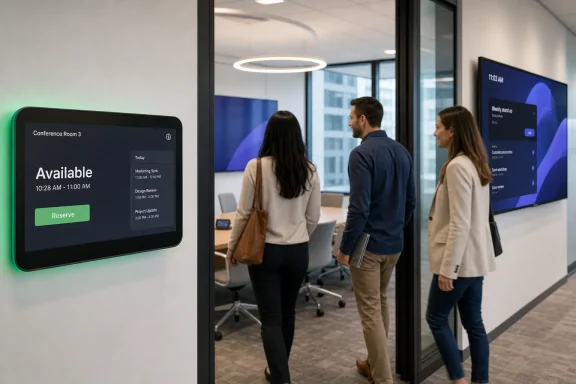
The useful detail for IT teams is that this is not a new calendar engine or a way to schedule arbitrary future meetings from the console. It is an immediate-use reservation workflow: when the room calendar has an opening, the console presents a Reserve button, and the person in the room chooses how long to occupy the space. Microsoft documented the feature in the April 2026 Teams Rooms on Android release notes, where it arrived alongside digital signage and live transcription.
The Roadmap entry was updated on August 12, but the feature itself was already released months earlier. Administrators looking at the newly modified Roadmap listing should treat it as a status refresh, not evidence of a fresh August rollout or a newly required client update.
The console now competes with the panel workflow
Teams Panels have supported on-the-spot room bookings for some time. Those wall-mounted devices let a user reserve an available space from the panel, with reservations beginning immediately and ending before the next meeting or after a maximum window. The change in Roadmap 548652 moves that basic convenience to the Teams Rooms on Android console sitting inside the room.
That distinction matters in rooms without a dedicated panel, and in spaces where the panel is mounted outside the door but attendees have already entered. A group that finds an empty conference room no longer needs to split off to locate the resource mailbox in Outlook or scan a QR code to schedule the space. They can claim the room at the device they are about to use for the meeting.
Microsoft’s current Teams Rooms home-screen documentation says the control appears in the room calendar only when the room is available. In practical terms, the button is a fast path to creating a reservation against the room resource account; it does not override Exchange availability, ignore an existing booking, or create a loophole around the organization’s room-calendar policies.
The workflow also changes the meeting-room calendar immediately. A reservation made from the console blocks the room, so a colleague checking availability from Outlook or Teams should see the space as occupied rather than assuming it remains available merely because nobody had booked it earlier.
The maximum booking window limits abuse — but does not eliminate it
The implementation closely resembles Microsoft’s established ad-hoc reservation behavior on Teams Panels. Users select an end time in 15-minute increments, with the reservation capped by the next scheduled meeting or a maximum of 24 hours, whichever occurs first. If the next event starts too soon, the reserve option should not be offered.
That means the feature is designed for an empty room that has been discovered right now, not for someone trying to bypass normal scheduling by grabbing a desirable room days in advance. It also prevents a spontaneous group from reserving through a meeting that is already on the calendar.
There is a catch for facilities and collaboration teams: immediate reservations can still make a room look busy without proving that it is occupied. Microsoft’s Teams Panels documentation notes that ad-hoc reservations produce Teams meetings, and that releasing or canceling them may require access through Teams or Outlook rather than simply clearing the booking at the room display. The Android console announcement does not spell out an equivalent self-service cancellation or early-release path for this workflow.
Organizations that already struggle with ghost meetings should therefore test the reservation lifecycle before enabling it estate-wide. A 24-hour ceiling limits the blast radius of an abandoned booking, but it is still a long time to remove a scarce meeting room from circulation.
The control is available, but the default needs verification
Microsoft’s April release notes say admins can control the feature through the Allow ad hoc room reservation device setting in the Teams admin center. Microsoft’s Teams Rooms home-screen documentation gives a second management path: on the Android appliance itself, open Teams Admin Settings, choose Meetings, and toggle Allow ad hoc room reservation. The same setting can be deployed through an Android Teams Rooms configuration profile.
The submitted Roadmap item calls the feature available in Teams Rooms Pro-licensed spaces, while a reposted Microsoft 365 Message Center notice identified as MC1227619 says it was enabled by default when released. Microsoft’s public configuration documentation explains how to turn the feature on or off, but does not clearly state a universal default for every existing Android room configuration.
Admins should not assume their present room fleet has the same state simply because the Roadmap says “Launched.” Existing per-device settings, configuration profiles, and staged deployment rings can leave otherwise identical rooms behaving differently. The sensible first check is a pilot room: verify that the Reserve button appears only when the resource calendar is free, create a short booking, then confirm that the reservation is visible from a standard user’s Outlook or Teams calendar view.
A practical rollout checklist is short:
- Confirm that each intended room uses a Teams Rooms Pro license, since the Roadmap entry does not position this as a Teams Rooms Basic entitlement.
- Review the Android configuration profile in Teams admin center for the Allow ad hoc room reservation setting before changing individual consoles.
- Test the reservation duration choices against a room with a scheduled meeting less than an hour away.
- Decide who can cancel abandoned ad-hoc reservations and document that process for help desk and workplace-services staff.
- Tell users that reserving the room calendar is separate from starting a call, sharing a screen, or joining an existing scheduled meeting.
April’s client release is the operational baseline
Microsoft places ad-hoc room reservation in the Teams Rooms on Android release labelled 1449/1.0.96.2026087210, under its April 2026 changes. That is more useful than the Roadmap’s platform label alone because it gives admins a concrete release note to compare with device inventory and update status.
The version naming is awkward: the release entry is filed under April even though the embedded build string resembles a later date. Microsoft does not explain that mismatch in the release notes. What the record supports is simpler: the capability is part of the documented April 2026 Android Teams Rooms feature set, and Microsoft’s current home-screen guidance still describes the control as available.
This is also not a Windows Teams Rooms announcement. Microsoft’s broader home-screen documentation now documents ad-hoc room reservation for both Windows and Android Teams Rooms, but Roadmap 548652 specifically concerns the Android console rollout. IT teams with mixed fleets should validate each platform rather than assuming that an Android setting, deployment profile, or client build maps directly to Windows rooms.
Hardware remains another variable Microsoft leaves largely to the device makers. Teams Rooms on Android is deployed across appliances from vendors such as Logitech, Poly, Yealink, Neat, and others, often with different console models and firmware dependencies. The release notes identify the software feature, but they do not provide a public per-model certification list for ad-hoc reservation. A room that is behind on its Teams Rooms app, device firmware, or management policy may not surface the button despite having the right license.
This is a small feature with a real support consequence
For end users, the change is nearly invisible: an empty room can be reserved from the same screen used to join the meeting. For administrators, it adds another way that the room resource account can be written to outside the familiar Outlook scheduling flow.
That makes calendar hygiene the real issue. Teams Rooms Pro customers should decide whether immediate booking fits the way their spaces are governed, particularly in offices where facilities staff rely on check-in, automatic release, or strict organizer accountability to keep rooms available. The best deployment is one where a spontaneous meeting can claim a room quickly without creating a new stockpile of unexplained all-day reservations.