
The change sounds modest—another discovery screen for an existing Viva Engage feature—but it addresses a real gap in Microsoft’s current Teams integration. Microsoft’s own Teams administration documentation still lists campaign and Topics-page management among the Engage functions confined to the Viva Engage app or web experience, and says several campaign-related right-rail features are not supported in Teams. The new hub does not promise campaign administration from Teams mobile. It promises campaign discovery and participation, which is a narrower but potentially more useful change for ordinary employees.
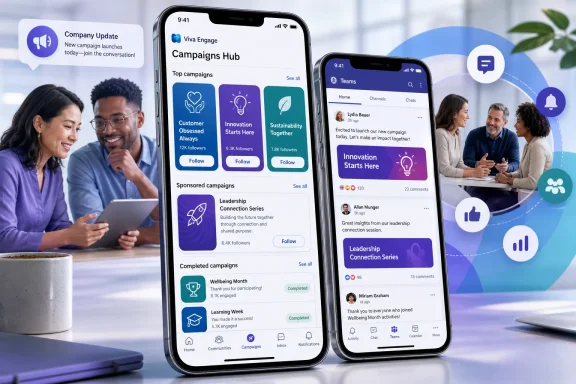 A mobile directory for campaigns, rather than a campaign authoring tool
According to the roadmap description, the Campaigns Hub will surface top and sponsored campaigns, let users browse active and completed campaigns, open campaign details, and follow campaigns they care about. Microsoft says it will be available in both the standalone Viva Engage app and Viva Engage within Teams on Android and iOS.
That creates a clearer distinction between running a campaign and encountering one. Microsoft’s Viva Engage documentation says licensed Engage admins and corporate communicators create, publish, end, delete, and analyze official campaigns through the campaign dashboard. Campaigns themselves are organized around a verified hashtag and a campaign landing page, where related posts from communities and storylines are collected.
Today, users often find campaigns through those tagged posts, campaign modules in the Engage home feed, or a shared link. Microsoft’s documentation describes a “Top campaigns” module that orders three official campaigns by follower count, plus a separate module for campaigns a user follows. The planned hub appears to consolidate those scattered entry points into one mobile destination, while adding completed campaigns to browsing.
For communicators, that matters less as a new publishing capability than as a distribution change. A campaign that relies on an executive’s post being seen in the right community—or on employees recognizing and selecting a hashtag—depends heavily on chance and on users already knowing where to look. A central mobile hub gives Microsoft a product-controlled front door for campaigns, including ones the organization chooses to sponsor.
Teams mobile already supports campaigns, but not this discovery layer
Microsoft introduced a rebuilt Viva Engage experience for Teams mobile in 2025, including campaigns alongside home feeds, communities, leadership content, Answers, and integrated activity notifications. Its more recent Teams and Viva Engage material has continued to push communities, storylines, events, and corporate communication into Teams, where employees already spend their workday.
The Campaigns Hub extends that path, but admins should not confuse the planned mobile feature with Microsoft’s broader Communities in Teams work. Microsoft Learn currently describes Engage communities in Teams as a public preview, while storylines in Teams are generally available. Those community experiences can be independently enabled or disabled through Teams messaging policies.
Roadmap ID 570157 is specifically scoped to the Viva Engage app and Viva Engage in Teams mobile. It does not say that the hub will appear in the desktop Teams client, the Teams web app, or the broader Communities interface. It also does not state whether campaign cards, sponsored placements, or follow activity will be synchronized with every existing Engage surface at launch.
That omission matters for organizations that have deliberately limited Viva Engage’s presence in Teams. Microsoft’s Teams documentation says both community and storyline experiences are enabled by default, but admins can turn them off independently. If the Campaigns Hub rides on the same Engage-in-Teams configuration, a tenant’s current policy settings may determine whether users ever see it. Microsoft has not yet published the management documentation needed to confirm that relationship.
“Sponsored” campaigns will need governance before October
The word “sponsored” is the most consequential detail in the roadmap entry. Microsoft already lets organizations make official campaigns more visible through top-campaign modules and verified hashtags. A specifically sponsored position suggests communicators may get a way to elevate campaigns independently of organic follower counts, although Microsoft has not described the selection rules, controls, limits, or reporting behind it.
That is useful for high-priority internal work such as a security-awareness drive, a benefits-enrollment deadline, a major policy change, or a company-wide event. It can also make the employee-facing feed feel more directed from the top down if sponsorship becomes a routine communications shortcut. The roadmap does not disclose whether sponsored placement will be a paid feature, a Viva Engage Premium entitlement, or simply an admin-controlled ranking option.
There is a licensing issue administrators should clarify before planning a launch around the feature. Microsoft’s current documentation says campaigns are available in Viva Engage Premium. It also says only licensed Engage admins and corporate communicators can create, manage, and delete official campaigns, though unlicensed admins can access the management dashboard to delete campaigns. The roadmap lists Microsoft Teams and Microsoft Viva as products but does not identify a license requirement for viewing, following, or participating through the new hub.
That leaves a practical question unanswered: will every Teams and Microsoft 365 user who can access Engage be able to browse the hub, while Premium licensing remains confined to campaign creation and analytics? Or will the hub itself require a Premium entitlement? The current roadmap entry does not say.
Existing campaign controls remain relevant
Organizations should also avoid assuming that a polished discovery surface changes campaign moderation or retention behavior. Under Microsoft’s current Viva Engage guidance, a corporate communicator or Engage admin can remove a post from an official campaign landing page without deleting the original post from the community or storyline where it was made. Ending an official campaign disables the follow button and default publisher, but posts using the verified hashtag can still appear on that campaign’s landing page.
In other words, the Campaigns Hub is likely to make campaigns easier to find; it does not, based on the published information, change the underlying relationship between campaign pages and the conversations they aggregate. Communications and compliance teams should continue to treat campaign-associated posts as Engage content subject to the organization’s existing governance, rather than as content contained solely within a temporary promotional page.
Microsoft also documents daily refreshes for campaign analytics. The roadmap does not promise new mobile analytics for campaign owners, so communicators should not plan on real-time campaign management from a phone. The stated benefit is participation: discovering campaigns, seeing their details, and following them.
What IT teams can check now
There is no rollout action to take yet, and Microsoft has not published affected app-version numbers, a staged-rollout schedule, admin toggles, or a Message Center notice tied to Roadmap ID 570157. The item is limited to Microsoft’s worldwide standard multi-tenant cloud; Microsoft has not announced availability for government, education, or sovereign environments.
Before October, Teams and Viva administrators can at least verify the basics that determine whether Engage is usable in Teams:
- The Office 365 Viva Engage enterprise application must be enabled for user sign-in in Microsoft Entra ID.
- Network controls must not block Viva Engage service endpoints.
- Users need Microsoft 365 and Teams licenses, along with access to Viva Engage.
- Teams messaging policies should be reviewed because Viva Engage community and storyline experiences have separate enablement controls.
- Campaign owners should confirm that they have Viva Engage Premium licensing and the appropriate corporate communicator or Engage administrator role.
Microsoft’s June Viva Engage update described broader work on bringing company communications into Teams and on managing complex campaigns end to end. The Campaigns Hub is more limited than that vision: it is a mobile discovery and follow surface, not the announced end-to-end campaign-planning system.
Still, it solves a basic adoption problem. When the feature reaches general availability, employees will no longer need to stumble across a hashtagged post to know an official campaign exists. For organizations that use Viva Engage for required awareness drives or leadership initiatives, October’s change could make campaign reach less dependent on the behavior of already-engaged users—provided Microsoft supplies the licensing and policy details that the roadmap entry currently leaves open.
