
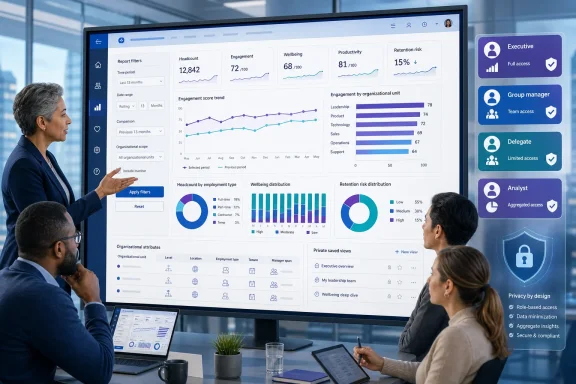
The practical change is broader than changing a date slicer. In Viva Insights, eligible users will be able to adjust the reporting period, apply filters and organizational attributes, alter report visuals and layouts, and save the result for future viewing. The reporting period can extend to 13 months where the underlying report supports it.
Microsoft’s initial Roadmap wording makes this sound like a new reporting capability for “leaders and analysts.” Its own Viva Insights documentation shows that analysts already have a substantial report-customization workflow today: they can add charts, text boxes, and report pages; change filters and visual types; and save copies of customized reports. The material new element is the extension of that authoring-style experience to leaders, group managers, and delegates who previously consumed prebuilt insights without the same latitude to reshape a report.
That distinction matters for IT teams planning the rollout. This is less a brand-new Power BI editing engine than an expansion of who can use one inside the Viva Insights web app—and, therefore, who can create persistent versions of sensitive workforce and Copilot-adoption views.
 The September schedule has already moved once
The timing is more specific than the Roadmap card alone suggests. Microsoft’s Message Center notice says general availability will begin in early September 2026 and complete by late September 2026. The same notice says that schedule was previously early August, meaning organizations that were preparing for an August change should reset communications and support readiness around September.
The Roadmap listing says the release applies to Microsoft Viva on the web in Microsoft’s worldwide standard multi-tenant cloud. It does not list GCC, GCC High, DoD, or other sovereign-cloud availability. Administrators in those environments should not assume that a September worldwide multi-tenant target also means a simultaneous deployment in their tenant.
Microsoft says no administrative action is required for the feature to arrive. That is true in the narrow deployment sense, but it understates the governance decision. A feature that changes report readers into report customizers can alter the volume of saved views, internal support requests, and questions about whether a user’s version represents the approved organizational metric definition.
The supported audience is wider than “leaders and analysts”
According to the Message Center notice, the feature is intended for four classes of Viva Insights users with access to Microsoft Copilot Analytics:
- Chief Officers with tenant-level access can customize the reports they can already open.
- Group Managers with team-level access can create views within their existing scope.
- Delegates can create, access, and manage customized reports for the leaders they support.
- Viva Insights Analysts retain their existing Analyst Workbench capabilities and can save reports privately or share them within their assigned data partitions.
Microsoft’s Viva Insights role documentation supports the access boundary behind that list. Analysts have broad access to advanced analysis and the Viva Insights web app, including Copilot Dashboard and Copilot Analytics reports. Business leaders, managers, and delegates can access the Copilot Dashboard and Copilot Analytics reports but do not receive the analyst’s advanced-analysis or administrative tools.
In other words, the new experience does not turn managers into full Viva Insights analysts or give them unrestricted access to workforce data. It gives them more control over the shape of reports already available within their assigned scope. A group manager can focus a report on a time window or organizational attribute relevant to their team; that is different from opening the Analyst Workbench and running a fresh people or meeting query against the broader organizational dataset.
Delegation is the operational wrinkle. Executive assistants, chiefs of staff, and other authorized delegates will be able to manage customized reports on behalf of Chief Officers and Group Managers. Organizations that have treated delegation as a convenience feature should review those assignments before September, because this release makes delegation a route to creating and maintaining saved management reporting views.
Saved reports are personal by default, not a new corporate dashboard
The most consequential detail in Microsoft’s notice is also the easiest to miss: customized reports made by Chief Officers, Group Managers, and delegates will be private by default. They are visible to the report owner and that owner’s authorized delegates.
That design avoids a predictable governance problem: a manager’s local changes to filters, time range, chart selection, or layout should not silently rewrite the standard report for every other user. It also means a saved view is not automatically a shared, governed executive dashboard. If a leader creates a view that appears to show a drop in Copilot use, another leader will not necessarily see that view, its selected period, or the same organizational filters.
Analysts have a different sharing model. Microsoft says analysts can save customized reports privately or share them within their assigned Viva Insights partitions, subject to existing partition permissions. A partition is an analyst workspace constrained to a selected employee population and its organizational attributes. That is important because report customization does not erase existing data boundaries; it operates within them.
The underlying report types also remain bounded. Microsoft’s current customization guidance says analysts can customize out-of-the-box Power BI reports, including reports such as Copilot Studio agents and Copilot for Sales adoption reports, plus reports based on queries already run by an analyst. It explicitly says analysts cannot customize certain raw custom-query report types, including Person queries and Meeting queries. Microsoft has not published a complete September matrix identifying every report that leaders and managers will be allowed to customize, so admins should avoid promising that every Viva Insights chart will gain an edit button.
Privacy thresholds survive the new editing controls
Microsoft says existing governance, security, privacy controls, roles, and permissions will continue to apply. In Viva Insights, that is not boilerplate. The product’s minimum group-size rules govern whether a visual may expose results for small populations.
Microsoft’s administrator documentation says the minimum group size is used to protect individual privacy. When fewer people are active in Outlook and Teams than the configured threshold, Viva Insights hides organizational insights for that period. The threshold cannot be lower than five, and it applies to data visualizations in advanced-analysis Power BI templates as well as group comparisons in leader and manager insights.
The report-customization documentation makes the connection explicit: adding tables based on different attributes does not bypass the threshold, because tables whose insights fall below the organization’s minimum group size are not shown. A manager may be able to add a department, location, function, or other organizational attribute to a report, but cannot use the new feature to drill a result beneath the privacy floor.
There is a separate eligibility gate for manager access. Managers must meet the organization’s configured minimum team size to access Viva Insights, and that setting also cannot be below five. The team definition includes the manager plus direct and indirect reports. If a manager expected to receive this feature cannot access the relevant report in September, the likely first checks are their enabled manager status, licensing and service plan, team-size eligibility, and whether they were granted scoped Copilot-insights access.
Administrators can control adoption, but must set the policy deliberately
Microsoft says Viva Feature Access Management can enable or disable Report Customization for users, groups, or the tenant. This is a meaningful safeguard for organizations that want a staged rollout, but the current public Feature Access Management reference does not yet list “Report Customization” among the named Viva Insights modules it displays. Microsoft’s Message Center notice is the primary statement that the September capability will be controllable; admins should verify the exact policy name and location in their tenant once rollout begins rather than relying on older documentation menus.
Feature Access Management policies are evaluated per user, and Microsoft says the most restrictive applicable policy takes precedence. Changes generally take effect within 24 hours. That makes a group-based pilot feasible, but it also means overlapping policies can create unexpected denials if an organization has already used Viva controls for other features.
The sensible preparation is administrative rather than technical:
- Review who has Chief Officer, Group Manager, delegate, and Insights Analyst access before the September rollout window.
- Confirm that manager scopes and delegation assignments reflect current reporting relationships, especially for executives with administrative support staff.
- Decide whether report customization should be enabled tenant-wide on day one or introduced through a limited user or Entra group policy.
- Update internal reporting guidance to distinguish a private customized view from an approved shared metric pack.
For most users, this will be a welcome reduction in the back-and-forth between an executive who wants “the same report, but for my organization and the last quarter” and an analyst who has to produce it. For Viva Insights administrators, the change brings a new class of report author into a product built around workforce and Copilot metrics. The September release preserves the existing permission and privacy model, but it will make role assignment, delegation hygiene, and policy design visible in far more users’ day-to-day reporting experience.
