
The practical consequence is sharper on Windows. Microsoft’s current VS Code agent sandboxing is available on macOS and Linux, including WSL2 on Windows, rather than as a native Windows host boundary. A Windows development shop cannot treat a generic recommendation to “enable sandboxing” as a completed control; it must decide where agent commands run, what credentials are exposed there, and which actions still require approval.
Augment’s guide arrived as public-sector guidance has moved in the same direction. The April 30, 2026 joint advisory from CISA, NSA, and allied cyber agencies warns that agentic systems introduce privilege, design, behavior, structural, and accountability risks beyond those of a conventional chat assistant. It recommends incremental deployment, monitoring, accountability, and human oversight. Those are sound objectives. The hard part is translating them into enforceable controls on a developer workstation and CI environment.
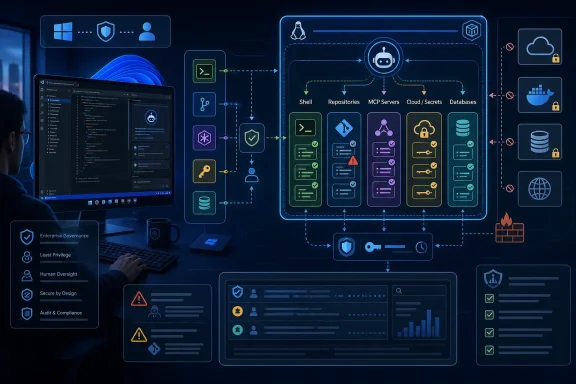 The incident record supports runtime controls — but not every detail in the guide
The strongest example in Augment’s guide is CVE-2025-53773, the GitHub Copilot and Visual Studio command-injection flaw scored at CVSS 9.6. Microsoft’s advisory describes an issue that could allow local code execution, and the NIST National Vulnerability Database identifies Microsoft Visual Studio 2022 version 17.14.0 through 17.14.11 as affected. That scope is important: the guide discusses the issue principally as a GitHub Copilot problem, while the official affected-software record specifically names Visual Studio 2022.
The attack technique remains relevant to VS Code users. Security researcher Johann Rehberger documented how indirect prompt injection could alter settings to auto-approve tools or commands, while GitHub’s own security write-up acknowledges that malicious instructions embedded in issues, web content, files, or tool output can lead to token exposure or arbitrary code execution. GitHub has since added approval flows, workspace restrictions, sandboxing options, and enterprise controls. The lesson is not that any one setting file is permanently dangerous; it is that an agent allowed to modify configuration can alter the controls intended to constrain it.
The guide is less precise when it summarizes Amazon Q Developer vulnerabilities CVE-2026-12957 and CVE-2026-12958 as a malicious .amazonq/mcp.json route to remote code execution and cloud credential theft without consent. AWS’s June 23 security bulletin describes something narrower and materially different. CVE-2026-12957 involved project configuration commands executing after a user trusted a malicious workspace; CVE-2026-12958 involved inadequate symlink validation that could resolve outside the workspace trust boundary. AWS identifies the affected component as Language Servers for AWS, used by Amazon Q Developer plugins, and says both issues are fixed in Language Servers for AWS 1.69.0.
AWS does not describe those two CVEs as an MCP configuration attack, does not say cloud credentials were stolen, and explicitly says the first issue required the user to trust the workspace. That does not make the flaws routine. It means the architectural finding is more exact: workspace trust is a security boundary that can fail after a user crosses it, so organizations must not use “trusted workspace” as a substitute for command isolation or credential scoping.
The August 2025 Nx s1ngularity compromise needs the same distinction. Nx’s postmortem says attackers first abused a GitHub Actions injection weakness to steal an npm publishing token, then pushed malicious package releases for roughly four hours. The packages scanned systems for sensitive data, attempted to use installed AI tools such as Claude and Gemini, and uploaded results through the GitHub CLI. It is evidence that local AI tooling can be folded into a supply-chain payload. It is not evidence that an AI coding agent independently caused the original package compromise.
That difference changes the design response. The preventive controls are not limited to prompt filtering or model behavior. They include npm provenance checks, dependency controls, GitHub Actions hardening, least-privileged workflow tokens, endpoint monitoring, and separating developer secrets from agent-accessible environments.
Windows is the unaddressed deployment boundary
Microsoft’s latest VS Code security documentation says agent sandboxing uses OS-level restrictions for file-system and network access, but it lists support on macOS and Linux — with WSL2 as the Windows path. Native Windows development remains a different proposition. A developer running VS Code directly on Windows 11 should not assume that enabling Copilot agent mode creates a Linux-style containment boundary around terminal commands.
For Windows administrators, the immediate baseline is more mundane and more dependable:
- Untrusted repositories should open in VS Code Restricted Mode, where agents are disabled until the workspace is reviewed.
- Copilot, Amazon Q, Claude Code, Cursor, and other agent tools should not receive standing access to developer cloud credentials, production database clients, SSH keys, or broadly scoped GitHub tokens.
- Agentic command execution should happen in WSL2, a dev container, a disposable virtual machine, or a purpose-built remote development environment when the task requires shell access to untrusted code.
- Enterprise policy should prevent global auto-approval and block “bypass permissions” modes for managed clients.
GitHub’s June 2026 enterprise setting for Copilot is a useful example of what enforceable governance looks like. Administrators can disable Bypass Permissions mode — the setting commonly described as yolo mode or auto-approve — through enterprise-managed configuration. That matters more than an instruction in a repository telling an agent to be careful, because the policy sits outside the model’s context window and outside the repository an attacker may control.
The limitation is clear: approval prompts by themselves are not a security architecture. Users approve prompts quickly when they appear dozens of times during a normal coding session. A meaningful control plane needs to make routine low-risk work fast while forcing distinct treatment for actions that change trust boundaries: launching a new MCP server, writing editor settings, accessing secrets, pushing to a protected branch, creating cloud resources, changing IAM, or running destructive database commands.
The right unit of least privilege is the action, not the agent
Classic identity and access management assumes an administrator can decide what a user or service needs before it begins work. Coding agents upset that assumption because the tool path is selected during execution. An agent asked to fix a test may read a file, install a package, call a browser, execute a build command, modify project configuration, and open a pull request — all within one session.
Giving the agent a permanently broad developer identity solves the usability problem by removing the security boundary. It also turns prompt injection, malicious repository content, compromised MCP tools, and model mistakes into credentialed actions.
The durable replacement is runtime authorization. Each consequential tool call should be evaluated with the identity of the initiating user, the agent session, the specific tool, the target resource, and the requested operation. A request to read source files is different from a request to write .vscode/settings.json; a request to run a unit test is different from a request to invoke PowerShell with access to a user profile; a request to create a temporary cloud object is different from changing a production security group.
This does not require every shell command to wait for a human click. It requires policy categories. An organization can permit read-only repository searches and test execution in a constrained environment while escalating changes to configuration, source-control remotes, secrets, network destinations, production tenants, and deletion operations.
Agent identity also needs to be separate from the developer’s personal identity. The developer should remain the accountable requester, but the agent session should receive a short-lived, scoped credential that can be logged and revoked independently. Shared personal access tokens and copied cloud profiles defeat this model because audit trails cannot distinguish a developer’s deliberate action from an autonomous tool call made in that developer’s name.
Architecture reviews need to test the actual execution path
Augment presents six sensible control planes: execution isolation, network egress restrictions, agent identity, tool authorization, human approval, and observability. The omission is evidence that a buyer can independently assess whether its product delivers each one on Windows, in WSL2, in remote containers, and in CI.
A security review should demand answers that are concrete enough to test:
- Where exactly does agent-issued shell code execute, and what host files, Windows credential stores, environment variables, mounted paths, and network interfaces can it reach?
- Can an agent change its own approval settings, install or alter an MCP server, modify workspace rules, or write to a directory that is automatically executed by an editor, build system, or CI runner?
- Are source-control, cloud, package-registry, and database credentials ephemeral and scoped to one agent session, or does the agent inherit the developer’s full workstation identity?
- Which events are retained: prompts, repository context, tool calls, command arguments, outputs, approval decisions, token exchanges, and final changes? Without a record of denied as well as approved actions, an organization cannot reconstruct a prompt-injection attempt.
- What is enforced by the vendor’s backend, what is controlled by an administrator, and what remains a user-local preference that an agent or malicious repository could influence?
These questions expose a gap in much agent-security marketing. A vendor may say it has an “auditable session” or an “approval gate,” but neither phrase establishes that the gate is impossible for the agent to reconfigure or that the audit record captures the actual command, credential, and destination involved.
The near-term Windows playbook is therefore straightforward: patch the affected Amazon Q Developer plugins to the releases containing Language Servers for AWS 1.69.0; bring Visual Studio and VS Code agent tooling current; prohibit unmanaged bypass-permission modes; and place agents that execute commands inside a deliberately constrained WSL2, container, VM, or remote environment.
Security architecture for the agentic SDLC is not a new framework replacing NIST, secure development practices, or workstation management. It is the point where those existing programs must begin treating the coding agent as an identity with mutable instructions, executable tools, and privileges that have to be constrained at the moment it acts.
