
WindowsUpdate 1.0.0.msi rather than a genuine Windows update.The warning now circulating in August is worth taking seriously, but it is also recycling an older, specific incident as a broad new alert. Malwarebytes’ underlying technical report dates to April; Windows Central and PC Gamer subsequently summarized the same analysis, and a July post from Pro-Networks repeated its core details. No independent public analysis located for this report establishes that the original lure is still serving malware on August 6, 2026, or that it has expanded beyond the French-language campaign Malwarebytes observed.
That distinction should change the response. This is not evidence of a flaw in Windows Update, a rogue Microsoft-issued KB, or a vulnerability that a normal Windows 11 patch will repair. It is a social-engineering attack: the victim is sent to a fraudulent website, downloads an installer, and runs it.
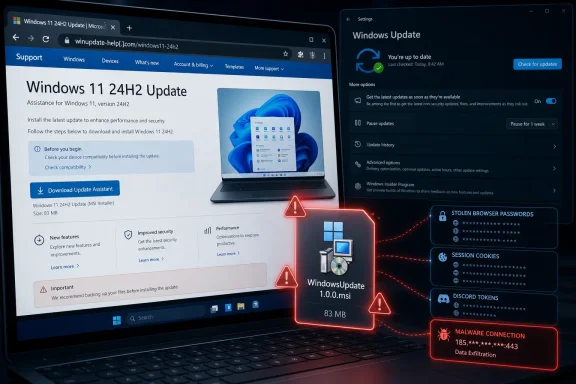 The fake page impersonates Windows 11 version 24H2 support
According to Malwarebytes, the lure used the defanged domain microsoft-update[.]support, which closely imitates the visual style of Microsoft’s support pages while differing at the one detail that matters: it is not a microsoft.com domain. The page advertised a plausible-looking Windows 11 version 24H2 cumulative update and placed a prominent blue download button where a user would expect one.
The page’s French language matters because it shows the campaign was targeted, not simply an indiscriminate fake-update pop-up. Malwarebytes assessed that the operators were pursuing French-speaking victims, potentially taking advantage of the large amount of personal data exposed in recent French breaches to make follow-up lures more credible. But the technique travels easily: a cloned support page, a familiar Windows release label, and an “update now” prompt need little localization to work elsewhere.
The submitted warning correctly says the page is designed to look normal. Its more important omission is that a browser page is not how ordinary Windows 11 quality updates are offered to a user. Microsoft’s documented path is Start, Settings, Windows Update, then “Check for updates”; when updates are available, Windows downloads and installs them from there. Microsoft also provides controlled manual paths for administrators, including the Microsoft Update Catalog and official Windows installation media pages, but those should be reached directly rather than through an unsolicited advertisement, message, or web prompt.
There is another technical tell in this particular campaign. Microsoft’s Windows Update Standalone Installer handles .msu update packages. The observed payload was an .msi Windows Installer package. An MSI file is not automatically malicious—many legitimate applications use it—but a supposed Windows cumulative update arriving as WindowsUpdate 1.0.0.msi from a lookalike support page deserves to be treated as hostile.
Familiar developer tools conceal the actual payload
The installer was built with WiX Toolset 4.0.0.5512, a legitimate open-source installer framework. That fact has been repeated in the downstream coverage, sometimes with the implication that legitimate tooling somehow authenticates the update. It does not. WiX is a packaging tool, not a Microsoft trust stamp; attackers use it because it can make an installer look orderly and familiar to both users and basic security checks.
Malwarebytes found more deliberate impersonation in the file metadata. The package’s Author field said “Microsoft,” its title said “Installation Database,” and its comments claimed to contain the material required to install WindowsUpdate. Those are fields that can be written by the installer author. They are not equivalent to a valid Microsoft digital signature, and the public Malwarebytes report does not establish that the malicious package was signed by Microsoft.
Once executed, Malwarebytes says the MSI installs an Electron-based application under the affected user’s AppData profile. Electron is a widely used application framework, and the main executable was reportedly a renamed Electron shell. That helps explain why antivirus detection was weak at the time of analysis: scanning a clean, common runtime does not necessarily expose malicious JavaScript packed within it.
Malwarebytes reported zero VirusTotal detections across 69 engines for the main executable at the time it examined the sample, and zero across 62 engines for the Visual Basic launcher. That is a snapshot, not a guarantee that the payload remains undetected today; Malwarebytes says it added protection after its analysis. Still, it illustrates why “my antivirus did not stop it” is a poor test of whether an unexpected installer is legitimate.
The attack chain is more revealing than any one file. Malwarebytes says the VBS launcher invokes the built-in Windows script host, the Electron component launches a renamed Python interpreter called _winhost.exe, and the payload installs Python tools associated with process inspection, encryption, and Windows API access. The researchers also found obfuscated code aimed at browser data and Discord tokens, payment details, and two-factor authentication changes.
This is credential theft with persistence, not a nuisance installer. Malwarebytes observed two startup mechanisms: a SecurityHealth value in the current user’s Run registry key that points to WindowsUpdate.exe, and a Spotify.lnk shortcut in the Startup folder. Both names borrow trust from ordinary Windows and application behavior.
The campaign’s real risk is account takeover
The immediate danger is broader than a compromised Windows sign-in. Malwarebytes says the malware can collect browser-stored passwords, cookies, and session tokens, then contact command-and-control infrastructure through services whose names can blend into normal traffic. A stolen session cookie can sometimes let an attacker access a web account without needing to type the password again, which is why merely changing one password is an incomplete response.
For an individual PC, someone who downloaded but did not run the MSI should delete it, empty the browser download entry, and avoid reopening the site. A full Microsoft Defender scan is sensible, but the situation changes materially if the installer was launched. Malwarebytes’ published indicators include WindowsUpdate.exe and AppLauncher.vbs in AppData\Local\Programs\WindowsUpdate, plus an unexpected Spotify.lnk in the user Startup folder.
For a managed endpoint, treat execution as a security incident rather than a desktop-support cleanup task. Microsoft’s Defender for Endpoint guidance supports isolating a suspected compromised device from the network while retaining its connection to the Defender service for investigation. Isolation limits further exfiltration and lateral movement while responders review the device timeline, collect evidence, scan the endpoint, and hunt for the same files or network indicators elsewhere.
Credential recovery should be performed from a known-clean device. Reset passwords stored in the affected browser, revoke active sessions where services permit it, prioritize email, identity-provider, banking, administrator, and remote-access accounts, and make sure multifactor authentication is enabled. Malwarebytes recommends treating saved passwords, cookies, and session tokens as exposed; that is the right assumption for this sample, particularly because Discord and browser-session theft were part of the reported behavior.
Windows Update should be an allowlisted workflow
The deeper lesson for IT teams is that update safety cannot rest on whether a page “looks Microsoft-like.” The fake site copied enough of the support-page language and layout to defeat visual inspection, while the installer used mainstream tooling and familiar Windows-like names to weaken basic file checks. An acceptable update process has to remove the decision from the page itself.
For personal devices, Windows Update in Settings should be the default route, with automatic updates enabled where practical. For businesses, Windows Update for Business, Intune, Windows Server Update Services, Configuration Manager, or another managed deployment path should be the only approved means of receiving Windows quality updates. A user should never need to search for a monthly cumulative update, click a social-media advertisement, or respond to an email asking them to install an “urgent” Windows patch.
Microsoft’s current Defender documentation also gives organizations a useful containment layer: SmartScreen in Edge, web-threat protection, and Network Protection in block mode can stop access to known malicious or low-reputation domains across browsers and even non-browser processes. Those controls will not block every new lure before it is identified, but they reduce the gap between a domain being reported and a user reaching it.
The practical rule is simple enough to train and enforce: when an unexpected web page says Windows needs an update, close it without downloading anything, then open Settings > Windows Update yourself. In this campaign, that one detour prevents the attack because the counterfeit installer has no way to enter the machine unless the user hands it permission to run.
