
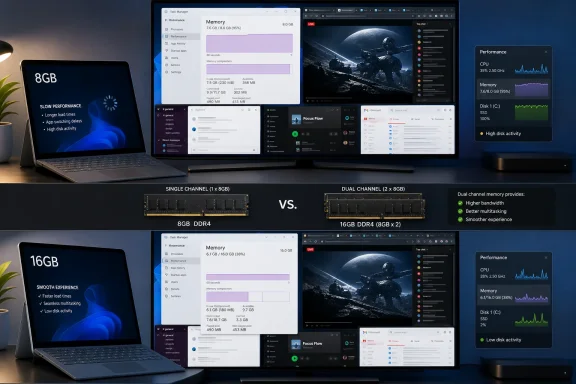
According to MakeUseOf, a Ryzen 5 5600 and Radeon RX 5600 XT system with one 8GB DDR4 module installed used 7.4GB of its 7.9GB available memory with Chrome, Slack, Spotify, and three browser tabs open. Opening Gmail as a fourth tab reportedly caused visible lag. That is an important result for anyone holding onto an 8GB machine, but it is not proof that Windows 11 itself consumes 8GB, nor that every new 8GB laptop will behave the same way.
The overlooked detail is the test configuration: removing one stick from a 16GB desktop normally turns a dual-channel memory setup into single-channel DDR4. That changes more than capacity. It reduces memory bandwidth, which can affect an integrated GPU substantially and can also worsen responsiveness under pressure. The Radeon RX 5600 XT sidesteps the integrated-graphics problem because it has its own VRAM, but the configuration remains a poor stand-in for a thin modern laptop using soldered LPDDR5x memory and shared graphics memory.
A second recent test from Windows Central illustrates why the MakeUseOf results should be read as a warning about a constrained configuration rather than a universal verdict on 8GB. Its older Core i5-10400 desktop with 8GB of single-channel DDR4 kept memory use below 6.6GB during browser testing, and later reached roughly 7.2GB with Edge, a 4K YouTube stream, GIMP, Spotify, and Word open. The systems, browsers, open sites, Windows builds, background processes, and measurement methods differ too much to crown either result definitive. Together, however, they show the real rule: 8GB can work, but the headroom is workload-dependent and disappears quickly.
 Microsoft’s 8GB Surface is a commercial decision, not a Windows recommendation
Microsoft has not raised Windows 11’s formal 4GB memory floor since the operating system launched. That requirement answers only whether Windows can install and boot on qualifying hardware; it does not describe a recommended configuration for multitasking, Teams calls, browser-heavy work, virtual machines, development tools, or modern games.
The more relevant signal is Microsoft’s May 2026 announcement for the Surface Laptop for Business 13-inch. The model launched in 16GB and 24GB configurations, with an 8GB version promised later in the year at a lower starting price. Microsoft said the 8GB model will start at $1,299.99, while the initial 16GB model started at $1,499.
That makes this less a debate about whether an old PC can remain usable and more a question of what customers are being asked to accept in a new premium-priced computer. An 8GB Surface may suit narrowly defined office work, but its soldered memory means the buyer cannot correct the decision later. A $200 saving at checkout is permanent hardware compromise when the workload changes.
The distinction is sharper for organizations looking at Microsoft’s AI-branded hardware. Microsoft’s own Surface comparison material says certain Copilot+ PC experiences require systems configured with 16GB or more of RAM. An 8GB Surface Laptop can still run Windows 11 and standard applications, but it occupies a lower tier than the 16GB Copilot+ systems Microsoft has used to market the platform’s headline local AI features.
The MakeUseOf test shows a ceiling, but not a clean baseline
MakeUseOf did several things that ordinary users usually cannot or will not do. It disabled third-party startup programs, avoided demanding games and content-creation work, and tested only a few applications at once. Those controls help isolate memory pressure, but they also make the 7.4GB reading more concerning: the system was already close to its usable limit before the sort of background load many Windows PCs accumulate over time.
The report’s recommendation to remove unnecessary startup applications is sensible. So is its larger advice not to purchase an 8GB Windows 11 PC in 2026 unless the price difference is meaningful and the workload is clearly modest. But “debloating” needs more precision than it usually gets in consumer advice. Removing manufacturer utilities, trial antivirus products, auto-updaters, unused cloud-sync clients, and applications set to launch at sign-in can improve startup behavior and reclaim memory. Removing Windows components through unofficial scripts can also break servicing, management baselines, application dependencies, or future feature updates.
The story’s claim that the Weather app can use nearly 1.2GB of RAM, attributed there to Windows Latest, also should not be generalized. Memory figures for Windows App SDK applications, web-backed experiences, browsers, and Widgets vary with the app version, cached data, running WebView2 processes, extensions, and whether Task Manager is displaying working set, private working set, or committed memory. MakeUseOf did not identify the Windows 11 version, build number, browser extensions, page file settings, or a repeatable process-level breakdown. Those omissions matter when a conclusion turns on a few hundred megabytes.
Task Manager’s total memory percentage is useful for a quick health check, but it is not a complete diagnosis. Windows deliberately uses idle RAM for cache and can reclaim some of it as applications ask for more. The real warning signs are sustained high memory use accompanied by heavy disk activity, application stalls, browser-tab reloads, increasing Committed memory, and a growing hard-fault rate in Resource Monitor. A machine at 90 percent memory use can still feel fine; one that repeatedly pages active data to an SSD will not.
Browser choice helps, but it cannot create capacity
MakeUseOf advises moving away from Chrome, suggesting Edge or Brave as less demanding alternatives. That may help in a particular session, but browser branding alone is not a dependable memory fix. Edge and Brave are Chromium-based browsers too, and all major browsers isolate tabs, extensions, renderers, GPU processes, and site workers for stability and security. The number and type of tabs—video calls, Gmail, online documents, social feeds, dashboards, and web apps—often matter more than the browser name on the title bar.
Windows 11 also offers practical controls that are safer than indiscriminate “debloat” packages. Users can audit Startup apps in Task Manager, remove programs they no longer use, limit extensions, and keep adequate free SSD space so the system-managed page file can operate normally. Microsoft’s Windows documentation still treats the page file as necessary in typical installations, including for crash-dump support; disabling it to “save writes” or force performance is the wrong move on an 8GB system.
Widgets can be disabled through Settings for personal PCs, while managed Windows editions have an official policy to disallow them. Administrators can also control the older Windows Copilot policy on supported Pro, Enterprise, Education, and IoT Enterprise builds, although Microsoft now labels that policy deprecated and notes that it does not govern every newer Copilot experience. Those controls may reduce unwanted background activity or simplify a managed desktop, but neither is a substitute for more physical RAM.
Users should also resist replacing Windows Search wholesale merely to conserve memory unless they understand the tradeoff. Voidtools Everything is exceptionally fast at locating files by filename because it indexes NTFS metadata, but it does not replace Windows Search’s full-content indexing, Start menu integration, Outlook search behavior, or enterprise search policies. It is a useful supplemental tool, not a universal repair for an 8GB configuration.
Upgrade first; tune second
For an existing PC with replaceable memory, moving from 8GB to 16GB remains the practical fix. It gives Windows room for the browser, collaboration software, security tools, file sync, and the unpredictable background work that appears during updates and sign-in. On systems with two memory channels, installing a matched pair can also restore dual-channel bandwidth that a one-stick test system loses.
Before spending money, owners should determine whether their device has upgradeable DIMM or SO-DIMM slots, whether one module is soldered to the board, and the maximum memory supported by the laptop or motherboard. Task Manager’s Performance tab can show installed memory and occupied slots, but the manufacturer’s service documentation is the authority on supported capacity and module type. A mismatched module may work, yet matched capacity and speed are preferable when buying an upgrade.
The hard limit is that software tuning cannot make an 8GB machine into a 16GB machine. MakeUseOf has usefully documented how quickly a deliberately light Chrome, Slack, and Spotify workload can reach the edge on one Windows 11 PC. Microsoft’s forthcoming 8GB Surface Laptop means consumers and IT buyers will see more machines sold at that edge. For a device intended to last several years, the safer purchase is still 16GB—and for an 8GB device already on the desk, the priority is an actual memory upgrade before stripping down the operating system.
