
For owners of older laptops, virtual machines, classroom devices, and thin-client-style PCs, the distinction matters. A 4GB system can technically install and boot Windows 11, but “supported” and “comfortable under a modern workload” have become very different things. Microsoft’s own current consumer guidance says 8GB is recommended for a PC intended to remain useful long term, while 16GB or more suits demanding creative work. The official Windows 11 installation requirement, however, still says 4GB.
That gap is no longer easy to treat as a footnote. Windows itself, endpoint security tooling, a Chromium-based browser, Teams or other collaboration software, cloud-sync clients, and a handful of line-of-business apps can rapidly consume the available working set on a 4GB device. Once physical memory is exhausted, Windows must rely much more heavily on the page file, turning even ordinary multitasking into an SSD-bound waiting game.
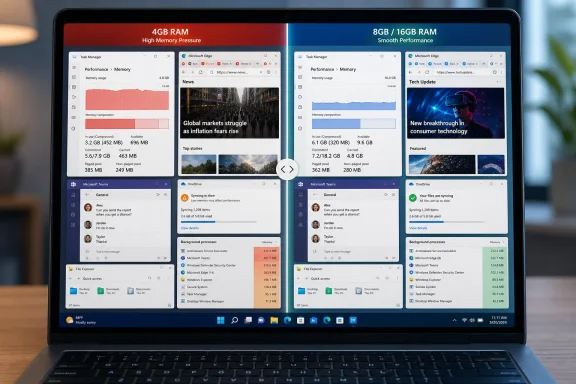 The Requirement Was Always an Install Floor, Not a Performance Promise
Microsoft has long treated Windows 11’s 4GB memory figure as a minimum hardware threshold: enough RAM to run the operating system on a compliant device, not a guarantee that every daily workload will feel responsive. That is technically defensible. A freshly installed Windows 11 machine with one browser tab, limited background software, and no substantial multitasking can operate in 4GB.
But the real-world Windows environment has changed. The modern desktop carries more resident services, security controls, synchronization processes, web-rendered app surfaces, notifications, shell components, browser tabs, and background updaters than the systems for which 4GB once felt merely modest. The pressure increases further on machines using integrated graphics, where system memory can also serve the GPU.
Microsoft’s 2026 Windows quality initiative is built around reducing resource usage, improving responsiveness under load, and making File Explorer, Search, Start, and other common shell experiences feel faster. The company’s Windows Insider Blog has already said it is lowering Windows’ baseline memory footprint and shifting more core experiences to WinUI 3 to reduce platform overhead and interaction latency.
The new 8GB-and-up qualification reported by Neowin is therefore revealing. Microsoft is not saying a 4GB PC will stop working. It is saying that the next round of memory-efficiency engineering is being targeted where it expects the broadest usable benefit: systems with enough headroom for the operating system to reclaim and redistribute.
That makes 8GB the emerging practical baseline for Windows 11, even if it is not yet the formal minimum.
Why Memory Pressure Makes a PC Feel Slow Before the CPU Does
Windows users often blame a slow machine on an aging processor, but insufficient RAM can be the more immediate bottleneck. When an application needs memory that is no longer available, Windows reclaims memory from inactive processes, compresses eligible pages, and ultimately moves data between RAM and storage through the paging system.
Those mechanisms keep the PC running, but they are not free. RAM operates at a vastly different speed and latency profile from even a fast NVMe SSD. The user sees the result as delayed task switching, browser tabs that reload, applications pausing when brought back into focus, or Start and File Explorer appearing to hesitate when several other programs are open.
This is why a low-memory Windows 11 PC can seem fine at the desktop but deteriorate quickly in a normal workday. Opening Edge with several tabs, joining a Teams call, syncing OneDrive, keeping Outlook open, and using a browser-based business application is a routine workload, not an edge case. On a 4GB machine, it can create persistent memory contention even if the CPU is mostly idle.
The issue is especially relevant to IT departments retaining older hardware after Windows 10’s end-of-support transition. A device may meet Windows 11’s TPM 2.0, Secure Boot, processor, and storage criteria yet still be a weak candidate for an in-place upgrade because it carries only 4GB of soldered RAM. Compliance with the setup checker does not erase the user-experience risk.
For virtual desktop infrastructure and local Hyper-V labs, the same principle applies. Allocating the bare 4GB minimum to a Windows 11 virtual machine may be sufficient for a quick configuration task, but it leaves little margin for Windows Update, Defender scans, a browser, management agents, and the applications being tested. Administrators should treat 4GB as a constrained lab allocation, not a default desktop profile.
WinUI 3 and WebView2 Are Part of the Bigger Repair Job
Microsoft’s plan is not limited to trimming a few background processes. The Windows team has tied its performance work to broader architectural changes, including moving more common Windows experiences to WinUI 3 and reducing unnecessary overhead in shared UI infrastructure.
WinUI 3 is Microsoft’s modern native Windows UI framework. In theory, consolidating more shell surfaces around a common native framework can reduce duplicated work, smooth out interactions, and simplify long-term engineering. Microsoft has specifically connected that work with faster responsiveness in areas such as Start.
At the same time, Windows increasingly depends on Chromium-derived technology. Microsoft Edge and WebView2 provide web-rendering capabilities for apps and parts of the operating system, enabling developers to deploy rich interfaces quickly and consistently. The trade-off is that embedded web experiences can bring the memory behavior of a browser process model into places users do not necessarily think of as “the browser.”
That does not mean WebView2 is inherently a defect or that every memory problem can be assigned to Chromium. Web technologies are central to modern application development, and process separation can improve stability and security. But on a device with limited RAM, every persistent process and every retained web view matters. Memory savings in those components can produce outsized practical gains precisely because they free capacity for the software users actually launch.
Microsoft’s earlier Low Latency Profile effort illustrates the same broader strategy. That feature improves perceived responsiveness by allowing Windows to increase CPU frequency briefly during interactive actions such as opening system UI and launching applications. It can make the shell feel faster, but it does not solve the underlying problem of an overloaded memory budget. The forthcoming memory work is more consequential for lower-end systems because it addresses the resource that determines whether the machine can keep active workloads resident at all.
The 8GB Surface Laptop Debate Makes the Point
The timing is awkward for Microsoft. Neowin recently highlighted criticism of an 8GB Surface Laptop configuration, following reporting that the lower-memory model could feel markedly more constrained than a 16GB version under everyday activity. The processor was not necessarily the limiting factor; memory capacity was.
That criticism should not be read as proof that every 8GB Windows laptop is unusable. It is not. Plenty of users can work effectively with 8GB when their applications are modest, their browser behavior is disciplined, and the machine has fast storage. But it is increasingly difficult to argue that 8GB is generous capacity for a premium Windows notebook expected to remain productive for years.
The more important lesson is that RAM decisions now define the life span of many PCs. Memory upgrades are unavailable on a large share of thin-and-light devices because the RAM is soldered to the motherboard. A buyer who chooses 8GB is often making a permanent trade-off, not selecting an entry configuration that can be remedied later.
Microsoft has already drawn a more demanding line for Copilot+ PCs, where 16GB is the baseline. That requirement reflects the memory demands of local AI features and the hardware class Microsoft wants to promote, but it also creates an uncomfortable contrast: Microsoft’s flagship AI-capable Windows experience begins at four times the memory cited in Windows 11’s general installation requirement.
What Administrators and Enthusiasts Should Do Now
There is no indication that Microsoft is raising Windows 11’s official 4GB minimum today. Organizations should not expect a future update to suddenly make currently eligible 4GB machines ineligible. The change here is more subtle: performance optimization is being planned around a higher memory tier, and that should influence refresh, image, and support decisions.
For managed fleets, a sensible approach is to classify 4GB Windows 11 systems as limited-use endpoints. They may remain suitable for single-purpose kiosks, tightly controlled shared devices, basic remote-access terminals, or narrowly scoped task stations. They are poor fits for broad knowledge-worker deployment, heavy browser usage, conferencing, local development, or modern endpoint stacks with multiple security and management agents.
For personal systems, Task Manager remains the quickest reality check. Watch the Memory section during a typical workload rather than immediately after boot. If memory is consistently near capacity, if committed memory regularly exceeds physical RAM by a wide margin, or if disk activity spikes during ordinary task switching, more RAM—or a more capable replacement device—will provide a more meaningful improvement than cosmetic tuning.
Microsoft’s promised reductions could make 8GB and 16GB PCs feel less burdened later this year, particularly in Start, File Explorer, Search, and other always-used parts of the shell. But the company’s own 8GB targeting also establishes the practical boundary: Windows 11 may still install on 4GB, yet Microsoft’s next performance push is being designed for machines that have already moved beyond it.
Update: Microsoft details WebView2 and allocator work behind Windows 11 memory cuts (August 3, 2026)
Gizmodo reports that Windows and Devices president Pavan Davuluri has added more detail on the planned efficiency work, saying Microsoft is targeting Chromium and WebView2 components used within the operating system as well as a more efficient memory allocator.
The company is also reportedly rebuilding some interfaces, including the Properties dialog, without WebView2. If that work expands to more commonly used shell components, it could reduce the background memory overhead that is particularly noticeable on 8GB systems.
For IT teams, the development reinforces that the initiative is not simply a visual refresh for Windows 11. Microsoft appears to be addressing underlying UI-platform and allocation behavior that can affect responsiveness when browsers, collaboration clients, security agents, and line-of-business apps compete for limited RAM.
Update: Microsoft outlines full-stack approach to Windows 11 memory reductions (August 3, 2026)
Windows Central reports that Marcus Ash, Microsoft’s corporate vice president of Design and Research for Windows, says the 8GB optimization effort reaches beyond individual shell components or WebView2 changes.
Ash described it as a “full-stack” project spanning interface design, application behavior, the kernel scheduler, and drivers. Microsoft is also examining preload behavior—specifically, how long apps and components remain resident before memory is reclaimed when a PC comes under pressure.
According to Windows Central, the company is instrumenting common customer workloads across teams and focusing on reducing the operating system’s footprint at every layer. Ash also said Windows should make it easier for users to identify and close software that is contributing to memory pressure.
The added detail suggests the promised improvements may affect both baseline RAM use and how Windows responds once an 8GB device is already heavily multitasking. Microsoft still expects to begin shipping the memory and performance work before the end of 2026.
Update: Windows Central reports early performance changes are already reaching Windows 11 (August 5, 2026)
Windows Central reports that several parts of Microsoft’s broader Windows performance effort are already shipping or available in Insider builds, rather than remaining solely a late-2026 roadmap. The outlet specifically points to the recently released Low Latency Profile, which raises CPU frequency during common interactions to improve the responsiveness of app launches, taskbar flyouts, and context menus.
The report also says Microsoft’s newer System Compositor work is reducing latency and memory overhead for WinUI-based interfaces. Windows Central tested a new WinUI Run dialog and cited faster File Explorer navigation and more consistent search behavior as further signs that the platform work is beginning to show up in everyday shell experiences.
Those changes do not replace the separate memory-footprint reductions Microsoft has said are still in development. But they provide early, user-visible evidence that the wider effort is progressing, especially for PCs where interface lag becomes more apparent during heavier multitasking.
Update: Microsoft removes Windows gaming guidance that called 32GB a “no-worries” RAM tier (August 5, 2026)
HotHardware reports that Microsoft has removed a Windows gaming guidance document that had described 16GB of RAM as essential and 32GB as a more comfortable capacity for gaming alongside browsers, Discord, or streaming tools.
The removal does not alter Windows 11’s official 4GB installation minimum or Microsoft’s stated plan to optimize Windows for 8GB-and-up PCs. However, it further complicates the company’s public memory messaging: Microsoft is pursuing lower-overhead Windows experiences while some current retail configurations still ship with 8GB of non-upgradeable memory.
For buyers and IT planners, the practical conclusion remains unchanged. 8GB may benefit from the forthcoming efficiency work, but 16GB offers materially more headroom for multitasking, collaboration software, browser-heavy workloads, and longer device life.
Update: A second deleted Microsoft RAM guide points to a broader rollback (August 6, 2026)
PC Gamer reports that Microsoft has also removed a separate support document, published in May, that reportedly described 32GB as a “no-worries” memory upgrade. The earlier update covered the deletion of Microsoft’s gaming-PC guidance; this newer report indicates that at least two distinct Microsoft pages carrying 32GB recommendations are no longer available.
According to PC Gamer, the gaming guide had positioned 16GB as sufficient for most players and 32GB as preferable for demanding games or heavily modded titles. Both retired links now reportedly redirect visitors away from the original advice.
That does not change Windows 11’s 4GB installation requirement or Microsoft’s stated 8GB-and-up optimization target. It does, however, make the removal look less likely to be an isolated documentation cleanup. For buyers and fleet planners, Microsoft’s public guidance is now less useful as a clear capacity roadmap—while the practical case for 16GB or more on long-lived, multitasking-heavy PCs remains unchanged.
Update: Microsoft adds boot, logon, and File Explorer reliability to its quality push (August 7, 2026)
Microsoft’s latest Windows quality progress report now explicitly includes improved boot and logon times alongside the previously detailed memory-efficiency work. The company says it is reducing overhead through a more efficient allocator, WinUI 3 tuning, and Chromium/WebView2 optimizations.
Microsoft also describes foundational File Explorer architecture changes intended to improve launch and navigation responsiveness. It says the work addresses unstable Home transitions, blurry thumbnails, Address Bar usability, keyboard navigation, file-size formatting, and renaming reliability.
For Windows users and administrators, the scope now appears broader than reducing baseline RAM use on 8GB-and-up PCs. The stated goal includes shortening delays before the desktop is usable and improving reliability in everyday shell workflows, though Microsoft has not published independent benchmarks or quantified the gains.
